

Recommended Free Tools
iTechGuides is reader-supported. When you buy through links on our site, we may earn an affiliate commission. As an Amazon Associate I earn from qualifying purchases. Learn more
File Explorer not responding, won’t open or opens and closes? This guide offers 4 fixes known to repair File Explorer in Windows 10.
Option 1: Check for Updates and Restart Your PC
The first method to try to repair File Explorer in Windows 10 is to check for updates. Then restart your PC. To check for Windows update:
- Right-click Windows 10 Start Menu and select Settings.

- Then, on Windows Settings, click Update & security.

- Finally, on Windows Update, click Check for updates and wait. If Windows Update finds any new update, they will be displayed. To install the updates, click Download and install.

After restarting your PC, if the problem with Windows 10 File Explorer is not fixed, try the next recommended fix.
Quick wins for a faster PC:
Clear out junk files and repair common Windows errorsFree Scan →Scan for outdated or missing drivers - takes under a minuteDriver Scan →Option 2: Check that there is Enough Space in the OS Drive
If you do not have enough space on the drive your Windows 10 is installed, it may affect Windows 10 adversely – including File Explorer.
Popular on Amazon
- 【Wide Application】This precision screwdriver set has 120 bits, complete with every driver bit you’ll need to tackle any repair or DIY project. In addition, this repair kit has 22 practical accessories, such as magnetizer, magnetic mat, ESD tweezers, suction cup, spudger, cleaning brush, etc. Whether you're a professional or a amateur, this toolkit has what you need to repair all cell phone, computer, laptops, SSD, iPad, game consoles, tablets, glasses, HVAC, sewing machine, etc
- 【Humanized Design】This electronic screwdriver set has been professionally designed to maximize your repair capabilities. The screwdriver features a particle grip and rubberized, ergonomic handle with swivel top, provides a comfort grip and smoothly spinning. Magnetic bit holder transmits magnetism through the screwdriver bit, helping you handle tiny screws. And flexible extension shaft is useful for removing screw in tight spots
- 【Magnetic Design】This professional tool set has 2 magnetic tools, help to save your energy and time. The 5.7*3.3" magnetic project mat can keep all tiny screws and parts organized, prevent from losing and messing up, make your repair work more efficient. Magnetizer demagnetizer tool helps strengthen the magnetism of the screwdriver tips to grab screws, or weaken it to avoid damage to your sensitive electronics
- 【Organize & Portable】All screwdriver bits are stored in rubber bit holder which marked with type and size for fast recognizing. And the repair tools are held in a tear-resistant and shock-proof oxford bag, offering a whole protection and organized storage, no more worry about losing anything. The tool bag with nylon strap is light and handy, easy to carry out, or placed in the home, office, car, drawer and other places
- 【Quality First】The precision bits are made of 60HRC Chromium-vanadium steel which is resist abrasion, oxidation and corrosion, sturdy and durable, ensure long time use. This computer tool kit is covered by our lifetime warranty. If you have any issues with the quality or usage, please don't hesitate to contact us
One way to repair File Explorer in Windows 10 is to ensure that you have enough space in drive C – or the drive Windows 10 is installed on your computer.
Use the steps in our guide – How to Delete Temporary Files on Windows 10 – to clean up drive C and free up some space. I strongly recommend the second option – How to Delete Temporary Files on Windows 10 with CCleaner.
After performing this task and confirming that your PC has enough space on the OS drive, restart your PC. Then, check File Explorer.
PC Slower Than It Used to Be?
A free scan shows the junk files, broken settings and background clutter dragging Windows down - then fixes them in one click.Free scan · Windows 10 & 11Outdated Drivers Are Slowing You Down
One free scan finds every outdated or missing driver and matches the right update for your exact hardware.Free scan · exact hardware matchAlso popular on Amazon

- 【59 in 1 Precision Screwdriver Set】Small screwdriver set contains 44 screwdriver bits, Phillips PH000,PH00,PH0,PH1,PH2; Flathead -1.0, -1.5 -2.0,-3.0; Torx T1 T2 T3 T4 T5, Torx security TR6 TR7 TR8 TR9 TR10 TR15 TR20; Triwing Y0.6, Y1.5. Y2.3, Y3.0; Pentalobe P2(0.8) P5(1.2); Triangle 2.3; U-type U2.6; H-type: H0.9, H1.3, H1.5, H2.0, H2.5, H3.0; MID-type: MID; Sleeve: M2.5, M3.0, M3.5, M4.0, M4.5, Cross 2.0, G3.8, G4.5
- 【Unique Handle Design】Ergonomic design handle, more energy-saving operation, batch head built-in strong magnet, easy to adsorb the batch head. The screwdriver bit is made of high quality CRV steel, which is wear-resistant and hard.
- 【Multi-Functional Accessories】Mini Tool kit contains 15 accessories for a variety of repair needs, including a magnetic plus or minus area to increase or decrease the magnetism of the bit, a long pry bar, a scimitar shaped pry bar, four triangular pry blades, three double-ended pry bars, tweezers, a black cleaning brush, a SIM card thimble, and a suction cup. Note: The package is made of PP material without carton and user manual.
- 【Practical Storage Box】Compartments are categorized for placement, each CRV precision bit is marked with a model number for easy identification, neatly dispensed for easy storage and searching. The box is sturdy and durable with strong clasps that protect each accessory well. The bits are mini (long 28mm, diameter 3.98mm) for precision work, not suitable for large screws.
- 【Wide Scope of Application】Suitable for iPhone/Samsung/Huawei and other cell phones; Mini/Air/Pro and Huawei/Honor and other laptops; Macbook/Air/Pro; Kindle/Kindle Fire; Ring Video Doorbell/ Video Doorbell 2/Pro/Elite; PS4/PS5/XOBX game console controllers and consoles, and PC laptops , watches, glasses, jewelry, toys, flight models, drones, cameras, RC cars, and some small appliances like coffee makers.
If the problem is not fixed, it is time to try our more tech recommendation – starting with method 3 below.
Option 3: Run System File Checker and DISM Repair Tools
I understand that it can be frustrating when your computer just wouldn’t work! It may also be more frustrating that the first 2 steps did not repair your Windows 10 File explorer problem.
Please don’t give up yet. The last 2 methods are almost guaranteed to fix the problem.
Also popular on Amazon

- 【Precision screwdriver set】-- 40Pcs screwdriver set has 30 CRV screwdriver bits which are phillips PH000(+1.2) PH000(+1.5) PH00(+2.0) PH0(+3.0) PH1(+4.0), flathead -0.8 -1.2 -1.5 -2.5 -3.0, torx T1 T2 T3 T4 T5, torx security TR6 TR7 TR8 TR9 TR10 TR15 TR20, triwing Y000(Y0.6) Y00(Y1.5) Y0(Y2.5) Y1(Y3.0), pentalobe P2(0.8) P5(1.2) P6(1.5), MID 2.5, with a screwdriver handle, a double-ended spudger, a long spudger, 3 triangle spudgers, Tweezers, a cleaning brush and a suction cup with SIM card thimble.
- 【Slip-resistant rotatable handle】-- All our screwdriver bits are made of high quality CR-V chrome vanadium steel. CR-V screwdriver bits do not rust easily and are not prone to be broken. The screwdriver handle is made of TPR and PP materials, with a special non-slip design, offering a sense of comfortable. The top of the handle is rotatable design which makes it more convenient to remove the screws; the handle head and the screw head has magnetic adsorption which can quickly replace the screws.
- 【Portable gadgets】-- The triangular spudger is more suitable for opening the screen of the mobile phone.The double-ended spudger is more suitable for opening the back cover of game devices. The long spudger can pry the internal parts of the device.The suction cup can open the screen, which is more convenient to repair the mobile phone.The SIM card thimble can be used to replace the SIM card of the mobile phone. The cleaning brush can clean the dust of the device.Tweezers can grip small parts.
- 【Wide scope of application】-- +1.5/2.0 P2 Y0.6 MID2.5 are used for iPhone7/8/X/XR/11/12/13. +1.2/1.5/2.0/3.0 T2/3/4/5 P2 are used for Samsung/Huawei/Xiaomi and other phones. +1.5/2.0/3.0 T3/4/5/6/9 are used for iPad/Mini/Air/Pro. +1.2/1.5/2.0/3.0/4.0 T2/3/4/5 -2.5 are used for Huawei/Honor and other tablets. P2/5/6 +1.5/2.0/3.0/4.0 T3/4/5/6/7/8/9 Y2.5/3.0 are used for Macbook/Air/Pro. +1.5/2.0/3.0 T5 are for Kindle/Kindle Fire. T6/15 are used Ring Video Doorbell/ Video Doorbell 2/Pro/Elite.
- 【Wide scope of application】-- T8 +1.5/2.0/3.0 are used for PS3/PS4/PS5 controllers and consoles. T6/8/10 are used for Xbox 360/Xbox One/Xbox Series controllers and consoles. Y1.5/2.5/3.0 +1.5/2.0 are used for Switch/NS-Lite/Joy-Con/Wii/Game Boy Advance. T3/8 are used for Fitbit wristband/folding knife. +1.2/1.5/2.0/3.0/4.0 T3/4/5/6/7/8/9 Y2.5/3.0 -2.5 are used for Microsoft/Acer/Dell and other laptops. +1.2/1.5/2.0/3.0/4.0 -0.8/1.2/1.5/2.5/3.0 are used for Desktop Computer/Watch/Glasses/Toy.
Here are the steps to apply the 3rd fix:
- Search command prompt, then right-click Command Prompt from the search results and select Run as administrator.

- Then, when command prompt opens as an administrator, enter the command below into command prompt – and press the enter key on your keyboard.
SFC /ScanNow
Wait for the command to reach 100%. Then, proceed to the next command.

On the same command prompt, type the command below. Then, press the enter key on your keyboard.
DISM.exe /Online /Cleanup-Image /Restorehealth
Once again, wait for the DISM command to reach 100%. Then, restart your computer.
Also popular on Amazon

- 【Precision Screwdriver Set】 Small screwdriver set has 140 bits in multiple models, including Torx , Phillips, Pentalobe, Star, Triwing, Triangle Etc, covering most screwdriver models on the market. The 4 long bits can help you remove deeper screws. Some commonly used screwdriver bits are also equipped with 2-3 bits of the same model as backup.
- 【Unique Handle Design and CRV Material】 The screwdriver handle is made of TPR and PP materials, the cap is rotatable, and it adopts an extended tool bar design. The length of the tool bar can be adjusted, making it easy to reach deep for disassembly. Screwdriver bits are made of high-quality CRV steel, which is wear-resistant and has high hardness.
- 【Multifunctional Accessories】 Mini screwdriver set contains 12 accessories to meet various repair needs. The matching flexible shaft facilitates multi-angle disassembly and repair of electronic products. The magnetizer demagnetizer tool can increase or decrease the magnetism of the bit. The magnetic mat is used to absorb small screws to avoid loss. The 1/4‘’ to 4mm silver adapter provided is used for drill to adapt large and thick bits, which is not suitable for precision and small manual screwdriver bits. This toolkit also comes with a double-ended pry bar, triangular pick and suction cup for easy repairing.
- 【Practical Storage Box】 Each screwdriver bit is marked with a model number for easy identification and is placed in a magnetic storage slot. The accessory slot can store various accessories safely and securely. The box is made of ABS plastic and PP material, which is solid and durable, and the buckle is firm, which can protect each accessory well.
- 【Wide Range of Application】Applicable to iPhone/Samsung/Huawei and other cell phones; Mini/Air/Pro and Huawei/Honor and other tablet PCs; Macbook/Air/Pro; Kindle/Kindle Fire; Ring Visual Doorbell/Visual Doorbell 2/Pro/Elite; PS4/PS5/XOBX game consoles, as well as PC laptop computers, jewelry, toys, aeromodels, drones, remote-control cars, and some small household appliances such as coffee machines.
If in the rare instance your Windows 10 File Explorer is still not repaired at this stage, you need to try the our last card – Run Automatic Repair. See the next section for detailed steps.

Option 4: Run Automatic Repair
Here is our final method to repair File Explorer in Windows 10 – run automatic repair. To run automatic repair, follow the steps below:
Do these 3 things before closing this tab:
1Clear out junk files and repair common Windows errors2Scan for outdated or missing drivers - takes under a minute3Repair Windows errors before they cause bigger problems- Right-click Windows 10 Start Menu and select Settings. Then click Update & security.
- On the left pane of Windows Update, click Recovery.

- Then, on the Advanced startup section of Recovery, click Restart now. Then wait for the computer to restart and boot to recovery mode.

- When your computer displays Choose and option, select Troubleshoot – the second option.

- Then, on the Troubleshoot screen, click Advanced options.

- When the Advanced options screen is displayed, click Startup Repair. Your computer will initiate automatic repair – wait for the computer to display the Startup Repair screen.

- Then, on the Startup Repair screen, click on your account – enter your password and click Continue – see the 2 screenshots below.


If your credentials are correct, Windows 10 will initiate automatics repair. From this point all you have to do is, wait! During the automatic repair, the computer will restart several times.
Also popular on Amazon

- 64-in-1 Precision Screwdriver Set: This small screwdriver set includes 48 bits (Phillips, Flathead, Torx, Torx security, Triwing, Pentalobe, Hex, Triangle, U-type, Square, SIM, MID, OVAL, Gamebit, Nut driver). It's a complete electronics repair kit that has been professionally designed to repair computers, PC, laptops, Macbooks, tablet, phones, PS4 PS5, XBOX, Switch, eyeglasses, drone, watches, Ring doorbells and more
- Ergonomic & Magnetic Design: The super smooth swivel cap on the top of the handle makes it easier to rotate screws with less effort. This mini screwdriver features an ergonomic non-slip design and rubberized handle that provides a comfortable grip and precise control. The built-in strong magnet ensures magnetic bit holder transmits magnetism through the screwdriver tip to help you with tiny screws
- Practical Accessories: Our electronics tool kit comes with 8 types of 15 essential accessories. Magnetizer can enhance the magnetism of the screwdriver tip, pointed tweezers make it easy to handle screws and tiny components, spudger and hook tool is effective for connecting/disconnecting components, scraping off adhesives, suction cup, pry tools, opening picks and brush to help open and clean your device
- Organize & Portable Storage: All screwdriver bits are stored in rubber bit holder which marked with type and size for fast recognizing. The rubber bit holder can be fixed on the shelf of the sturdy plastic case, also can be removed for easy access, making it more convenient for you to perform repairs. The case provides secure protection and organized storage, while being lightweight and portable for easy transportation
- Premium Quality & Warranty: STREBITO manufactures premium quality, pro-grade screwdriver set. The precision bits are CNC machined to be precise, made of 60HRC Chromium-vanadium steel which is resist abrasion, oxidation and corrosion. This micro screwdriver set is covered by our lifetime warranty. If you have any issues with the quality or usage, simply contact customer service for troubleshooting help

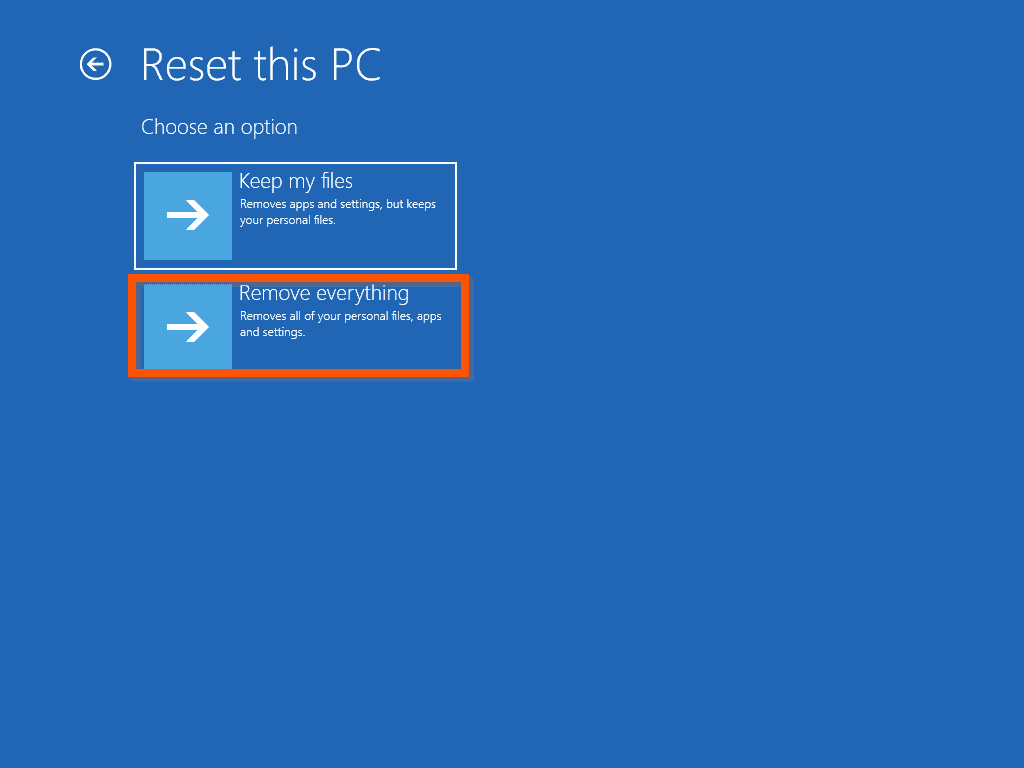
If you receive a message saying that “Startup Repair couldn’t repair your PC”, it means that the repair did not work. In that instance, I will recommend resetting your PC.

Conclusion
I hope you found this guide helpful. If you found this article helpful, kindly spare 2 minutes to share your experience by responding to the “Was this page helpful?” question below.
Finally, for more Windows 10 Itechguides, visit our Windows 10 How-To page.
Free tools Windows power users keep installed
One-click scans. No signup required.
You may also find our comprehensive File Explorer guide very helpful – Get Help With File Explorer In Windows 10: The Ultimate Guide.
Quick Recap
Product prices and availability are accurate as of the date/time indicated and are subject to change. Any price and availability information displayed on Amazon at the time of purchase will apply.


ALl the typical useless gibberish of one trying to remain technically relevant. AS professionals who use Windows and Office to earn a living in their high six figures, the problems we are experiencing in Windows 11 and its Pro version are code, and not some simple repair processes we already know about.
Your guide is really well written and clear. Thanks. My issue was that File Explorer would close moments after I opened it and the task bar would then disappear and then reappear as if it crashed and then restarted. I tried all your steps but without the issue being resolved…
Then found a simple solution which fixed it – based on advice from http://www.qdoscc.com/blog/windows-explorer-crashes-due-quick-access-view . The problem was Quick Access in file explorer – deleting the file explorer history resolved my problem. I could right click on file explorer and click on a folder to open that up rather than just opening up file explorer in default mode. Then navigate to quick access, right click on it and select options > general tab > and click on “Clear” button within Privacy to Clear File Explorer History. It seems that there was a file within quick access history that had a file path too long for file explorer to cope with causing it to crash. Hope this helps. You might want to include something along these lines to check in your next update – assuming any of it makes sense – I am not an IT techy.