
iTechGuides is reader-supported. When you buy through links on our site, we may earn an affiliate commission. As an Amazon Associate I earn from qualifying purchases. Learn more
Read this guide to learn how to fix a tombstoned Active Directory Domain Controller, a DC that has not replicated to other DCs for a period over the Tombstone Lifetime.
Step 0: Review Problem Background and Overview
When you run dcdiag, other DCs in the domain report that the offending DC last synched on a date over the tombstone lifetime, which is 180 days by default.
Here is a sample log entry I received when I ran dcdiag:
PC Slower Than It Used to Be?
A free scan shows the junk files, broken settings and background clutter dragging Windows down - then fixes them in one click.Free scan · Windows 10 & 11Outdated Drivers Are Slowing You Down
One free scan finds every outdated or missing driver and matches the right update for your exact hardware.Free scan · exact hardware matchLast replication received from <domain controller name> at 2022-09-08 06:09:58. WARNING: This latency is over the Tombstone Lifetime of 180.
I ran the dcdiag command on April 10, 2025. This means the offending domain controller had not synced with other DCs for over 2 years! When this happens, we say that the DC has been “tombstoned,” which means that it has records older that the AD Forest’s Tombstone Lifetime.
Popular on Amazon

- 40 Gbps 2000 Mhz High Speed: The Cat 8 ethernet cable support max. 40 Gbps data transfer and 2000 MHz Brandwith, ideal for gaming and streaming, greatly improving upload and download speed, sound, image and resolution quality
- Excellent Anti-interference: The ethernet cable comes with 4 shielded foiled twisted pairs (F/FTP), pure copper core and gold-plated RJ45 connector, reducing interference, noise and crosstalk, making network speed faster and more stable
- Marvelous Durability: Internet cable wrapped with quality cotton braided cord, which makes the LAN cable stronger and more durable. The test proves that this internet cable can be bent at least 10000 times without broken, very suitable for long-term use
- PoE Supported: All lengths of ethernet cord can support the PoE power supply function except 65ft. You don't need additional power supply when installing a PoE camera, which is very convenient and safe
- Wide Compatibility: With the RJ45 Connector, network cable can be perfectly compatible with computers, laptops, modems, routers, PS5, X-Box and other networking devices. It can also be fully backward compatible with Cat7, Cat6e, Cat6, Cat5e, Cat5
As part of the first steps to troubleshoot and fix the problem, I performed the following actions:
- Confirmed that all required firewall ports between the tombstones DC and the FSMO role DC are open.
- Enabled DNS Debug logging. Then, after 24 hours, verified that the server is only communicating with itself, and has not accepted any incoming client requests.
- Enabled netlogon debug logging. After 24 hours, verified that the server did not respond to any logon or other event requests.
Once these tasks were performed, I had solid evidence to confirm that the DC was broken. In this scenario, the only solution was to demote the DC, perform metada clean up and then, re-promote the DC.
In the remaining sections of this guide, I have explained the detailed steps I used to accomplish these tasks.
What’s actually slowing this PC down?
Pick the symptom - the matching free tool is one click away.
Also popular on Amazon

- Cat 6 performance at a Cat5e price but with higher bandwidth
- High Performance Cat6, 30 AWG, RJ45 Ethernet Patch Cable provides universal connectivity for LAN network components such as PCs,computer servers,printers,routers,switch boxes,network media players,NAS,VoIP phones
- Jadaol cat6 standard cable support Cat8 and Cat7 network and provides performance of up to 250 MHz 10Gbps and is suitable for 10BASE-T, 100BASE-TX (Fast Ethernet), 1000BASE-T/1000BASE-TX (Gigabit Ethernet) and 10GBASE-T (10-Gigabit Ethernet)
- UTP(Unshielded Twisted Pair) patch cable with RJ45 gold-plated Connectors and are made of 100% bare copper wire, ensure minimal noise and interference
- The unique flat cable shape allows for a cleaner and safer installation. You can easily and seamlessly make the cable run along walls, follow edges & corners or even make it completely invisible by sliding it under a carpet.
Step 1: Remove the DNS Server Role from the DC
This must be performed first. Otherwise, the DC demotion task (Step 2) fails.
#Open PowerShell as administrator

Uninstall-WindowsFeature -Name DNS
Restart the server to complete the removal of the DNS role.
Step 2: Remove the Global Catalog Role from the DC
If the server is badly broken, you must remove the Global Catalog role from the DC. Otherwise, the DC demotion will also fail.
Also popular on Amazon
- High-Performance Connectivity: This Cat 6 ethernet cable is designed for superior performance, with a 24 AWG copper wire core. It provides universal connectivity as an ethernet cord for LAN network components such as PCs, servers, printers, routers, and more, ensuring reliable and fast network connections
- Advanced Cat6 Technology: Experience Cat6 performance with higher bandwidth at a Cat5e price. This network cable is future-proof, ready for 10-Gigabit Ethernet and backwards compatible with any existing Cat 5 cable network. It meets or exceeds Category 6 performance according to the TIA/EIA 568-C.2 standard
- Reliable Wired Network Solution: Known variously as a Cat6 network cable, ethernet cable Cat 6, or Cat 6 data/LAN cable, this RJ45 cable offers a more secure and reliable connection than wireless networks. It's ideal for internet connections that demand consistency and security
- Durable and Secure Design: The connectors of this ethernet cable feature gold-plated contacts and strain-relief boots for enhanced durability. Bare copper conductors not only improve cable performance but also comply with communication cable specifications
- High-Speed Data Transfer: With up to 550 MHz bandwidth, this ethernet cord is ideal for server applications, cloud computing, video surveillance, and streaming high-definition video. It also supports Power over Ethernet (PoE, PoE+, PoE++) for powering devices like IP cameras, VoIP phones, and wireless access points, ensuring fast and reliable network performance.
- Open Active Directory Sites and Services via Server Manager (link opens in a new browser tab).
- Then, navigate to the DC’s site and expand it, then expand Servers and click the server name. On the details blade, right-click NTDS Settings, and select Properties.

- After that, clear the Global Catalog check box, select Yes to the warning message, and finally, select OK.

Step 3: Demote the Server as a Domain Controller
#1. Save the password to use as local Administrator password. At the cred prompt, enter Administrator as the username and then, the password you want to use as the server's local Administrator password post its demotion as a DC

$password = Get-Credential

#2. Demote the Server as a DC

Uninstall-ADDSDomainController -LocalAdministratorPassword $password.password -Confirm:$false -NoRebootOnCompletion -ForceRemoval -SkipPreChecks
See the results of the commands below:


Restart the server to complete the demotion.
Step 4: Perform Metadata Cleanup from the FSMO Role Holder
After demoting the DC, before re-proting it, you must perform a metadata cleanup of the DC using ntdsutil.
The Tool Desk
Outbyte Driver Updater FREEFix the driver behind crashes, sound loss and screen glitchesFind Drivers →Outbyte PC Repair FREEClear out junk files and repair common Windows errorsFree Scan →Follow the steps below to complete this task.
- Determine the FSMO role holder by running the command below from any Domain Controller.
netdom query fsmo
- Sign into the DC that holds the FSMO roles and open the command prompt as administrator. Then, run the following ntdsutil commands in the order provided.
#1. Type ntdsutil and press enter. Then, on the ntdsutil prompt, type metadata cleanup and press enter

ntdsutil: metadata cleanup

#2. On the metadata cleanup: prompt, execute the followin commands

metadata cleanup: connections
metadata cleanup: connect to server <domain_fsmo-role-holder>
metadata cleanup: q

#3. Then, on the metadata cleanup: prompt, type select operation target, then press enter key.

metadata cleanup: select operation target

#4. On the select operation target: prompt, run the following commands in order:

select operation target: list domains
select operation target: select domain <enter number for the domain where the failed DC resides>
select operation target: list sites
select operation target: select site <enter the site number of the failed DC>
select operation target: list servers in site
select operation target: select server <enter number of the server>
select operation target: q

#5. On the metadata cleanup: prompt, execute remove selected server

metadata cleanup: remove selected server

Then, on the Server Remove Confirmation Dialog, confirm that the DC you want to remove is displayed, then select Yes.

#6. Quit metadata cleanup and ntdsutil by executing the q command in both prompts

- Log on to the FSMO role DC and force replication by running the command below from a command prompt opened as administrator.
repadmin /syncall <domain_fsmo-role-holder> /Aped
Quit the repadmin command by pressing any key.
- Then, monitor the progress of the replication by running the command below. Replace the text in bold with the Distinguished Name of the server you’re cleaning its metadata.
repadmin /showobjmeta * "<enter the Distinguished Name of the server here>"

For the avoidance of doubt, the above command must only return parts of the result that says “Directory object not found.” If it rertuns a table, you must wait until the command no longer returns a table.
Step 5: Reinstall the DNS Server Role on the Server
In Step 1, we removed the DNS Server role. Before promoting it to a DC, you must reinstall this role with the following steps:
Also popular on Amazon
- IN THE BOX: Amazon Basics 15-foot RJ45 Cat-6 UTP (Unshielded Twisted Pair) Ethernet cable in black for connecting networked devices
- COMPATIBILITY: RJ45 connectors ensure universal connectivity with computers, printers, routers & potentially compatible with smartphones
- PERFORMANCE & SPEED: Supports transmission speeds up to 10 Gigabit per second with 250 MHz bandwidth for low signal loss
- USES & APPLICATIONS: Connects devices in a wired network setup; suitable for linking computers, printers & routers in home or office environments
- CONNECTOR QUALITY: Gold-plated contacts & bare copper conductors improve signal integrity & provide corrosion protection; snagless plug design prevents damage
- Sign in to the server as local administrator – enter .\administrator in the username field – and use the password you specified in Step 3 when you demoted the server as a DC.
- Execute the command below to reinstall the DNS Server role, including all sub-features and management tools, and restart the server if required.
#Open PowerShell as administrator

Install-WindowsFeature -Name DNS -IncludeAllSubFeature -IncludeManagementTools -Restart

#see the screenshots below for the progress and result of the command


Step 6: Repromote the Server to a Domain Controller
While still signed in to the server with the local administrator account and PowerShell opened as administrator, execute these commands to promote the server to a DC.
#1. Generate the required parameters. When you run this command, PowerShell will prompt you to enter creds - enter the domain username (domainname\username) and the password with permissions to promote a server to a Dc.
#The command also prompts you to "Enter the domain to promote into" - enter the FQDN of the domain

$HashArguments = @{
    Credential = (Get-Credential)
    DomainName = (Read-Host "Enter the domain to promote into")
    InstallDns = $true
}

#2. Promote the server to a DC and configure the server as a DNS server. This command will prompt you to enter the SafeModeAdministratorPassword (the Directory Service Restore Mode, DSRM password)

Install-ADDSDomainController @HashArguments
The screenshots below show the inputs and results of the commands.


Step 7: Configure the DC in Sites and Services
- Log in to the server with your domain credentials and open Active Directory Sites and Services from the Server Manager Tools menu.

- In the Active Directory Sites and Services console, navigate to the server’s site and expand it. Then, expand Server > <the DC’s server name> and left-click NTDS Settings.
- In the details blade, confirm that the replication connection was automatically generated. If it has not been generated, run the command below to generate it.
repadmin /kcc

- After that, verify that the server’s subnet is associated with the site. To do this, right-click the site and choose Properties. The server’s subnet should be displayed in the Subnets section of the General tab – see the second screenshot below for reference.


Step 8: Perform Manual Replication and Verify Success
- While still signed in to the server, open PowerShell or CMD as administrator and run the following command:
repadmin /syncall <enter the name of the FSMO DC here> /Aped
Wait for the replication command to complete, then press Q before proceeding to the next step.
Also popular on Amazon

- Designed for Outdoor & Direct Burial Installations – Heavy-duty double-shielded Cat8 Ethernet cable minimizes EMI/RFI interference and delivers stable long-distance performance. Waterproof, anti-corrosion PVC jacket allows safe direct burial and reliable use in outdoor or indoor environments.
- 26AWG for Stable High-Load Networks – Thicker 26AWG conductors provide faster, more stable data transmission than standard 32AWG cables. Ideal for high-performance home networks, gaming setups, smart homes, and data-intensive applications.
- F/FTP Shielding & Hyper-Speed Performance: Cat8 Ethernet cable constructed with 4 shielded foiled twisted pairs and 26AWG OFC conductors; supports bandwidth up to 2000 MHz and data transmission speeds up to 40 Gbps, effectively reducing signal interference and ensuring stable connections. Ideal for low-latency gaming, 4K/8K streaming, and high-speed internet connections.
- RJ45 Connectors & Wide Compatibility: Cat8 Ethernet cable with two shielded RJ45 connectors; compatible with networking switches, IP cameras, routers, Nintendo Switch, modems, PS3, PS4, Xbox, patch panels, servers, smart TVs, and more; works with Cat7, Cat6, Cat5e, and Cat5 devices
- Weatherproof & UV Resistant: Outdoor-rated Cat8 Ethernet cable with UV-resistant PVC jacket; withstands direct sunlight, extreme cold, humidity, and hot weather; anti-aging and durable; Includes 18-month support.

- Verify that the repadmin command was successful by executing the PowerShell command below:
Get-ADReplicationPartnerMetadata -Target $env:userdnsdomain -Scope Domain | Select-Object Server, LastReplicationAttempt, LastReplicationSuccess, PartnerType
In my case, the above command failed to contact some DCs. Further troubleshooting confirms that the AD ports required to replicate and work were blocked from the DC where I ran the Get-ADReplicationPartnerMetadata command.
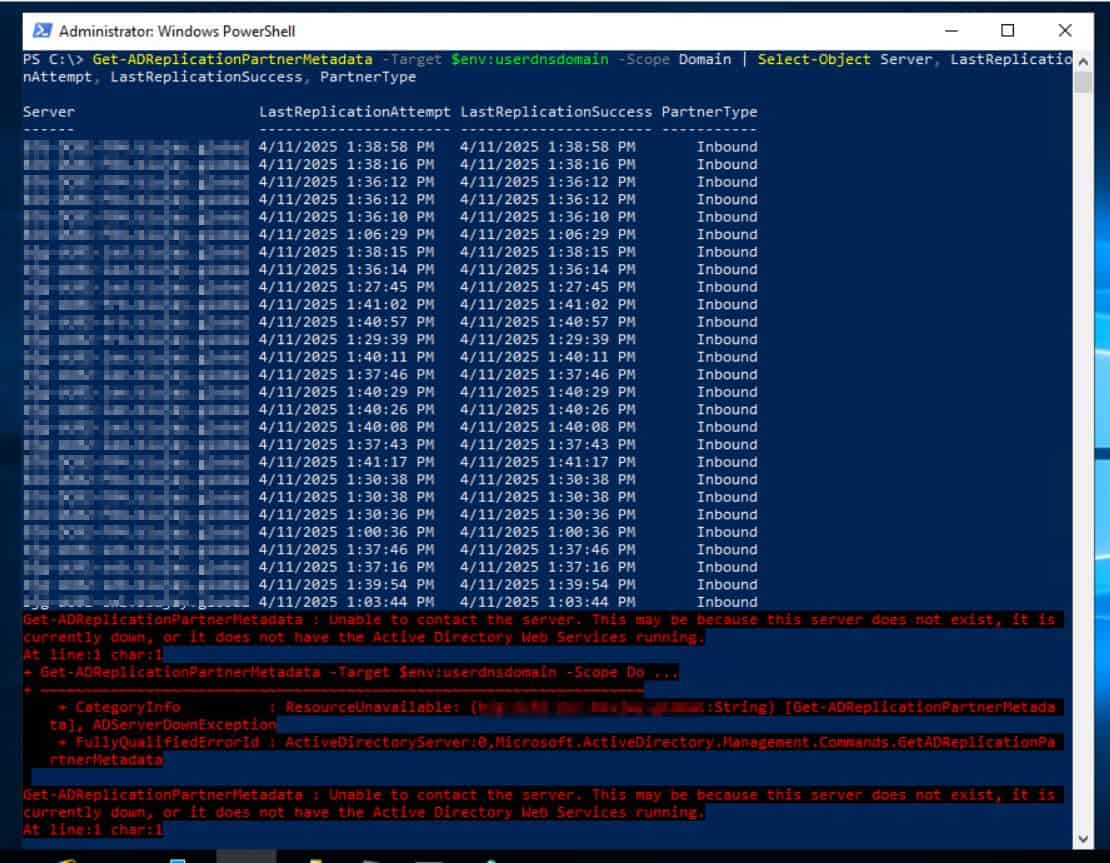
To fix the problem, I requested that the SecOps team open those ports. Once the ports were opened, I re-ran Get-ADReplicationPartnerMetadata, and there were no more failures.
Step 9: Rerun DCDIAG to Check for Replication Errors
Finally, rerun dcdiag in the DC you just repaired and on the FSMO role DC to check for replication errors.
Free tools Windows power users keep installed
One-click scans. No signup required.
Conclusion
The Windows Active Directory Domain Controllers are designed to regularly replicate and update the AD database. However, in rare instances, one DC may stop replicating.
If this happens and you have confirmed that all required AD ports are opened, the last step to fix the DC is to demote it, perform metadata clean-up of its objects from the AD database, and finally re-promote it to a DC.
In this guide, I outlined the detailed steps to fix a tombstoned AD DC by following the above steps.


Hey ,I see the website http://www.itechguides.com and it’s impressive.I wonder if the content or banners advertising options are available on your site ?What will be the price if we would like to put an article on your site?Note : Article must not be any text like sponsored or advertise or like thatCheers kevin del