

iTechGuides is reader-supported. When you buy through links on our site, we may earn an affiliate commission. As an Amazon Associate I earn from qualifying purchases. Learn more
This Itechguide explains Outlook.
What is Outlook?
Outlook is an email software developed by Microsoft. Users can use Outlook to send, receive and read emails. It was first released as part of Microsoft Office suite, but recently it has been repackaged as part of Office 365 suite and as a free version – Outlook.com.
However, Outlook is more than just an email client. It is a suite of productivity tools – it includes calendar, and contacts as well. You can create events and meetings with its Calendar.

Moreover, you can add and manage your email contacts as well. For the detailed features of this email tool from Microsoft, see the Features & Benefits section of this guide.
The Tool Desk
Outbyte PC Repair FREERepair Windows errors before they cause bigger problemsFix Now →Outbyte Driver Updater FREEScan for outdated or missing drivers - takes under a minuteDriver Scan →How Outlook Has Evolved
This email tool was first released in 1990. Then, it was released as part of Office 97 suite (Word, Excel and PowerPoint). Since Outlook 97 version, different versions has been released, each adding new features.
Popular on Amazon

- Model: Dell OptiPlex 7050 Small Form Factor (SFF)
- Processor: Intel Core i7-7700 3.60 GHz
- Memory: 32GB DDR4 Ram
- Storage: 1TB Solid State Drive (SSD) Fast Boot + Storage
- Operating System: Windows 11 Pro (64-bit)
Fast forward to June 28, 2011, it was repackaged as part of Office 365 products. Then, in July 31, 2012, Outlook.com was born. It is a free email and productivity tool aimed at competing directly with Gmail. The free version can also send and receive emails as well as used to manage contacts and calendar.
Outlook Options
Based on the information in the first 2 sections of this Itechguide, you would have figured out that there are different ways you can access this email tool. This section covers the different ways you can access and use Outlook.
Part of Microsoft Office 2019
Outlook is still part of Microsoft Office 2019. Before 365, Microsoft sold Office as a stand-alone bundle, not subscription-based. You can still purchase Office Home & Business 2019 for a one-time cost of $249.99 (price correct as at May 5th 2020).
You will be able to install and receive up-to-date versions of Outlook, Word, Excel, PowerPoint for Windows or Mac.
Also popular on Amazon
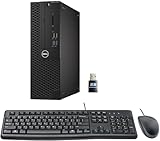
- This Certified Refurbished product is tested and certified to look and work like new. The refurbishing process includes functionality testing, basic cleaning, inspection, and repackaging. The product ships with all relevant accessories, a minimum 90-day warranty, and may arrive in a generic box. Only select sellers who maintain a high-performance bar may offer Certified Refurbished products on Amazon.com.
- Dell Optiplex 3050 SFF Desktop computer PC, Intel Quad Core i5-6500 up to 3.6GHz, 16GB DDR4, 256GB SSD
- Includes: USB Keyboard & Mouse, USB WiFi adapter, Microsoft office 30 days free trail.
- Port: Front: USB 3.0(2), USB 2.0(2); Rear: DP, HDMI, USB 3.0(2), USB 2.0(2), RJ-45.
- Support 4K (3840x2160) Dual display, makes it easy to connect two monitors at the same time, and you can expand working Windows, mirror content, or expand a single window across multiple monitors.
Part of Office 365 Subscription
You can also get Outlook as part of Office 365 monthly or annual subscription. As at the time of writing this Itechguide, 365 has 2 subscriptions – Microsoft 365 Apps for business and Microsoft 365 Business Standard.
Outlook.com
You can also access Outlook as a free email service (just like Gmail). To create a free Outlook.com email, visit Outlook.com. When you create a free Outlook.com, you will have the option to upgrade tom Office 365.
Features & Benefits of Microsoft Outlook
Most of the features discussed in this section may apply only to the paid version. Some of the features may not be available in the free version.
Email Calendar, and Contacts
As I already mentioned in this Itechguide, you can send, read and reply to emails. However, you can manage and organize your contacts as well as create meetings and tasks.
Also popular on Amazon

- [INTEL POWERED CONTENT] - Built with a 8th Generation Hexa-Core Intel i5 and 32GB of DDR4 RAM; Modern, Windows 11 ready, with 4K support, Executive multitasking, media streaming and smooth, multi-tab web browsing; Perfect as an all-purpose multimedia computer; built for content creators; Plenty of RAM and Mass storage for photo and video editing powered by Intel HD 630
- [LATEST WIRELESS TECH] - This Dell Desktop Computer easily connects to the internet through the Built In WiFi / Bluetooth
- [SOLID STATE STORAGE] - This Dell Computer setup comes with an ultra-fast 1TB Solid State Drive (SSD); Setup as the primary boot device; Boot and load programs with lightning speed ; Additional expansion available
- [BUY & OWN WITH CONFIDENCE] - From the world's largest Microsoft Authorized Refurbisher; Quality Guarantee and Free Tech Support; Award-winning Customer Service; | Support Sustainable Business
- [MODERN HI-SPEED PORTS] - USB 3.0 (x4) | USB 2.0 (x4) | DisplayPort (x1) | HDMI Port (x1) | Audio Combo Jack (x1) | Audio Out (x1) | RJ-45 Ethernet (x1) | Internal SATA (x3)
Moreover, with Office integration, you can attach documents directly from Microsoft OneDrive. You can also access your contacts and send them emails or invite them to meetings. You can even view LinkedIn profiles right from Outlook!
Book Meetings and Manage Schedules
You can also use this Microsoft productivity tool to create new meetings, book conference rooms and manage responses to meeting invites. You can also share your calendars and even see if your colleagues are available for a meeting – you also see if they are busy.
Built-in Security and Intelligence
Outlook also comes with built-in security – spam control, information security and more. It also comes with built-in intelligence that “anticipates your needs”, according to Microsoft.
What’s actually slowing this PC down?
Pick the symptom - the matching free tool is one click away.
One example of how the smart intelligence can help make life easy for you is by adding your bill payments automatically to your calendar so you do not forget to pay the bills.
Also popular on Amazon
Multi-Device Support
Finally, for this section, with Outlook, you can access your email from your desktop PC*, Mobile apps, Mac and Web.
Free Mail for Windows 10
This Itechguide has written extensively about Microsoft Outlook. This final section discusses a free Windows 10 mail client that can work as a great alternative.
This email client may not be as robust as Outlook but it has all the features you need in an email tool – including email, Calendar, Contacts, and Tasks.
Recommended Free Tools
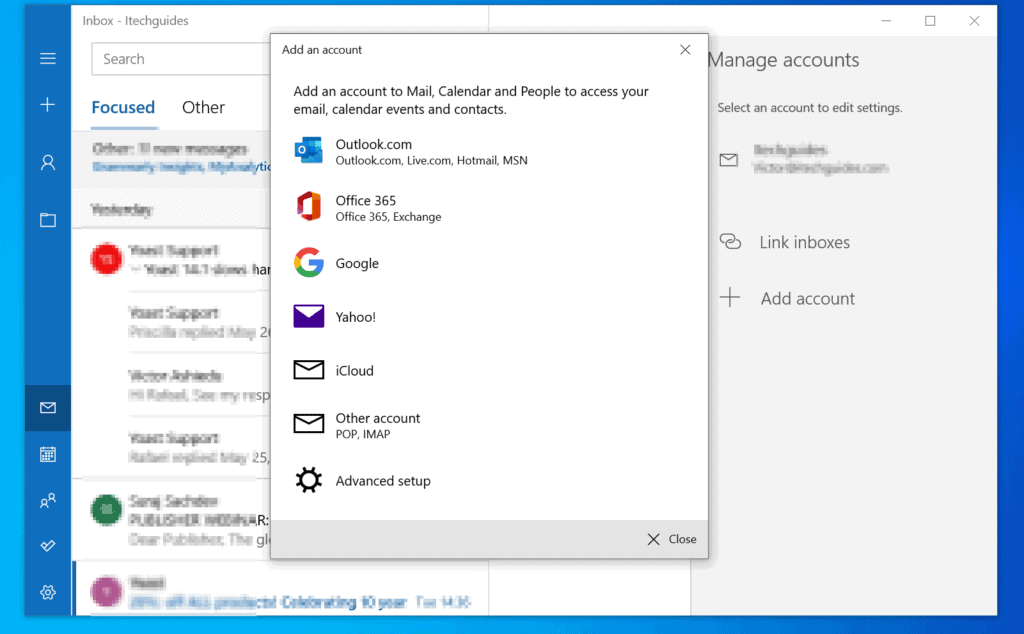
Moreover, you can also use Mail for Windows 10 for Gmail, Yahoo, iCloud and any other POP or IMAP emails. For steps to set it up, see the Set up guide.
Also popular on Amazon
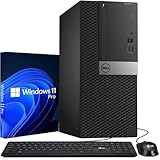
- Storage: 256GB SSD – Quick Boot Speeds and Responsive Storage
Conclusion
I hope this post was helpful to you. If the post was of any help to you, click on “Yes” beside the “Was this page helpful” question below.
You may also express your thoughts and opinions by using the “Leave a Comment” form at the bottom of this page.
Finally, for more Email tech Itechguides, visit our Email & Productivity Tools Explained page. You may also find our Work from Home page very helpful.
Free tools Windows power users keep installed
One-click scans. No signup required.
Quick Recap
Product prices and availability are accurate as of the date/time indicated and are subject to change. Any price and availability information displayed on Amazon at the time of purchase will apply.



I was advised to use outlook by a woman expert from Microsoft, but what she wrote I could not understand though I use Internet since it was introduced in Tbilisi in Sakartvelo//Georgia Republic/Gurcistan/Gruzia/Aiakolkheti/Aiakardu. Your text is understandable. I wish everything free of charge for being afraid of wicked liars. etc. Today I am tired to do what the woman expert demanded. I shall try to do it romorrow morning .
Thank you very much.