
iTechGuides is reader-supported. When you buy through links on our site, we may earn an affiliate commission. As an Amazon Associate I earn from qualifying purchases. Learn more
Are you in search of a way to redact text(s) on your WordPress website? Read through this comprehensive guide, as it provides step-by-step procedures to achieve that.
Option 1: Redact Text Using the Eyes Only Plugin
The Eyes Only plugin is one of the easiest plugins to redact text on your WordPress website. Due to how simple this plugin is to use, it is the go-to plugin for redacting texts on many WordPress websites.
Hence, the first sub-section below will teach you how to install and activate this plugin in WordPress. Meanwhile, the second sub-section teaches how to redact text(s) in WordPress with the plugin.
Crashes, No Sound, or Screen Glitches?
Random freezes, missing sound and display glitches usually trace back to one bad driver. Find and replace yours safely.Free scan · under a minutePC Slower Than It Used to Be?
A free scan shows the junk files, broken settings and background clutter dragging Windows down - then fixes them in one click.Free scan · Windows 10 & 11Step 1: Install the Eyes Only Plugin
- Use an administrator account to log in to the backend of your WordPress site. Then, on the left pane of the backend dashboard, hover your mouse on Plugins and left-click Add New from the displayed options.

- After doing that, input “Eyes Only” in the search field on the Add Plugins page.

- Next, click the Install Now button of the Eyes Only plugin from the search result.

- Wait for the plugin to install on your WordPress website successfully, then click the blue Activate button to activate it.

Step 2: Redact Text Using the Eyes Only Plugin
- Access the backend of your WordPress site with an admin account. Afterward, click Posts or Pages on the left pane, depending on where you want to redact a text(s).

- Now, click the title of the post/page where you want to redact a text(s) to open it. I will select the “Redacting” post on our WordPress site for this demonstration.

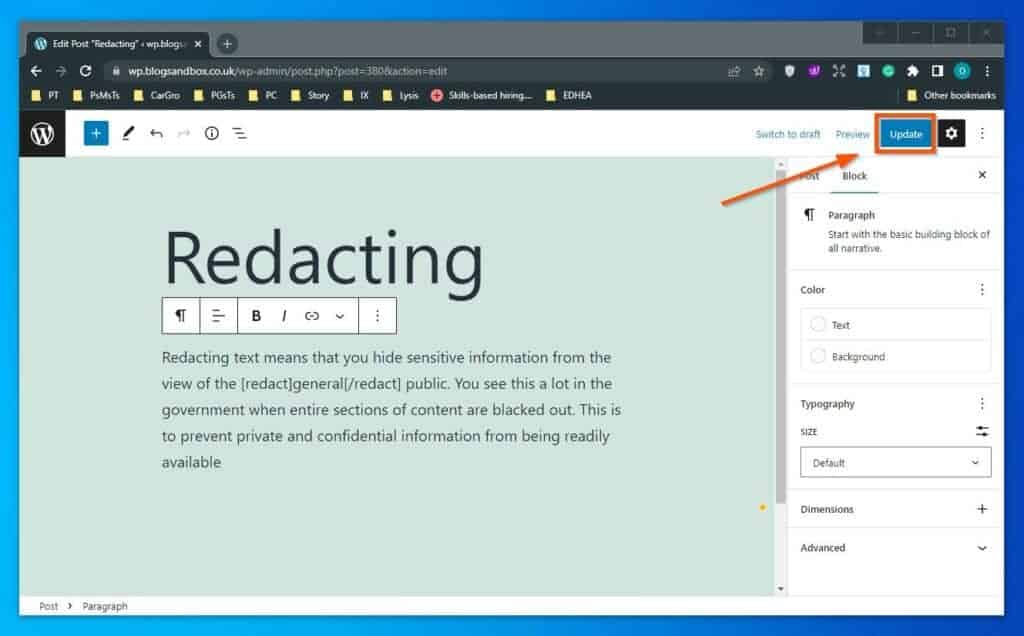
- When the post opens, wrap the text(s) you want to redact between the tags below.
[redact] [/redact]
For instance, if we intend to redact “general” in our post, below is what the text would like after wrapping it with the tags.
Popular on Amazon

- All-in-One Desk Organizer: WALI multi-tier desk organizer features 4 letter trays, a vertical file folder organizer, 2 metal pen holders and a sliding divided drawer, keeping your office supplies for desk tidy and maximizing desktop space, ideal for women and men as office desk accessories
- Premium Metal Quality: WALI desktop file organizer is crafted from thickened steel metal wire mesh, featuring dense small mesh to hold desk supplies steadily. Its sturdy structure enhances load-bearing capacity to avoid deformation; all parts are firmly fixed to prevent falling, ensuring overall stability and durability of the desktop organizer
- Save Space: Documents are organized by the vertical file folder organizer. Tiered letter tray is suitable for planner, paper, letters,books, magazines, mail, bills and phones. The sliding drawer and metal pen holders can store all office supply accessories, such as pens, pencils,markers, scissors, suitable for workers, teachers and students
- Easy Installation: No complicated tools or tedious steps. 1 Pack WALI desk organizers and accessories can be assembled in minutes with clear instructions. Ideal for office, dorm, college, home office, school, classroom use
- Elegant & Practical Decor: Classic black finish complements any office, school or dorm decor, serving as both a practical home office storage and organization tool and a sleek desktop decor to show your professional style, ideal for users who pursue a tidy, aesthetic workspace
[redact]general[/redact]

- When you’ve done that, click the Update button at the top right corner of the page. Hence, the text should appear redacted if you view the post/page on your site’s front end (live website) – see the screenshot below.

Option 2: Redact Text Using the Text Mutator Plugin
Aside from the Eyes Only plugin, you can also use a plugin known as Text Mutator to redact text(s) on your WordPress website. As a matter of fact, this plugin is very similar to the Eyes Only plugin.
However, it offers more customization options compared to the Eyes Only plugin.
That being said, the following subsections will teach you how to install this plugin in WordPress. Then, you will learn how to use the plugin to redact text in WordPress.
Do these 3 things before closing this tab:
1Repair Windows errors before they cause bigger problems2Fix the driver behind crashes, sound loss and screen glitches3Clear out junk files and repair common Windows errorsAlso popular on Amazon

- 【Space Saving】: The compact design of this wood desk organizer maximizes vertical space while keeping all office supplies within reach, making your workspace more organized.
- 【Improve Work Efficiency】: This pen organizer contains 4 trays, 1 magazine rack, 1 pen holder, and 1 sliding drawer, which can help you quickly identify the contents of each compartment, helping to keep papers, notebooks, and office supplies neatly organized and easily accessible., so that you can stay busy and creative all day long.
- 【High-quality Materials】: This workspace organizer is made of high-quality wood and solid steel and high-quality plastic for better stability and durability. The outer layer is epoxy-coated, rust-proof and very durable, ensuring a long service life. Its simple design can be perfectly integrated with any decorative style
- 【Easy to Assemble】: Detailed instructions and matching assembly tools ensure a fast and efficient assembly process. It is super easy to assemble without worrying about any problems!
- 【Happy Shopping】: We offer a 100-day return policy. If you have any questions, please feel free to contact us, we will help you within 24 hours.
Step 1: Install the Text Mutator Plugin
- Login to the backend of your WordPress site with the aid of an administrator account. Then, on the left pane of the backend dashboard, hover your mouse on Plugins and left-click Add New from the displayed options.

- After you’ve done that, input “Text Mutator” in the search field on the Add Plugins page.

- Next, click the Install Now button of the Text Mutator plugin from the search result.

- After you’ve successfully installed the plugin, click the blue Activate button to activate it.

Step 2: Redact Text Using the Text Mutator Plugin
- Access the backend dashboard of your WordPress site with the aid of an admin account. Then, hover your mouse on Settings among the menus on the left pane and select Text Mutator Settings.

- In the Text Mutator setting page, customize how you want the plugin to redact text(s). For example, you can set the color for the redacted text, set the background color, and so on.
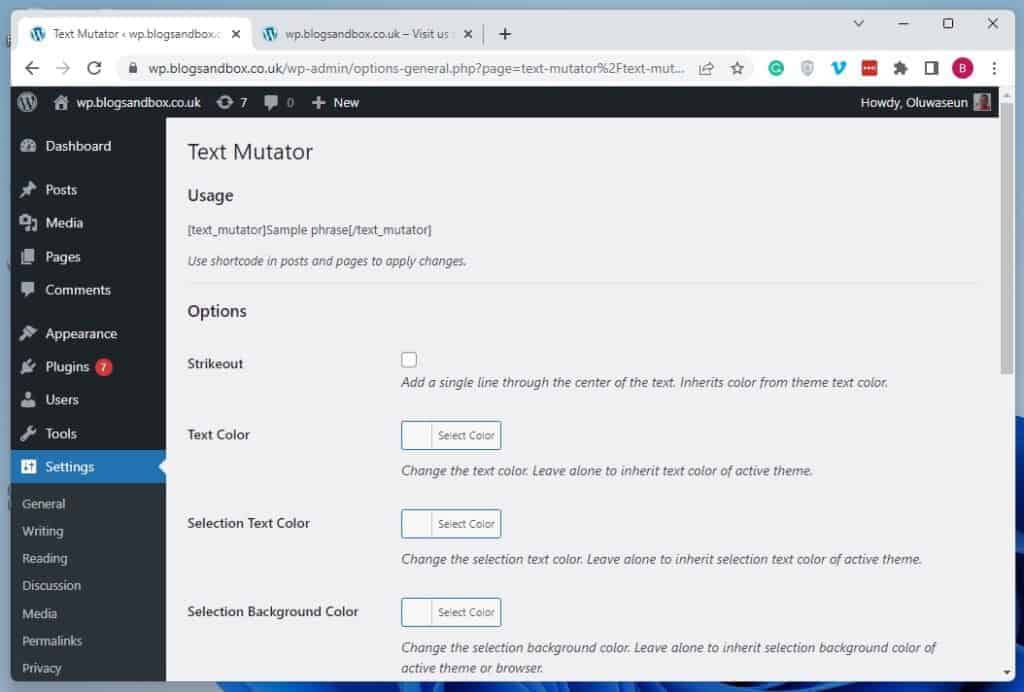
- After making the necessary customizations, click the Save Changes button at the bottom of the page to save the change.

- Now, select Posts or Pages on the left pane of your WordPress site’s backend dashboard, depending on where you want to redact a text.

- Afterward, click the title of the post/page where you want to redact text(s) to open it. In this case, I will open the “Redacting” post on our WordPress site.

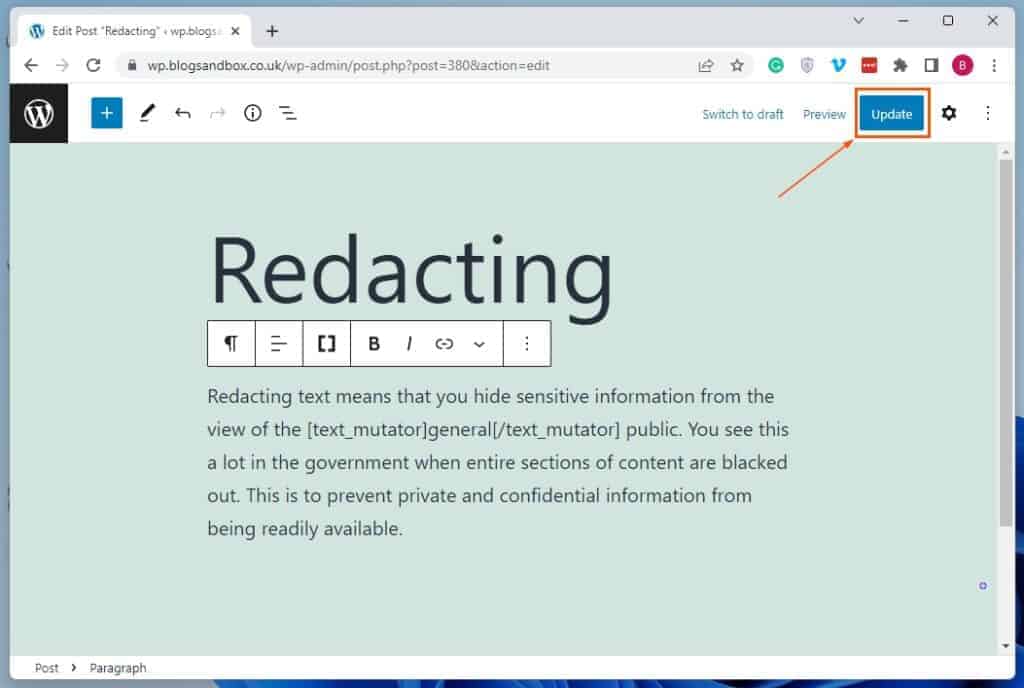
- When the post/page opens, wrap the text you want to redact between the tags below.
[text_mutator] [/text_mutator]
For example, if I want to redact “general” in our post, below is what the text should look like after wrapping it between the tags.
[text_mutator] general [/text_mutator]

- After doing that, click the Update button at the top right corner of the page to save the change. Thus, whenever someone views the text on your site’s front end (live website), it should appear redacted – see the second screenshot.

Frequently Asked Questions
A redacted text is a text in a document that is obscured and isn’t visible.
Yes, you can redact text in WordPress. Although WordPress doesn’t have a built-in feature for redacting text, there are several plugins that can do that.
Also popular on Amazon

- Multifunctional: The desktop organizer has 2 storage boxes and 1 pen box, you can store many office supplies, such as pens, scissors, staplers, etc. Perfect for office, bookcase, home, etc
- Quality Material: The office supplies desktop organizer is made of lightweight and durable metal mesh and reinforced with a sturdy steel frame for lasting strength and reliable performance
- Large Capacity Organizer: The 7-layer layered design and large capacity make the paper organizer ideal for managing a wide variety of letter-sized letters, papers, books, bills, and more. Makes it super easy for you to quickly identify the contents of each compartment
- Save Space: Desktop organizer can help you organize your desktop and help you save space better. Keep you productive at work all the time
- Size: 16.75 "W x 8.75 "D x 16.75 "H (U.S. Patent Pending)
As of the time of writing this article, the Eyes Only plugin is free.
Recommended Free Tools
WordPress was released on the 27th of May 2003.
Yes, you can. To learn how to do that, read our How to Highlight Text in WordPress article.
Conclusion
Redacting texts in your WordPress website can help you share information publicly while keeping sensitive text(s) private. However, WordPress doesn’t offer a built-in feature for redacting text.
Also popular on Amazon

- 【Unique Desk Decor】: The monitor stand has a classic black coating, adding elegance and modernity to your office while being sturdy and practical. allowing you to work in a cozy and tidy environment with greater comfort and efficiency.
- 【Improved Work Efficiency】: The monitor riser comes with a sliding drawer and two pen holders. It accommodates various office desk items, saving space. It helps you quickly identify the contents of each compartment, doubling your work speed.
- 【Reduced Fatigue】: Elevate your monitor to a comfortable viewing height, relieving pressure on your neck, shoulders, and back, and enhancing comfort and creativity throughout the day.
- 【Wide Compatibility】: Monitor Riser / Stand for printer, computer, laptop, notebook. with a ventilation design to prevent overheating. Non-slip rubber pads provide stability during work.
- 【Happy Purchase】: Enjoy a 100-day return policy. Contact us with any questions, and we'll provide assistance within 24 hours.(USPTO Patent Application Number: 65268496)
Nonetheless, there are several free plugins that allow users to redact text in WordPress. Fortunately, this guide explained how to install and use two of these plugins in WordPress.
These plugins include the Eyes Only plugin and the Text Mutator plugin.
The Tool Desk
Outbyte Driver Updater FREEScan for outdated or missing drivers - takes under a minuteDriver Scan →Outbyte PC Repair FREERepair Windows errors before they cause bigger problemsFix Now →With all that being said, I sincerely hope you found this guide interesting and helpful. If you did, click on “Yes” beside the “Was this page helpful” question below.
Also popular on Amazon

- Mesh Pen Holder for Desk: Multipurpose 3 compartments desk organizer (8*4*4in), Suitable for storing pens, pencils, scissors, sticky notes, paper clips, etc. Keep your desk tidy and organized.
- Premium Material: Made of high-quality metal and mesh, durable and sturdy, not easy to deform or break. The smooth surface is easy to clean and will not scratch your desktop or other items.
- Convenient Design: The pen holder has three compartments, which can hold different types of stationery and supplies. The design is simple and practical, and the size is suitable for most desks.
- Sticky notes holder: The mesh pen holder has a sticky notes holder which is convenient for jotting down important reminders, to-do lists, or phone numbers.
- Wide Application: This pen holder is suitable for office, school, home, and other places. It can help you organize your desk, keep your stationery and supplies in order, and make your work more efficient.
You may also express your thoughts and opinions by using the “Leave a Reply” form at the bottom of this page.
Before leaving, you can visit our WordPress & Websites How-To page to find more WordPress guides like this.
Quick Recap
Product prices and availability are accurate as of the date/time indicated and are subject to change. Any price and availability information displayed on Amazon at the time of purchase will apply.
Free tools Windows power users keep installed
One-click scans. No signup required.