
The Tool Desk
Outbyte PC Repair FREERepair Windows errors before they cause bigger problemsFix Now →Outbyte Driver Updater FREEFix the driver behind crashes, sound loss and screen glitchesFind Drivers →iTechGuides is reader-supported. When you buy through links on our site, we may earn an affiliate commission. As an Amazon Associate I earn from qualifying purchases. Learn more
Wondering how to link an email address to your WordPress site? You should read this article as it teaches multiple ways to accomplish that.
Option 1: Link an Email Address via the WordPress Block Editor
The fastest and easiest way to link an email address on your WordPress site is through the default WordPress block editor. To learn how to accomplish that, follow the procedures and screenshots provided below.
- First, access the backend dashboard of your WordPress site as an administrator. Then, click Pages or Post on the dashboard’s left pane, depending on where you want to link an email address.

- Next, select the title of the page or post where you want to link an email address. In this case, I want to link an email address in the “Contact” page on my WordPress website.
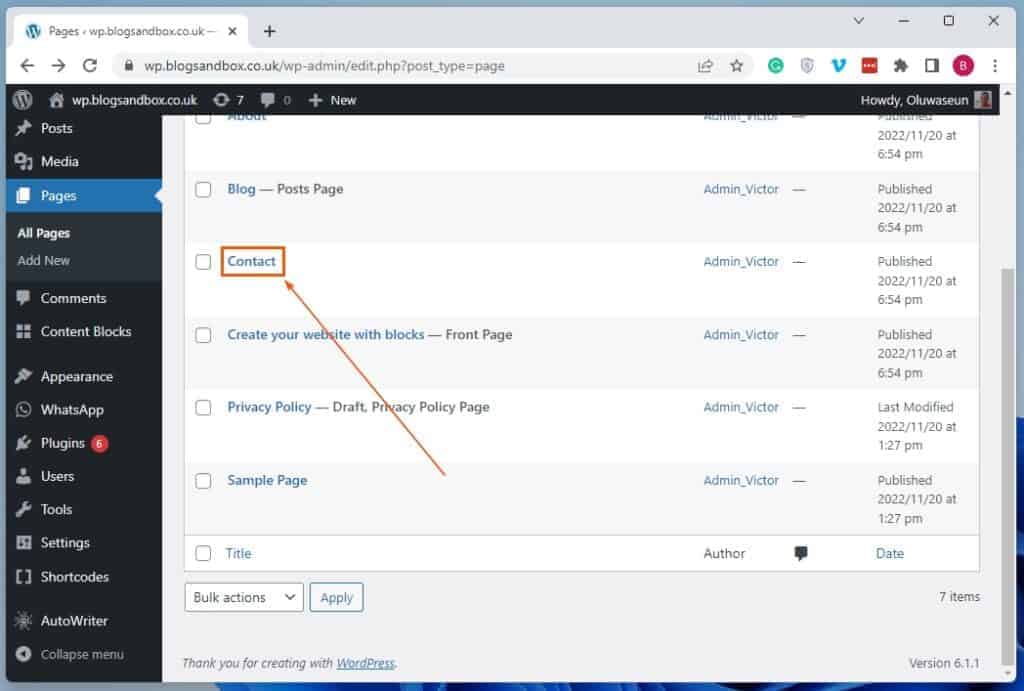
- When the page or post opens, highlight the text to which you want to link an email address. Then, click the Link button among the buttons on the toolbar at the top of the text block.

- In the input box that appears, input “mailto:” followed immediately by your preferred email address and press the enter key. For instance, if I want to link “itechguides@itechguides.com” to the highlighted text, I will input “mailto:itechguides@itechguides.com” in the input box.

- Finally, click the Update button at the top right corner of the page to save the change.

Option 2: Link an Email Address in WordPress Using HTML
Another way to link an email address on your WordPress website is by using a certain HTML element. The following procedures demonstrate how to link an email address in WordPress using HTML.
Outdated Drivers Are Slowing You Down
One free scan finds every outdated or missing driver and matches the right update for your exact hardware.Free scan · exact hardware matchWindows Errors? Fix Them Before They Spread
Repair common Windows errors and clear accumulated junk for a smoother, more stable PC - no reinstall needed.Free scan · no reinstall- With the aid of an admin account, log in to the backend dashboard of your WordPress website. Next, depending on where you want to link an email address, click Posts or Pages on the dashboard’s left pane.

- After that, open the post or page where you want to link an email address by left-clicking its title. For this illustration, I will select the “Contact” page on our WordPress site.

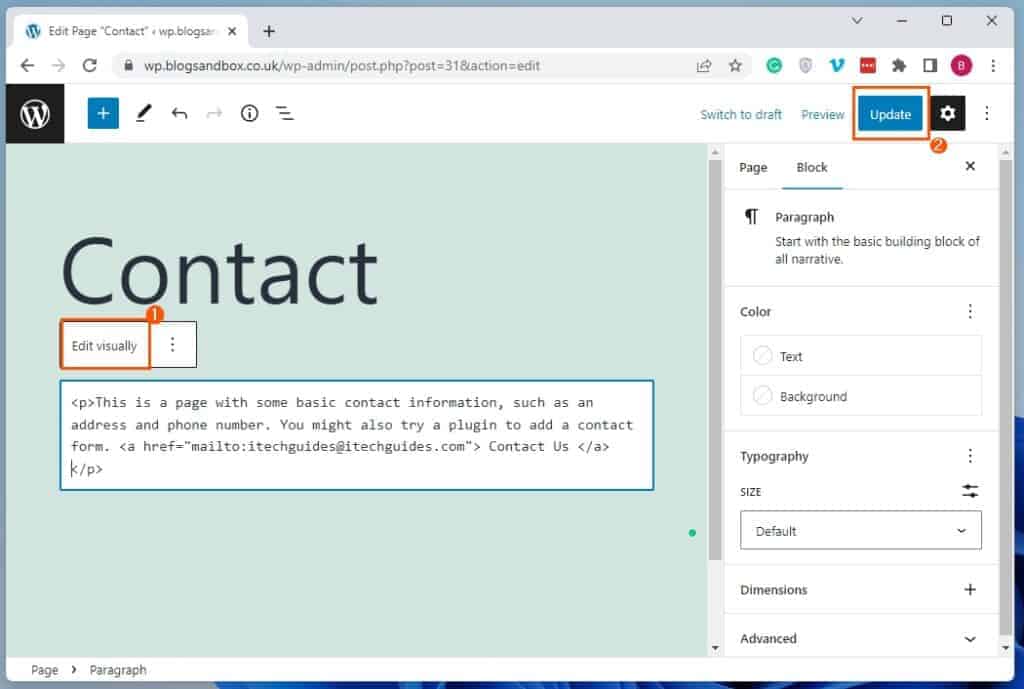
- When the post/page opens, select the text block that features the text to which you want to link an email address. Then, click the Options button on the toolbar at the top of the text block and select Edit as HTML.

- Afterward, wrap the text to which you want to link an email address in the HTML element below. However, replace “example@gmail.com” with your preferred email address.
<a href="mailto:example@gmail.com"> </a>
For example, if I want to link the “itechguides@itechguides.com” email address to “Contact Us”, below is what the HTML element should look like.
Popular on Amazon

- COMPARTMENT CAPACITY & POCKETS:Separate laptop compartment fits 17/15/14/13 Inch Macbook/Laptop.Separate compartment Fits Maximum 9.7” iPad.Main compartment roomy for tech electronics accessories,3-5 days clothing,5 A4 Books.Front compartment with 2 Pockets for power Bank and Shaver,2 Pen pockets and key fob hook.Pocket for socks and gloves.Front hidden zipper pocket fits papers.2 mesh pockets for water bottle and compact umbrella.Strap pocket fits bus card and Metro Card,One glasses hold strip.
- COMFY&STURDY: Comfortable airflow back design with thick but soft multi-panel ventilated paddingand Lightweight material, gives you maximum back support. Breathable and adjustable shoulder straps relieve the stress of shoulder. Foam padded top handle for a long time carry on.
- FUNCTIONAL&SAFE: A luggage strap allows backpack fit on luggage/suitcase, slide over the luggage upright handle tube for easier carrying. With a hidden anti theft pocket on the back protect your valuable items from thieves. Well made for international airplane travel and day trip as a travel gift for men .
- BUILD-IN USB PORT : The backpack comes with built in USB charger outside , built in charging cable inside, offers you a convenient way to charge your phone when you are walking, riding.
- DURABLE MATERIAL&SOLID: Made of Water Resistant and Durable Polyester Fabric with metal zippers. Ensure a secure & long-lasting usage everyday & weekend.Serve you well as professional office work bag,slim USB charging bagpack,college backpacks for men women.THIS ITEM IS NOT INTENDED FOR USE BY CHILDREN 12 AND UNDER.
<a href="mailto:itechguides@itechguides.com"> Contact Us </a>

- When you’ve done that, click the Edit visually button, then left-click the Update button at the top right corner of the page to save the change.
Frequently Asked Questions
No, it isn’t. “mailto” is a URI (Uniform Resource Identifier) for email addresses.
It is used to develop hyperlinks on websites, allowing users to send an email to a specific address directly from an HTML document.
To make an email address clickable in WordPress, follow the steps below.
a) First, access the backend dashboard of your WordPress site as an administrator.
b) Then, click Pages or Post on the dashboard’s left pane, depending on where you want to make an email address clickable.
c) Next, select the title of the page or post where you want to make the email address clickable.
d) When the page or post opens, input the email address you want to make clickable in a text block and highlight the email address.
e) Following that, click the Link button among the buttons on the toolbar at the top of the text block.
f) In the input box that appears, type “mailto:” followed immediately by the email address and press the enter key.
g) Consequently, the email address should be clickable. Finally, click the Update button at the top right corner of the page to save the change.
Also popular on Amazon

- LOTS OF STORAGE SPACE&POCKETS: One separate laptop compartment hold 15.6 Inch Laptop as well as 15 Inch,14 Inch and 13 Inch Laptop. One spacious packing compartment roomy for daily necessities,tech electronics accessories. Front compartment with many pockets, pen pockets and key fob hook, makes your item organized and easier to find
- COMPANY WITH YOU ANYWHERE: This backpack is Personal Item Backpack Size for frontier: 18 * 12 * 7.8 inch, meets most airlines. Made for flight travel and daily commutes, with organized pockets for clothes, a bottle, an umbrella, and tech accessories. Under seat backpack size easy to carry on and keeps your hands free—helping you feel prepared, calm, and accompanied from departure to arrival and enjoy your trip
- FUNCTIONAL & SAFE: A luggage strap allows backpack fit on luggage/suitcase, slide over the luggage upright handle tube for easier carrying. With a hidden anti theft pocket on the back protect your valuable items from thieves. Well made for international airplane travel and day trip as a travel gift for men
- COMFORTABLE USING: Designed for all-day comfort using, this laptop backpack for men features a soft padded back panel with thick yet breathable multi-layer ventilated cushioning that provides excellent support and helps reduce pressure on your back. The adjustable shoulder straps are breathable and ergonomically padded to ease shoulder strain, while the foam-padded top handle ensures a comfortable grip for extended carrying
- STURDY MATERIALS & SOLID: Made of Water Resistant and Sturdy Polyester Fabric with metal zippers. Ensure a secure & long-lasting usage everyday & weekend.Serve you well as professional office work bag,slim bagpack, back to college backpacks. 15.6 inch travel laptop backpack for daily using and organize
Raymond Samuel Tomlinson is regarded as the father of email. He was a computer programmer from the United States who implemented the first email program on the ARPANET system in 1971.
Sadly, according to Wikipedia, he passed away on March 5, 2016.
The following are the major types of website emails.
a) Welcome email
b) Offer email
c) Survey email
d) Request email
e) Newsletter email
f) Free gift email
g) Value email
h) The We’re Hiring email
I) New product email
j) Announcement email
Also popular on Amazon

- Durable design: Laptop backpack features a durable, water-repellent snow yarn polyester fabric and streamlined design with a padded interior to protect your laptop, notebook and other important stuff
- Comfortable fit: This compact backpack has a quilted back panel and fully adjustable shoulder straps making it comfortable for all day use, plus a quick access front zippered pocket for extra storage
- Laptop backpack: Perfect for daily commuters, college students and all types of travelers; accommodates laptops up to 15.6 inches
- Convenient storage: In addition to the laptop compartment, there are separate pockets for mobile devices, business cards, and other daily tools in quick-access compartments. The main compartment offers extra space for magazines, notepad and other laptop accessories
You can attach various types of files to an email. These include Word documents, PDF files, images, videos, folders, Excel spreadsheets, and so on.
Conclusion
Offering visitors the option to contact you through your website is very important. One of the many ways you can do that is by linking an email address to your WordPress website.
Also popular on Amazon

- Fits Most Standard 17" Laptops: This 17 inch laptop backpack has a separate laptop compartment for 15.6, 16, and most standard 17 inch laptops and tablets. Please note: it may not fit oversized or extra-thick gaming laptops. The main compartment is roomy for work files, school books and travel clothes. Designed for men, it works well as an office backpack, school bookbag, and laptop backpack for daily use
- TSA Approved Backpack: The TSA-friendly laptop compartment opens from 90 to 180 degrees, helping speed up airport security checks and making this backpack school for men convenient for airplane travel. Sized at 18.5" x 13" x 7.9" with a 30L capacity, it fits in overhead bins for carry-on use. The travel-ready design helps keep your laptop and essentials organized for smoother travel, work, and college use
- Multiple Pockets for Organized Storage: The front of the laptop backpack 17 inch features a large zippered pocket for daily essentials and a quick-access pocket for smaller items like cards. Side mesh pockets hold a water bottle or umbrella. A back anti-theft pocket helps store wallets and passports. This 17.3 inch computer backpack keeps your belongings organized and easy to access
- Travel Friendly and Comfortable Design: This 17 laptop backpack features a trolley sleeve on the back, allowing it to fit over a luggage handle and free your hands during travel. A breathable back panel helps keep you comfortable while walking and commuting. Adjustable padded shoulder straps and a comfortable handle provide added comfort for daily carry. Recommended age range: 5 years old and up
- Water Resistant and Multipurpose: This 30L work backpack for men is made of water-resistant 600D polyester fabric with organized storage for work, college, and travel. It is suitable for office work, school use and short business trips as a tsa large laptop backpack. It is also practical gifts choice for adults men, college graduations, and thoughtful gifts for Thanksgiving Day, Christmas Day, and other speical days, like birthdays and holidays
Fortunately, this guide demonstrated two ways to link an email address in WordPress. To be more specific, we discussed how to execute this task through the default WordPress block editor.
This guide also taught us how to link an email address on a WordPress site using HTML. Hence, with this guide, linking an email address to any post or page on your WordPress website should be seamless.
Also popular on Amazon

- Tech Backpack: Pack all your essentials in the 1900 ScanSmart 17-inch laptop backpack specifically designed to speed you through airport security by allowing laptop-in-case scanning
- Secure Storage: This laptop backpack for men and women features an enhanced laptop compartment with zippered access for a 17-inch laptop and a padded TabletSafe tablet pocket
- Effortless Organization: Computer bag includes a main compartment with an accordion file holder and a RFID-protected organizer compartment with a removable key/fob clip and multiple divider pockets
- Multiple Pockets: Add-a-bag trolley strap slides over telescopic handles, 1 front and 2 side quick-access pocket secure essentials, and 2 mesh side pockets accommodate water bottles and umbrellas
- Comfortable To Carry: Lay-flat laptop bag includes ergonomically contoured, padded shoulder straps, adjustable compression straps, airflow back padding, and a reinforced, molded top handle
Hopefully, you found the methods provided in this WordPress guide helpful. If you did, click on “Yes” beside the “Was this page helpful” question below.
You may also express your thoughts and opinions by using the “Leave a Reply” form at the bottom of this page.
Finally, visit our WordPress & Websites How-To page to get more helpful and comprehensive WordPress guides like this.
Free tools Windows power users keep installed
One-click scans. No signup required.
Quick Recap
Product prices and availability are accurate as of the date/time indicated and are subject to change. Any price and availability information displayed on Amazon at the time of purchase will apply.