
PC Slower Than It Used to Be?
A free scan shows the junk files, broken settings and background clutter dragging Windows down - then fixes them in one click.Free scan · Windows 10 & 11Crashes, No Sound, or Screen Glitches?
Random freezes, missing sound and display glitches usually trace back to one bad driver. Find and replace yours safely.Free scan · under a minuteiTechGuides is reader-supported. When you buy through links on our site, we may earn an affiliate commission. As an Amazon Associate I earn from qualifying purchases. Learn more
This Itechguide teaches you how to transfer ownership of a Google Doc. The guide covers steps to transfer ownership of a Google Doc from a PC (Docs.Google.com).
After transferring ownership of a Google Docs document, you will NO LONGER be able to: 1, Transfer ownership back to yourself. 2, Delete the file from Google Drive.
When you create a Google Docs document, you automatically become the “owner” of the file. But you can transfer this ownership to another person.
Step 1: Share the Doc with the New Owner
- Open Docs.Google.com from a browser on your PC. Then, sign in with your Google Drive Account

- From Google Docs homepage, open the document you want to transfer to another user.
- When the document opens, on the top right of the document, click Share. Share with others pop up will open.
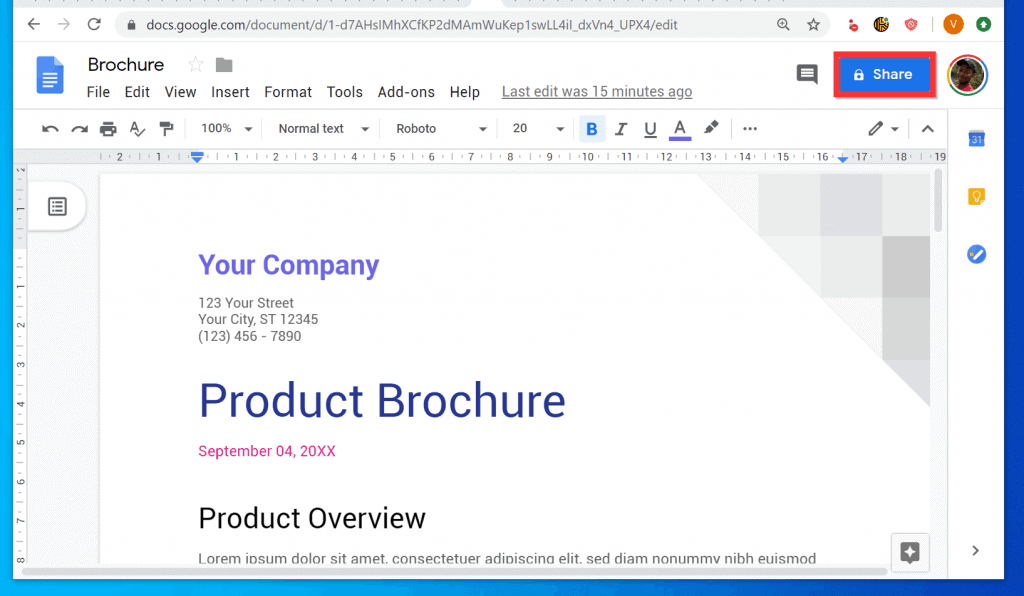
- Type the email address of the user you want to transfer file ownership to. Then, at the bottom left of the pop up, click Send.

Step 2: Transfer Ownership to the New Owner
After sharing the document with the person, use the steps below to transfer ownership to the new owner.
Free tools Windows power users keep installed
One-click scans. No signup required.
- On the top right of the document, click Share.
- Then, at the bottom right of Share with others pop up window, click Advanced. The file’s Sharing settings will open.

- Beside the person you shared the file with in the first section of this Itechguide, click the Edit drop-down. A set of options will be displayed.

- From the displayed options, click Is the owner. The file ownership will move from you to the new owner.

- Finally, to transfer ownership of a Google Doc, at the bottom left of Sharing settings, click Save changes.

I hope you found this Itechguide helpful. If it was helpful, click on “Yes” beside the “Was this page helpful” question below.
Popular on Amazon

- Ergonomic Posture Correction: Designed to elevate your laptop to the perfect eye level, this adjustable laptop stand significantly reduces neck, shoulder, and spinal fatigue. Transform your desk into a healthier workstation, ideal for long hours of typing, Zoom meetings, or gaming.
- Unshakable Dual-Rod Stability: Unlike single-hinge models, our stand features a highly engineered dual-support rod mechanism. It perfectly distributes weight to ensure a 100% wobble-free typing experience, safely supporting heavy-duty devices up to 22 lbs (10kg).
- Advanced Thermal Cooling Panel: Maximize your device's performance. The unique geometric heat-vent design on the upper panel provides superior airflow compared to standard solid stands. This continuous heat dissipation prevents your laptop from thermal throttling and hardware damage during intensive tasks.
- Universal 10-16” Compatibility: A versatile computer riser that seamlessly fits all 10 to 16-inch laptops. Broadly compatible with MacBook Pro/Air, Dell XPS, HP, Lenovo, ASUS, Chromebook, and large gaming laptops. The anti-slip silicone pads firmly grip your device and protect it from scratches.
- Foldable, Portable & Ready to Go: Maximize your productivity anywhere. The dual-foldable design allows the stand to collapse completely flat in seconds. Easily slip it into your backpack or briefcase, making it the ultimate portable office accessory for business trips, cafes, or hybrid work setups.
You may also express your thoughts and opinions by using the “Leave a Comment” form at the bottom of this page.
Finally, for more Google Itechguides, visit our Google How To page.
Quick Recap
Also popular on Amazon

- 【Adjustable & Ergonomic】:This laptop stand can be adjusted to a comfortable height and angle according to your actual needs, letting you fix posture and reduce your neck fatigue, back pain and eye strain. Very comfortable for working in home, office and outdoor.
- 【Sturdy & Protective】 :Made of sturdy metal, it can support up to 17.6 lbs (8kg) weight on top; With 2 rubber mats on the hook and anti-skid silicone pads on top & bottom, it can secure your laptop in place and maximum protect your device from scratches and sliding. Moreover, smooth edges will never hurt your hands.
- 【Heat Dissipation】 :The top of the laptop stand is designed with multiple ventilation holes. The open design offers greater ventilation and more airflow to cool your laptop during operation other than it just lays flat on the table.
- 【Portable & Foldable】:The foldable design allows you to easily slip it in your backpack. Ideal for people who travel for business a lot.
- 【Broad Compatibility】:Our printer stand is compatible with all laptops from 10-15.6 inches, such as MacBook Air/ Pro, Google Pixelbook, Dell XPS, HP, ASUS, Lenovo ThinkPad, Acer, Chromebook and Microsoft Surface, etc.Be your ideal companion in Home, Office & Outdoor.
Also popular on Amazon

- ✔️[Foldabe & Protable] - Foldable laptop stand for desk & Protable computer stand, It combines the advantages of market brackets, convenient travel laptop stand. Easy to use. Suitable for working at home, office and outdoor, improve comfort.
- ✔️[360°Rotation] - The computer stand with 360° rotating base, 360° rotation connected with the base is more flexible, the computer stand allows you to rotate the laptop to any angle.
- ✔️[Stable & Durable] - The Computer stand is made of one-piece fiber metal material, which is more durable and stable than ordinary aluminum alloy computer stands. The upgraded rotating base makes the stand performance more stable, and the non-slip silicone protects the laptop from sliding.Only supports laptops up to 16 inches.
- ✔️[Ergonmic Desing] - You can freely adjust the height and angle of the laptop stand to keep it at eye level, which helps to reduce the pressure on your body while working. Whether sitting or standing, there is a comfortable angle.
- ✔️[Wide Compatibility] - Our laptop stand is compatible with all laptops from 10-16 inches, such as MacBook Air/Pro, Google PixelBook, Dell XPS, HP, ASUS, Lenovo ThinkPad, Acer, Chromebook and Microsoft Surface, etc. It is an ideal companion for computer workers.
Also popular on Amazon

- 【Adjustable & Ergonomic】:This laptop stand can be adjusted to a comfortable height and angle according to your actual needs, letting you fix posture and reduce your neck fatigue, back pain and eye strain. Very comfortable for working in home, office and outdoor.
- 【Sturdy & Protective】 :Made of sturdy metal, it can support up to 17.6 lbs (8kg) weight on top; With 2 rubber mats on the hook and anti-skid silicone pads on top & bottom, it can secure your laptop in place and maximum protect your device from scratches and sliding. Moreover, smooth edges will never hurt your hands.
- 【Heat Dissipation】 :The top of the laptop stand is designed with multiple ventilation holes. The open design offers greater ventilation and more airflow to cool your laptop during operation other than it just lays flat on the table.
- 【Portable & Foldable】:The foldable design allows you to easily slip it in your backpack. Ideal for people who travel for business a lot.
- 【Broad Compatibility】:Our desktop book stand is compatible with all laptops from 10-15.6 inches, such as MacBook Air/ Pro, Google Pixelbook, Dell XPS, HP, ASUS, Lenovo ThinkPad, Acer, Chromebook and Microsoft Surface, etc.Be your ideal companion in Home, Office & Outdoor.
Also popular on Amazon

- Broad Compatibility: Besign LS03 Laptop Mount is compatible with all laptops from 10''-15.6'', such as Air 13, Pro 13 / 15 / 2018 / 2017 / 2016, Lenovo ThinkPad, Dell, HP, ASUS, Chromebook, and other notebooks.
- Ergonomic Design: This LS03 Laptop Stand could elevate your laptop by 6’’ to a perfect viewing level, help you improve your posture and reduce neck and shoulder pain. This laptop stand is super easy to detach and assemble.
- Stable And Protective: This laptop stand is made of premium Aluminum alloy, it is sturdy, support up to 8.8 lbs(4kg), no worry any wobble at all; the rubber on the holder hands sticks tightly, ensure your laptop stable on the stand and prevent any scratches.
- Keep Laptop Cool: the open aluminum design provides good ventilation and airflow to prevent your laptop from overheating. It folds flat if you need to store it, create extra space on your desk and keep your desk clean and organized.
- Easy to Use: thanks to the detachable design, you could assemble it very easily it 3 steps.
Product prices and availability are accurate as of the date/time indicated and are subject to change. Any price and availability information displayed on Amazon at the time of purchase will apply.
What’s actually slowing this PC down?
Pick the symptom - the matching free tool is one click away.