

iTechGuides is reader-supported. When you buy through links on our site, we may earn an affiliate commission. As an Amazon Associate I earn from qualifying purchases. Learn more
This Itechguide teaches you how to add fonts to Google Docs. The guide covers 2 steps to to add fonts to Google Docs from a PC.
Step 1: Install the Add-on
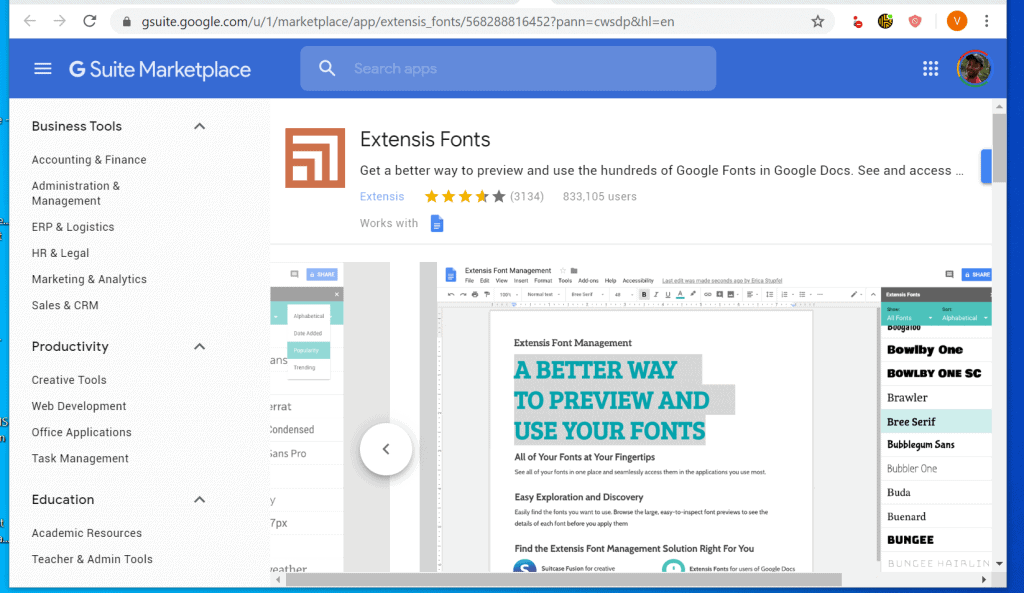
- Open the Extensis Fonts add-on page.
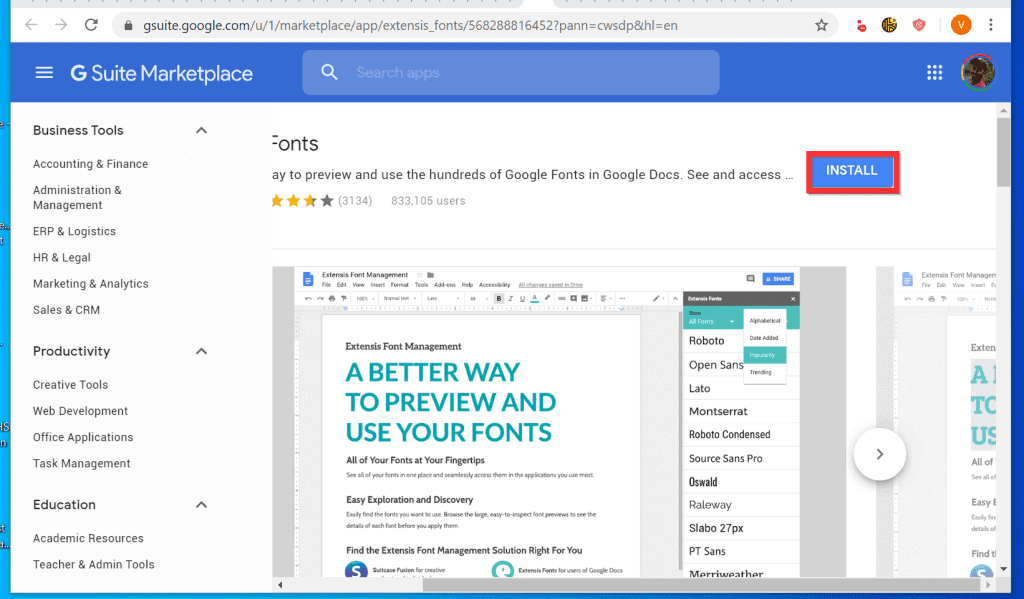
- On the top right of the page, click INSTALL.
- Then, on the Get ready to install pop up window, click CONTINUE.

- To grant the add-on access to your account, select the Google Account you use to login to Google Docs.

- Then, on the next page, scroll down and click Allow.

- You will receive a confirmation that the add-on has been installed.
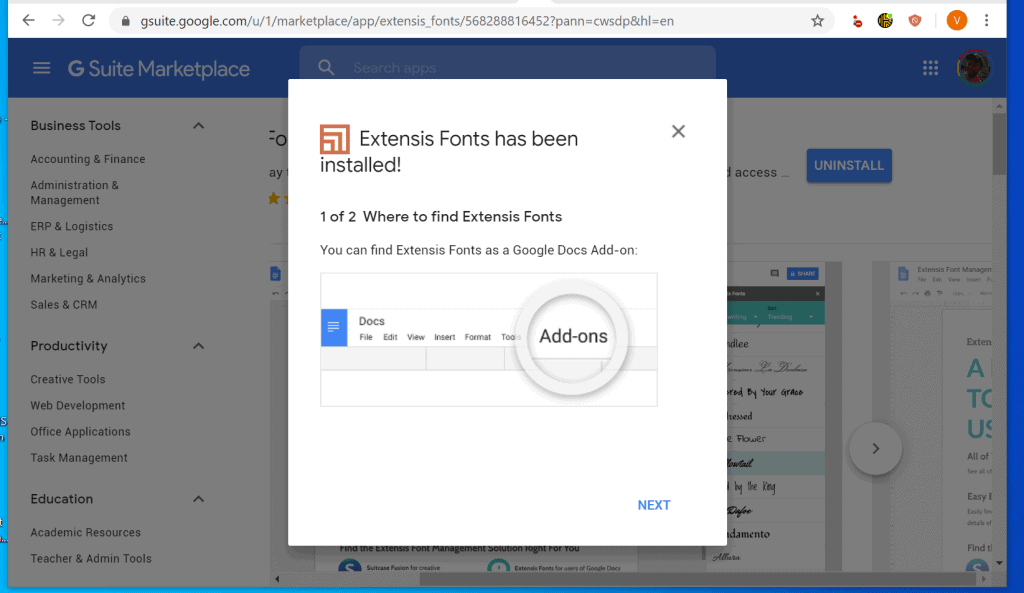
The next section covers how to use font…
Step 2: Change Fonts with the Add-on
After installing the add-on follow the steps below to add fonts to Google Docs document…
- Open Docs.Google.com from your PC. Then, sign in with your Google Account.

- Once you sign in to Google Docs, open the document you want to modify.
- You can open a saved document from Recent documents or from Google Drive.

- To open Google Drive from Google Docs, click the 3 lines on the top left of the page. Then click Drive.


- Highlight the text(s) you want to change to a different font. Then, on the Google Docs menu, click Add-ons. Then hover over Extensis Fonts and click Start.
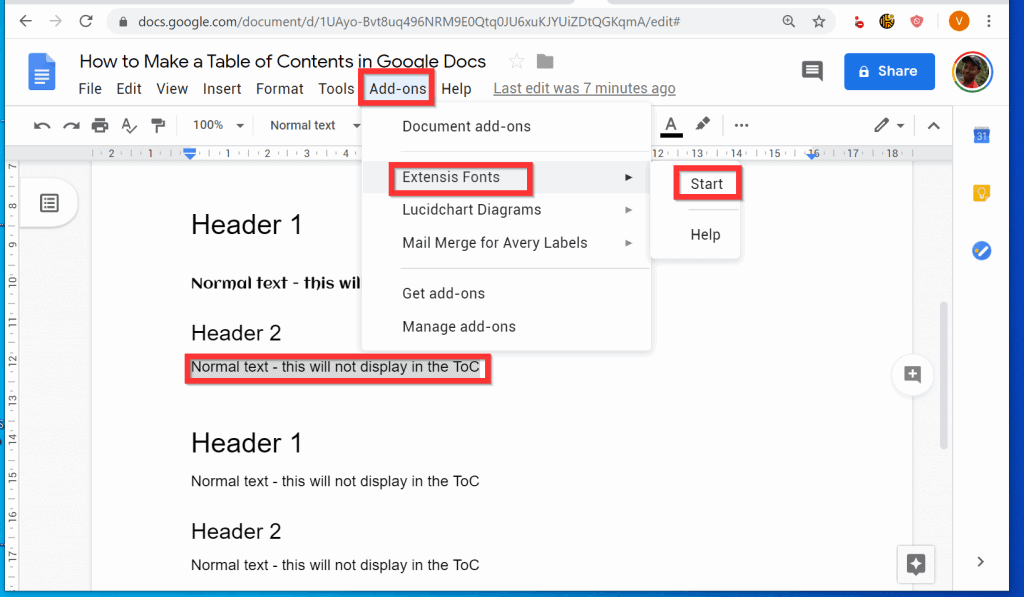
- On the right side of the page, the Add-on will display a list of fonts. To change the highlighted text to a new font, click on a font from the list.
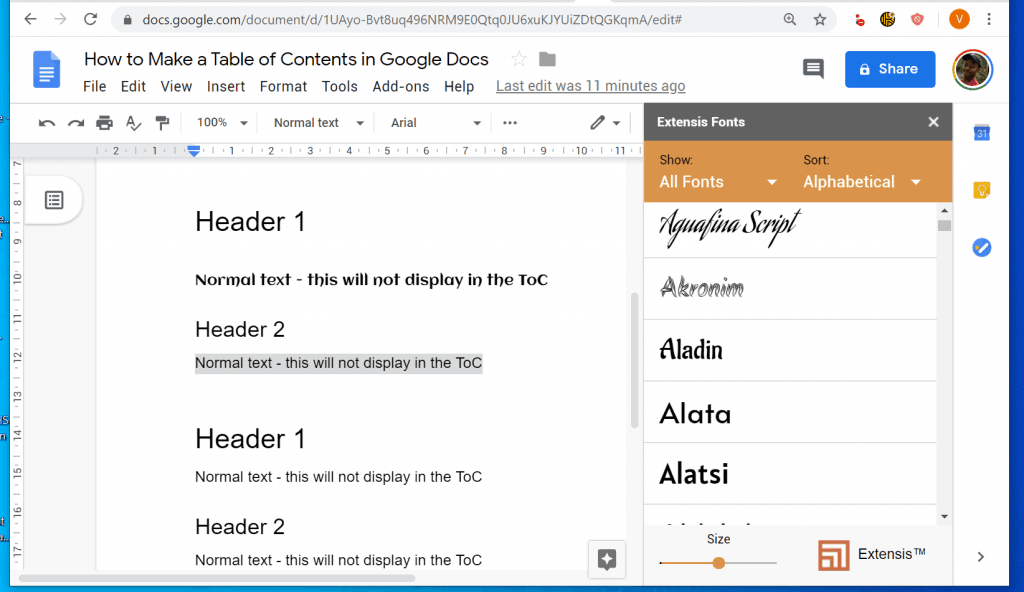
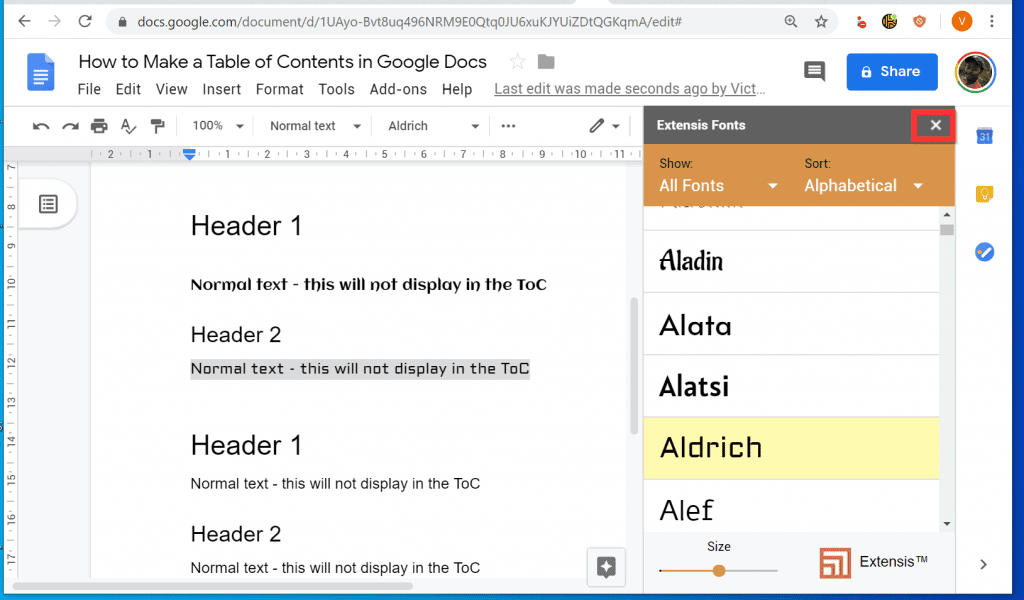
- The highlighted text will change to the new font. To close the add-on, on the top right click the x.

It is this easy to add fonts to Google Docs! I hope you found this Itechguide helpful. If you found it helpful, click on “Yes” beside the “Was this page helpful” question below.
You may also express your thoughts and opinions by using the “Leave a Comment” form at the bottom of this page.
Popular on Amazon

- Reliable Plug and Play: The USB receiver provides a reliable wireless connection up to 33 ft (1), so you can forget about drop-outs and delays and you can take it wherever you use your computer
- Type in Comfort: The design of this keyboard creates a comfortable typing experience thanks to the low-profile, quiet keys and standard layout with full-size F-keys, number pad, and arrow keys
- Durable and Resilient: This full-size wireless keyboard features a spill-resistant design (2), durable keys and sturdy tilt legs with adjustable height
- Long Battery Life: MK270 combo features a 36-month keyboard and 12-month mouse battery life (3), along with on/off switches allowing you to go months without the hassle of changing batteries
- Easy to Use: This wireless keyboard and mouse combo features 8 multimedia hotkeys for instant access to the Internet, email, play/pause, and volume so you can easily check out your favorite sites
Finally, for more Google Itechguides, visit our Google How To page.
Quick Recap
Also popular on Amazon
- Precision Typing: An instantly familiar experience, type with ease and comfort on this full-size wireless keyboard, featuring reduced noise, palm rest, spill-resistant design (1), adjustable tilt legs
- Built For Comfort: The sleek combo's wireless mouse features an ambidextrous shape and soft rubber side grips that fit comfortably in your palm, as well as enhanced tracking and precise cursor control
- Long-Lasting Autonomy: The wireless keyboard and mouse set come with long-lasting battery life, with the keyboard lasting up to 36 months and the wireless mouse for up to 18 months (3)
- Customized Control: Enhanced productivity at your fingertips, the computer keyboard comes built with convenient, essential hotkeys providing direct access to media, calculator, battery check functions
- Wireless Freedom: Plug-and-play your keyboard and mouse with the mini Logitech Unifying USB receiver, for a reliable wireless connection up to 33 ft away from your PC or laptop (2)
Also popular on Amazon

- The keyboard's sleek and stylish design features low-profile, whisper-quiet keys that provide a comfortable typing experience, suitable for those seeking a Logitech wireless keyboard and mouse combo or quiet keyboard enthusiasts
- Logitech advanced 2.4 GHz wireless connectivity gives you the reliability of a cord plus wireless convenience; suitable for a keyboard and mouse wireless setup with fast data transmission, virtually no delays or dropouts, and wireless encryption
- The ambidextrous portable mouse with plug-and-forget nano-receiver storage integrates seamlessly into any wireless keyboard mouse combo, letting you stay connected as you roam around your home, in the office, and all points in between
- You can go up to 24 months for the keyboard and up to 12 months for the mouse without the hassle of changing batteries. The wireless mouse and keyboard combo puts power management in your hands. Battery life varies with use and conditions
- Want to play your favorite movie, skip a boring song, or jump to Taobao? It's all at your fingertips with the logitech keyboard wireless and 11 hot keys plus 4 programmable F-keys for instant multimedia access
Also popular on Amazon

- 【Ergonomic Wireless Keyboard Mouse 】: Wireless ergonomic keyboard is equipped with adjustable height tilt legs to increase comfort and prevent your wrists injury when typing for a long time. The full size wireless keyboard with numeric keypad and 12 multimedia shortcut keys, such as play/ pause, volume increase and decrease, and email, to help you improve work efficiency
- 【Stable & Reliable Wireless Connection】: This wireless keyboard and mouse combo share the same USB receiver(stored in the mouse), and they can also be used separately. Plug & play, no need to download any software, 2.4 GHz wireless provides a powerful and reliable connection up to 33 feet(10m) without any delays.You can enjoy the convenience and freedom of wireless connection at home or at work
- 【Comfortable Optical Mouse】: This compact lightweight wireless mouse features a hand-friendly contoured shape for all-day comfort, and smooth, precise tracking.1600 DPI to meet your daily needs. Perfect for home & office work and entertainment
- 【Long Battery Life】: Up to 365 Days of battery life for keyboard and mouse wireless, say goodbye to the hassle of charging cables and replacing batteries. After 10 minutes of inactivity, the wireless keyboard mouse combo will automatically go into sleep mode to save energy. The wireless keyboard requires one AAA battery, and the wireless mouse requires one AA battery.
- 【Less Noise, More Quiet Keys】: Soft membrane keys provide a quiet and comfortable typing experience, So you can type with confidence on a wireless keyboard crafted for comfort, precision and fluidity. The wireless mouse adopts silent micro-motion technology, which is almost completely silent when clicked. No more concerns about disturbing others.
Also popular on Amazon

- Dependable wireless connection: Enjoy the reliability and convenience of 2.4 GHz connectivity with your logitech wireless keyboard and mouse combo, wireless range up to 10 meters away at home, or work.
- Full-Size Wireless Keyboard: Comfortable, quiet typing on a familiar keyboard layout with palm rest, spill-resistant design, and media keys. This wireless keyboard and mouse logitech has easy-access to media keys
- Plug and Play: MK345 works seamlessly with Windows, macOS, and ChromeOS. Experience hassle-free setup with the logitech mk345 wireless combo and wireless keyboard mouse combo for various operating systems.
- Long-lasting Battery: The MK345 combo offers a full size keyboard battery life of up to 3 years and a mouse battery life of 18 months (1); batteries included
- Comfortable Right-handed Mouse: This wireless USB mouse with dongle works well for this wireless mouse and keyboard combo, featuring a contoured shape for all-day comfort and smooth, precise tracking and scrolling for easier navigation.
Product prices and availability are accurate as of the date/time indicated and are subject to change. Any price and availability information displayed on Amazon at the time of purchase will apply.
Independent reader supportYour contribution helps us test, update, and keep practical guides available for everyone.


