

Do these 3 things before closing this tab:
1Fix the driver behind crashes, sound loss and screen glitches2Repair Windows errors before they cause bigger problems3Scan for outdated or missing drivers - takes under a minuteiTechGuides is reader-supported. When you buy through links on our site, we may earn an affiliate commission. As an Amazon Associate I earn from qualifying purchases. Learn more
If you are a member of the Windows 10 Insider Program you can install Windows 10 19H2 Preview Build. Here are the full steps.
Step 1: Download the Windows 10 19H2 Preview Build ISO
Here are the steps to download Windows 10 19H2 Preview Build ISO:
- Login to your computer and open Insider.Windows.com.
- To login to your Insider account, click the sign in icon on the top right corner of the page (highlighted below).

- Enter your email address an click Next. Then enter your password and click Sign in.
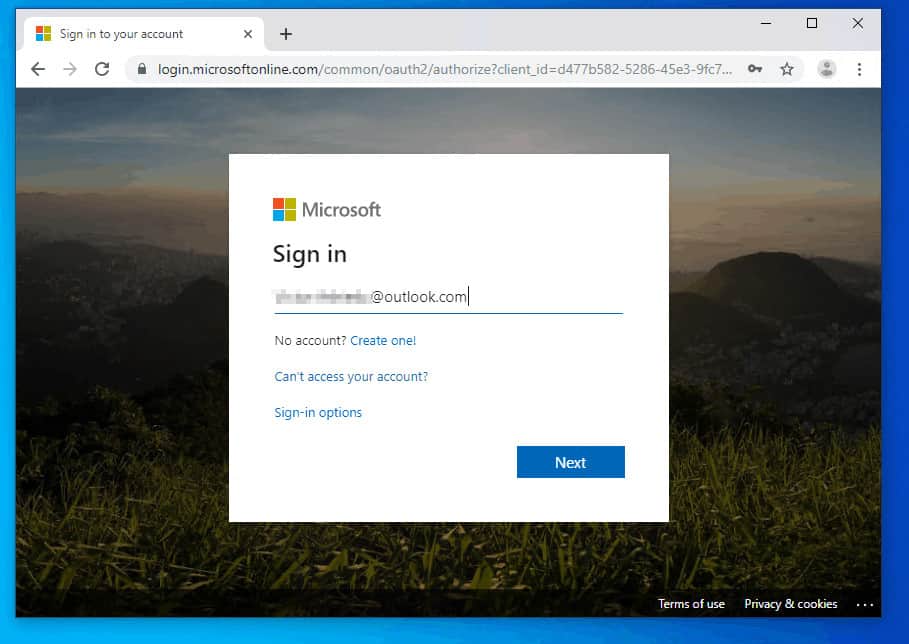

- Once you successfully sign into your Windows Insider account, proceed to the next step.

- Click this link Windows 10 Insider Advanced Download. If you receive the message shown below, refresh the page.

- The download page will open. Scroll down to Select edition. Then click the Select edition drop-down and select Windows 10 Insider Preview (Release Preview) – Build 18363. This is the 19H2 Build.
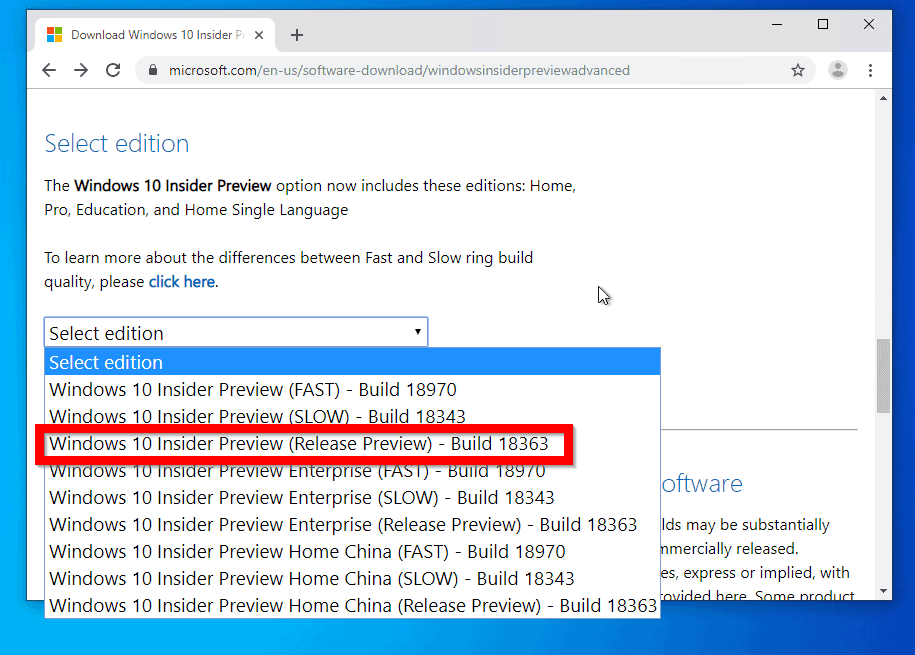
- After selecting the edition, click Confirm.

- When the Select the product language option loads, click the drop-down and select your language. Then click Confirm.

- Finally, to download the Preview build, click the link to the build architecture you want to download. Then wait for the ISO image to download.


Step 2: Create a DVD with the ISO File
When the ISO file is fully downloaded, you need to create a DVD using the ISO file. You can use a DVD burner software but Windows 10 has an in-built burner.
Alternatively, you could simply mount the ISO file.
Popular on Amazon

- USB-C 2-in-1 storage OTG: The Lexar JumpDrive Dual Drive D40E features USB Type-A and Type-C connectors in a slim, portable form factor for easy device compatibility
- Transfer speeds up to 100MB/s: Based on internal testing, performance may vary depending upon the host device, interface, and usage conditions. 1MB=1,000,000 bytes
- Plug and Play: Widely compatible with USB Type-C smartphones, tablets, laptops, Macs, and traditional Type-A devices, no software installation required. The 360° swivel design allows for easy switching between connectors without the hassle of losing a cap
- Durable & Compact: The Lexar D40E USB memory stick features a metal enclosure, withstands temperatures from 0° to 50° C (32°F to 122°F), and is lightweight at 26g with dimensions of 70.4 x 16.9 x 11.7mm
- Security & Warranty: Securely protects files using an advanced security software solution with 256-bit AES encryption. Backed by a Lexar 3-year limited warranty
Here are the steps to either burn the file to a DVD or mount it:
- Open the path you saved the ISO file. Then right-click the file.
- To mount the file, select Mount.

- The ISO will be mounted into an available drive and open automatically.

- If on the other hand you prefer to burn to a DVD, right-click the file then select Burn disk image.

Step 3: Install Windows 10 19H2 Preview Build
Once you have mounted or created a DVD, move to the next step. For the purpose of this guide, I will use the mount option.
Also popular on Amazon

- High-speed USB 3.0 performance of up to 150MB/s(1) [(1) Write to drive up to 15x faster than standard USB 2.0 drives (4MB/s); varies by drive capacity. Up to 150MB/s read speed. USB 3.0 port required. Based on internal testing; performance may be lower depending on host device, usage conditions, and other factors; 1MB=1,000,000 bytes]
- Transfer a full-length movie in less than 30 seconds(2) [(2) Based on 1.2GB MPEG-4 video transfer with USB 3.0 host device. Results may vary based on host device, file attributes and other factors]
- Transfer to drive up to 15 times faster than standard USB 2.0 drives(1)
- Sleek, durable metal casing
- Easy-to-use password protection for your private files(3) [(3)Password protection uses 128-bit AES encryption and is supported by Windows 7, Windows 8, Windows 10, and Mac OS X v10.9 plus; Software download required for Mac, visit the SanDisk SecureAccess support page]
Here are the steps to install Windows 10 19H2:
- Mount the ISO as described in the previews section.
- Then open the drive the ISO file was mounted and double-click setup.
- On the User Access Control prompt, click Yes.

- Then wait for Windows 10 installer to get ready.

- At Install Windows 10 screen, to begin install of Windows 10 19H2, click Next. Then wait for the installer to check for updates online.


- Once it has received updates, the installer will perform some pre-installation tasks.

- Then the Applicable notices and licence terms screen will load. Click Accept.

- Wait for the installer to download required updates.

- When the updates are downloaded, the wizard will perform more checks..

- Finally, on the Ready to install screen, confirm that you are happy with the options. Then click Install.

- The installation will start…

- At some point during the installation your PC will display this screen.

- Installation of Windows 10 19H2 Preview build is almost competed!
- When you login, the installer will perform final updates.

- To confirm that you have the new version of Windows 10, open Run. Then type this command and press OK.
Winver
Here it is, Version 1909! You have it before it is officially released!
Recommended Free Tools

Conclusion
That is how to install Windows 10 19H2 Preview. I hope you found the methods in this guide helpful.
Also popular on Amazon

- What You Get - 2 pack 64GB genuine USB 2.0 flash drives, 12-month warranty and lifetime friendly customer service
- Great for All Ages and Purposes – the thumb drives are suitable for storing digital data for school, business or daily usage. Apply to data storage of music, photos, movies and other files
- Easy to Use - Plug and play USB memory stick, no need to install any software. Support Windows 7 / 8 / 10 / Vista / XP / Unix / 2000 / ME / NT Linux and Mac OS, compatible with USB 2.0 and 1.1 ports
- Convenient Design - 360°metal swivel cap with matt surface and ring designed zip drive can protect USB connector, avoid to leave your fingerprint and easily attach to your key chain to avoid from losing and for easy carrying
- Brand Yourself - Brand the flash drive with your company's name and provide company's overview, policies, etc. to the newly joined employees or your customers
If you did, kindly spare 2 minutes to share your thoughts by responding to the “Was this page helpful?” question below.
For more Windows 10 guides visit our Windows How To page.
Quick Recap
Also popular on Amazon

- 【16GB Flash Drive】USB flash drives with 16GB capacity, meet your needs of daily use on work, school, home and travelling for photos, music, videos, files storage and transfer. IMEASON thumb drives can be used to store different files, easy to data backup.
- 【Metal Swivel Cap Design】USB thumb drive is metal swivel cover provides extra protection for the usb thumbdrive connector, no usb drive cap to lose; keychain design makes it easier to carry without worrying lose it.
- 【Wide Compatibility】USB drive supports Windows 7/8/10/11 / Vista / XP / Unix / 2000 / ME / NT Linux and Mac OS, also Supports USB 2.0 and 1.1 ports. USB Stick support TV, desktop, notebook computer, car, audio and other device. The USB Memory Stick is your great data storage and transfer companion with traveling and working.
- 【Easy to use】usb memory stick is plug and play without any software installation. Just simply plug the Flashdrive into the port of your USB-compatible devices such as computer, laptop to start data storage or transmission.
- 【What You Get】16 GB USB Flash Drive Thumb Drive, The default format of the usb storage flash drive is FAT32.
Also popular on Amazon

- GOOD VALUE PACKAGE - 1 Pack 32GB Memory Stick USB 2.0 Flash Drives with great cost performance and high quality.
- BIG CAPACITY - The available capacity: 29.10GB-29.8GB, You can save the data of movies, music, photos, designs, programs, manuals, handouts in a high speed.Good performance in digital data storing, transferring and sharing with families, friends, workmates, clients and machines.
- EASY TO USE & PLUG AND WORK - Support windows 7 / 8 / 10 / Vista / XP / 2000 / ME / NT Linux and Mac OS, Compatible with USB2.0 and below.
- TWISTTURN DESIGN & EASY CARRY - The metal clip rotates 360° round the ABS plastic body which with rubber oil skin feeling finish. The capless design can avoid lossing of cap, and providing efficient protection to the USB port.
- WARRANTY & SUPPORT - SIMMAX logo is laser printed on the USB connector surface, our products are of good quality and we promise that any problem about the product within one year since you buy.
Product prices and availability are accurate as of the date/time indicated and are subject to change. Any price and availability information displayed on Amazon at the time of purchase will apply.



