
Recommended Free Tools
iTechGuides is reader-supported. When you buy through links on our site, we may earn an affiliate commission. As an Amazon Associate I earn from qualifying purchases. Learn more
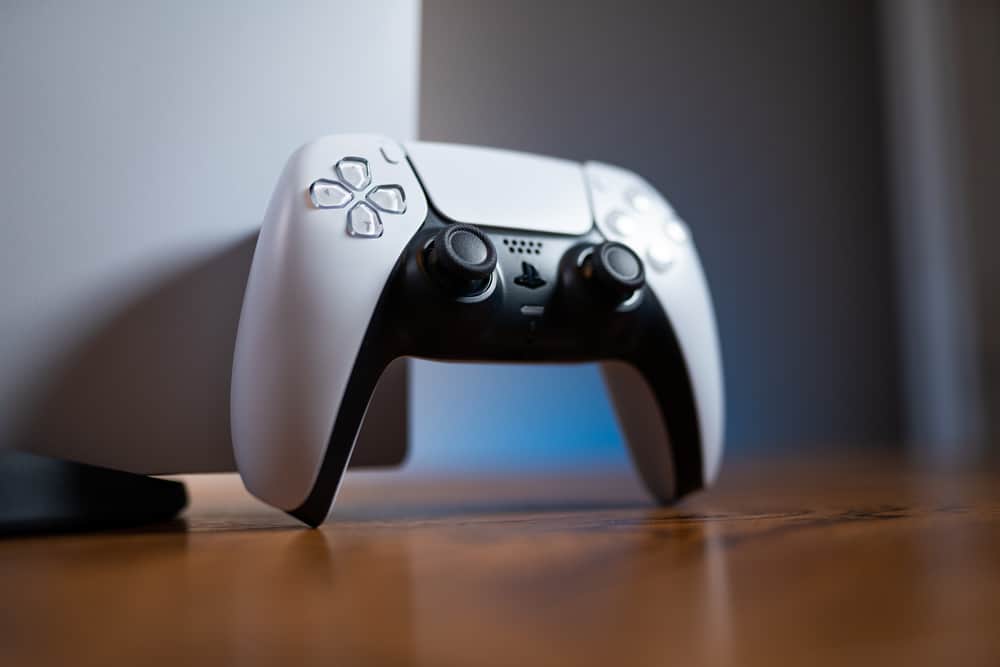
Is your PS5 controller not connecting, and you’re unsure why? This article aims to provide insights and solutions to resolve the issue.
Starting this article is a section that discusses several reasons your DuelSense wireless controller doesn’t connect. Then, I will provide various tips to fix the problem.
Meanwhile, our FAQ section addresses some of the questions people often ask relating to this article’s topic.
The Tool Desk
Outbyte PC Repair FREEClear out junk files and repair common Windows errorsFree Scan →Outbyte Driver Updater FREEScan for outdated or missing drivers - takes under a minuteDriver Scan →Reasons Your PlayStations 5 Controller Doesn’t Connect

There are several potential reasons your PS5 Controller is not connecting. Here are some common ones.
Popular on Amazon

- 🎮【Widely used】Compatible with Playstation 5 PS5 Dual Sense Controller and Xbox Series X/ Xbox Series S/ Switch Pro controllers, and more devices with USB C (Type C) interface.
- 🎮【Perfect Long】 With the perfect 6.6ft length, you can lie on the couch or sofa and play games while you are charging at the same time. and you can also pose in a variety of positions without worrying about your PS-5 Charger Cables are not long enough.Make it easy to stay in the game!
- 🎮【SIMULTANEOUSLY CHARGE & PLAY】 No need to wait for the PS5 or Xbox Series X/S controller to be fully charged, you can enjoy the game continuously without the pause of a dead controller! With our USB C controller charger wire, you are able to charge your batteries while you play or in-between matches unlike a charging dock, making gaming night with friends a breeze!
- 🎮【Perfect Connection】 This cable distinguished from the common USB cables, can withstand at least 9999 cycles of 90 degree bend test. Compact connector heads slot in easily and steadily, won't get loose or fall out of your devices. Just enjoy the best gaming experience.
- 🎮【100% Satisfaction】This USB charger cable support maximum 2.0 Amp current and transfer data up to 480 Mbits via USB 2.0, High Speed charging and Data Transfer at the same time. If you have any questions, please feel free to let us know, we will resolve your issue within 24 hours.
1. Controller Is Paired With Another Device
When you pair your PS5 controller with a device, the controller establishes a special connection with that device. This connection allows the controller to communicate with the device and send commands.
However, each PS5 controller can only be paired with one device at a time. So, if the controller is already paired with another device, it won’t connect to a different device until it’s unpaired from the original one.
This is done to prevent confusion and ensure the controller works properly with the intended device.
2. Low Battery
Your PlayStation 5 controller needs power to work, just like how a flashlight needs batteries to shine. To give more detail, the controller gets this power from a built-in rechargeable battery.
Hence, when the battery is low, it means there isn’t much power left. In this case, the controller might not have enough juice to establish and maintain a wireless connection with a device.
This is similar to when a flashlight’s batteries are running out and the light dims.
3. Bluetooth Connectivity Issues
The DualSense controller connects to devices using Bluetooth wireless technology. Hence, if there’s interference or obstacles between the controller and the device, the Bluetooth signal might weaken.
Free tools Windows power users keep installed
One-click scans. No signup required.
This can result in a failed connection attempt. Besides, the range Bluetooth can cover is limited.
Hence, If you’re too far away from the device, the controller might struggle to establish a connection.
Also popular on Amazon

- 【Latest USB C to USB C Cable】USBC to USBC cable, which means it has 2 SAME flat c port charging cable. NOTE: To achive max 100W charging speed, you need an USB type-c port charger that supports 100W of output. Note: ✘✘✘ DO NOT support video output
- 【2026 Upgraded 100W/5A Fast Charging】Experience the next level of charging! With our lightning-speed 100W usb c to c cable, your iPhone 17 Pro Max reaches a whopping 71% battery in 30 minutes, fast charging MacBook Pro 16" up to 50%, also charge Samsung S26 Ultra to 85% while 60W cable is only 54%, notably knocks off 45mins of your waiting time. And data transfer speeds up to 480Mbps
- 【MFI Certified Emark Chip】Yosou 100W c to c cable fast charging cord is build in the original power delivery E-Mark chip, which supports USB C PD fast charging. Also has passed 48-hour salt spray test ,ROHS,REACH USB-IF, provides comprehensive protection to devices battery and adapters, keep you in light-speed charging and safe
- 【Wilder Compatibility】Yosou usb c to usb c fast charging cable for iPhone 16 Pro Max/Galaxy S26 supports PD fast charging. Fully compatible with iPhone17 16, 15, 15 Pro, 15 Plus, 15 Pro Max, M1 M2 MacBook Air/Pro 13 14 15 16 inch, iPad Pro 12.9''/11", iPad Mini 6, iPad 10, Samsung Galaxy S26 S25 S24, S23, S23+, S23 Ultra, S22 +, S22, S21 Note 10/20, Z Fold, Z Flip, Tab, Google Pixel 8 Pro, 8, 7 Pro, 7. Xiaomi Redmi, Oneplus, Xbox, Switch, Steam Deck, ThinkPad, Surface, Chromebook, Dell XPS, HP and any Type-C device
- 【Amazing Durability】Featured by a sandblasted aluminum shell and unibody plug and the body is made of revolutionary fishing net X Nylon braided wire, usbc to usbc cable provides a high-quality texture and enhance heat dissipation capability, Lasts 10x longer than ordinary cables-proven in a laboratory environment to withstand 40000 bends, resulting in a longer lifespan compared to ordinary TPE C to C cables
4. Outdated Firmware
Firmware is like a set of instructions or rules your PS5 controller follows. It’s a bit like a recipe that tells the controller how to work with connected devices.
Hence, just like you update the PS5 console to get new features and fix problems, your controller also needs updates to its firmware. If your controller’s firmware is outdated, it might not function correctly, causing this connection issue.
PC Slower Than It Used to Be?
A free scan shows the junk files, broken settings and background clutter dragging Windows down - then fixes them in one click.Free scan · Windows 10 & 11Outdated Drivers Are Slowing You Down
One free scan finds every outdated or missing driver and matches the right update for your exact hardware.Free scan · exact hardware match5. Hardware Problem
The PS5 controller uses Bluetooth technology to connect wirelessly to the console. However, sometimes, the controller can encounter hardware issues related to its Bluetooth components, such as a malfunctioning Bluetooth chip.
This can prevent the controller from establishing a stable connection with the console. Besides, there can also be problems with the battery or the circuitry responsible for managing the power distribution of the controller.
This can also affect the controller’s capability to establish a connection or maintain it.
Dropping the controller, spilling liquids on it, or subjecting it to excessive force can damage its internal hardware components.
Quick wins for a faster PC:
Clear out junk files and repair common Windows errorsFree Scan →Scan for outdated or missing drivers - takes under a minuteDriver Scan →How To Fix DualSense Wireless Controller That Won’t Connect

If you’re facing issues with your PS5 gamepad not connecting to the console, there are several troubleshooting steps to resolve the issue. Here are some tips to help you fix the problem.
1. Re-sync The Controller
Restart or turn on your PlayStation 5, then connect the controller to a USB port on the PS5. Following that, press the PS button on the controller to pair it with your console.
In case you’re wondering, the PS button is usually between the controller’s thumbstick- it is shaped like the PlayStation logo.
Also popular on Amazon

- Simultaneously charge and play your DualSense Controller
- 10 foot braided cable with durable metal housing
- USB to USB-C charging cable
- Officially Licensed by Sony
2. Check Battery
Ensure that your controller has a sufficient battery charge. If the battery is low, the controller might not have enough power to establish a stable wireless connection.
Do these 3 things before closing this tab:
1Fix the driver behind crashes, sound loss and screen glitches2Repair Windows errors before they cause bigger problems3Scan for outdated or missing drivers - takes under a minuteHence, charge the controller using the provided USB cable and a power source. However, if the controller doesn’t turn on or charge, there is an issue with the battery.
If that’s the case, you need to replace the battery.
3. Check For Wireless Interference
Ensure there are no other electronic devices or physical obstructions interfering with the wireless signal between the controller and the console. If there is, move any potential sources of interference away.
Moreover, nearby Bluetooth devices could also interfere with the wireless signal. Hence, if there are any nearby Bluetooth devices around, move them away or turn off their Bluetooth connectivity.
Besides, you should move closer to the PS5 when connecting the controller. Specifically, stay within a reasonable range, usually within 20 feet.
4. Reset Controller
On the back of the PS5 controller, there’s a small hole next to the screw. Use a paperclip or a similar tool to press the reset button inside the hole.
This can help reset the controller’s wireless connection and potentially fix the problem.
5. Contact PlayStation Support
If none of the above solutions work, it’s a good idea to contact PlayStation’s customer support for further assistance. They can provide guidance and help you troubleshoot the issue in more detail.
Also popular on Amazon

- 🎮 SIMULTANEOUSLY CHARGE & PLAY - No need to wait for the PS5 Dualsense controller to be fully charged, you can enjoy the game continuously without the pause of a dead controller! With our PS5 controller charger wire, you are able to charge your batteries while you play or in-between matches unlike a charging dock, making gaming night with friends a breeze!
- 🎮 BEST PS5 CABLE EVER - No power loss with this premium PS5 charging cable for full speed charge. Made with 23 AWG High Gauge Low Impedance wires which enable our USB cable charges 20% faster than regular USB cables. Supports maximum 3.0 Amp current via USB 3.0.
- COMFORT AND CONVENIENCE: Embrace unmatched comfort and convenience with the ultra-soft silicone cable, featuring a sleek, tangle-resistant design for a smooth, knot-free experience every time.
- 🎮 STRENGTHENED CONSTRUCTION - Built to withstand the rigors of daily use, this cable promises incredible flexibility and a lifespan of over 25,000 bends.
- 🎮 UNIVERSAL COMPATIBILITY - USB-IF Certified, specifically designed for PS5 Dualsense and Xbox Core controllers, powers you up to take charge of your game. Also Compatible with Xbox Elite Series 2, Switch Pro, NS Switch, Switch Lite and almost all USB Type-C devices (New MacBook, Chromebook Pixel, LG V30, Samsung Galaxy S9, LG G6).
Besides, if it’s a hardware problem and the controller is still under warranty, you may be eligible for a replacement. Always refer to PlayStation’s official support channels for accurate and up-to-date guidance.
Independent reader supportYour contribution helps us test, update, and keep practical guides available for everyone.Frequently Asked Questions

The most common problem with the PS5 controller is the stick drift issue. This is a common problem in many controllers where the analog sticks register movement even when not touched.
This can lead to in-game characters moving on their own. Stick drift could be caused by wear and tear on the analog mechanisms, dust or debris accumulation, or other hardware issues.
Depending on the usage, the battery life of the PS5 controller can range from 12 to 15 hours on a full charge.
There is usually a small hole next to the screw on the back of the PS5 controller. Using a paperclip, you can press the button inside the hole to reset the controller.
The standard PS5 controller costs around $70. Meanwhile, the latest DualSense Edge controller will cost you around $200.
PlayStation released the PS5 on November 12, 2020.
Conclusion
The inability of your PS5 controller to connect to the console can be attributed to a variety of factors. These factors can range from minor issues to more complex hardware or software problems.
This frustrating situation can hinder your gaming experience and require troubleshooting efforts to resolve the issue. While frustrating, these issues are not unfixable.
Gladly, this article provides several tips to fix the problem and get your PS5 gamepad up and running as usual.
What’s actually slowing this PC down?
Pick the symptom - the matching free tool is one click away.
I hope this article has been helpful to you. If it was, we’d appreciate it if you could share your thoughts on our community platform at [discourse_topic_url].
If you have any questions about this topic, feel free to ask on [discourse_topic_url]. Our team and fellow community members are there to help and answer your questions quickly.
To find more articles like this, you can check out our Technology Explained page.
Quick Recap
References And Further Reading
- lifewire.com – How to Fix It When a PS5 Controller Won’t Connect
- online-tech-tips.com – PS5 Controller Not Connecting to Console? 10 Ways to Fix
- thedroidguy.com – How To Fix PS5 Controller Won’t Connect | Won’t Sync | NEW in 2023!
- thetechedvocate.org – HOW TO FIX IT WHEN A PS5 CONTROLLER WON’T CONNECT
- slashgear.com – How To Fix A PS5 Controller That Won’t Connect, Sync, Or Charge
- [discourse_topic_url]


Great article, Oluwaseun! This is a comprehensive guide for anyone facing PS5 controller connectivity issues. Your explanations for the potential problems and the step-by-step solutions are clear and easy to follow.
I particularly appreciate your inclusion of the FAQ section, which addresses common concerns and provides even more valuable information. Stick drift is a prevalent problem, and knowing how to reset the controller and where to find support is helpful.
Your concluding message is encouraging, reminding readers that these issues are solvable with the right troubleshooting steps. Well done, and I’m sure many gamers will find this article extremely useful!