Free tools Windows power users keep installed
One-click scans. No signup required.
iTechGuides is reader-supported. When you buy through links on our site, we may earn an affiliate commission. As an Amazon Associate I earn from qualifying purchases. Learn more
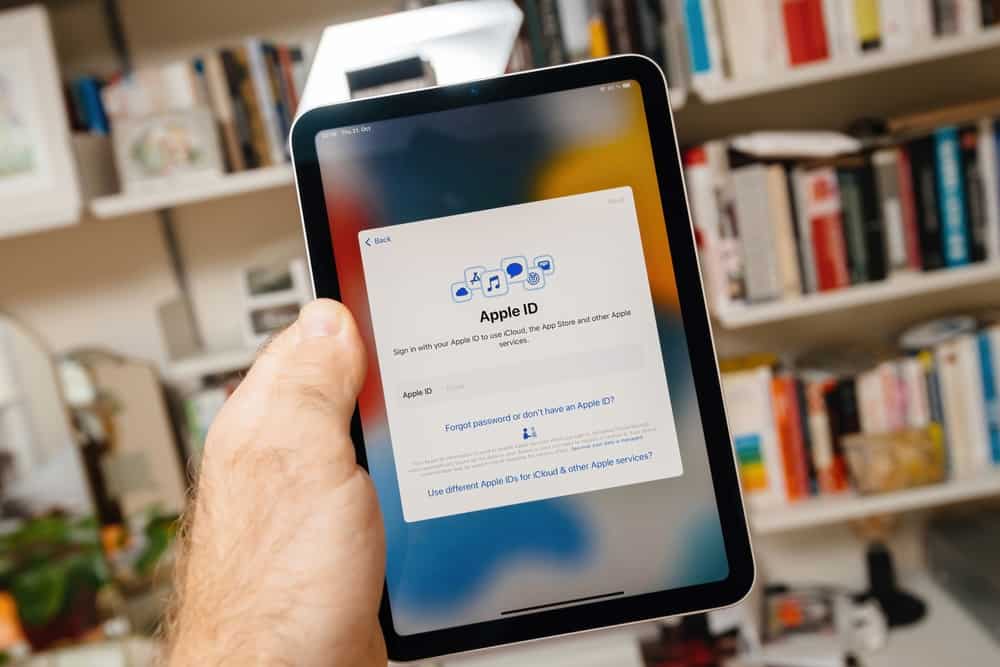
Are you experiencing difficulty signing out of your Apple ID? This article explores the reasons behind the issue.
Reasons You Can’t Log Out Your Apple ID
There could be several reasons why you are unable to remove your Apple ID from your Apple device. Some potential reasons include:
1. Active Subscriptions or Services
If you have active subscriptions or services linked to your Apple ID, the system may prevent signing out to ensure uninterrupted access. This is a measure to avoid inadvertent disruptions to paid or trial subscriptions.
What’s actually slowing this PC down?
Pick the symptom - the matching free tool is one click away.
This is because signing out may impact ongoing billing cycles or access to subscribed content. Apple prioritizes the user experience and service continuity.
Popular on Amazon
- NVQ Key Finder [NOT Compatible with Android]: The key finder connects to your phone via Bluetooth and works with the Apple Find My App(only iOS, Support Operating System: iPhone, iPad, or iPod touch with iOS 14.3 or iOS 14.3 or later), providing precise location monitoring capabilities by 80dB audible alarm system for quickly finding items, making it ideally choice to kee your items safety like in the offices, schools and outdoor adventures.
- Heavy Duty: Engineered for exceptional durability and heavy-duty performance, this advanced retractable keychain incorporates a high-strength stainless steel cord reinforced with a premium spring mechanism. Its capable of securely supporting up to 8 ounces of weight which is equivalent to approximately 20 standard keys. The reliable retraction functionality without sagging or performance degradation over extended periods of daily use.
- Convenient to Use:Designed with user convenience as a paramount consideration, the keychain features an impressive 32inch(81.5cm) extension capability that accommodates most practical reaching distances. It was complemented by a specially coated metal string that significantly reduces friction. Such as you can climb safely and smoothly for your little items for attaching to the carabiner clip.
- Upgraded Design:The innovative upgraded design incorporates a precision-engineered zinc alloy carabiner with an elongated pressing area and enhanced switching mechanism, providing comfortable single-handed operation for users of all hand sizes, while offering versatile attachment options for belt loops, bags, backpacks, and outdoor equipment, including key rings and badge buckles for comprehensive organizational functionality.
- Ideal Gifts: Constructed from premium ABS materials combined with rustproof metal components, this multifunctional keychain represents the perfect fusion of robust physical construction and intelligent tracking technology, serving as an exceptional gift solution for professionals, students and outdoor enthusiasts alike. If you have any questions about the use of NVQ Item locator, feel free to contact us for fast 24-hour support. We will be standing by to provide you with a prompt response.
Hence, the company makes it necessary to fulfill any existing commitments before allowing the user to sign out.
2. iCloud Data Syncing
Apple devices heavily rely on iCloud for seamless data synchronization across multiple devices. Thus, in scenarios where data syncing is in progress, signing out could potentially disrupt this synchronization process.
Due to this, signing out might be temporarily restricted until ongoing iCloud-related activities are completed. This is to maintain the integrity of user data and ensure a consistent experience across Apple’s ecosystem.
Similarly, pending app downloads, updates, or installations on your device could interfere with the sign-out process. Apple restricts signing out when there are ongoing processes to prevent potential data corruption or incomplete installations.
3. Device Restrictions
Certain devices may have restrictions imposed by device administrators or users, such as Screen Time. These restrictions could be in the form of parental controls or company policies.
In such cases, signing out might be limited to prevent users from circumventing established limitations. These restrictions contribute to maintaining a controlled environment, aligning with Apple’s commitment to providing secure and customizable user experiences.
4. Network Issues
The successful execution of account-related actions, including signing out, often relies on a stable internet connection. Network issues such as low connectivity can impact the communication between your device and Apple’s servers.
Do these 3 things before closing this tab:
1Repair Windows errors before they cause bigger problems2Scan for outdated or missing drivers - takes under a minute3Clear out junk files and repair common Windows errorsThis can affect the ability to complete sign-out processes. Therefore, the system may restrict sign-out capabilities until a reliable network connection is established.
It does that so as to ensure the accuracy and completeness of the operation.
5. Software Glitch Or Bug
Glitches or bugs in the system can contribute to difficulties in signing out of an Apple ID. When the software experiences unexpected errors, it may disrupt the normal flow of operations, including the sign-out process.
Also popular on Amazon

- 【Works Seamlessly with Apple Find My App】The tracker tag pecifically designed for iOS devices, this tracker integrates perfectly with the Apple Find My network. Enjoy real-time location tracking, precise navigation, and remote audio triggering—no additional app download required, fully leveraging the robust Apple ecosystem.
- 【Track Anything, Anywhere】Keep your valuables fully secured. Easily monitor and locate keys, bags and other essentials with this practical tracker tag, which works perfectly via Apple's Find My network, exclusive for iOS devices.
- 【Precision Item Tracking】These air tracker tags help you locate misplaced belongings within a 100‑foot Bluetooth range. Trigger an 80dB alarm or follow directional guidance via the app. (iOS‑Only)
- 【Smart Item‑Finder Anti-Lost Mode】Get instant "Left‑Behind" alerts on your iPhone from your item locator, stopping lost belongings before they slip away. If misplaced, enable Lost Mode to securely share your contact info with nearby iOS devices via the Find My network. Share your item finder tag's location with up to 5 family members to speed up lost‑item recovery together.
- 【Privacy Protection】Your data is fully secured. Location records are never stored on the tracking tag, kept anonymous and encrypted, accessible only via your Apple ID.
These glitches might arise from coding errors, conflicts between different software components, or unexpected interactions within the operating system. In the context of signing out, a glitch could interfere with the communication between the user’s device and Apple’s servers.
Recommended Free Tools
This can lead to a failure in processing the sign-out request.
What to Do When You Can’t Sign out Your Apple ID
If you find yourself unable to sign out of your Apple ID on a device, it can be a frustrating experience. Here are some steps to take in such a situation:
1. Restart Your Device And Check Apple System Status
A straightforward yet effective step, restarting your device can clear temporary glitches. Power off your device, wait a few seconds and then turn it back on.
This can often resolve minor issues affecting the sign-out process.
Likewise, checking Apple System Status is a crucial step when encountering issues with your Apple ID. Apple System Status provides real-time information about the operational status of various Apple services.
2. Check Network Connection And Reset Network Settings
Ensuring a stable network connection is pivotal for various online functionalities, including signing out of your Apple ID. A poor or unstable connection can lead to communication issues with Apple servers, hindering the sign-out process.
By checking the network connection, you verify that your device has reliable access to the internet. Besides, in some cases, issues with network configurations or settings on your device can disrupt the smooth operation of Apple services.
Resetting networking settings involves reverting network-related preferences to their default state. This can resolve potential conflicts or misconfigurations that might be impeding the sign-out process.
3. Update Operating System
Keeping your device’s operating system up-to-date is crucial for maintaining your device’s integrity. When facing difficulties signing out of your Apple ID, updating the operating system can often resolve underlying issues.
Also popular on Amazon

- Including Clean Wiper with "E-REPAIR" LOGO
- Compatible with iPhone 6 (4.7'') and iPhone 6 plus (5.5'')
- Color: Black
- Come with Rubber ring and metal bracket
- It is used to fix non-working home button function, but not fix touch ID function.
Operating system updates frequently include bug fixes that address various software issues. Hence, if the problem preventing sign-out is a known bug, a subsequent update may contain the necessary fixes.
Moreover, security vulnerabilities can impact the overall performance of your device. Therefore, updating the operating system ensures that your device is equipped with the latest security patches.
This reduces the likelihood of encountering issues related to security vulnerabilities.
PC Slower Than It Used to Be?
A free scan shows the junk files, broken settings and background clutter dragging Windows down - then fixes them in one click.Free scan · Windows 10 & 11Outdated Drivers Are Slowing You Down
One free scan finds every outdated or missing driver and matches the right update for your exact hardware.Free scan · exact hardware match4. Disable Device Restriction
Device restrictions – often set through the Screen Time feature on iOS devices – provide a way for users to control and limit various aspects of device usage. However, these restrictions might inadvertently impact the ability to sign out of an Apple ID.
If that’s the case, disabling the restriction should fix the problem. To do that, Navigate to “Settings” > “Screen Time” > “Content & Privacy Restrictions” > “Account Changes”.
Hence, make sure the switch is on. You will have to enter the device’s passcode to disable the restrictions.
5. Contact Apple Support
When all else fails, reaching out to Apple Support is crucial. They can provide personalized assistance based on your specific situation.
Quick wins for a faster PC:
Clear out junk files and repair common Windows errorsFree Scan →Fix the driver behind crashes, sound loss and screen glitchesFind Drivers →You can contact them through the Apple Support website, the Apple Support app, or by visiting an Apple Store.
Independent reader supportYour contribution helps us test, update, and keep practical guides available for everyone.Frequently Asked Questions
Yes, you can use one Apple ID for multiple devices. This allows you to sync data, purchases, and settings across your Apple devices.
To sign out of your Apple ID on your device, go to “Settings” > [your name] > “Sign Out.” Enter your Apple ID password when prompted, and follow the on-screen instructions.
Also popular on Amazon

- 1.Important: Designed for medium to large dogs only. Your dog must be bigger than a Beagle with a neck size over 14 inches. Please do not order if your dog doesn't meet these requirements, as it won't fit
- 2.Ultra-Durable: Air tag dog collar combining premium hardware, material, craftsmanship, durable air tag holder and is military grade with long durability. Metal sides that attaches to the collar will never breaks
- 3.IPX8 Waterproof and Dustproof: Rain, swimming, or rolled around in the dirt? No prob,em! Fully enclosed dog collar with Air tag holder is fully shielded from water, dust and damage. Air tag dog collar offers durable, fully sealed protection for your pet's Airtag.(AirTag is NOT INCLUDED)
- 4.Control Handle : Military Training Nylon Dog Collar has special control handle,can efficiently control your dog when training, patrol,hiking, jogging, camping, working, running, jumping, traveling, camping.fits lots of medium and large dogs like German Shepherd, Border Collie, Rottweiler, Great Dane, Doberman, Golden Retriever, Husky, Labrador, Alaskan Malamute,etc
- 5,Anti-Lost Function: You will receive an real-time scanned location alert email or a phone call When someone scans the pet id tag's QR code; It is not a GPS tracker, only GPS until the finder scans the QR code and chooses to send a location to you
An Apple ID is a unique identifier provided by Apple Inc. that serves as the key to accessing various Apple services and products. It is a user account that allows individuals to interact with a wide range of Apple devices and services.
The Tool Desk
Outbyte Driver Updater FREEScan for outdated or missing drivers - takes under a minuteDriver Scan →Outbyte PC Repair FREEClear out junk files and repair common Windows errorsFree Scan →Your Apple ID is the account you use to access Apple services, including iTunes, App Store, and iCloud. Meanwhile, iCloud is a cloud-based service that stores your data and allows you to access it across multiple devices using your Apple ID.
Yes, you can use your Apple ID with iTunes. Your Apple ID is used to sign in to iTunes, allowing you to make purchases and download content.
Conclusion
Facing difficulty signing out of your Apple ID can be confusing. However, it is not a random issue – it’s part of how these systems are set up.
Think of it as a reminder of how complex the world of digital accounts can be. While the issue can be frustrating, this article discussed several reasons and solutions for the problem.
So, with the help of the tips provided in this article, you should be able to log out of your Apple ID in peace.
We hope you found valuable insights in this article. If so, please share your thoughts with us by leaving a comment below.
Alternatively, you can respond to the “Was this page helpful?” question below.
Explore more content on related subjects by visiting our Technology Explained page.
Quick Recap
Product prices and availability are accurate as of the date/time indicated and are subject to change. Any price and availability information displayed on Amazon at the time of purchase will apply.