
iTechGuides is reader-supported. When you buy through links on our site, we may earn an affiliate commission. As an Amazon Associate I earn from qualifying purchases. Learn more
In this Itechguide, Victor answers the question “What is a directory?”. To explain the concept, Victor starts with the general definition of a directory.
What is a Directory?
In general, a directory is a structure for organizing information in a tree to make it easy to access the information. Directories are usually organized in tree or hierarchical structure.





A good example is a telephone directory – these are listings of telephone subscribers’ names and addresses organized by geographical location. This information is structured to make it easy to locate the information you need – in this instance, a person’s telephone number, name, and address.
Do these 3 things before closing this tab:
1Clear out junk files and repair common Windows errors2Scan for outdated or missing drivers - takes under a minute3Repair Windows errors before they cause bigger problemsIn the remaining part of this Itechguide, I will explain directories in relation to the web, general computing, Windows and Linux.
Popular on Amazon
What is a Directory in Computing
In computing, a directory is a hierarchical tree structure used in computer file systems to organize files and folders. “Hierarchical tree” means that a directory may contain other directories. It may also contain files.

A directory inside another directory is called a subdirectory. The top directory is called the parent directory while the subdirectory is called the child directory. In a directory structure, the topmost directory that is not within another directory is called a root directory.

In computing, most operating systems, use the backslash “\” or forward-slash “/” to link a parent directory to its child directories.
What’s actually slowing this PC down?
Pick the symptom - the matching free tool is one click away.
Also popular on Amazon
What is a Web Directory?
In relation to the web, a directory is a listing of websites organized by categories and subcategories. Such directories include a list of websites and links to such websites.
What is a Directory in Windows?
In the Windows operating system, a directory is a collection of files and folders organized in a hierarchical tree.
As explained in the general computing section, in Windows, the top-level directory is called the parent while all directories within the top directory are called child directories. The parent-child hierarchical structure is called a tree.
Also popular on Amazon
Most Windows users generally use folders to refer to directories. If you use Windows, you may have created a folder before. If you create a folder and then, created another folder within that folder, the top-level folder is the parent folder. All folders within the top-level folder are called child folders.
Free tools Windows power users keep installed
One-click scans. No signup required.
A folder can also contain files. A file cannot contain other files or folders. An example of a file is a notepad.

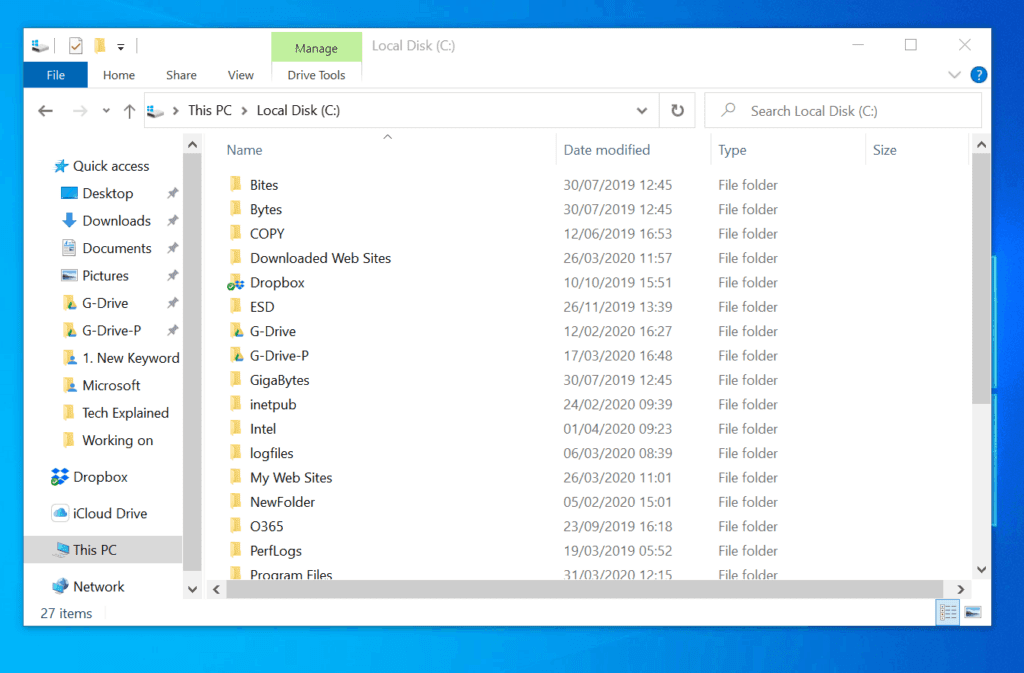
Windows operating systems also have root directories. A root directory is a directory that is not within another directory. On a Windows operating system, the Local Drive (C:) is root directory. All folders within it are sub-directories.
Also popular on Amazon

What is a Directory in Linux?
In Linux, a directory is a special file that contains a list of files, directories, and links (called objects). A directory also keeps the corresponding inodes for each of the objects stored in it.
Like in Windows operating system, a Linux directory uses a hierarchical structure to organize other directories and files. A directory hierarchy is called a directory tree.
Quick wins for a faster PC:
Scan for outdated or missing drivers - takes under a minuteDriver Scan →Clear out junk files and repair common Windows errorsFree Scan →Fix the driver behind crashes, sound loss and screen glitchesFind Drivers →When you log in to a Linux operating system, the first directory available for you is called your Home directory.
Also popular on Amazon

To list the directories and files in your current directory, use the ls command
ls

If you want to create a new directory in the current directory, type the mkdir command followed by the name of the directory. To create a new directory, NewDir in the current directory, use the command below.
mkdir NewDir

I hope you found this Itechguide helpful. If you found it helpful, click on “Yes” beside the “Was this page helpful” question below.
Recommended Free Tools
You may also express your thoughts and opinions by using the “Leave a Comment” form at the bottom of this page.
Finally, for more Explained Itechguides, visit our Tech Explained page.
Quick Recap
Product prices and availability are accurate as of the date/time indicated and are subject to change. Any price and availability information displayed on Amazon at the time of purchase will apply.