
Rows
Rows: Rows suits teams that need AI analysis, connected data, automation, and collaboration in one spreadsheet. Ranked #1 of 31 in AI Spreadsheet Tools by our editors (9.4/10); pricing: Free plan; best for connected spreadsheet teams.
At a glance
- Editor score9.4 / 10
- PricingFree plan
- Best forConnected spreadsheet teams
- Free planYes
- Paid from$6/user/mo
- Primary platformStandalone
- Founded2016 · Porto and Berlin
- Facts checked20 Sep 2026
Where it wins
- AI assists with analysis, reporting, formulas, and text-based data tasks
- Connects business tools, databases, ads platforms, and custom APIs
- Combines collaboration, dashboards, forms, embeds, and spreadsheet APIs
Where it doesn't
- Free includes only 5 AI Tasks per month
- Pro pricing combines a workspace charge with a per-user charge
- Advanced enterprise capabilities require an Enterprise plan
Our verdict on Rows
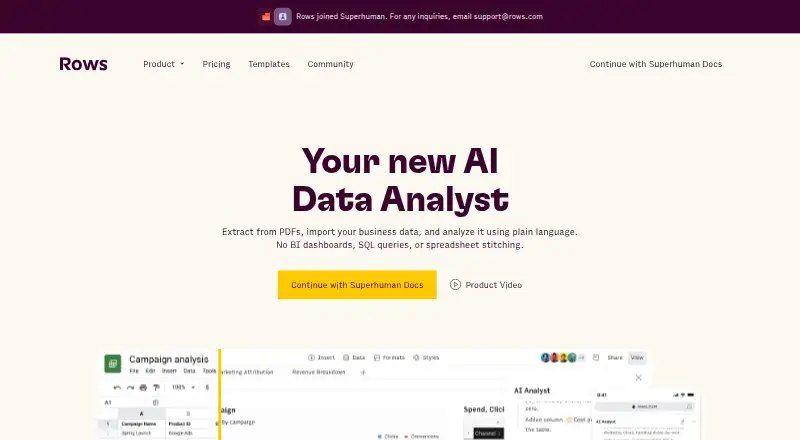
Rows combines a web-based spreadsheet with AI-assisted analysis, data transformation, integrations, collaboration, dashboards, forms, embeds, and APIs. It is aimed at individuals and teams that need to import, refresh, analyze, and share business data without keeping every workflow in separate tools. Spreadsheet users can also work through the web, a Chrome extension, or the API, with CSV and XLSX import and export supported.
The pricing structure starts with a Free plan at $0 per month, including 5 AI Tasks per month, manual data-table imports, 10 integration accounts, and up to 3 guests. Plus costs $8 per user per month with monthly billing or $6 per user per month with annual billing; it raises AI Tasks to 200 per month, adds daily Data Tables automation, and supports up to 10 guests. Pro costs $79 per month plus per user per month with monthly billing or $59 per month plus per user per month with annual billing. It includes 1,000 AI Tasks per month, minute-based Data Tables automation, 100 integration accounts, up to 200 guests, and Video Support. Enterprise adds advanced API endpoints, custom AI models, functions and integrations, high-volume usage, custom themes and designs, SAML SSO, and a Dedicated CS Manager.
Rows fits teams whose spreadsheet work depends on connected systems. Integrations include Google Analytics 4, Google Ads, Facebook Ads, Instagram, LinkedIn Ads, Salesforce, HubSpot, Google Sheets, Airtable, Snowflake, BigQuery, MySQL, PostgreSQL, Zapier, and Make. Its standout scope is the combination of AI functions for summarization, classification, translation, extraction, and text generation with formula solving and Data Tables for importing, transforming, and refreshing data. Teams wanting only conventional spreadsheet editing may find this broader connected-data model unnecessary, while teams building repeatable reporting and data workflows should consider Rows.
Your product? Our editors can test Rows in depth and publish a review, labelled as paid · from $149/mo →
Rows pricing
Rows fact sheet
| Free plan | Yes |
|---|---|
| Paid from | $6/user/mo |
| Primary platform | Standalone |
| Formula generation | Yes |
| Table transformation | Yes |
| Spreadsheet analysis | Yes |
| Workflow automation | Yes |
| Custom functions | Yes |
| API access | Yes |
| Deployment | Cloud, Browser extension |
| Platforms | Web, Chrome extension |
| Compliance & security | SSO/SAML |
| Support | Email, Live chat, Docs |
| Built for | Solo, Small business, Mid-market, Enterprise (editorial estimate) |
| Integrations | 50+ integrations: Google Analytics 4, Google Ads, Facebook Ads, Instagram, LinkedIn Ads, Salesforce … See all → |
| Pricing | Free plan (source) |
| Website | rows.com |
| Facts checked | 20 Sep 2026 |
Rows integrations
Rows lists 50+ integrations on its own site — the 19 named here are the ones its pages call out.
- Google Analytics 4
- Google Ads
- Facebook Ads
- LinkedIn Ads
- Salesforce
- HubSpot
- Google Sheets
- Airtable
- Snowflake
- BigQuery
- MySQL
- PostgreSQL
- Zapier
- Make
- Looker Studio
- Rows AI
- Python
- HTTP API
Alternatives to Rows
- GPTExcelA wide-ranging spreadsheet copilot with a free tier and paid usage limits.9.2
- QuadraticA collaborative spreadsheet that combines AI, code, databases, and familiar exports.9.1
- ChatGPT for ExcelAn Excel add-in for creating, analyzing, and updating workbooks with natural-language instructions.9.0


Rows vs the competition
- Rows vs GPTExcel
- Rows vs Quadratic
- Rows vs ChatGPT for Excel
- Rows vs Formula Bot (now Better Analyst)
- Rows vs Pelayar AI Spreadsheet Agent
- Rows vs Bricks



Compare Rows with any tool side by side →
Used Rows? Be the first to review it
The editor score above is our own research. What this page doesn't have yet is a reader's view — what you used Rows for, what worked and what didn't. No stars are seeded and no review is paid for; an editor reads every one before it appears.
Write a reviewTwo minutes · verified accounts only · read by an editor before it appears
Featured on iTechGuides

Rows is listed in our AI Spreadsheet Tools directory. Add the badge to your site — it links back to this page.
<a href="https://www.itechguides.com/products/rows/"><img src="https://www.itechguides.com/best/badge/rows.svg" alt="Featured on iTechGuides" width="230" height="46"></a>
Reviewed by iTechGuides Editors · Editorial team · Updated Oct 2026
Advertiser disclosure: iTechGuides is reader-supported. Vendors can pay for top positions in our rankings and for a place on other products' pages, and we may earn a commission when you click some links. Bought places stand at the number bought; this page and our disclosure say so. Paying vendors may get a fuller, more detailed review from our editors, and that review can change their score. How we rank.
Last updated · How we research and update