
IT Dock
IT Dock: A documentation workspace with RMM sync, self-hosting and a free plan for small teams. Ranked #7 of 20 in IT Documentation Software by our editors (7.9/10); pricing: Free plan; best for small MSPs starting with free documentation and RMM sync.
At a glance
- Editor score7.9 / 10
- PricingFree plan
- Best forSmall MSPs starting with free documentation and RMM sync
- Free planYes
- Asset inventoryYes
- Facts checked24 Sep 2026
Where it wins
- Free plan includes core documentation for up to 3 clients and 1 tech
- Syncs asset and device inventory with multiple RMM platforms
- Offers cloud or self-hosted deployment with migration between them
Where it doesn't
- Free plan limits teams to 1 tech and up to 3 clients
- Network diagrams use documented information, not automatic device discovery
- SSO and role-based permissions are on higher plans, not the Free plan
Our verdict on IT Dock
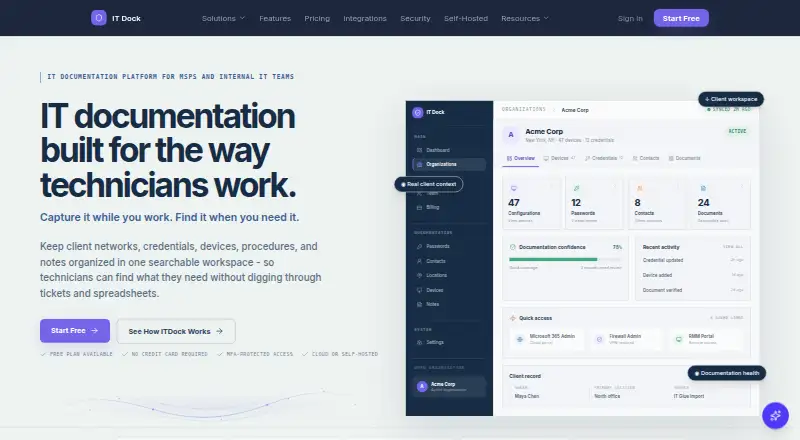
IT Dock organizes client records, credentials, devices, network information, procedures and guides in a searchable workspace. It is aimed at managed service providers and internal IT teams that need a shared place for operational documentation, with features spanning client onboarding, project capture, asset inventory and AI-assisted documentation. Small MSPs can start with its Free plan, while teams that need more clients or access controls can consider the paid tiers.
Its RMM and PSA connections are a meaningful fit for providers who want documentation alongside their service-management tools. Listed integrations include NinjaOne, Atera, Syncro, Datto RMM, ConnectWise Automate, ConnectWise Manage, HaloPSA and Autotask PSA. Device and asset inventory can synchronize with RMM systems, and the product can generate network diagrams from documented information. That is useful for keeping records connected to provider workflows, but it is distinct from automatic network-device discovery. Teams expecting discovery to map an undocumented network should look for a tool that explicitly provides it.
The Free plan costs $0 per month and includes 1 tech, up to 3 clients, core documentation features, 25 AI questions per month, 5 screenshot-to-documentation uses per month and manual network diagrams. Solo includes unlimited clients, all documentation types, an AI assistant, auto diagrams and an audit log; Team and Business add more included techs and administrative features such as role-based permissions and SSO. Cloud and self-hosted deployment give organizations a choice of hosting approach, with migration between them. Choose IT Dock if structured documentation, RMM sync and a free starting point matter; consider alternatives if network discovery is essential or the Free plan's client and staff limits are too restrictive.
Your product? Our editors can test IT Dock in depth and publish a review, labelled as paid · from $149/mo →
IT Dock pricing
All 4 IT Dock plans and prices →
IT Dock fact sheet
| Free plan | Yes |
|---|---|
| Paid from | Not verified |
| Deployment | Hybrid |
| Asset inventory | Yes |
| Network discovery | No |
| Runbook templates | Yes |
| SSO support | Yes |
| API access | Not verified |
| Documented asset limit | Not verified |
| Deployment | Cloud, Self-hosted |
| Platforms | Web |
| Compliance & security | 2FA |
| Built for | Solo, Small business, Mid-market (editorial estimate) |
| Integrations | 13 integrations: NinjaOne, Atera, Syncro, Datto RMM, SuperOps, ConnectWise Automate … |
| Pricing | Free plan (source) |
| Website | itdock.io |
| Facts checked | 24 Sep 2026 |
IT Dock integrations
IT Dock lists 13 integrations on its own site.
- NinjaOne
- Atera
- Syncro
- Datto RMM
- SuperOps
- ConnectWise Automate
- Tactical RMM
- N-able RMM
- Kaseya VSA
- Level.io
- ConnectWise Manage
- HaloPSA
- Autotask PSA
Alternatives to IT Dock
- HuduA broad IT documentation workspace combining assets, passwords, SOPs, and client sharing.8.9
- IT GlueA structured documentation hub with search, runbooks, password management and integrations.8.7
- IT PortalA flexible IT knowledge base with cloud and self-hosted options, but tier pricing needs close review.8.5



See all IT Dock alternatives →
IT Dock vs the competition
- IT Dock vs Hudu
- IT Dock vs IT Glue
- IT Dock vs IT Portal
- IT Dock vs ConnectWise Documentation
- IT Dock vs CompassDocs
- IT Dock vs Docusnap



Compare IT Dock with any tool side by side →
Used IT Dock? Be the first to review it
The editor score above is our own research. What this page doesn't have yet is a reader's view — what you used IT Dock for, what worked and what didn't. No stars are seeded and no review is paid for; an editor reads every one before it appears.
Write a reviewTwo minutes · verified accounts only · read by an editor before it appears
Featured on iTechGuides

IT Dock is listed in our IT Documentation Software directory. Add the badge to your site — it links back to this page.
<a href="https://www.itechguides.com/products/it-dock/"><img src="https://www.itechguides.com/best/badge/it-dock.svg" alt="Featured on iTechGuides" width="230" height="46"></a>
Reviewed by iTechGuides Editors · Editorial team · Updated Oct 2026
Advertiser disclosure: iTechGuides is reader-supported. Vendors can pay for top positions in our rankings and for a place on other products' pages, and we may earn a commission when you click some links. Bought places stand at the number bought; this page and our disclosure say so. Paying vendors may get a fuller, more detailed review from our editors, and that review can change their score. How we rank.
Last updated · How we research and update