
Clockify
Clockify: A broad time-tracking suite with a generous free plan and affordable annual tiers. Ranked #5 of 77 in Time Tracking Software by our editors (8.7/10); pricing: Free plan · 7-day trial; best for teams wanting broad, affordable tracking.
At a glance
- Editor score8.7 / 10
- PricingFree plan · 7-day trial
- Best forTeams wanting broad, affordable tracking
- Free planYes
- Paid from$3.99/seat/mo
- Desktop appYes
- Founded2017 · Palo Alto, California, USA
- Facts checked20 Sep 2026
Where it wins
- Unlimited tracking on the Free plan for up to four invited users
- Covers timesheets, projects, billing, reports, scheduling, and invoicing
- Web, desktop, mobile, browser extension, API, and offline access
Where it doesn't
- The Free plan allows up to four invited users
- Scheduling and activity monitoring require the Pro plan
- Single sign-on and enterprise controls require Enterprise
Our verdict on Clockify
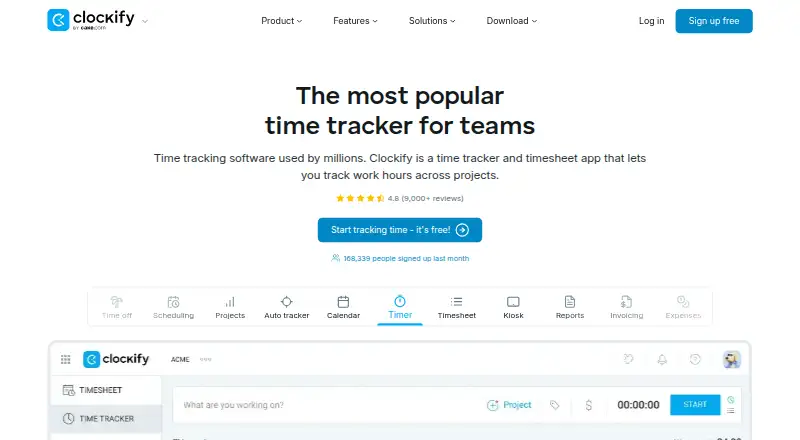
Clockify is time-tracking software for individuals and teams that need more than a basic stopwatch. It combines timer and manual entry with weekly timesheets, project and task tracking, billable rates, reporting, approvals, scheduling, invoicing, and offline tracking. Access spans web, Windows, macOS, Linux, iOS, Android, a Chrome extension, desktop and mobile applications, and an API. It suits teams that want one system for recording work, managing billable time, and turning tracked activity into operational reports.
The pricing structure gives Clockify a wide entry point. The Free plan costs $0 per seat per month and includes unlimited time tracking, timesheets, a timer, and up to four invited users for free. Basic costs $3.99 per seat per month with annual billing and adds time entry for others, required fields, bulk editing, kiosk support, and customizable exports. Standard costs $5.49 annually billed per seat per month and adds time off, invoicing, timesheet approval, locked time, and QuickBooks integration. Pro costs $7.99 and adds scheduling, activity monitoring, project forecasting, and additional productivity features. Enterprise costs $11.99 and adds single sign-on, a custom subdomain, and enterprise controls and security.
Its ecosystem supports common project, calendar, accounting, and automation workflows, including QuickBooks, Xero, Jira, Google Calendar, Outlook, Zapier, Asana, Trello, Todoist, Basecamp, GitHub, GitLab, ClickUp, Wrike, and Monday. Reports can be exported to PDF, CSV, and Excel, while invoicing can use tracked time and expenses. That breadth makes Clockify a strong choice for teams consolidating time, project, billing, and approval processes. It is less suitable for organizations that need advanced monitoring or enterprise security at the entry level, since those capabilities are reserved for higher plans.
Your product? Our editors can test Clockify in depth and publish a review, labelled as paid · from $149/mo →
Clockify pricing
All 5 Clockify plans and prices →
Clockify fact sheet
| Free plan | Yes |
|---|---|
| Paid from | $3.99/seat/mo |
| Project tracking | Yes |
| Billable time | Yes |
| Timesheet approvals | Yes |
| Mobile apps | Both |
| Desktop app | Yes |
| Offline tracking | Yes |
| Data export | Yes |
| Free trial | 7 days · no card needed |
| Deployment | Cloud, Desktop, Mobile, Browser extension |
| Platforms | Web, Windows, macOS, Linux, iOS, Android, Chrome extension |
| Compliance & security | SOC 2, ISO 27001, GDPR |
| Support | Email, Live chat, Phone, Community, Docs · 24/7 |
| Built for | Solo, Small business, Mid-market, Enterprise (editorial estimate) |
| Integrations | 100+ integrations: Pumble, Plaky, QuickBooks, Xero, Jira, Google Calendar … See all → |
| Pricing | Free plan · 7-day trial (source) |
| Website | clockify.me |
| Facts checked | 20 Sep 2026 |
Clockify integrations
Clockify lists 100+ integrations on its own site — the 20 named here are the ones its pages call out.
- Pumble
- Plaky
- QuickBooks
- Xero
- Jira
- Google Calendar
- Outlook
- Zapier
- Asana
- Trello
- Todoist
- Basecamp
- GitHub
- GitLab
- Azure DevOps
- ClickUp
- Wrike
- Monday
- Teamwork
- Notion
See all Clockify integrations →
Alternatives to Clockify
- Toggl TrackA mature time tracker with strong reporting, approvals, estimates, and integrations.9.2
- RescueTimeA broad automatic tracker for productivity, billable work, focus, and team timesheets.9.0
- Deltek RepliconA broad enterprise time-tracking suite for compliance-heavy project organizations.8.9


See all Clockify alternatives →
Clockify vs the competition
- Clockify vs Toggl Track
- Clockify vs RescueTime
- Clockify vs Deltek Replicon
- Clockify vs QuickBooks Time
- Clockify vs TimeCamp
- Clockify vs Hubstaff


Compare Clockify with any tool side by side →
Also Ranked In
Clockify is ranked in 4 of our directories.
Used Clockify? Be the first to review it
The editor score above is our own research. What this page doesn't have yet is a reader's view — what you used Clockify for, what worked and what didn't. No stars are seeded and no review is paid for; an editor reads every one before it appears.
Write a reviewTwo minutes · verified accounts only · read by an editor before it appears
Featured on iTechGuides

Clockify is listed in our Time Tracking Software directory. Add the badge to your site — it links back to this page.
<a href="https://www.itechguides.com/products/clockify/"><img src="https://www.itechguides.com/best/badge/clockify.svg" alt="Featured on iTechGuides" width="230" height="46"></a>
Reviewed by iTechGuides Editors · Editorial team · Updated Oct 2026
Advertiser disclosure: iTechGuides is reader-supported. Vendors can pay for top positions in our rankings and for a place on other products' pages, and we may earn a commission when you click some links. Bought places stand at the number bought; this page and our disclosure say so. Paying vendors may get a fuller, more detailed review from our editors, and that review can change their score. How we rank.
Last updated · How we research and update