

iTechGuides is reader-supported. When you buy through links on our site, we may earn an affiliate commission. As an Amazon Associate I earn from qualifying purchases. Learn more
This Itechguide teaches you how to share Amazon Wish List. The guide covers steps to share Amazon Wish List from a PC (Amazon.com) or Amazon Shopping App.
Option 1: Share Wish List from a PC (Amazon.com)
- Open Amazon.com from a browser on your PC. Then, on the top right of the page, hover over Account & Lists and click Sign in.

- Once you have successfully signed in to your Amazon account, on the top right of the page, hover over Accounts & Lists (below your name). A list of options will be displayed.
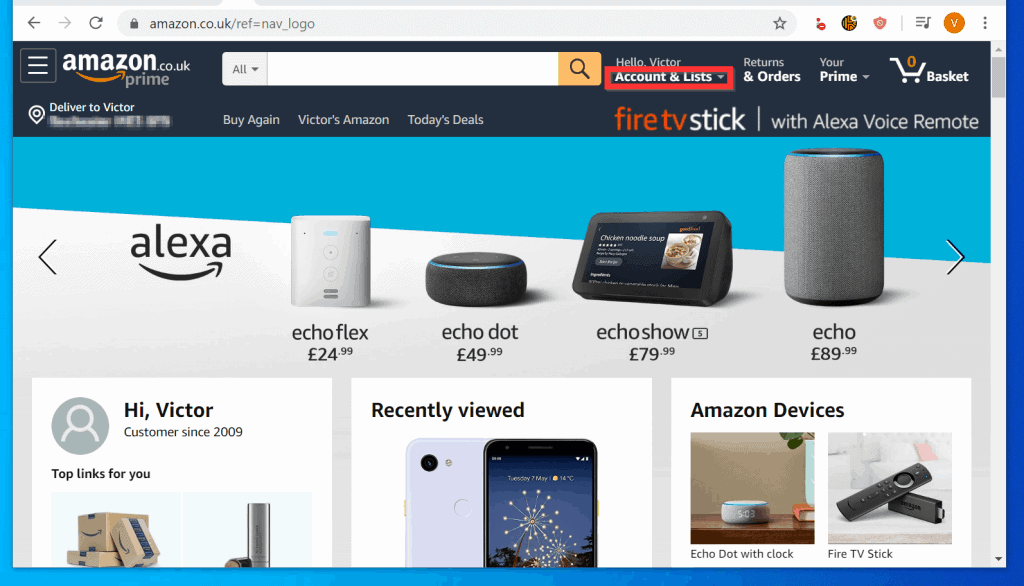
- From the displayed options, click Your Lists.

When you open your Wish List, sharing it require two steps. The first sub-section below cover steps to check that your Wish List is Sharable. The second, covers steps to share the Wish List.
Make Your Wish List Sharable from a PC (Amazon.com)
- Before you Share your Wish List, confirm that the Privacy is set Public or Shared.
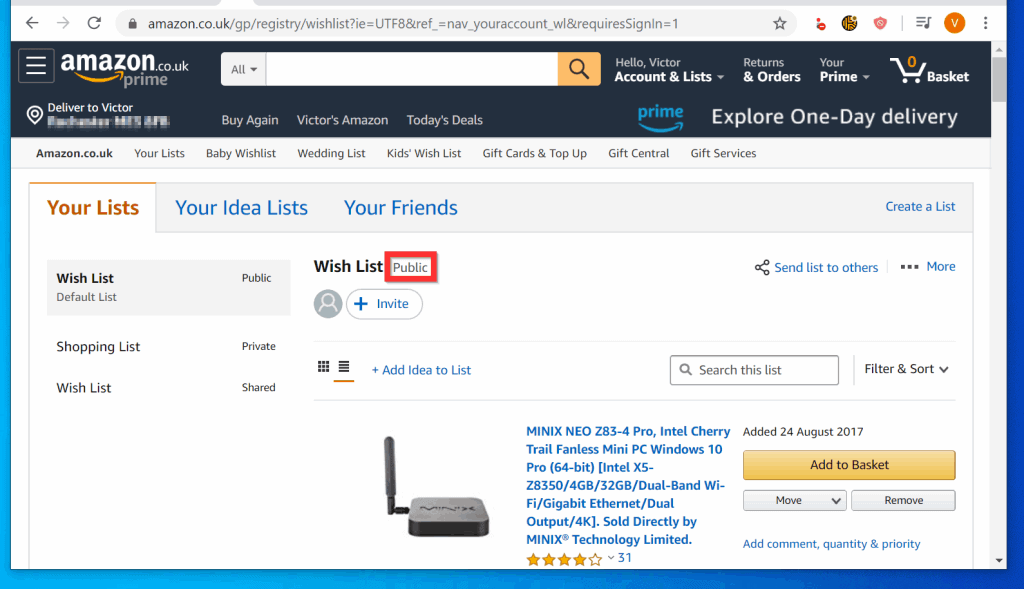
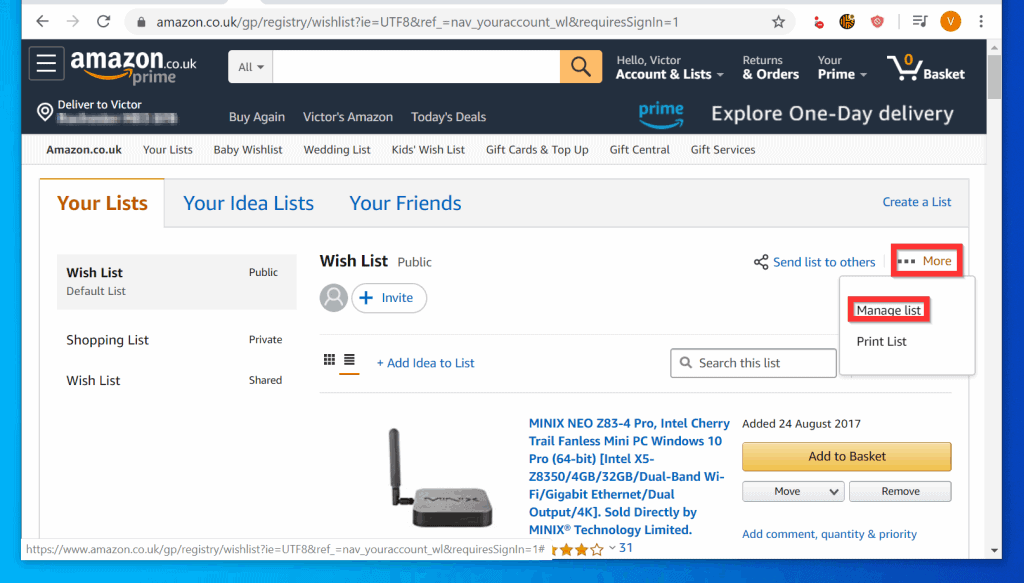
- If you previously set your Wish List to Private, on the top right of the page, hover your mouse over More. Then, click Manage List.
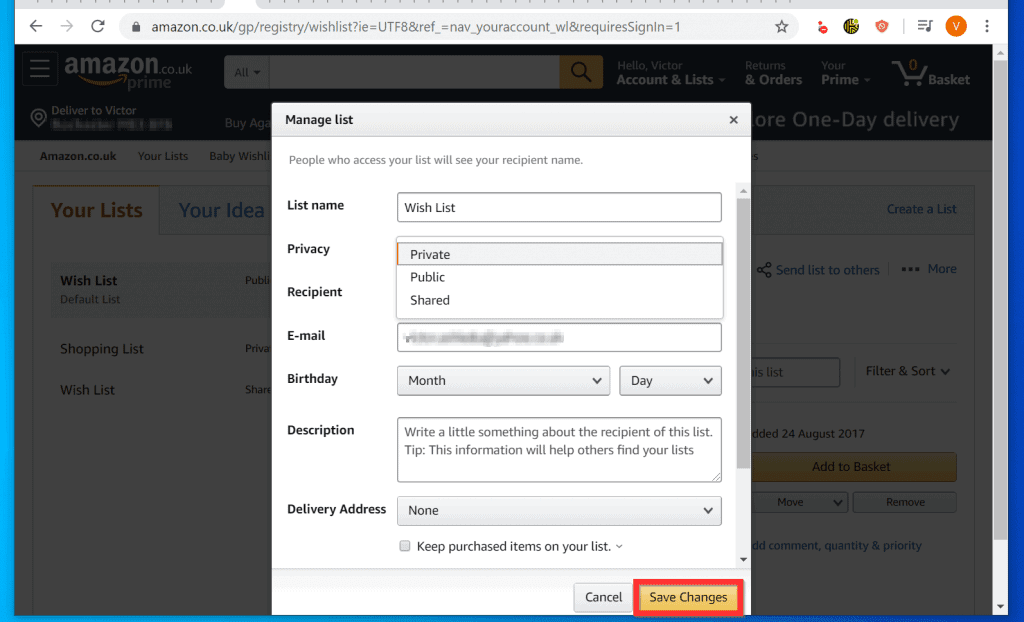
- When the Manage Lists pop up window opens, click the Privacy drop-down and select Public or Shared.

- To save your changed Privacy setting, at the bottom right of the pop up window, click Save Changes.
Invite Others to Your Wish List from a PC (Amazon.com)
Once your Wish List Privacy is set to Public or Shared, follow the steps below to Invite others to View or View and Edit your Wish List…
What’s actually slowing this PC down?
Pick the symptom - the matching free tool is one click away.
- Below Wish List, click Invite. You could also click Send list to others (top right). Invite others to your list pop up will open.

- The Invite others to your list pop up window offers two options. 1, click VIEW ONLY (Share your Wish List for view only – making changes NOT allowed).
- 2, click VIEW AND EDIT (Share the List and allow invited people to make changes to the Wish List – add or remove items).

- Finally, to share Amazon Wish List, click Copy link. or Invite by email.
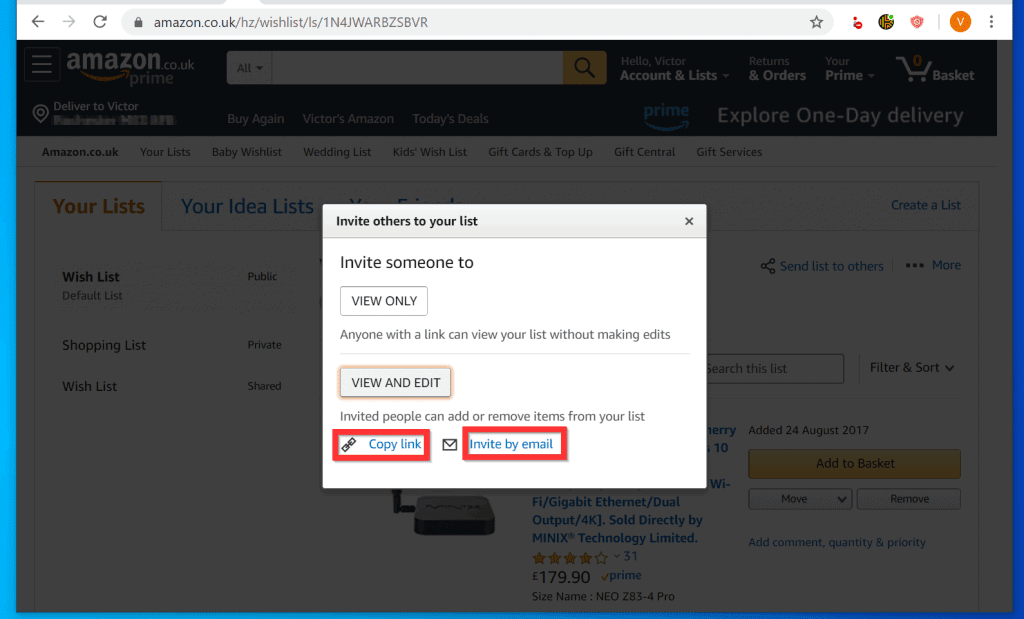
- If you click Copy link, the link to your Amazon Wish List will be copied to clipboard. You can then share the link on Social networking sites or via email.
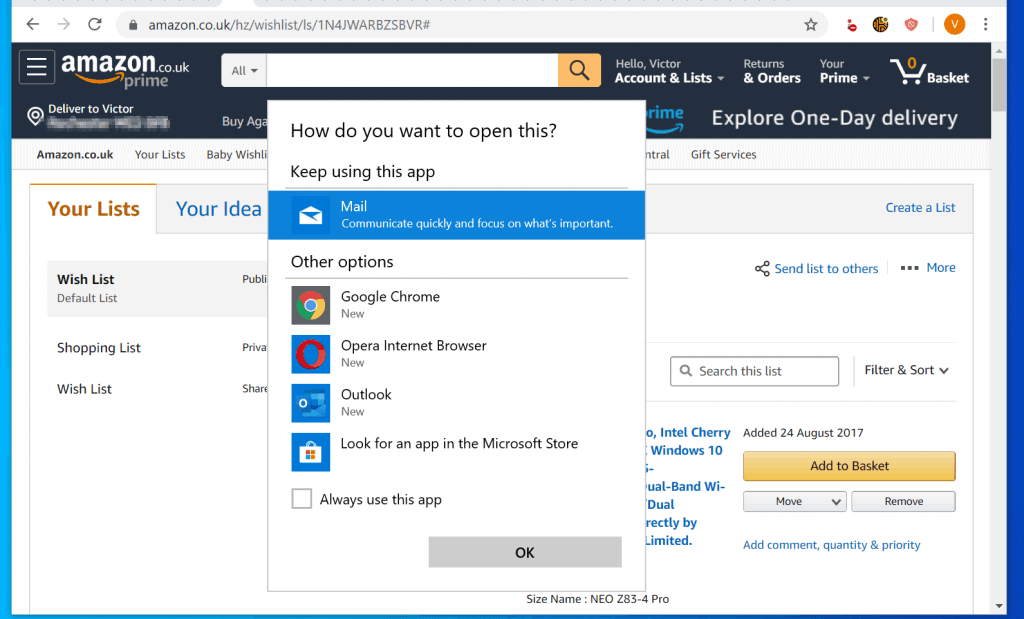
- Alternatively, if you click Invite by email you will be offered the option to select an email client.
Option 2: Share Wish List from Amazon Shopping App
- Open the Amazon Shopping App (Android) or Amazon App (iPhone) on your phone. Then, sign in to the App with your Amazon account.


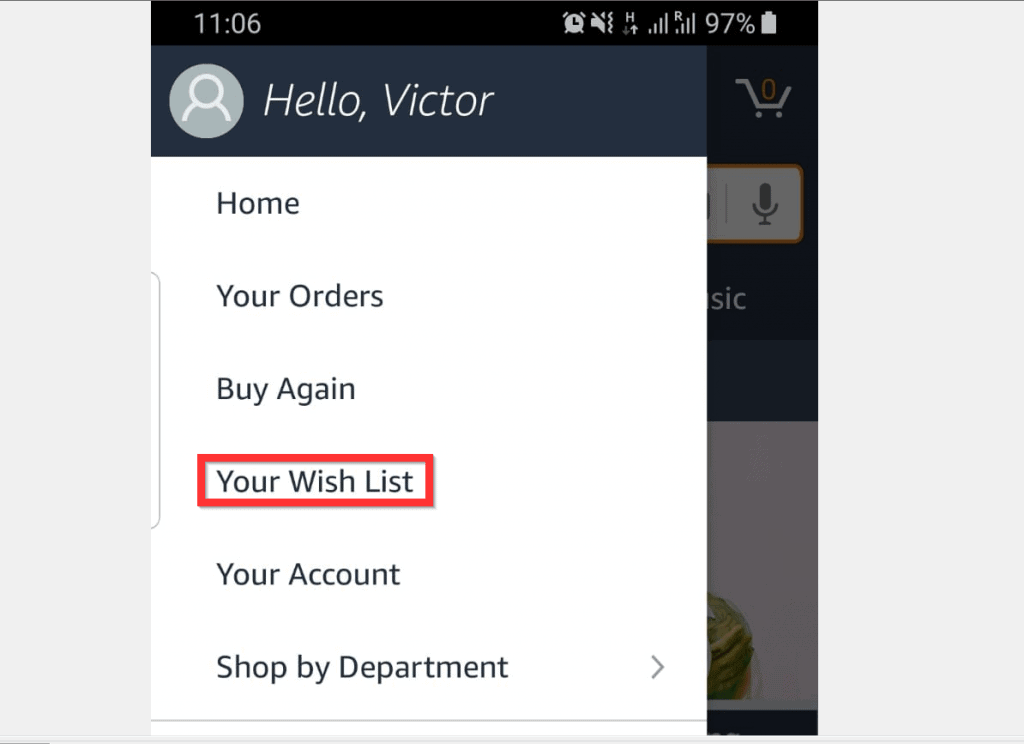
- When the App opens, tap the 3 lines on the top left of the App. A list of options will be displayed.

- From the displayed options, tap Your Wish List.
When your Amazon Wish List page opens, sharing it is a 2-step process. Each step is covered in the 2 sub-sections below…
Popular on Amazon

- Set Of 3 - Wrap It Up in Style: Say hello to the gorgeous gift wrapping paper roll set of 3 by ZICOTO! Measuring 17x120”, they are tailored to turn small to medium-sized gifts into instant eye-catchers. Your gifts are about to steal the show!
- Effortlessly Chic & Ready To Impress: The modern beige and sage beauties add just the right amount of charm and a sprinkle of excitement to any celebration. Your gifts will look so good, they might not want to be unwrapped!
- One Gift Wrap Set, Endless Possibilities: Like the little black dress of gift wrapping - always in style, no matter the occasion. The versatile go-to for all occasions - as wedding wrapping paper, baby shower or birthday wrapping paper roll for both women & men
- Make Every Gift A Masterpiece: Go ahead and elevate your gifts with premium wrapping paper that adds that extra wow factor. It’s the perfect finishing touch for your thoughtful gifts, making you the master of gift-giving every time!
- Create Unforgettable Memories For Your Loved Ones: It’s not just about the gift - it’s the excitement & anticipation that come with beautifully wrapped gifts. The love & thought you put into the whole process will have your nearest and dearest smiling with pure joy
Make Your Wish List Sharable from Amazon Shopping App
- On the top right of your Wish List page, tap More (3 dots). Then, from the displayed options, tap Manage list.

- On the Manage list page, tap the Privacy drop-down and select Shared or Public.
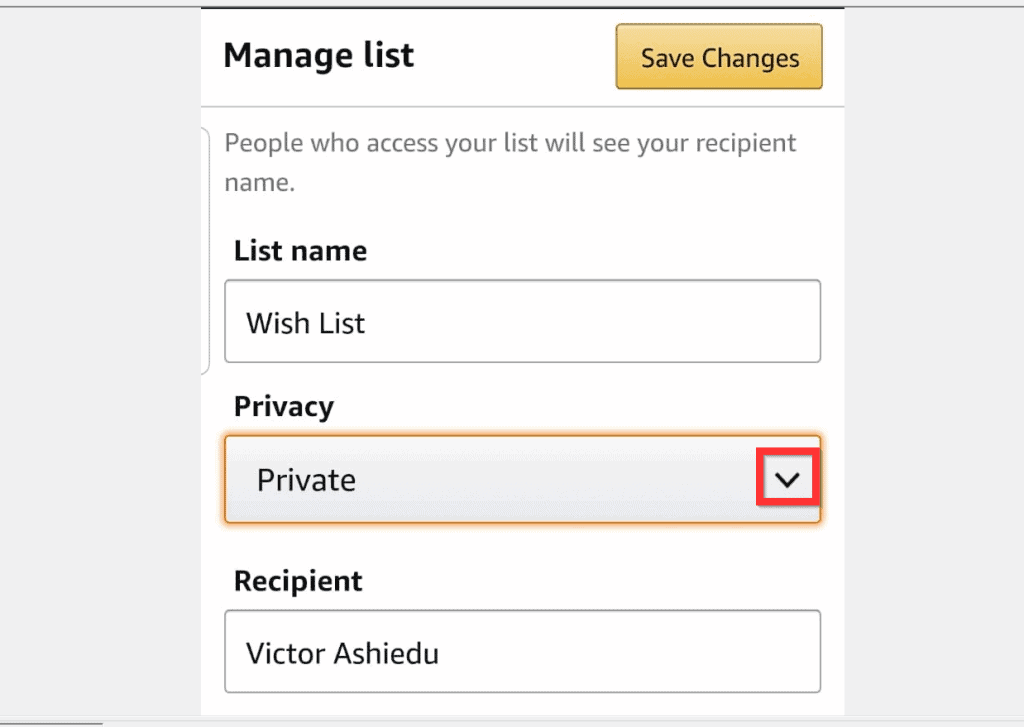
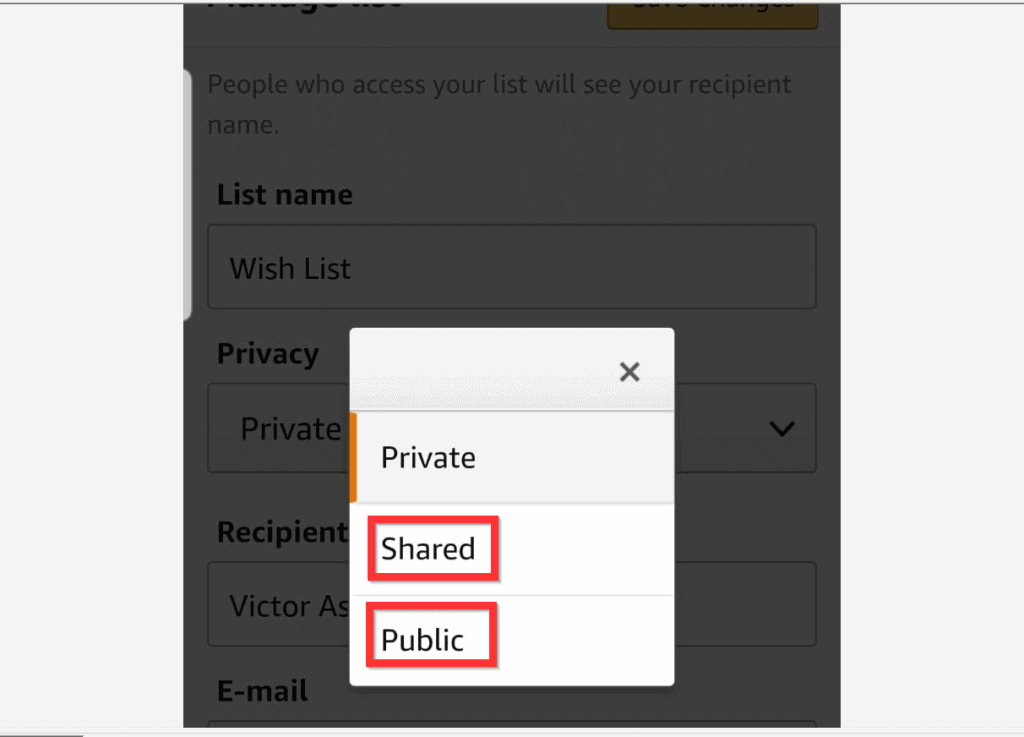
- Finally, to save your Privacy setting changes, on the top right of the screen, tap Save Changes.

Invite Others to Your Wish List from Amazon Shopping App
Once your Wish List is sharable, you can now share it. Here are the steps…
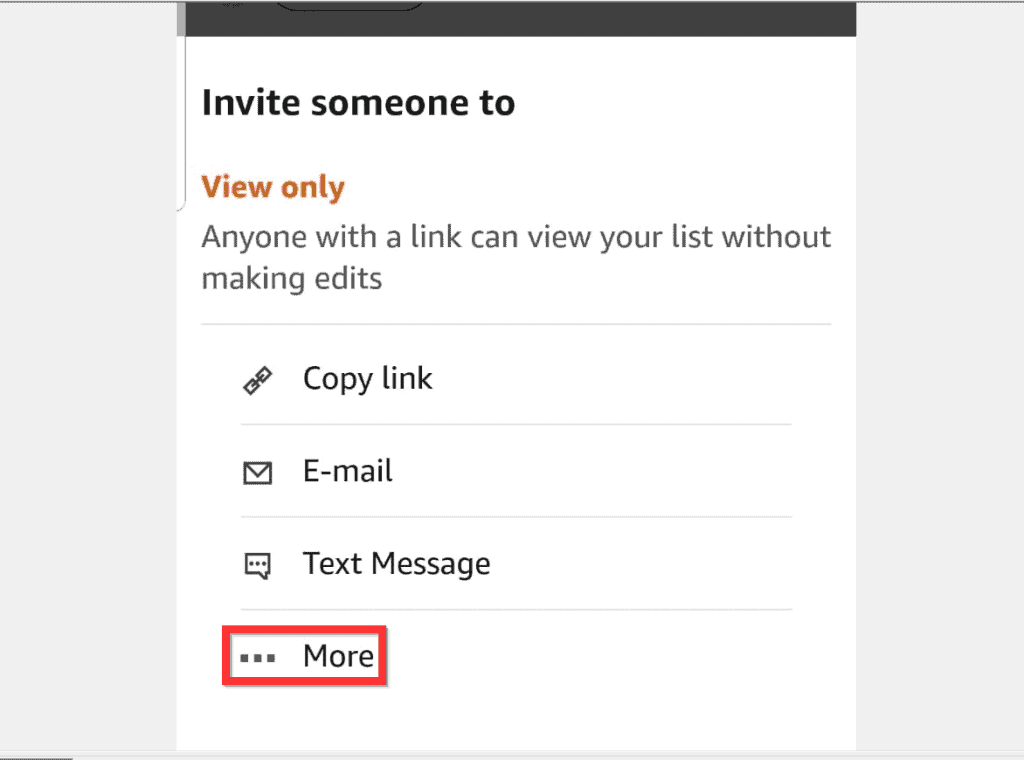
- From your Wish List screen, you can either tap Invite or tap More (top right of screen) and select Send list to others. See the second image below…
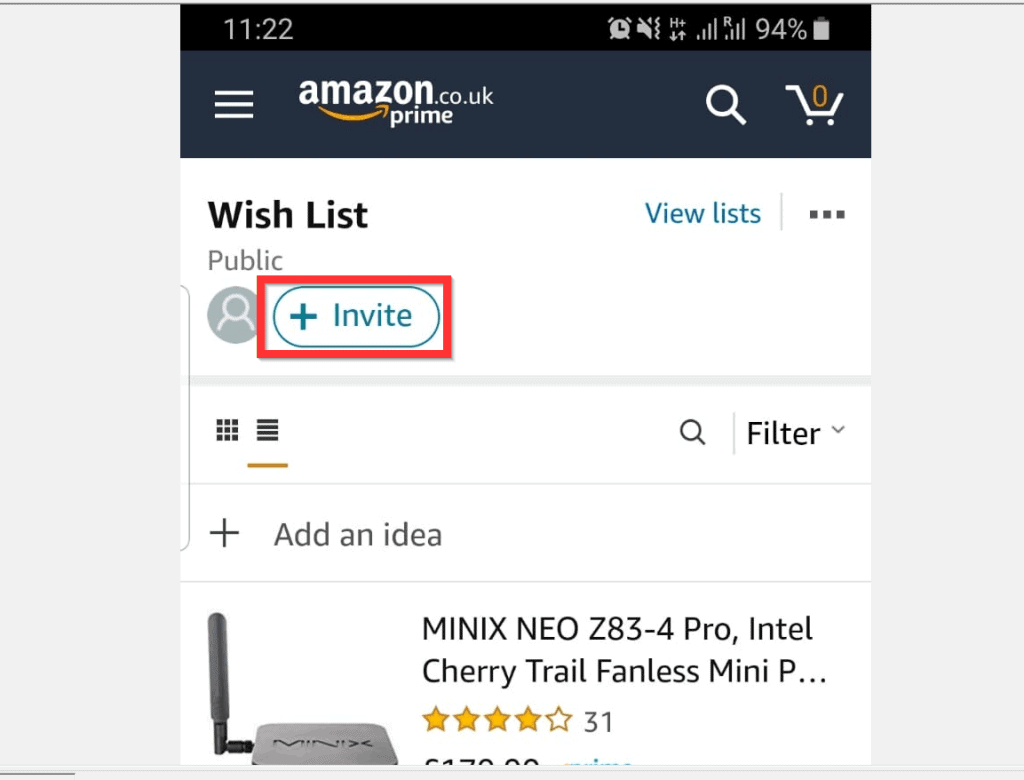

- Then, on Invite someone to pop out (bottom of screen), tap View only or View and Edit.
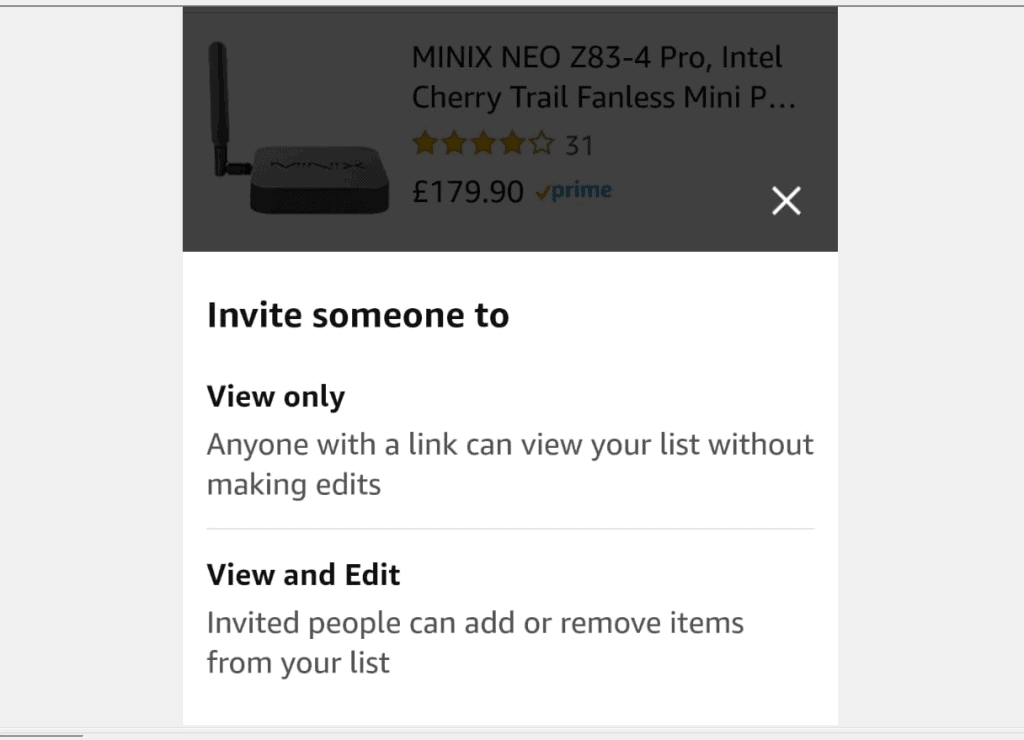
- Whichever option you select, a set of options will be provided. To share Amazon Wish List, you can tap Copy link (and decide how to share it).
- You could also tap E-mail (to share via email) or tap Text Message (to send link via SMS).
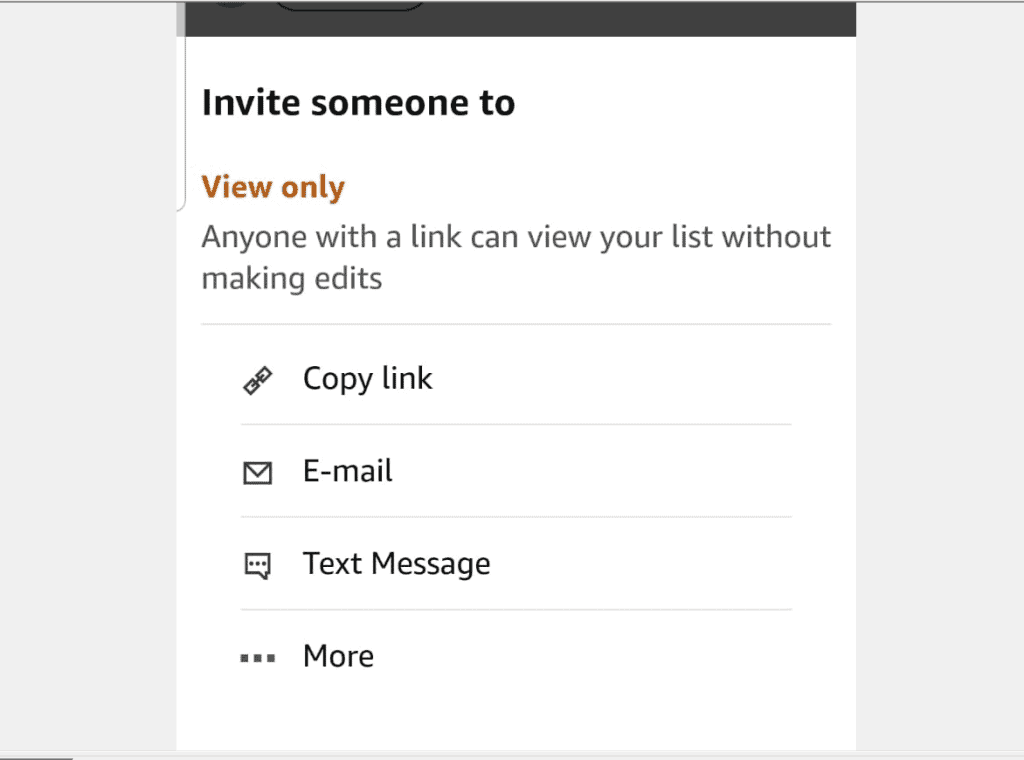
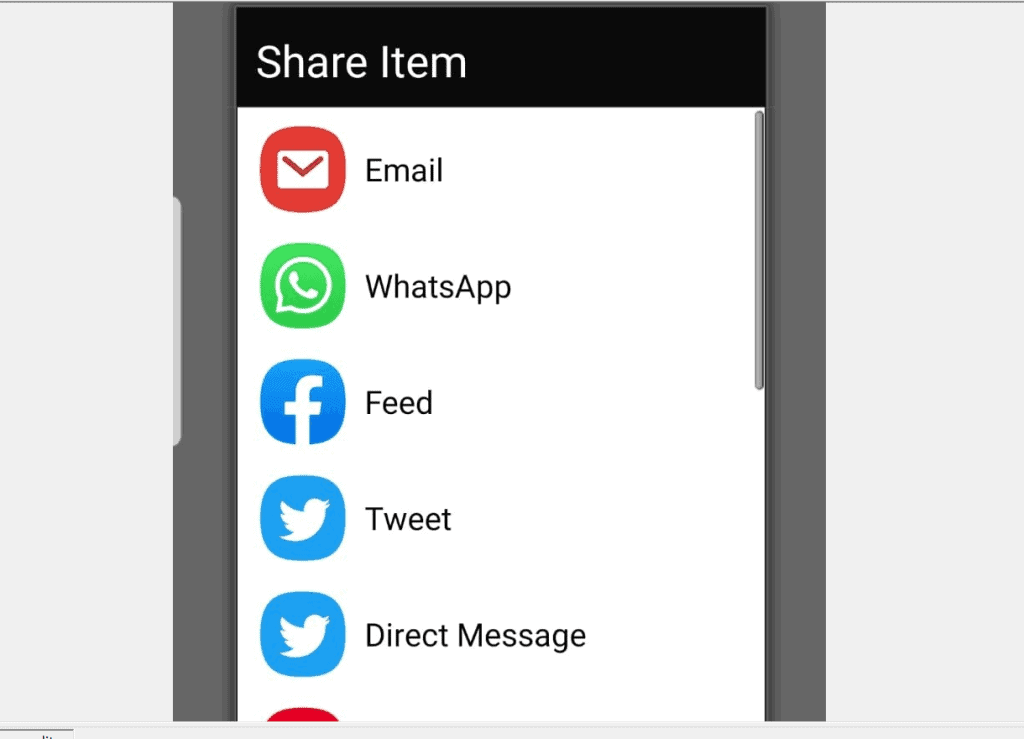
- To display more Share options, tap …More. Then, select your preferred share option.
- Displayed Share Item lists will depend on Apps installed on your device.
It is this easy to share Amazon Wish List! I hope you found this Itechguide helpful. If you found it helpful, kindly vote Yes to the “Was this post Helpful” question below.
Also popular on Amazon

- 【BIRTHDAY DESIGN】:The colorful "Happy Birthday" pattern are printed on it, bringing the most sincere blessings to the birthday girl or boy.Rich colors and interesting pattern designs will make the recipient of the gift happier
- 【PERFECT SIZE】: 17 inches wide x 394 inch(32.8 feet) long, 46.5 square feet per roll, The roll are not a standard width, more narrow than usual size,Perfect for medium and small gifts.Add a unique touch to your family, friends or child's birthday celebration
- 【HIGH QUALITY】: The packaging paper is made of high-quality paper, which is thicker, not easy to tear, and durable.The surface of the paper is covered with shrink film, smooth and shiny, preventing wrapping paper from scratches and reduce dust
- 【USE ALL OCCASION】: Perfect for birthday, party, congratulations, graduations, baby showers and more. Wrap gifts in chic printed paper to add vitality to your gifts. Whoever receives such a gift will feel your love and blessing for their special day, bringing endless laughter and happiness
- 【EASY TO USE】:The paper designed of the roll, which can be cut freely and has more flexibility. Can be used for packaging gift boxes, Crafts decoration, gift card bags, and so on. Breaking free from constraints and conventions for your DIY Making
Alternatively, you could ask a question, leave a comment or provide feedback with the “Leave a Comment” form found towards the end of this page.
Finally, for more Shopping Itechguides, visit our Amazon How-To how to page.
Quick Recap
Also popular on Amazon

- FLORAL PATTERN WRAPPING PAPER ROLL: Elevate your gifts with our charming wild flower wrapping paper, Each design features a whimsical arrangement of delicate blooms in soft, nature-inspired hues, bringing a touch of rustic elegance to every present.
- PRETTY BOTANICAL GIFT SHEETS: Crafted from premium-quality materials, our floral gift wrap combines durability with dreamy, muted tones. Perfect for bridal showers, garden parties, birthdays, wedding gift, engagement and Mother's Day, each wrap feels like a breath of fresh air.
- WILDFLOWER GIFT WRAP: Adorned with dainty wildflower prints, this 17 x 33' roll (46.8 sq ft) offers effortless charm for small to medium gifts, ldeal for boho weddings, spring celebrations, and everyday gifting always check gift sizes before ordering!
- DURABLE HOLIDAY UNICORN GIFT WRAP: Featuring a matte, high-definition print, this paper is sturdy yet easy to fold, Delicately rolled for secure shipping, it adds a cozy handpicked-meadow vibe to any gift.
- ALL OCCASIONS: From picnics to baby showers, rustic weddings to thank-you gifts, this wrap suits any laid-back celebration, Bonus: Use it as a sweet table runner for garden-party decor! Embrace the carefree beauty of wildflowers with every wrap.
Also popular on Amazon

- PERFECT SIZE: Each roll measures 17 inch wide x 9.8 feet long
- KRAFT FLORAL DESIGN: Colorful floral design will make your gift special and shining
- PREMIUM QUALITY: Created with high-quality paper materials, thick and not easily tear or rip, item came with shrink film to prevent wrapping paper from scratches and reduce dust
- USE ALL OCCASION: Perfect for wedding, birthday, valentine's day, baby shower, anniversary gifts wrap, it is also great for craft project
- QUALITY CUSTOMER SERVICE: Any question about products or orders, please feel free to contact the customer service, we will try our best to solve the problem
Also popular on Amazon

- Mini Roll: 17 inches wide, 120 inch (10 feet) long, 14 square feet per roll, 3 rolls 42 square feet total in the set
- Material: Thick paper, excellent printing performance with iridescent foil
- Color Combination: Showing the theme through the color scheme, works well alone or with each other
- Celebrate any Occasion: Suitable for holiday anniversary and birthday gift wrapping, wall and bulletin board decorations
- Easy to Use: Short rolls are easier to store and use, perfect for small boxes
Product prices and availability are accurate as of the date/time indicated and are subject to change. Any price and availability information displayed on Amazon at the time of purchase will apply.
Independent reader supportYour contribution helps us test, update, and keep practical guides available for everyone.


I am finding I cannot share the “Your gift ideas for X” either.
When I click on “Send List to Others” i get a popup that says “Invite others to List”, but the window only say’s “Content is not available”
Hello, I have found that shared Wishlists no longer remain visible among friends lists after a private list is viewed. Sure, the user who receives the link can see it at that moment when opened via the link.But they can only continue to see it via the link.
Despite the app noting that this person was added as my friend, their full list which I just opened is not visible beneath their header in my Friends Lists. The “your gift ideas for X” is, but not the actual shared list.
My wife and I and our extended family members are all experiencing this same problem if the shared list is no longer public.
How can I add the Wishlists for friends and family through the invite process if we have switched to private and do not intend to use these gift lists as collaborative ones. We only want to buy things for each other without the extra steps or the edit features.
Hello Christian,
Thank you for asking this question. Here are the steps to send your private Amazon Wish list to others:
How to Share a Private Amazon Wish List
1. Click on the Private Wish list to open its settings
2. Then, on the top right of the wish list settings, click “Send list to others”. The “Invite others to your list” pop-up will be displayed. Select the type of permission you wish to grant the person – VIEW ONLY or VIEW AND EDIT.
3. Finally, copy the link and send it to anybody you want to be able to view/edit the list and send it via WhatsApp or text message. You may also send the link via email
How to View a Private Amazon Wish List
1. Open the link the Wish List owner sent to you
2. The content of the Wish list will be available to the person.
I just wrote a new post with the detailed steps to access someone’s wish list – here is the link to the post – https://www.itechguides.com/how-to-find-someones-amazon-wish-list