

Recommended Free Tools
iTechGuides is reader-supported. When you buy through links on our site, we may earn an affiliate commission. As an Amazon Associate I earn from qualifying purchases. Learn more
This Itechguide teaches you how to disable OneDrive on Windows 10. The guide covers steps for 3 methods to disable OneDrive on Windows 10.
Option 1: Disable OneDrive from the Local Group Policy Editor
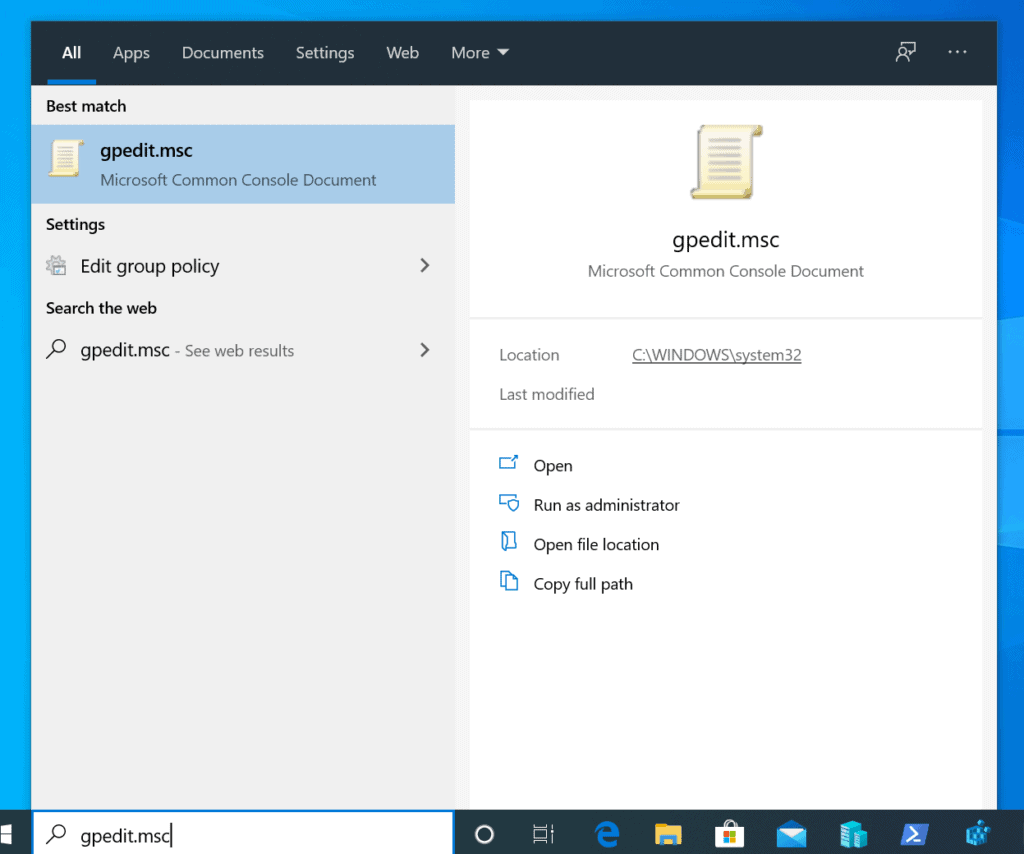
- Type gpedit.msc in the search box. Then, from the search results click gpedit.msc. The Local Computer Policy MMC will open.
- Beneath the Computer Configuration category of the CoLocal Computer Policy, expand Administrative Templates.
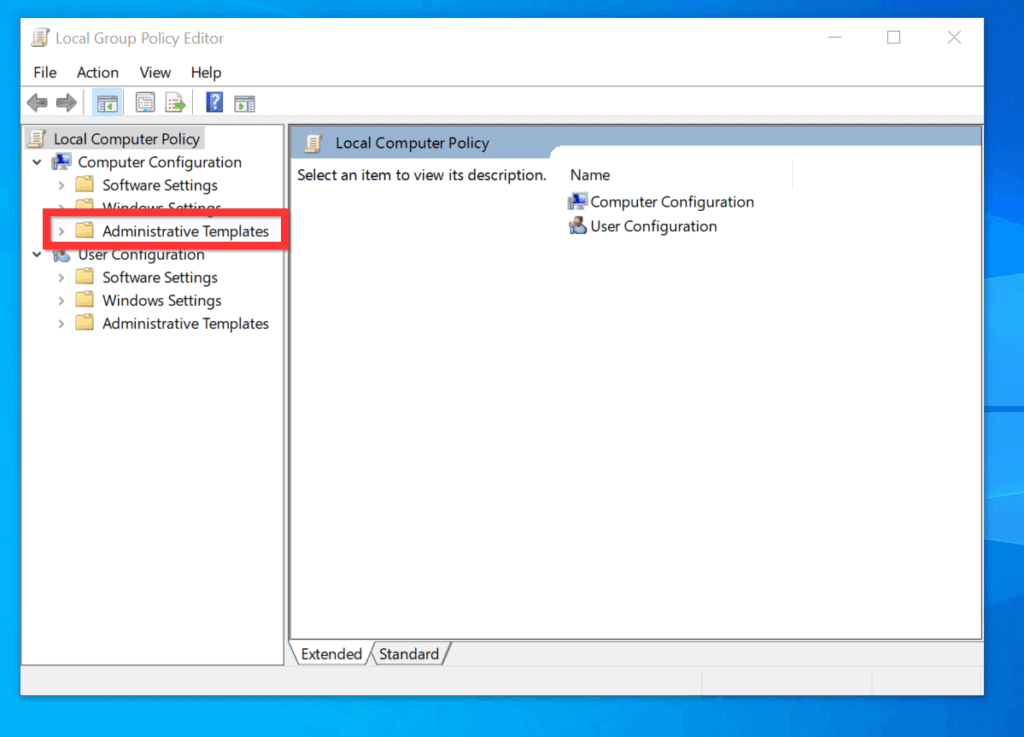
- Then, beneath Administrative Templates, navigate to the path below:
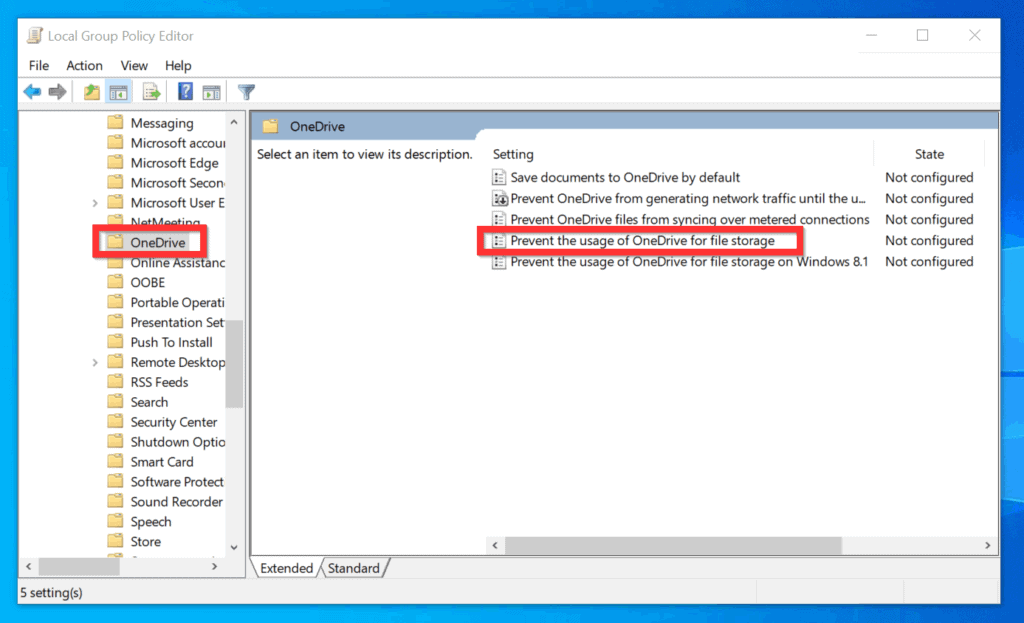
Windows Components\OneDrive
- On the left pane, click the OneDrive folder. Then, on the details pane, double-click Prevent the usage of OneDrive for file storage policy. The policy will open for editing.
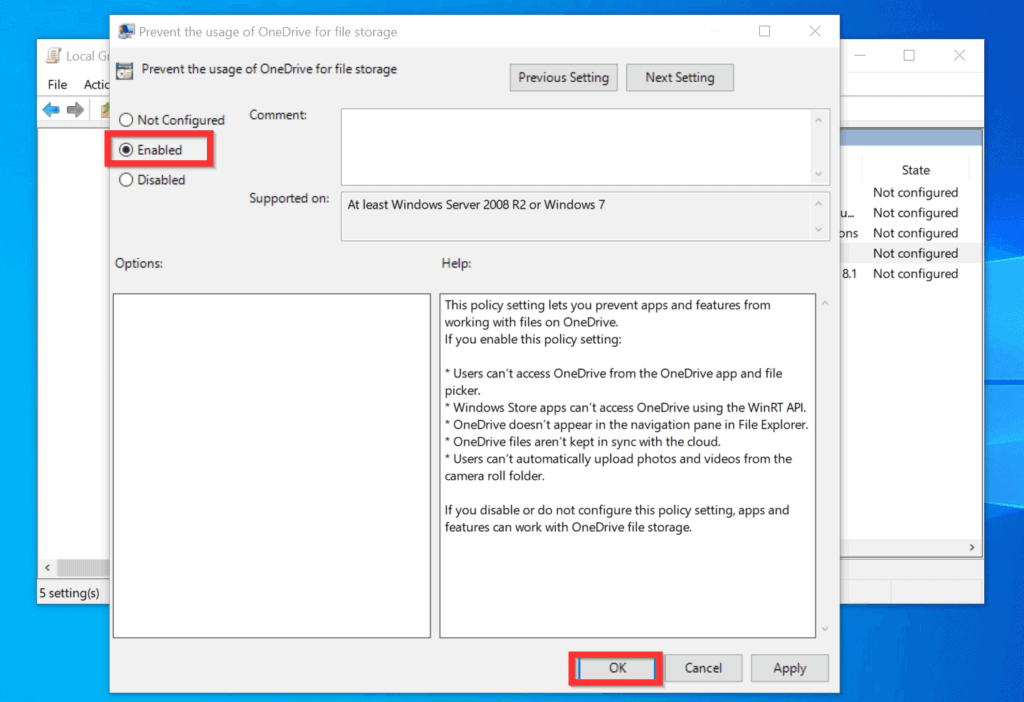
- Finally, to disable OneDrive on Windows 10 with Local Group Policy, on the top left of the Prevent the usage of OneDrive for file storage policy, select Enabled. Then, on the bottom right, click OK.
- The Status of the policy will now display Enabled.

- Once you enable this policy, you will no longer be able to use OneDrive. When you search for OneDrive, it will still display in the search result but you will NOT be able to open it.
Option 2: Disable OneDrive from Registry
If you use Windows 10 Home, use the steps below to disable OneDrive.
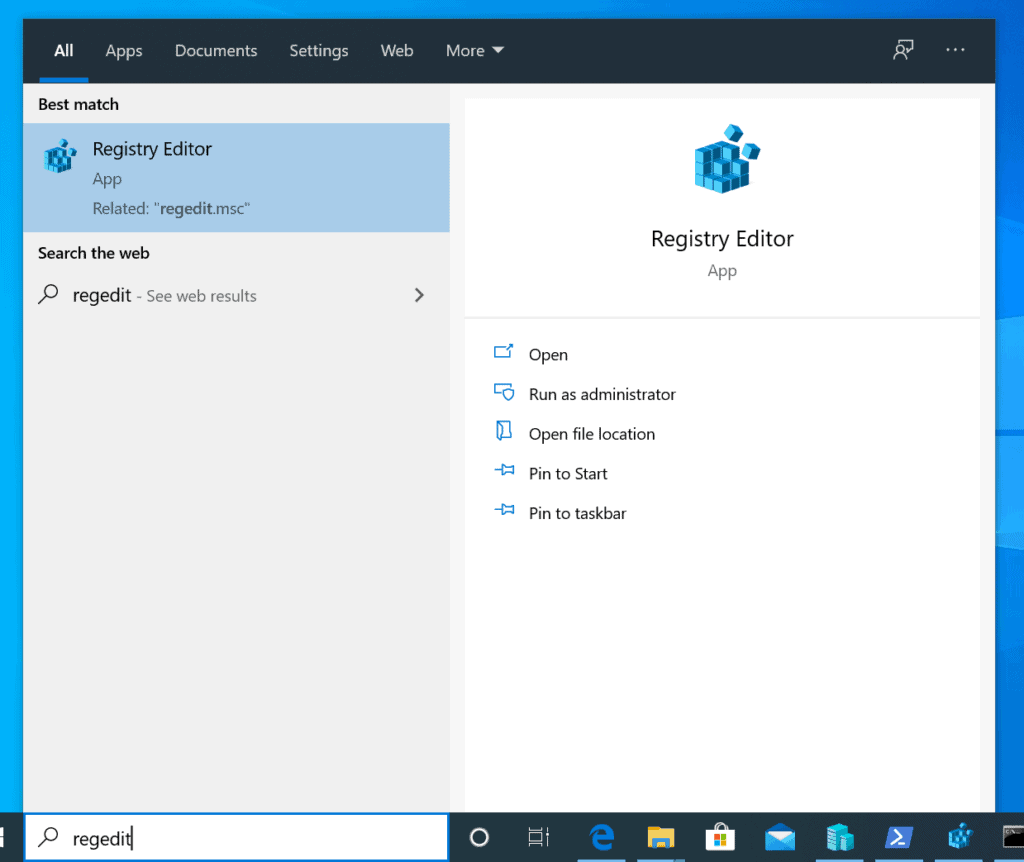
- Type RegEdit in the search box. Then, click Registry Editor. If you receive a User Account Control confirmation, click Yes.
- When registry editor opens, navigate to this key. Then click the OneDrive key.
HKEY_LOCAL_MACHINE\SOFTWARE\Policies\Microsoft\Windows
- If the OneDrive key is not available, right-click Windows key, point to New and select Key.
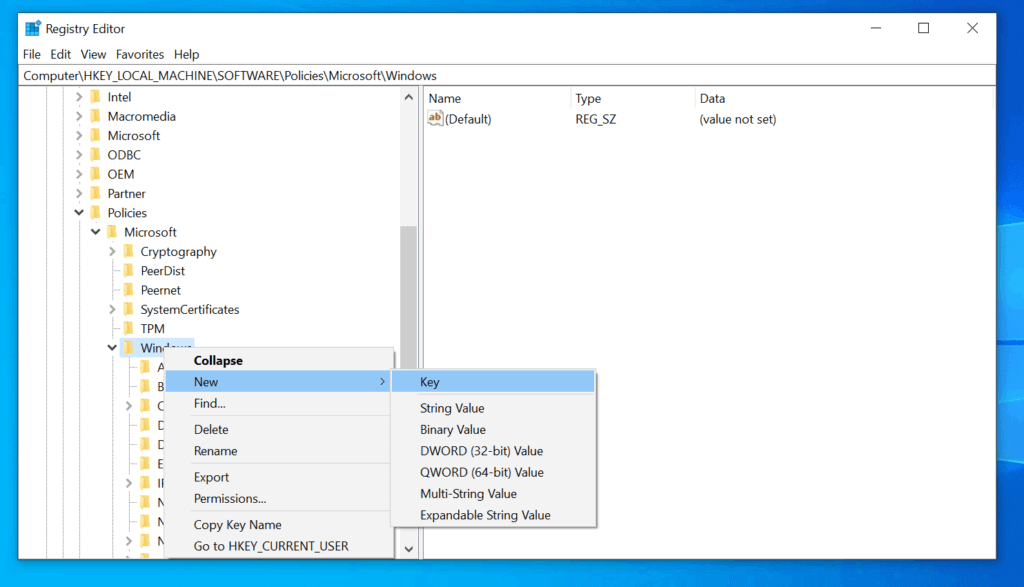
- On the new key, type OneDrive and press enter.
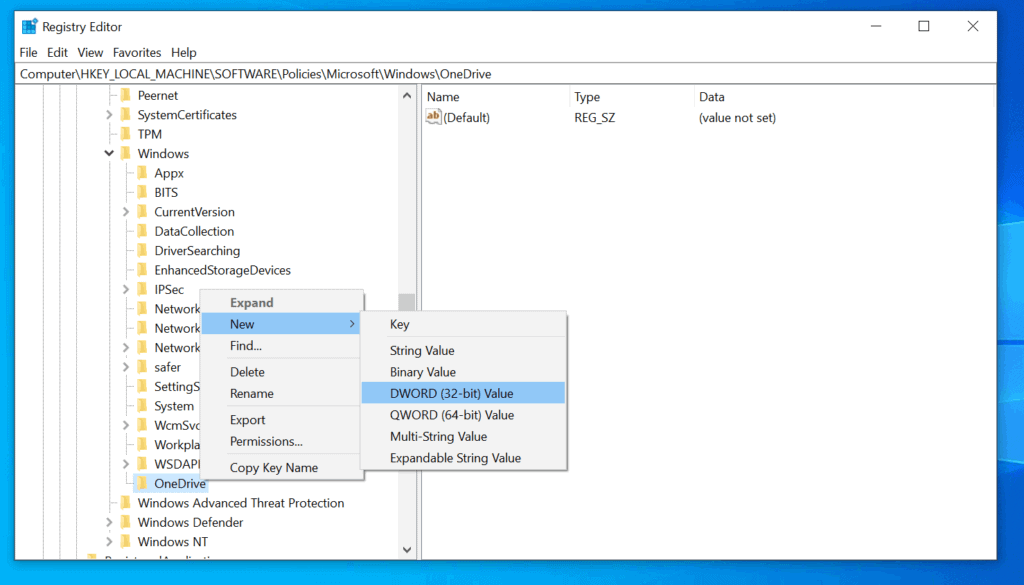
- Right-click the new OneDrive key, point to New and select DWORD (32-bit Value). Name the new DWORD value DisableFileSyncNGSC.
- Finally, to disable OneDrive on Windows 10 with the registry, double-click DisableFileSyncNGSC. Then, change the Value data from 0 to 1 and click OK.

- When you finish, DisableFileSyncNGSC DWORD will have a value of (1) in the Data column.
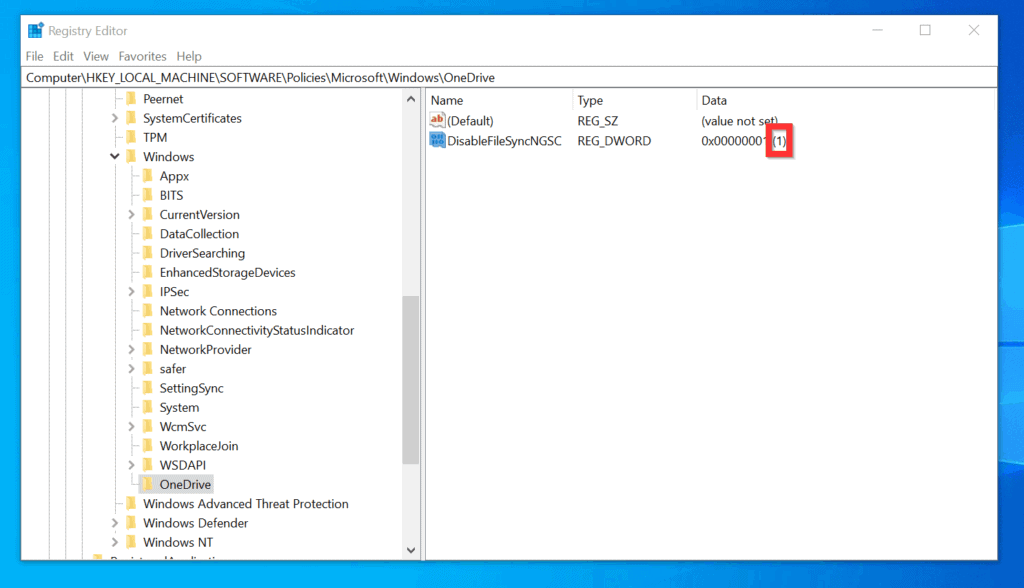
- Once you set the DisableFileSyncNGSC DWORD to 1, you will no longer be able to use OneDrive. When you search for OneDrive, it will still display in the search result but you will NOT be able to open it.
Option 3: Completly Uninstall OneDrive
The first 2 methods discussed in this Itechguide disable OneDrive. But you can uninstall OneDrive from Windows 10. This section covers steps to uninstall OneDrive from Windows 10.
Windows Errors? Fix Them Before They Spread
Repair common Windows errors and clear accumulated junk for a smoother, more stable PC - no reinstall needed.Free scan · no reinstallCrashes, No Sound, or Screen Glitches?
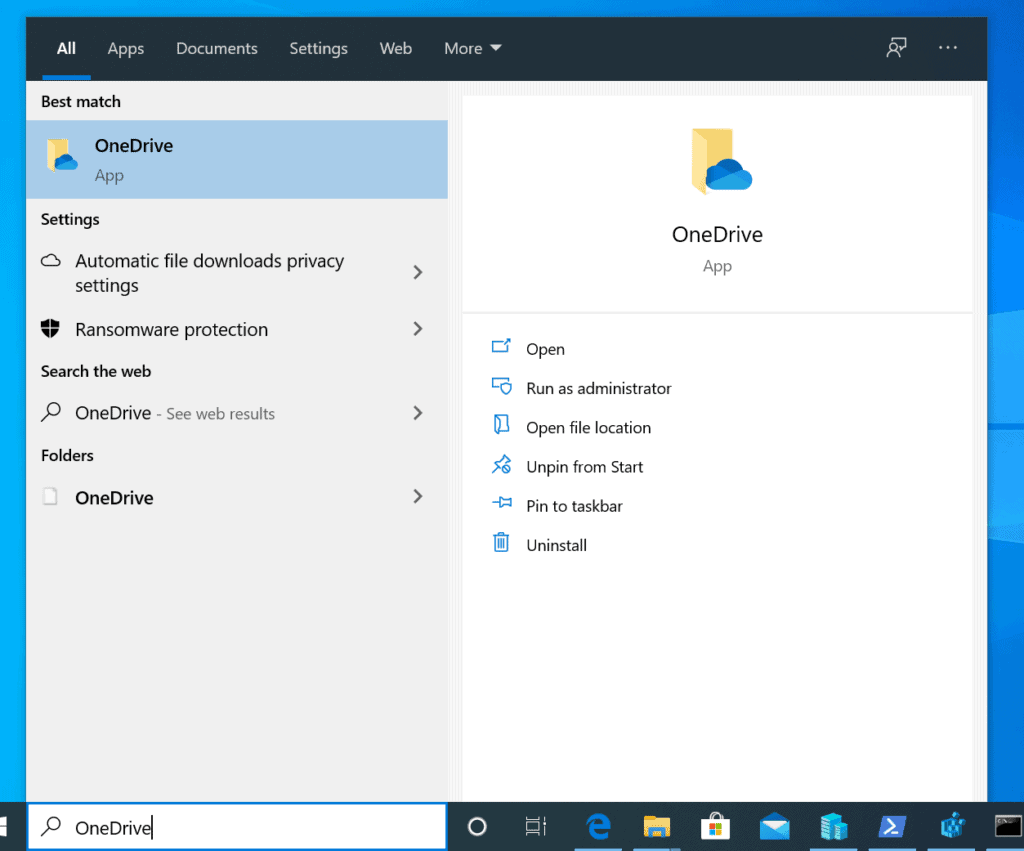
Random freezes, missing sound and display glitches usually trace back to one bad driver. Find and replace yours safely.Free scan · under a minute- Type OneDrive in the search box. Then, right-click OneDrive and select Uninstall.

- On Programs and Features, highlight Microsoft OneDrive (click it once). Then, click Uninstall.
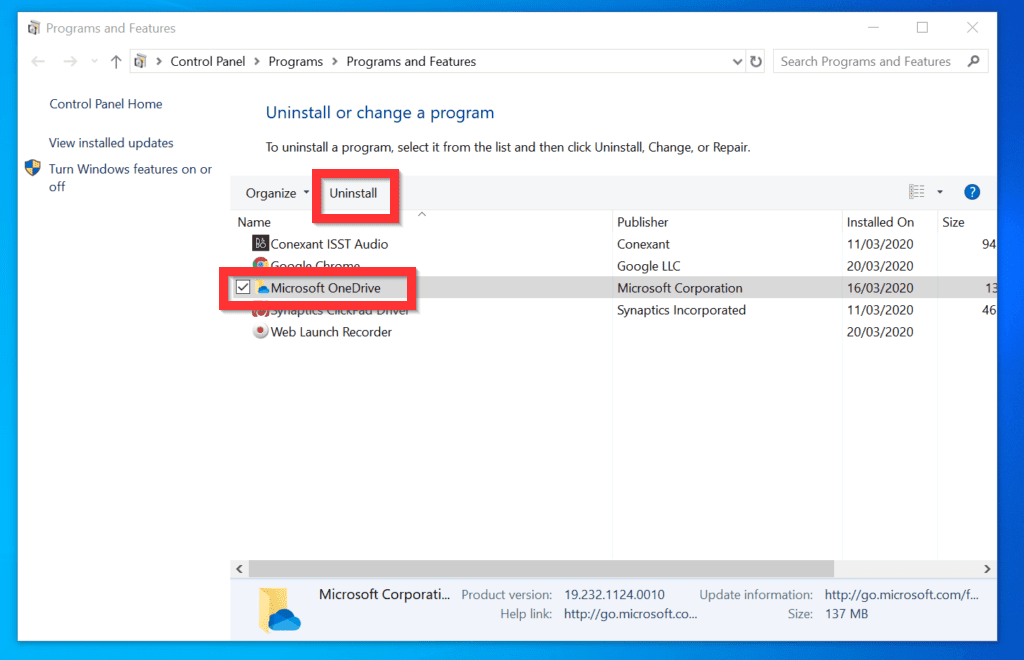
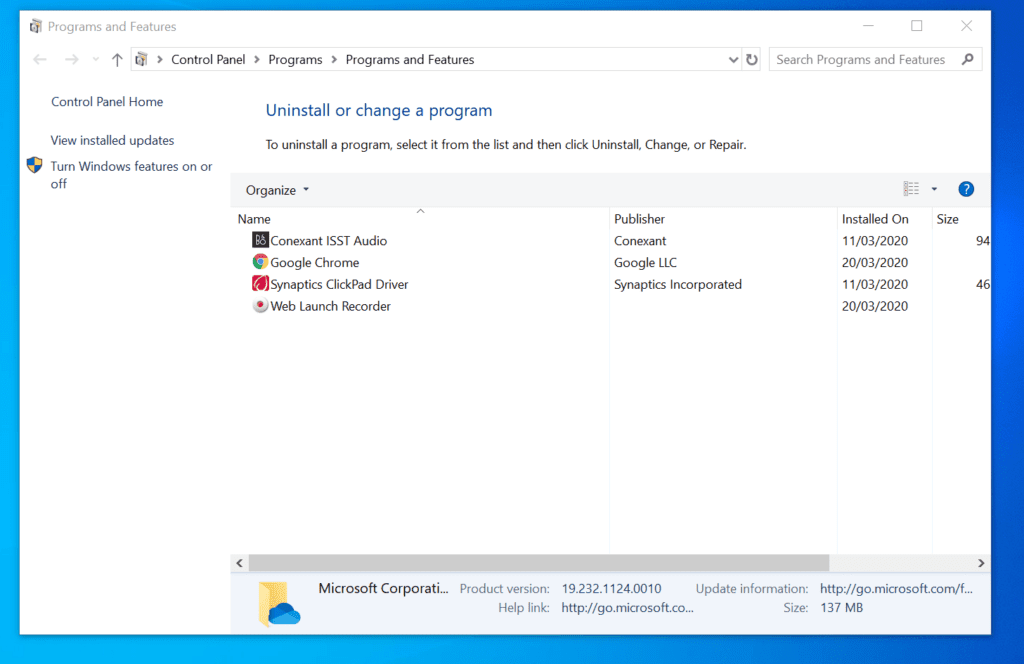
- If you receive a User Account Control confirmation screen, click Yes. OneDrive will be uninstalled immediately. It will no longer be available in the Programs and Features list.
It is very easy to disable OneDrive on Windows 10! I hope you found this Itechguide helpful. If you found it helpful, click on “Yes” beside the “Was this page helpful” question below.
Popular on Amazon

- Easily store and access 5TB of content on the go with the Seagate portable drive, a USB external hard Drive
- Designed to work with Windows or Mac computers, this external hard drive makes backup a snap just drag and drop
- To get set up, connect the portable hard drive to a computer for automatic recognition software required
- This USB drive provides plug and play simplicity with the included 18 inch USB 3.0 cable
- The available storage capacity may vary.
You may also express your thoughts and opinions by using the “Leave a Comment” form at the bottom of this page.
Finally, for more Windows 10 Itechguides, visit our Windows 10 How-To page.
Quick Recap
Also popular on Amazon

- High capacity in a small enclosure – The small, lightweight design offers up to 6TB* capacity, making WD Elements portable hard drives the ideal companion for consumers on the go.
- Plug-and-play expandability
- Vast capacities up to 6TB[1] to store your photos, videos, music, important documents and more
- SuperSpeed USB 3.2 Gen 1 (5Gbps)
Also popular on Amazon

- [Upgraded Version] - This external hard drive features a mirrored logo stripe combined with a striped anti-slip design, and the rounded corners of the casing make it easier to grip. The stripes also have a heat dissipation function, ensuring stable and fast data transfer.
- 【Ultra-thin and quiet】 - The motherboard adopts JMicron 578 noise-free solution, giving you a quiet working environment. Lightweight and portable size designed to fit in your pocket for easy portability.
- 【Ultra-Fast Data Transfers】 - Pairing this external hard drive with JMicron 578 solution USB 3.0 and USB 2.0 interfaces enables blazing-fast data transfer. It boasts theoretical read speeds of up to 125MB/s and write speeds of up to 103MB/s.
- 【Plug and Play】 - With no software to install, just plug it in and the drive is ready to use.The hard disk chip is wrapped with an aluminum anti-interference layer to increase heat dissipation and protect data.
- 【What You Get】 - 1 x Portable Hard Drive, 1 x USB 3.0 Cable, 1 x User Manual, Gift-type shell packaging ,Three-year manufacturer's warranty and free technical support services.
Also popular on Amazon
- Easily store and access 4TB of content on the go with the Seagate Portable Drive, a USB external hard drive.Specific uses: Personal
- Designed to work with Windows or Mac computers, this external hard drive makes backup a snap just drag and drop
- To get set up, connect the portable hard drive to a computer for automatic recognition no software required
- This USB drive provides plug and play simplicity with the included 18 inch USB 3.0 cable
- The available storage capacity may vary.
Also popular on Amazon
- Easily store and access 1TB to content on the go with the Seagate Portable Drive, a USB external hard drive.Specific uses: Personal
- Designed to work with Windows or Mac computers, this external hard drive makes backup a snap just drag and drop. Reformatting may be required for Mac
- To get set up, connect the portable hard drive to a computer for automatic recognition no software required
- This USB drive provides plug and play simplicity with the included 18 inch USB 3.0 cable
- The available storage capacity may vary.



