

Free tools Windows power users keep installed
One-click scans. No signup required.
iTechGuides is reader-supported. When you buy through links on our site, we may earn an affiliate commission. As an Amazon Associate I earn from qualifying purchases. Learn more
This Itechguide teaches you how to change YouTube profile picture. The guide covers steps to change YouTube profile picture from a PC and the YouTube Apps for Android and iPhone.
Option 1: Change Profile Picture from a PC (YouTube.com)
- Open YouTube.com from your PC. Then, sign in with your Google Account.
- On the top right of the page, click your profile icon. Then, from the displayed options, click Settings.

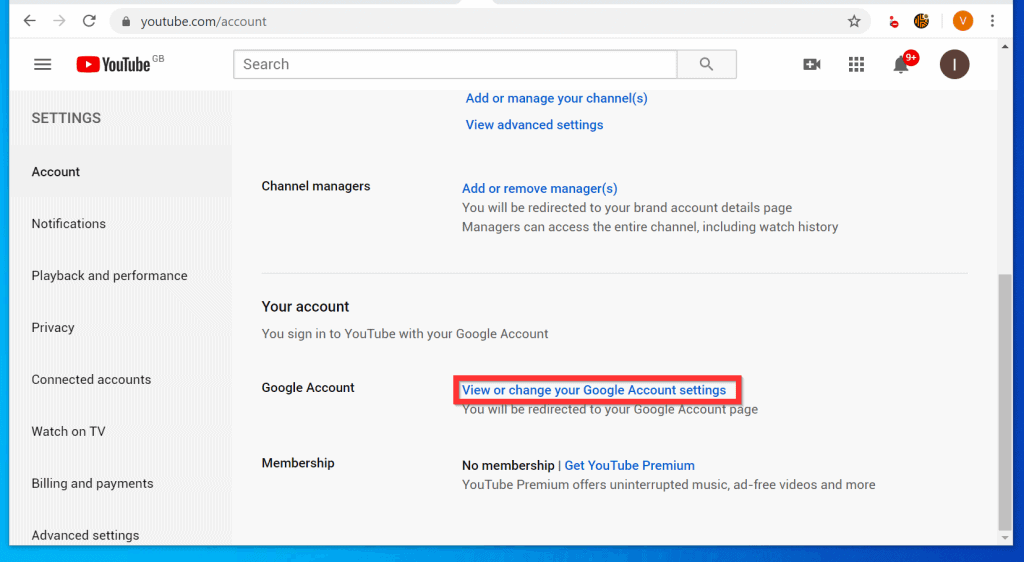
- When your YouTube account settings page opens, scroll down to Google Account section. Then, click View or change your Google Account settings. The link will open your YouTube Google Account page.
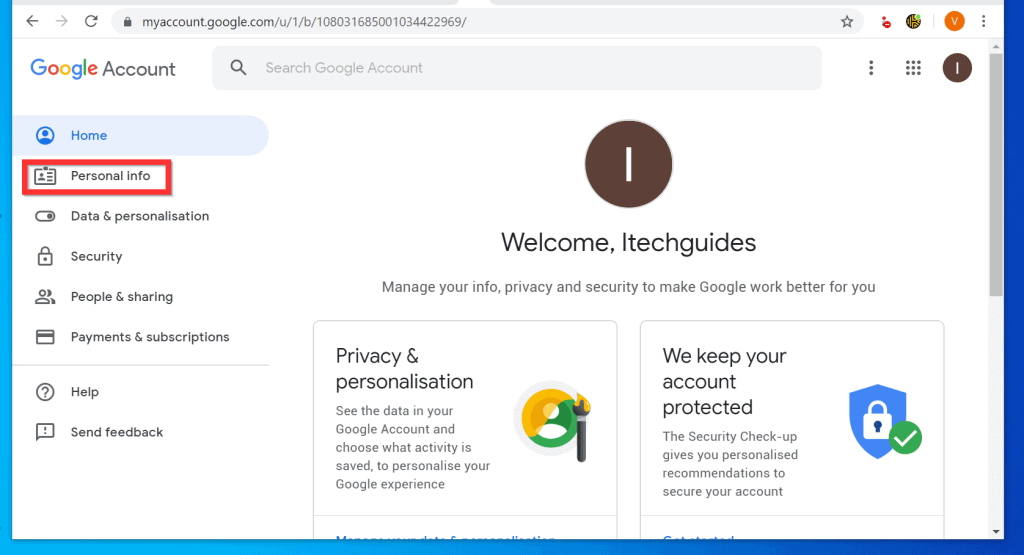
- When your Google Accounts page opens, on the left pane, click Personal Info tab.
- Then, beneath your Profile section, click Add a photo to personalize your account.

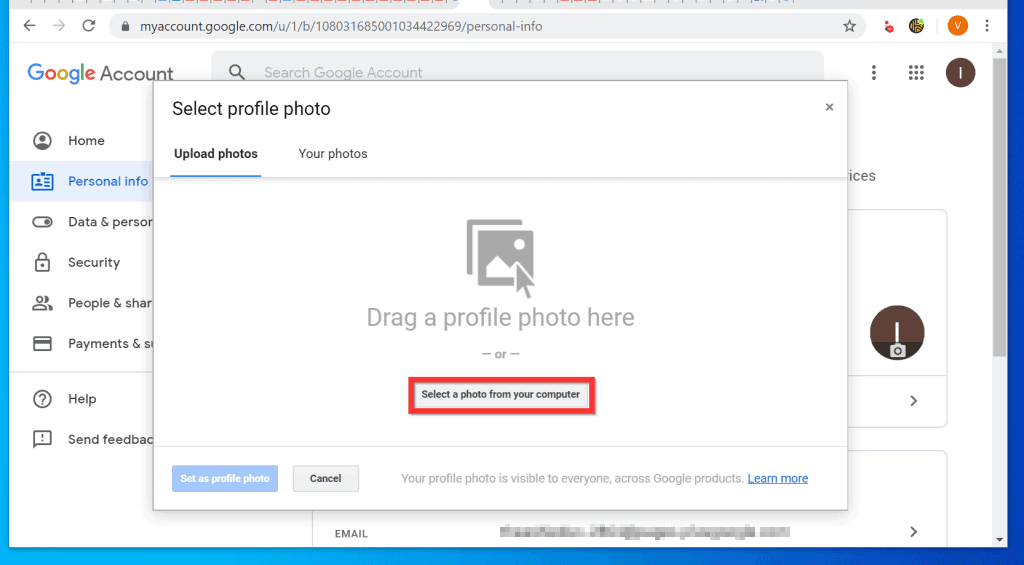
- Finally, from the Select profile photo pop up window, drag the photo you want to use for your profile into the Drag a profile photo here. Alternatively, click Select a photo from your computer.
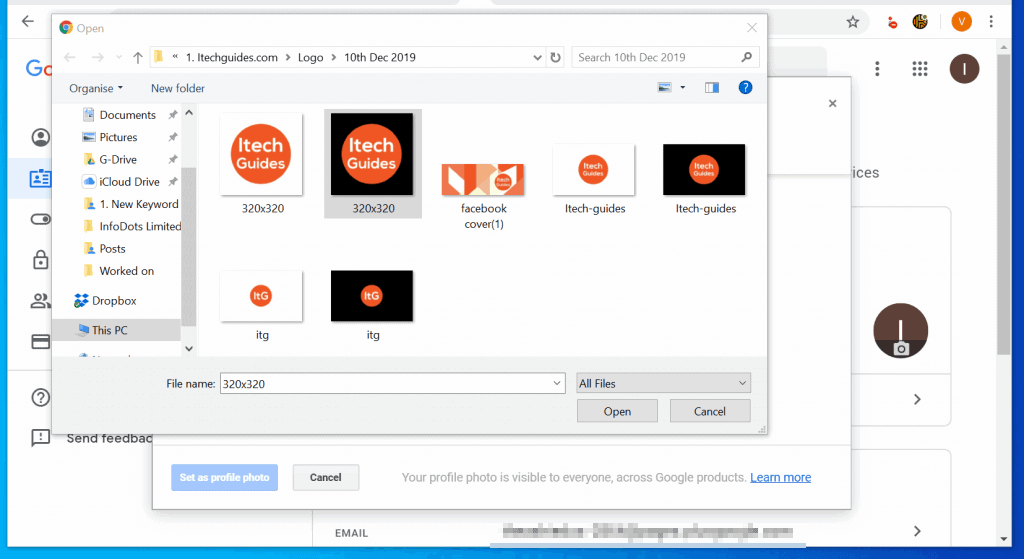
- Navigate to the location of the picture you want to use and click it. Then click Open.
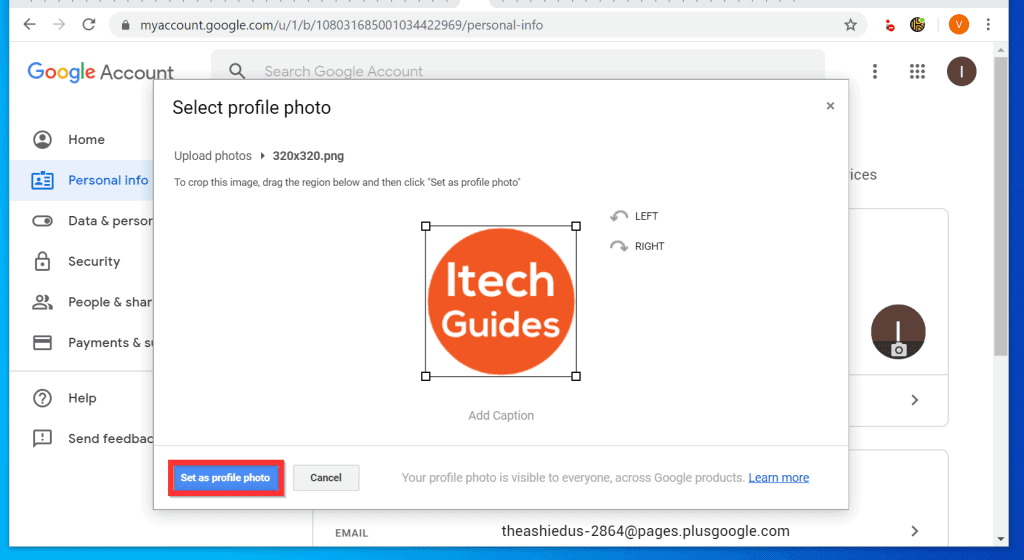
- Wait for the picture to upload. Then, at the bottom left of the pop up window, click Set as profile photo.

- Wait for the uploaded picture to save as your profile photo.
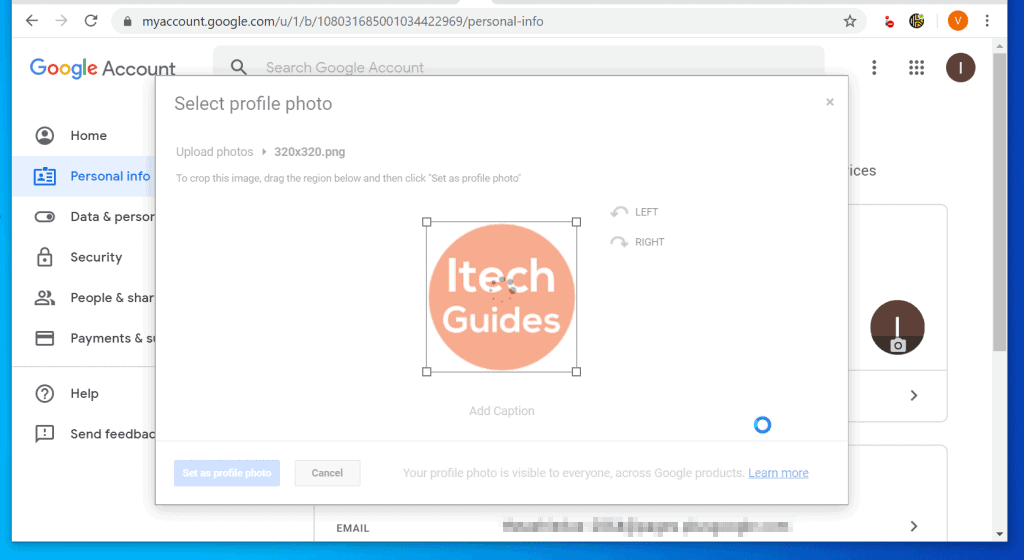
- When the changes have been made, the pop up window will close automatically and you will be returned to your Google Account.

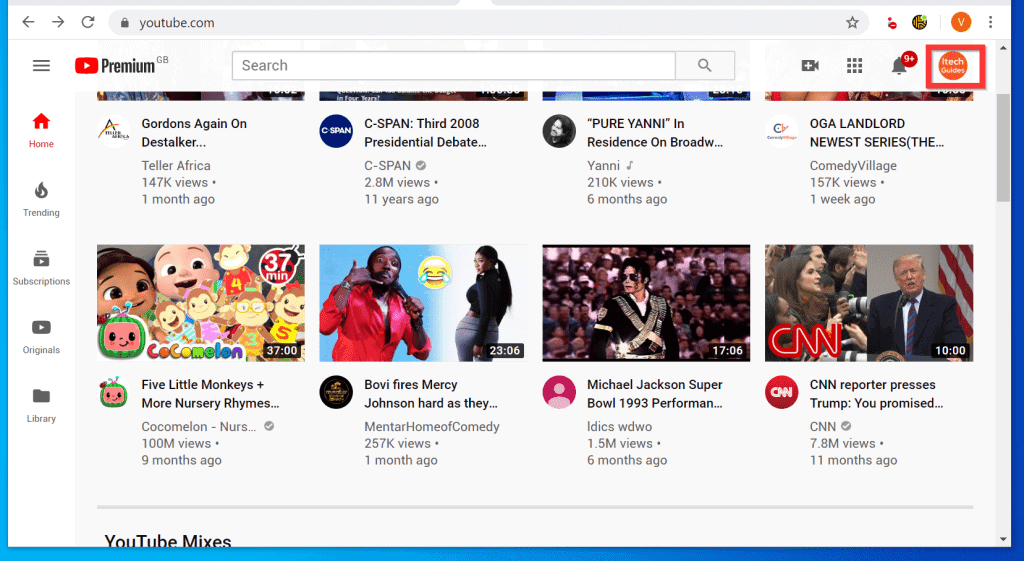
- To return to your YouTube profile, use the browser back button. Your YouTube profile picture will be updated to the photo you just uploaded!
Option 2: Change Profile Picture from the Android App
- Open the YouTube App on your Android phone. Then, login with your Google Account.

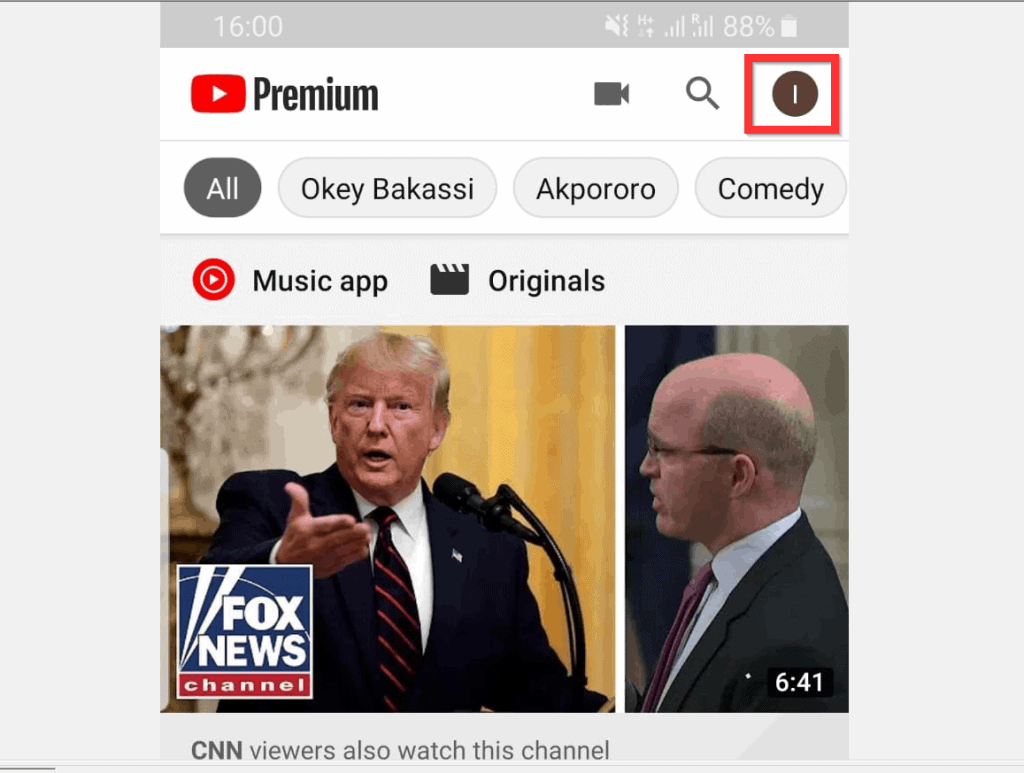
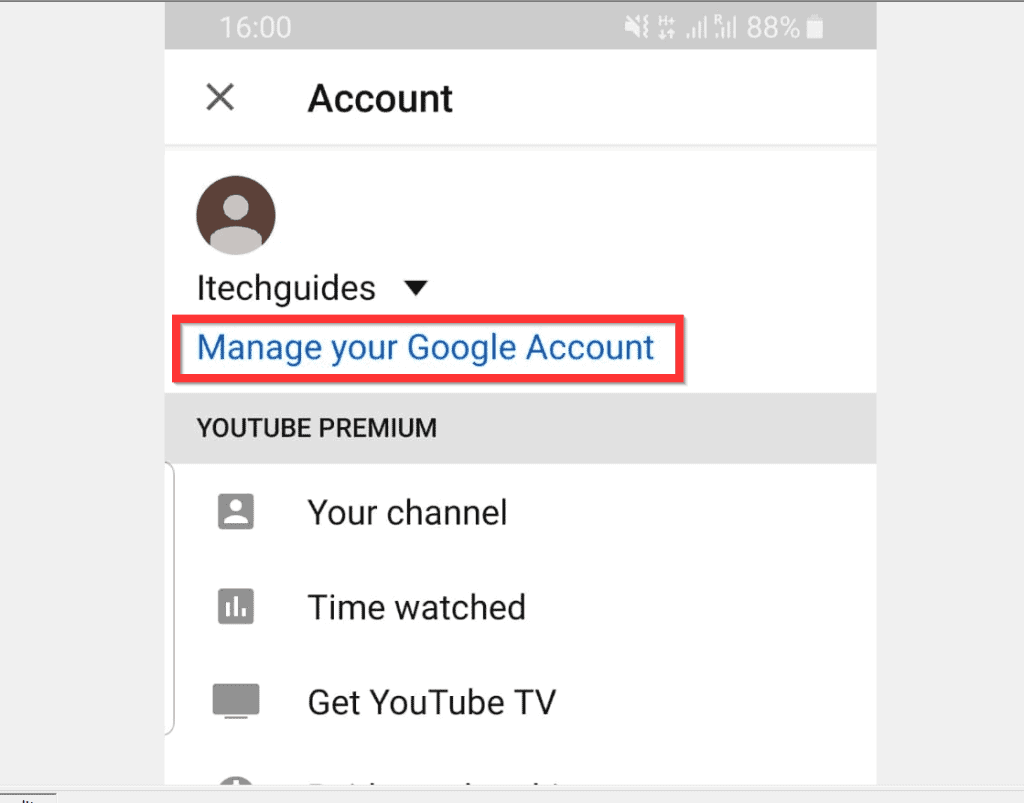
- On the top right of the App, tap your profile icon. Then, from the displayed options, tap Manage your Google Account and wait for your Google Account page to open.
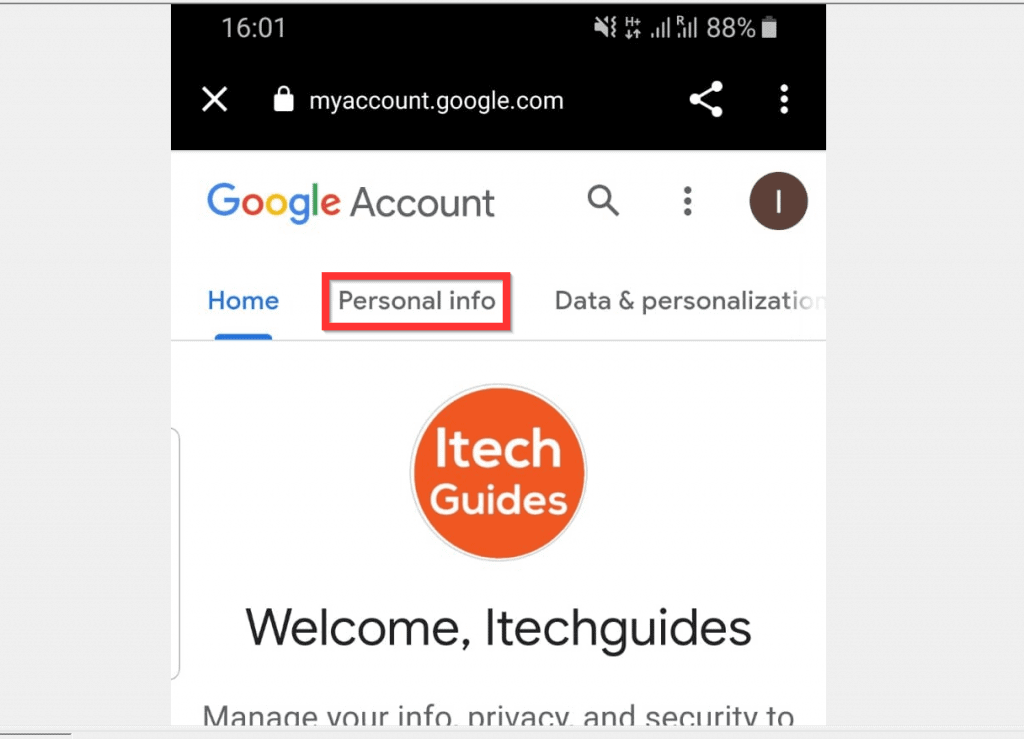
- When Your Google Account page opens, tap Personal info tab.
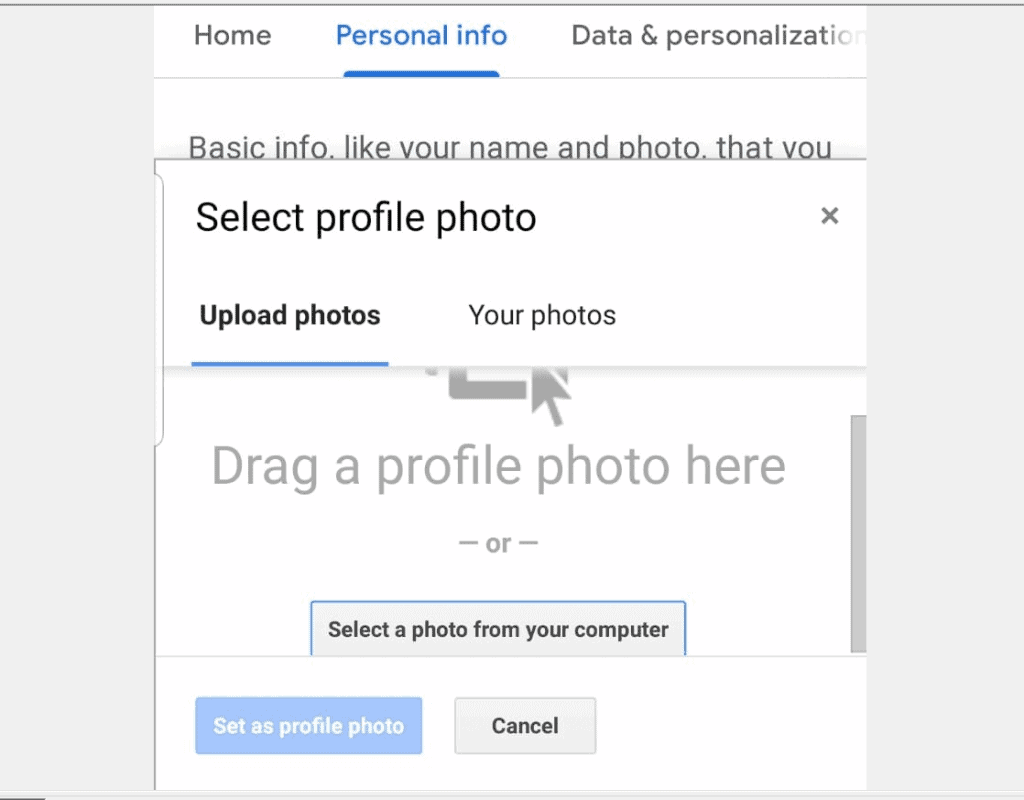
- Then, to change YouTube profile picture from the Android App, tap the current profile photo. A pop up window will be displayed. It may take a little while for the pop up to display.

- When the pop up window is displayed, tap Select a photo from your computer. Then, follow the steps to upload a new profile picture from your photo gallery.
- Instead of uploading a new profile photo, if you have existing profile photos on Google, tap Your photos tab.
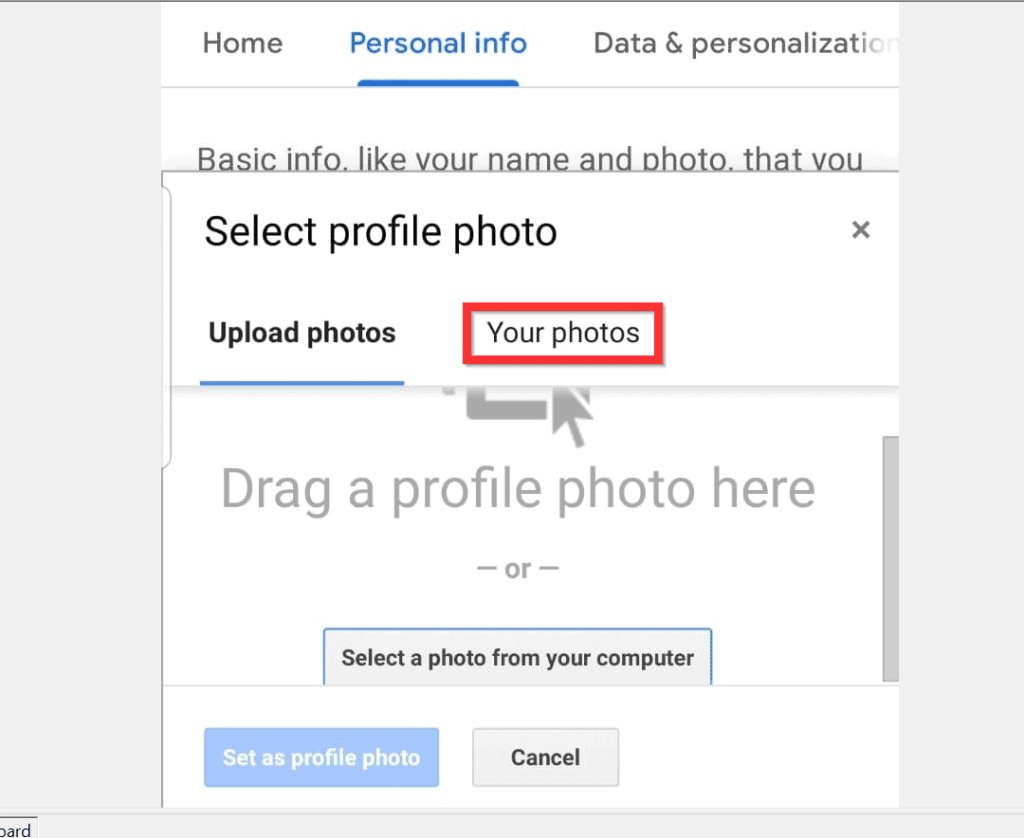
- When Your photos tab opens, tap on an existing photo you want to use as your new YouTube profile photo. Then tap Set as profile picture.

- Once the new profile picture is updated, the pop up window will close automatically. To return to the YouTube App, tap the x beside myaccount.google.com.

Option 3: Change Profile Picture from the iPhone App
- Open the YouTube App on your iPhone. Then, sign in with your Google Account.

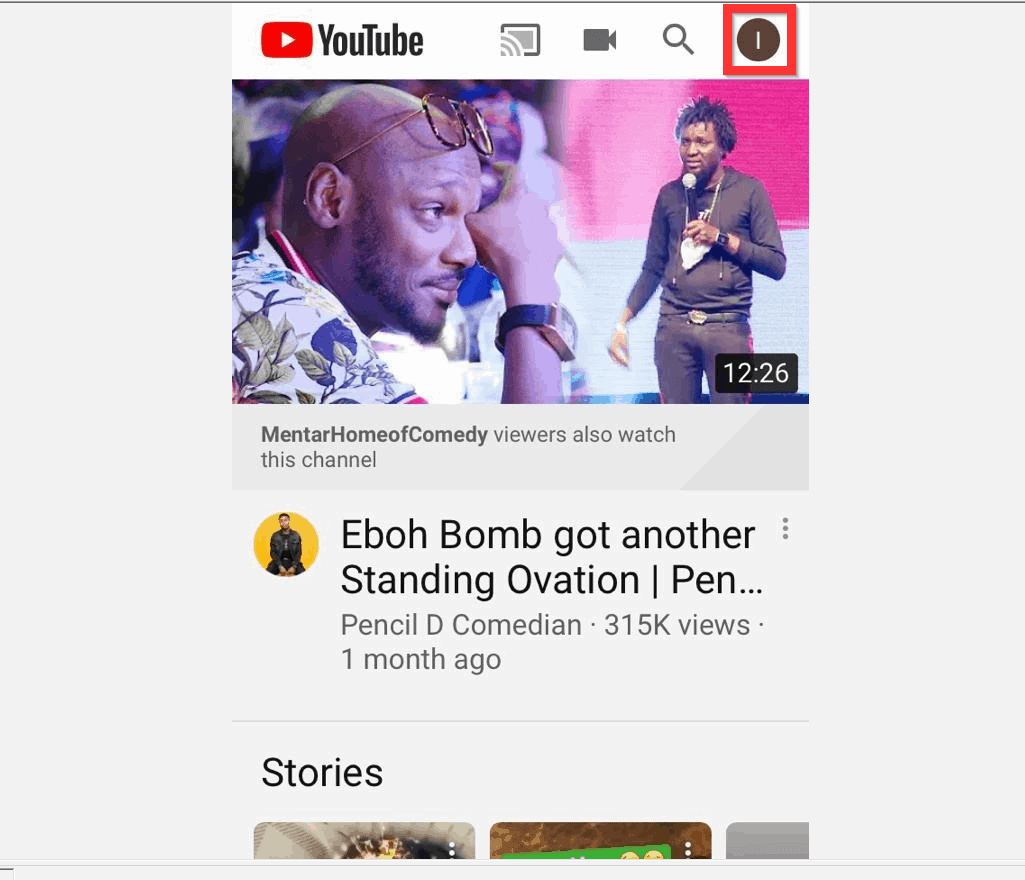
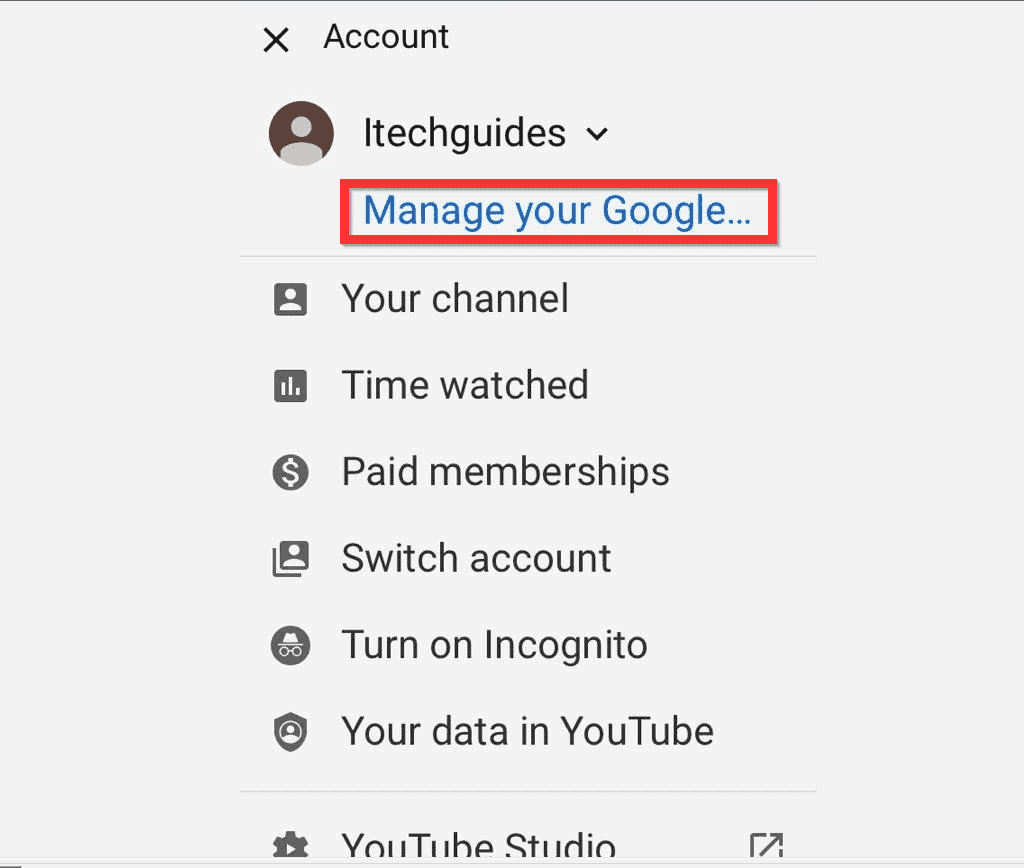
- On the top right of the App, tap your profile icon. Then, from the displayed options, tap Manage your Google Accounts.
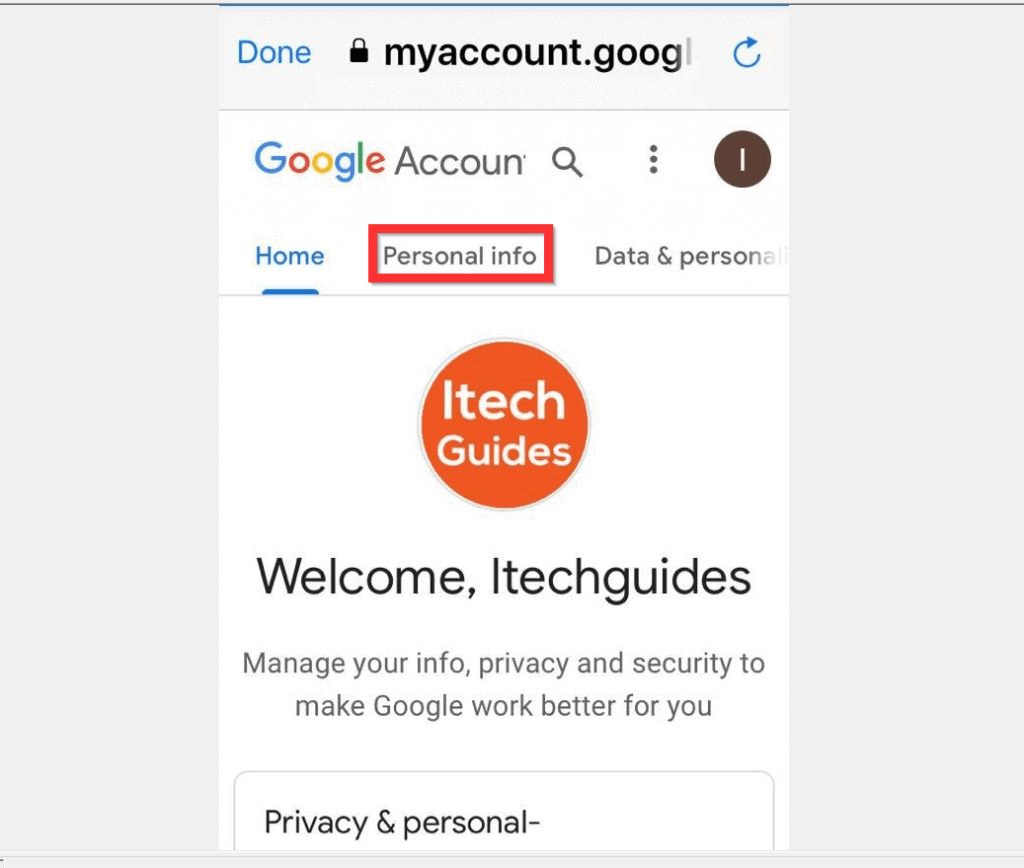
- When your Google Accounts page opens, tap Personal info tab.
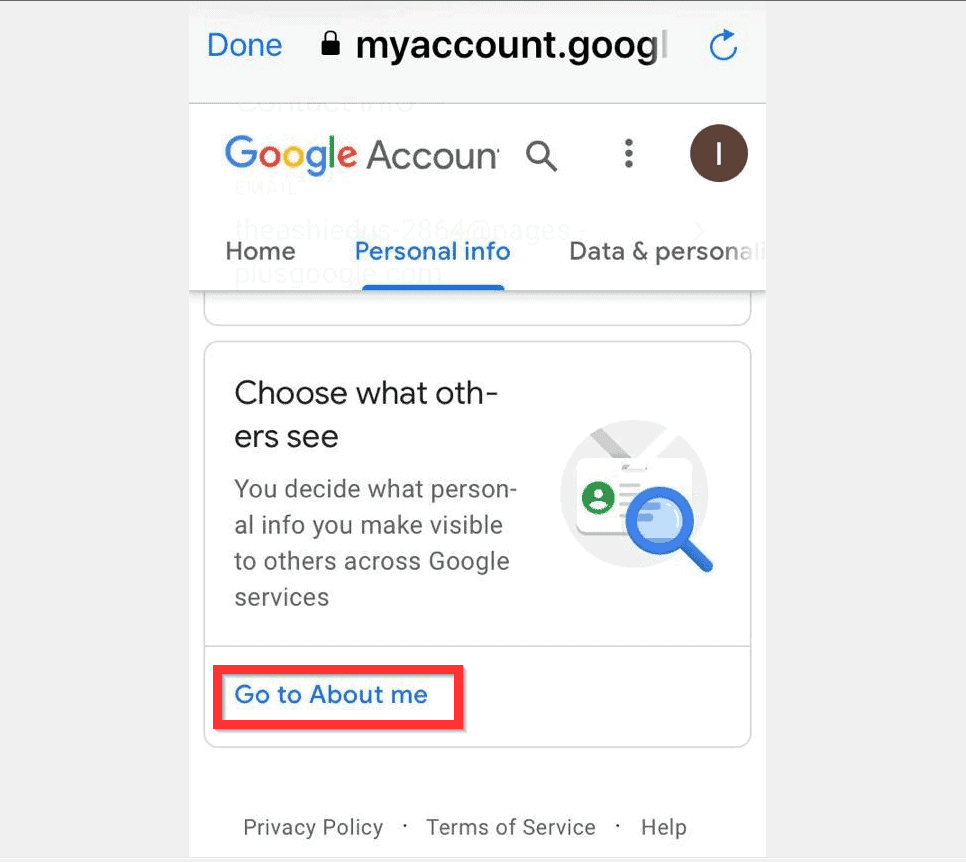
- Then, on the Personal info scroll down to the bottom of the page and tap Go to About me.
- The About me page will open with Choose a single profile picture pop up. You may select an existing picture or scroll down and tap Choose a new picture. Then, tap CONTINUE.

- You will then be offered the option to either Upload photo or use an existing photo.

- Finally, to change YouTube profile picture from the iPhone App, just above the new picture you just uploaded or selected, tap DONE. Then, on the left side of aboutme.google.com, tap Done.


I hope that you found it helpful. If it was helpful, click on “Yes” beside the “Was this page helpful” question below.
You may also express your thoughts and opinions by using the “Leave a Comment” form at the bottom of this page.
Finally, for more music and video streaming Itechguides, visit our Music & Video Streaming page.
Quick Recap
Also popular on Amazon

- BRIGHTER AND SOFTER: This ringlight features an large 10.5" lamp head with 120 pieces LED, and its impressively curved design sets it apart from other flat lamp shades. We've enhanced the lampshade with an upgraded, thicker coating to provide brighter illumination while avoiding dazzling problems. Our design is more user-friendly than ordinary flat lampshades and will not produce glare even after long hours of use, effectively protecting your eyes!
- ADJUSTABLE LIGHTING: This halo light with stand features a dimmable function with 3 color temperatures and 10 brightness levels (3000K-6500K), allowing you to customize the lighting to your specific needs. It's great for selfie, photography, makeup, live streaming, video recording, YouTube, TikTok, and more. Whether you're conducting a virtual class, art class, work meeting, or video conference at home, or in the office, this fill light provides professional-quality lighting for all your needs
- HEIGHT ADJUSTABLE: The height of this circle light can be extended from 23 inches to 31 inches (measured from the base to the top of the head), allowing you to easily adjust the height to fit your laptop, computer monitor, or webcam. Plus, the flexible lamp head can be freely adjusted 180 degrees back and forth, so you can easily find the perfect lighting angle and llumination for your task.
- STABLE BASE & FLEXIBLE PHONE HOLDER: Compatible with any smartphone, it come with a 360° bendable metal hose that securely holds your cell phone in place. Say goodbye to shaky videos and unstable photos! Our anti-scratch metal base is much more stable than ring lights with clamp and can fit on any table without taking up too much space.
- EXCELLENT LIGHTING: This LED desktop lamp has a high colour rendering index (CRI) of over 95 to ensure accurate colour reproduction, making your photos and videos look vibrant and lifelike. Whether you're a professional social media creator, a Youtube starter or just want to improve your video calls and selfies, this ring lamp delivers exceptional lighting performance.
Also popular on Amazon

- 【Perfect Lighting for Video, Makeup & Streaming】3 color modes (warm, natural, cool) with 10 brightness levels let you easily create soft, even lighting for TikTok, Zoom calls, makeup, and video recording. No harsh shadows, no overexposure—just clear, flattering light every time.
- 【50" Adjustable Tripod – Desk to Full Height】Extendable from 15.7" to 50", perfect for desk use, standing filming, or full-body shots. One setup for video calls, live streaming, selfies, and content creation.
- 【360° Rotation for Any Shooting Angle】Flexible phone holder and adjustable head allow portrait, landscape, overhead, and low-angle shots—ideal for creators, vloggers, and everyday use.
- 【Wireless Remote – Shoot Hands-Free】Includes wireless remote to take photos or videos up to 30ft away. Perfect for solo creators, group shots, and remote recording—no need to touch your phone.
- 【All-in-One Ring Light Kit for Phone Creators】Includes ring light, tripod stand, phone holder, and remote. Compatible with iPhone & Android devices—perfect for TikTok, YouTube, live streaming, Zoom meetings, and everyday use.
Also popular on Amazon

- 【MULTIPLE COLOR TEMPERATURE & ADJUSTABLE BRIGHTNESS】There are 3 Color temperatures (2800K, 4800K & 6500K) which offer different lighting atmosphere; This Studio Light is equipped with 356 Led beads which offers a stable and ample output of 15W. Features a high CRI of 97+ for precise color rendering. Adjust the brightness in a range of 10 to 100% with button up and down on remote to meet different photography circumstances, offering extra lighting for your works.
- 【LIGHT PANEL & POWER CABLE】The 10” (25.5 cm) x 7.8” (19.8 cm) LED light panel with compact design allows you to carry around conveniently with durable storage bag. Thickened light shell works a diffusion, making the lighting more softer. Ideal USB port for powering the device with 5V, 2A DC wall charger(not include) or power bank. Comes with USB-C adapters that allows you to power the device with cell phone or laptop.
- 【HEIGHT ADJUSTABLE TRIPOD】The tripod of the video light adopts durable but lightweight aluminum with powder sprayed layer, looks chic and classic. The light stand can be raised up to 60”. Folded size 17", perfect to store and carry. Adjust the height flexibly with 3 screw knobs loosen and tighten. Attach and detach the light panel easily with the 1/4" threads on the top of the tripod. Loosen the screw on side to rotate the light panel angle in range of 180°, tighten it when get suitable angle.
- 【WIDE APPLICATION】Essential equipment for Photo Studio, Video Recording, Photography, Low Angle Close Shooting, Portrait, Live Stream, Vlogging taking, Youtube Podcast Applications. Light weight and durable design allow you to carry around conveniently and move easily.
- 【Package List & Customer Service】There will be 2 LED studio light panels with cable. adjustable tripod stand for each light panel, 1 user manual, 1 storage bag, 2 USB-C adapters. Whatever issues you meet during the usage or any defects arise, rest assured that we are here to assist you.
Also popular on Amazon

- New RGB Dynamic Modes and 3 Normal Colors: Selfie ring light has warm light,white light,daylight,red,yellow,green,sky blue,blue,purple,RGB light provide 39 dynamic, breathing and illusory color mode
- Precise Control: Our light ring features exclusive stepless speed regulation and dimming. Whether you're in color dynamic mode or adjusting the warmth of the light in conventional lighting, you have complete control. It offers stepless brightness adjustment from 1% to 100% for both modes.
- Patented Premium Tripod: This tripod for the ring light reaches a maximum height of 62" and an overall height of up to 72". Crafted from top-quality aluminum alloy and metal, it stands strong and sturdy. Its compact design ensures easy portability, and locking it in place takes just a second. It comes complete with a phone holder that can stretch up to 3.3", accommodating a wide range of smartphones.
- Versatility at Its Best: Our ring light with stand and phone holder is incredibly versatile. It's perfect for makeup, photography, painting, dancing, taking pictures, live streaming, and even serves as a fill light, floor lamp, or zoom light. The tripod features a 1/4" screw thread that doubles as a camera tripod.
- USB-Powered Convenience: Powering the ring light with a stand is a breeze via USB ports. It's compatible with devices that support USB ports. For optimal performance, we recommend using an adapter or wall outlet that delivers a 5V/3A current, ensuring the Weilisi light operates at its maximum power mode.
Popular on Amazon

- 【12-INCH RING LIGHT WITH 240 LEDS】Equipped with 240 high-efficiency LEDs, this 10W ring light delivers bright, stable and evenly diffused illumination. The soft light helps reduce harsh shadows and improves facial and product details for video calls, live streaming, makeup, photography and content creation.
- 【TOUCH CONTROLS, 5 COLOR MODES & 10 BRIGHTNESS LEVELS】Adjust power, color temperature and brightness directly from the responsive touch-control panel. Choose from 5 color modes ranging from 3000K warm light to 6000K cool light and 10 brightness levels from 10% to 100% for makeup, streaming, tutorials, video calls and product shoots.
- 【62-INCH TRIPOD & HANDHELD SELFIE STICK】The adjustable tripod extends up to 62 inches and quickly converts into a handheld selfie stick for flexible filming. Its lightweight yet stable design supports desktop recording, standing videos, selfies, group photos, travel content and overhead shooting.
- 【360° ADJUSTABLE FOR PORTRAIT, LANDSCAPE & OVERHEAD SHOTS】The rotatable light head and adjustable phone holder make it easy to switch between portrait, landscape, low-angle and overhead views. Position your phone and lighting at a comfortable angle for TikTok, YouTube, livestreaming, tutorials, makeup and video calls.
- 【COMPLETE USB-POWERED CREATOR KIT】 Includes a 12-inch LED ring light, 62-inch tripod stand, phone holder, Bluetooth remote shutter and USB power cable. This all-in-one setup is easy to assemble, store and move between bedrooms, offices, studios and travel locations for everyday content creation.
Product prices and availability are accurate as of the date/time indicated and are subject to change. Any price and availability information displayed on Amazon at the time of purchase will apply.
Independent reader supportYour contribution helps us test, update, and keep practical guides available for everyone.


