

iTechGuides is reader-supported. When you buy through links on our site, we may earn an affiliate commission. As an Amazon Associate I earn from qualifying purchases. Learn more
This Itechguide teaches you how to change time on Windows 10. The guide covers steps for 4 methods to change time on Windows 10.
Option 1: Change Time from Date & Time Settings
- Right-click the Windows 10 Start menu and click Settings.

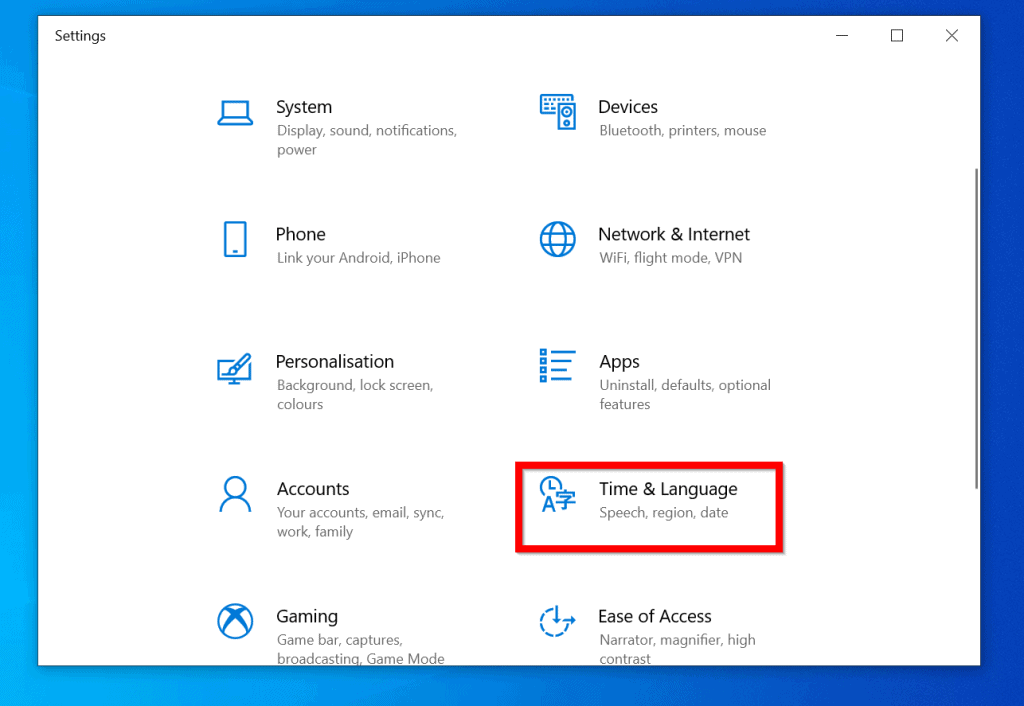
- On the Windows Settings screen, click Time & Language.
- When Date & time settings open, ensure that the Set the time automatically button is On and the Set the time zone automatically button is turned Off.
- Finally, scroll down to Time zone and set the correct time zone for your region. Then, beneath Synchronise your clock, click Sync now.
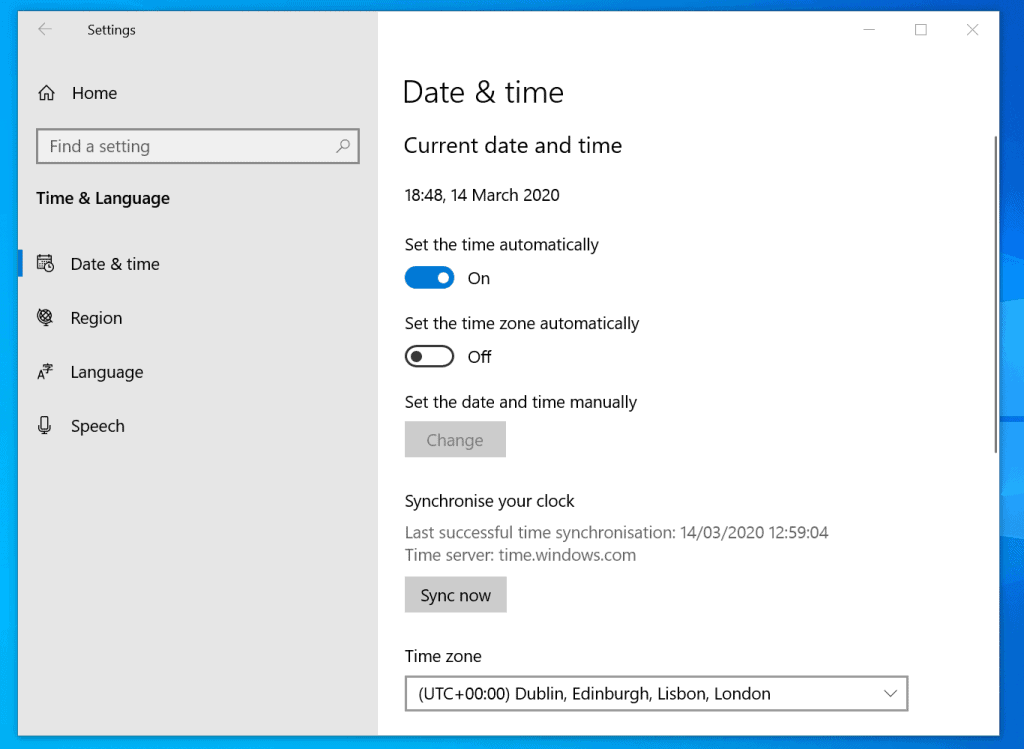
- If your time is not set correctly automatically, toggle the Set the time automatically button from On to Off. Then, beneath Set the date and time manually, click Change.

- Finally, on the Change the date and time pop-up window set the correct date and time. Then, on the bottom right of the pop-up, click Change.

Option 2: Change Time from Control Panel
- Type control panel in the Windows 10 search. Then, from the search result, click Control Panel.
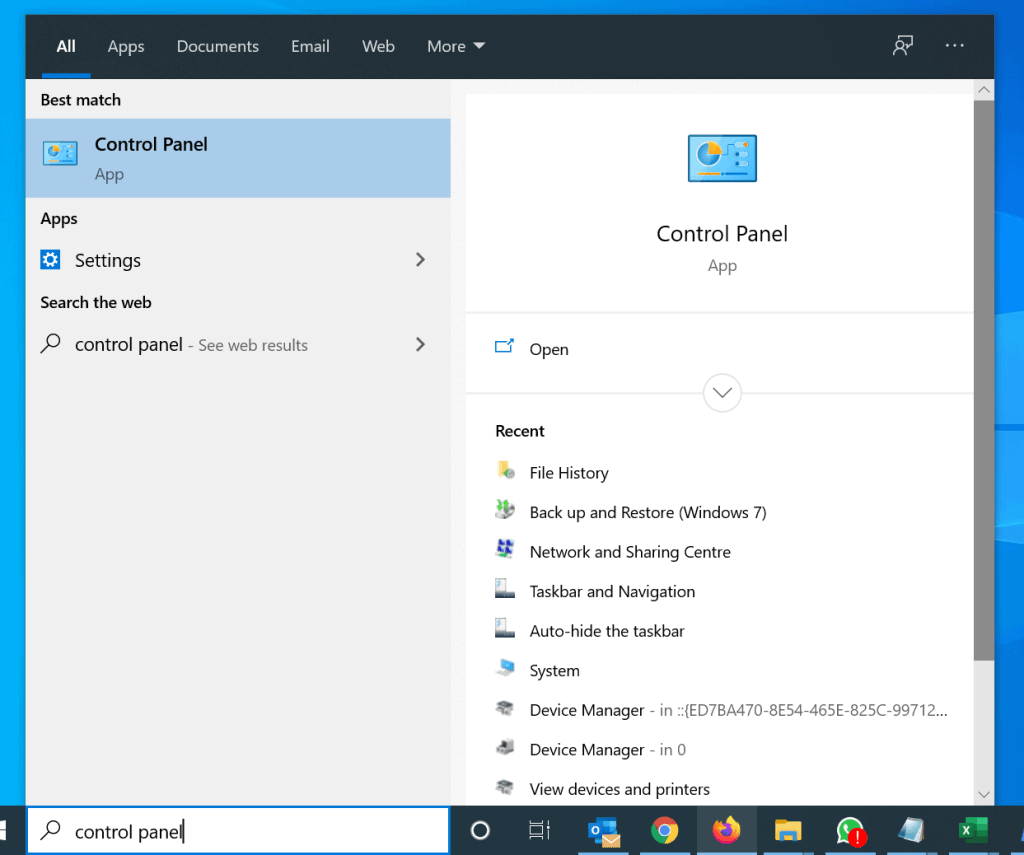
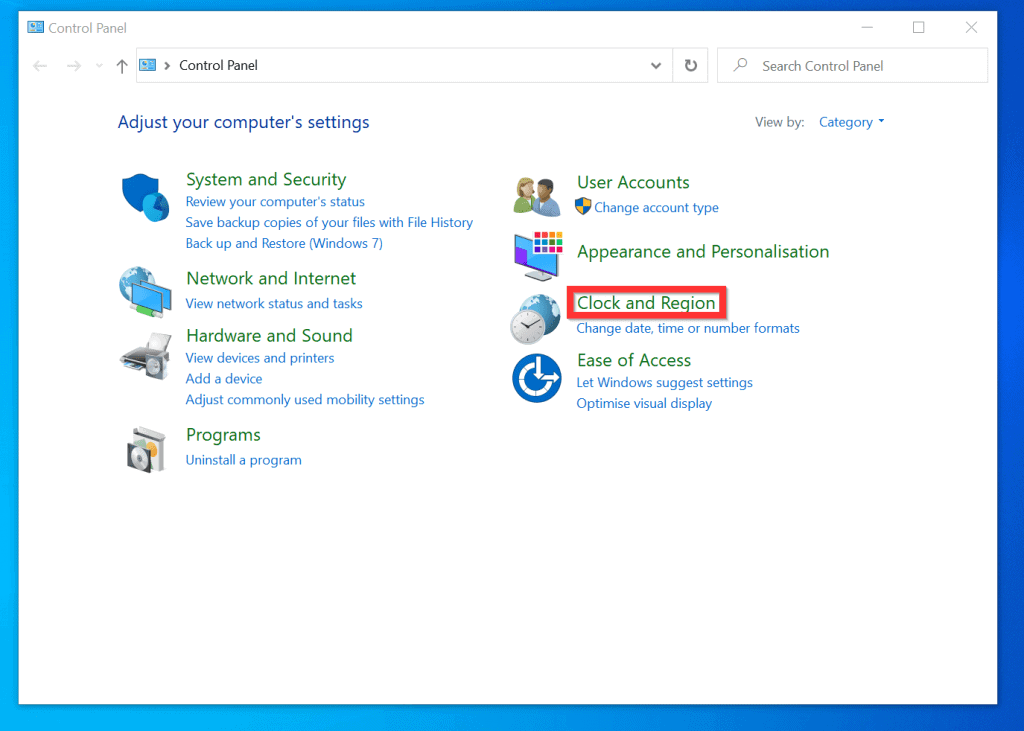
- When Control Panel opens, on the top right, if View by is not set to Category, click the drop-down and select Category.

- Then, click Clock and Region.
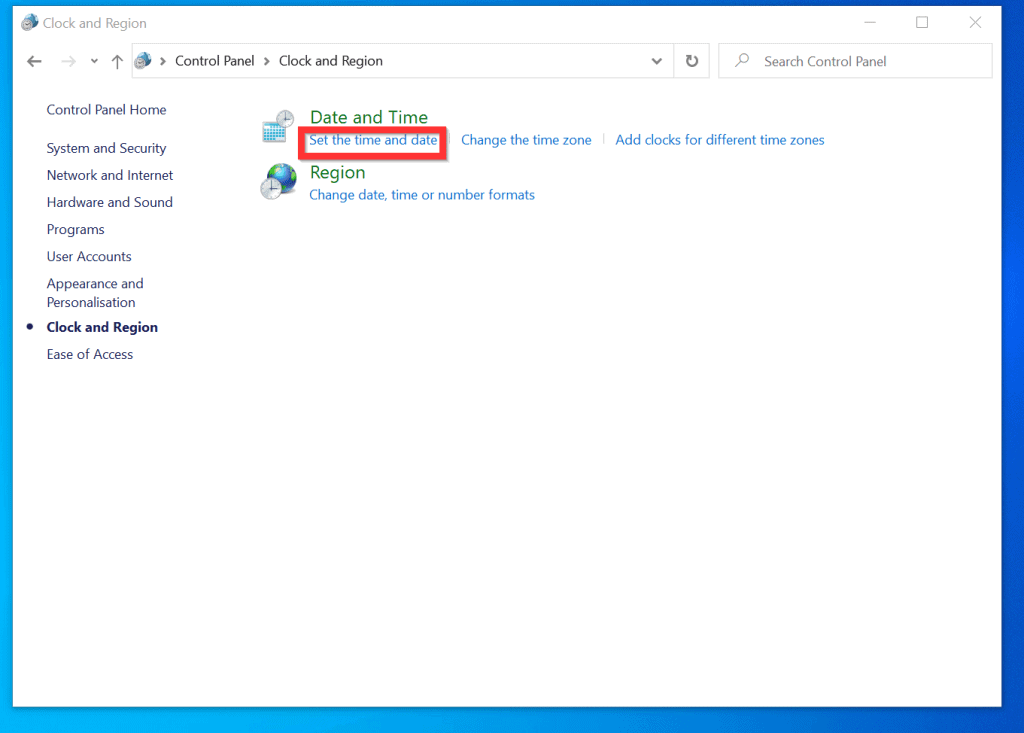
- When Clock and Region opens, beneath Date and Time, click Set the time and date.
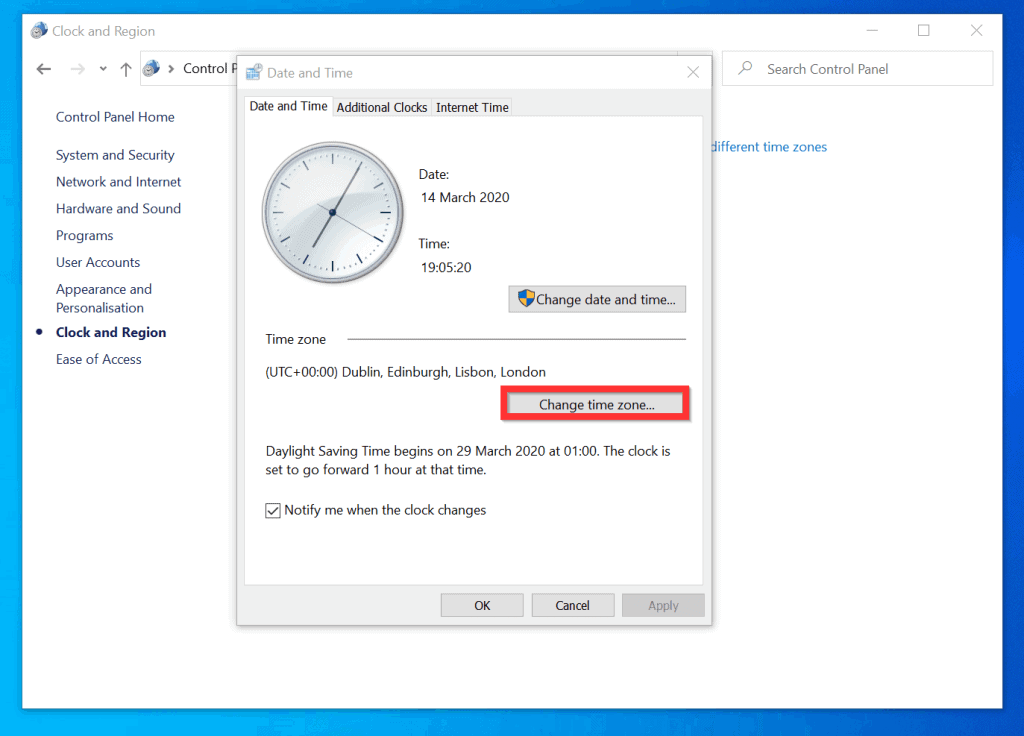
- On Date and Time setting screen, confirm that your time zone is set correctly. If your time zone is wrong, click Change time zone.
- Then, select the correct time zone and click OK.
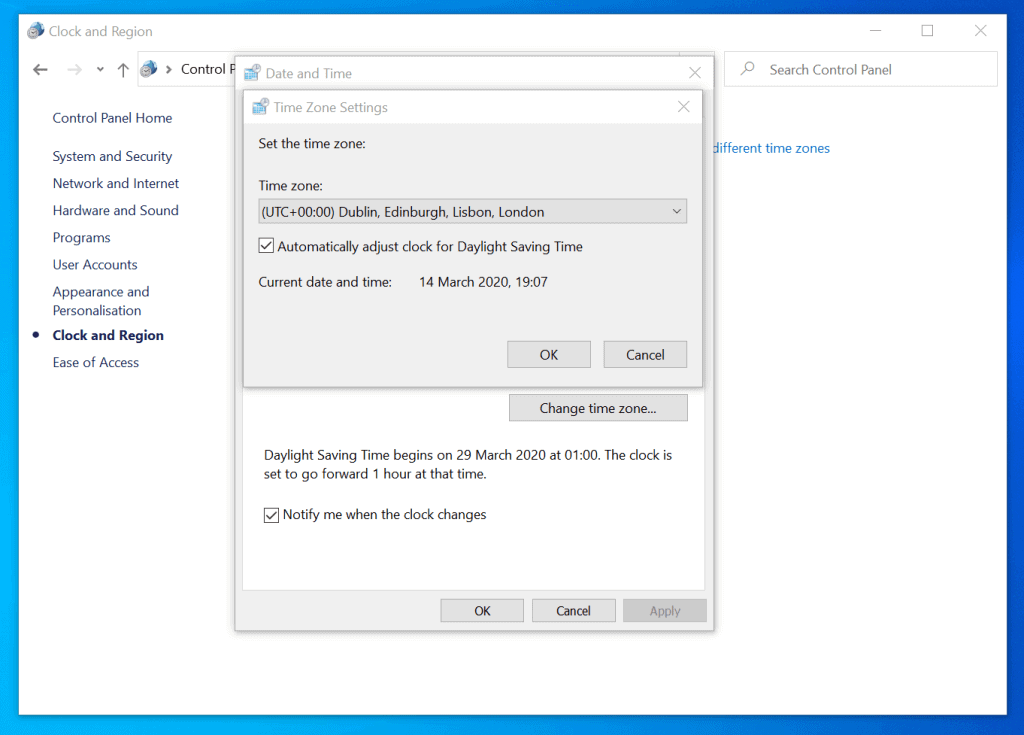
- Once you select the correct time zone, the time on your Windows 10 will be set correctly.
- If the time is still wrong, on the Date and Time setting, click Change date and time.
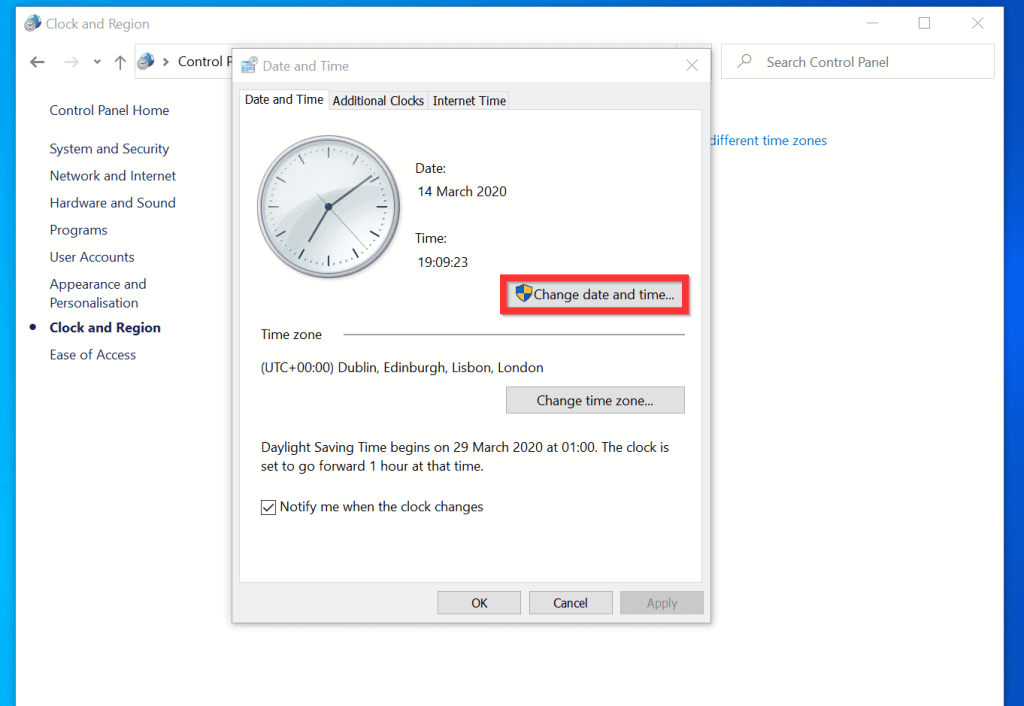
- Finally, to change time on Windows 10 manually, on the Date and Time Settings screen, set the correct time and click OK.

Option 3: Adjust Time with Command Prompt
- Type command prompt in the search box. Then, from the search result, right-click Command Prompt and select Run as administrator.
- If you receive a User Account Control confirmation, click Yes.
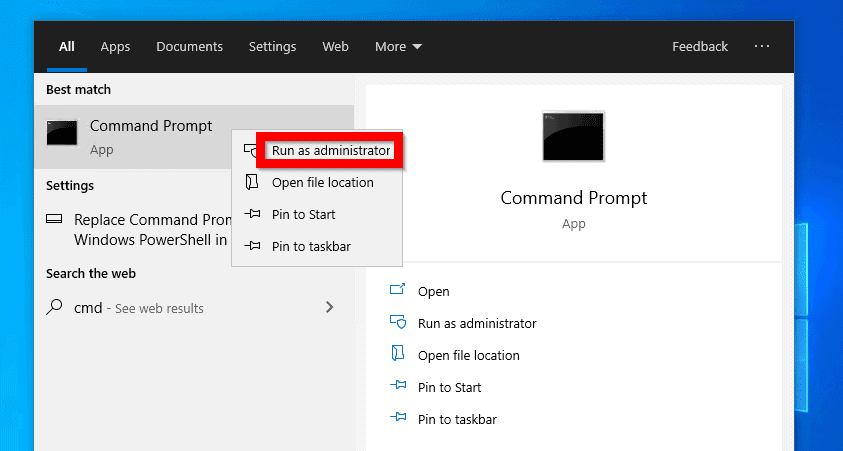
- On the command prompt, type the command below and press enter.
time
- The command will display the current time. Then, it will display a prompt for you to enter the new time. Enter the time in the format of the displayed current time and press enter.
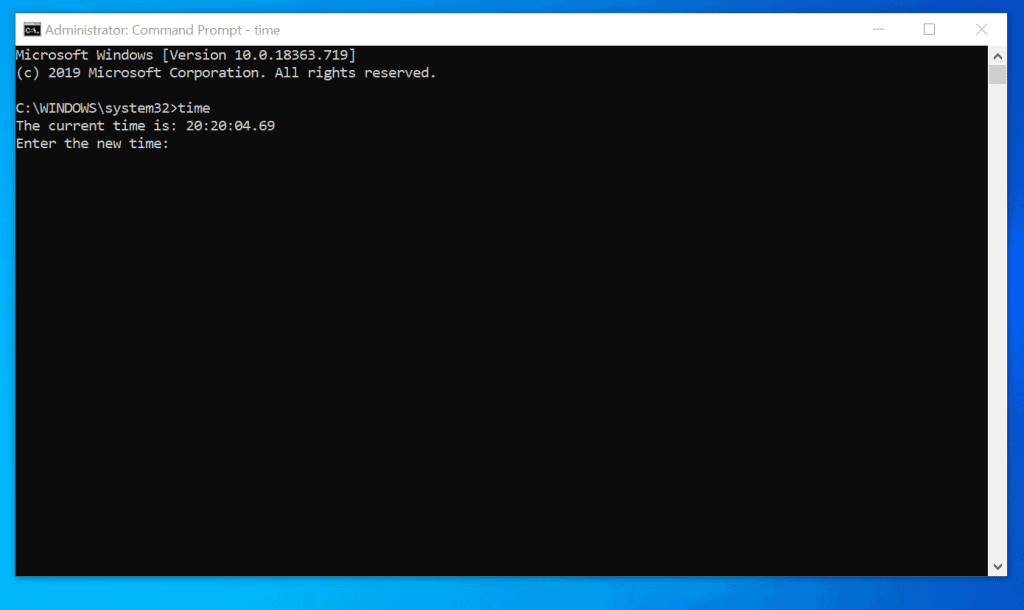
- For example, to change the time to 8:30 pm, enter 20:30 and press enter.

Option 4: Change Time with PowerShell
- Type powershell in the Windows 10 search box. Then, beneath Windows PowerShell, click Run as Administrator.
- If you receive a User Account Control confirmation prompt, click Yes.

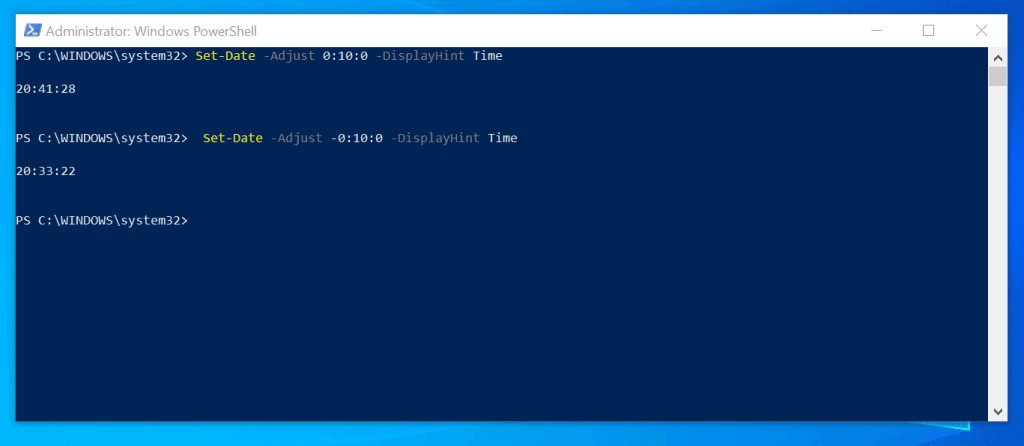
- On PowerShell prompt, use the Set-Date command to change time on Windows 10. Below are some examples of how you can use the Set-Date command:
To set the current time and add 10 minutes, type this command and press enter
Set-Date -Adjust 0:10:0 -DisplayHint Time
The command will execute and display the new time. The time on your PC will change immediately.

To set the time 10 minutes behind the current time, type the command below and press enter.
The Tool Desk
Outbyte PC Repair FREERepair Windows errors before they cause bigger problemsFix Now →Outbyte Driver Updater FREEScan for outdated or missing drivers - takes under a minuteDriver Scan →Set-Date -Adjust -0:10:0 -DisplayHint Time
The command will execute and display the current time.
Popular on Amazon
- Atomic Clock Digital - The clock has a built-in receiver that automatically synchronizes itself with WWVB radio broadcast, which will set and update time automatically every midnight, no need to set manually. It has four time zones selectable: EST, PST, MST, CST.
- Digital Wall Clock Battery Operated - This digital clock is supported by 3xAAA battery (Not included). No wires make it can be placed anywhere; and the low battery symbol reminds you to replace the battery in time to avoid getting the wrong time due to low power.
- Digital Wall Clock Large Display - The LCD screen measures 6.2 in x 3.7 in and it displays time, indoor temperature, day and date. Each section is showed separately, allows you to read the content easily and quickly.
- Atomic Clock with Auto DST - With DST on, the time would go forward or backward one hour automatically in daylight saving time, no worry about time changing on that day. If for no need, it could also be turned off, then “AUTO DST” disappears from screen.
- Digital Alarm Clock - The alarm could be turned on or off according to your need, just click the button to set. When alarm is set on, there is a bell icon staying on screen. The icon will disappear if alarm is set off. When alarm goes off, just click any button to stop it on the day.
It is very easy to change time on Windows 10! I hope this guide has helped you learn how to change time on Windows 10. If so, click on “Yes” beside the “Was this page helpful” question below.
You may also express your thoughts and opinions by using the “Leave a Comment” form at the bottom of this page.
Also popular on Amazon
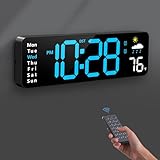
- 【Large LED Display】The 11" corded wall clock features full-screen time display and large bright numbers, easy to read. Here are all the features that you might expect for a digital wall clock: Time, Date, Week, Temp or Humidity. ATTENTION: Must be plugged in to work. Not battery operated.
- 【Auto Dimming】You can manually adjust the brightness by 10-levels. The digital wall clock has an auto dimming function; When turned on, the brightness will auto decrease at night, not to disturb your sleep.
- 【Time & Calendar Alternation】The digital wall clock's time and calendar can be set to alternating display mode.
- 【Memory Function】The wall clock also has a time memory function, no need to reset after power outage (2*AAA batteries need to be installed in advance).
- 【Remote Control & DST】All the settings and operations of the big wall clock do not need to be removed, but can be easily done with the remote control(2*AAA batteries need to be installed). You can easily change DST time in March and November using the remote.
Finally, for more Windows 10 Itechguides, visit our Windows How-To page.
What’s actually slowing this PC down?
Pick the symptom - the matching free tool is one click away.
Quick Recap
Also popular on Amazon

- [9.7" big digital clock] The white wall clock can be used as a desktop clock alarm for bedroom with desktop bracket, and also may be widely used in Living Room, Kitchen, Gym, Hotel, Office, Meeting Room, Classroom and so on. It is a super nice and cool unique decorative clock for wall and bedside alarm clock, size: 9.7x3.9x0.9 IN (142 g), big enough, easy to read.
- [Night Light Wall Clock] The modern digital clock shows the date, time, temperature(℃/℉) and adjustable night light, this cool wall clock was built-in light sensor with 8 levels of automatic dimming according to the ambient light, beside you can also adjust the brightness manually by the remote control with 3 levels dimming (High/Medium/Low) as your needs, it is clear and big enough to be visible at night or long distance.
- [with Remote Control] Just set this digital LED clock by a remote control to adjust the 12/24 hrs datetime, brightness/Auto brightness, alarm clock, easy to use. (Included CR2025 button battery is for the remote control)
- [Cute Alarm Clock with Snooze] This large number digital clock also got the alarm function with snooze, just set the alarm time by the remote control easily, the alarm will ring for 1 min, and then it will allow 5 mins snooze time (3 times) and ring again.
- [Power Supply] -The 3D digital clock is only powered by AC adapter (not included): 5V/1A. - 3 m USB power cable (included). -Built-in super farad capacitor: only used for time memory with approx. 2 hrs after power failure, not for regular power supply.
Also popular on Amazon

- Small & Compact Plug-in Alarm Clock for Every Room: Perfect for modern homes ditching cable boxes—place it under your living room TV to replace the lost clock display, or use it as a sleek bedside alarm in the bedroom. Also ideal for home offices, gyms, or dorm desks.
- 3-in-1 Multispace Display: Stay organized with a bright, easy-to-read display showing time, date, and indoor temperature—no more switching apps or devices.Its compact design fits seamlessly into any space, keeping you on schedule whether you’re streaming, working, or sweating.
- Adjustable Brightness for Day & Night: Adjust screen brightness in 4 levels+OFF with a single touch of the top-mounted button—no confusing menus. Keep it dim for a distraction-free bedroom at night or boost it for clear visibility in bright gyms or sunlit home offices.
- Plug-in Power Clock: This alarm runs on AC power (cable included), ensuring it’s always on and accurate.
- Sleek, User-Friendly Design:Designed with simplicity in mind: a single top button controls brightness, while the clean, modern look complements any decor—from minimalist living rooms to industrial-style home gyms. Its intuitive interface works for all ages.
Also popular on Amazon
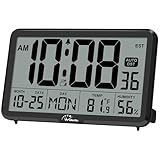
- Digital Wall Clocks, with Temperature and Humidity - These digital wall clocks are equipped with sensors help you master the most accurate indoor temperature and humidity and create the most comfortable indoor environment.
- Wall Clocks Battery Operated, Autoset: Once you insert three AA batteries(Not included), it will automatically set the correct time. You just need to select the time zone. It also has a Memory BATTERY in case of a power outage, in which case it will retain the correct time and date when the power returns.(non-atomic clock)
- Digital Clock Large Display: Wall clock or table clock with large number display, this desk alarm clock with 8 minutes snooze has been designed with absolute simplicity in mind, so you can operate and read it without any more ado
- Desk Clock, Accurate Date and Time: The wall clock set calendar, timer and alarm clock in one, accurate dates and times will keep you from missing important meetings and appointments
- Wall Clock for Livingroom Decor: 12 or 24 Hours display formats; 8 time zones to choose and an option to turn daylight savings time on or off; temperature display in Celsius or Fahrenheit; accurate date and time. These digital wall clocks work well for office, bathroom or kitchen decor.(no backlight)
Product prices and availability are accurate as of the date/time indicated and are subject to change. Any price and availability information displayed on Amazon at the time of purchase will apply.
Independent reader supportYour contribution helps us test, update, and keep practical guides available for everyone.


