
Recommended: Update Every Outdated Driver on Your PC in One Scan - Free →Recommended: Fix Windows Errors and Clear Junk Files in Minutes - Free Scan →Recommended: Crashes or Glitches? A Free Driver Scan Usually Finds the Culprit →
Special offer. See more information about Outbyte and uninstall instructions. Please review EULA and Privacy policy.
iTechGuides is reader-supported. When you buy through links on our site, we may earn an affiliate commission. As an Amazon Associate I earn from qualifying purchases. Learn more
This Itechguide teaches you how to change the margins on Google Docs. The guide covers steps to change the margins on Google Docs from a PC.
As at the time of writing this Itechguide, there is no option to add or adjust margins for a Google Docs document from the Apps. The tast can only be performed from a PC (Docs.Google.com).
Here are the steps to change the margins on Google Docs from a PC…
- Open Docs.Google.com from your PC. Then, if you have not yet signed in, you will be prompted to sign in with your Google Account.
- Open the Google Docs document you want to change its margin. You can open a saved document from Google Docs home page or from Google Drive.

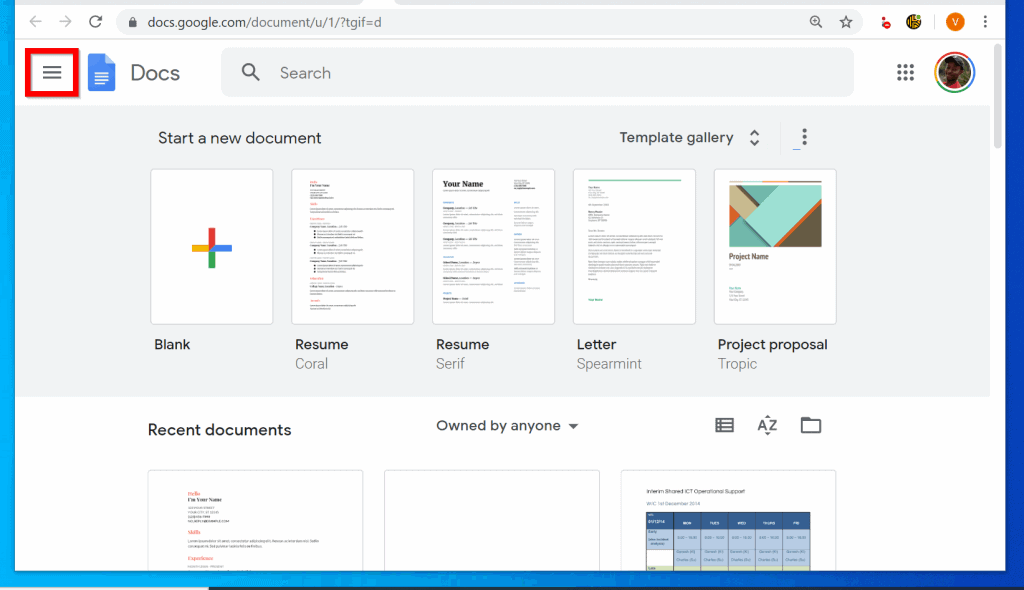
- To access Google Drive from Google Docs home page, on the top left of Google Docs, click the 3 lines. Then select Drive.

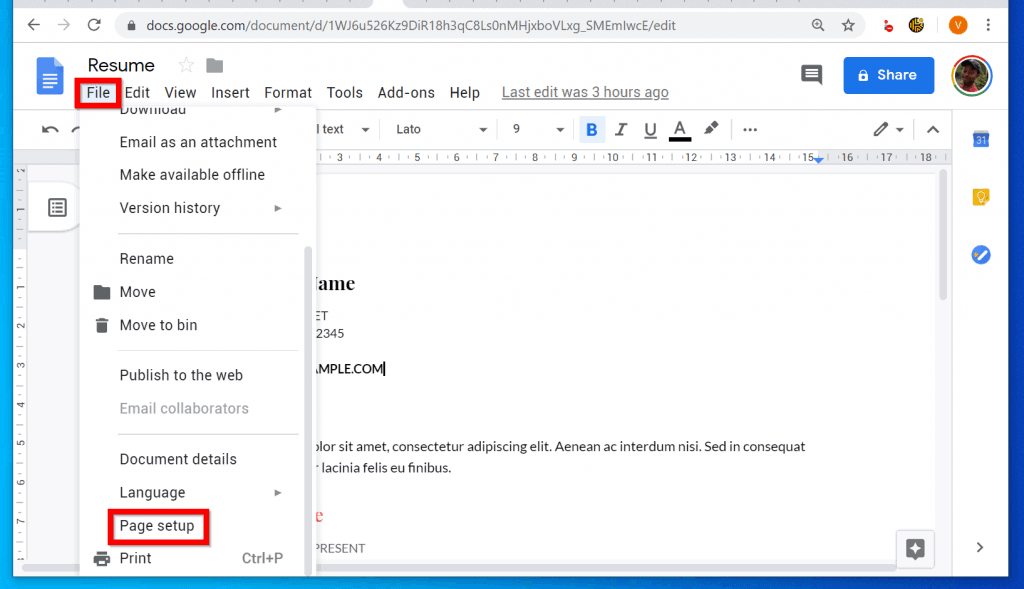
- When the document opens, to change the margins on Google Docs, on the top left of the document, click File. Then scroll down the displayed options and select Page setup. Page setup is just before the last item on the list.
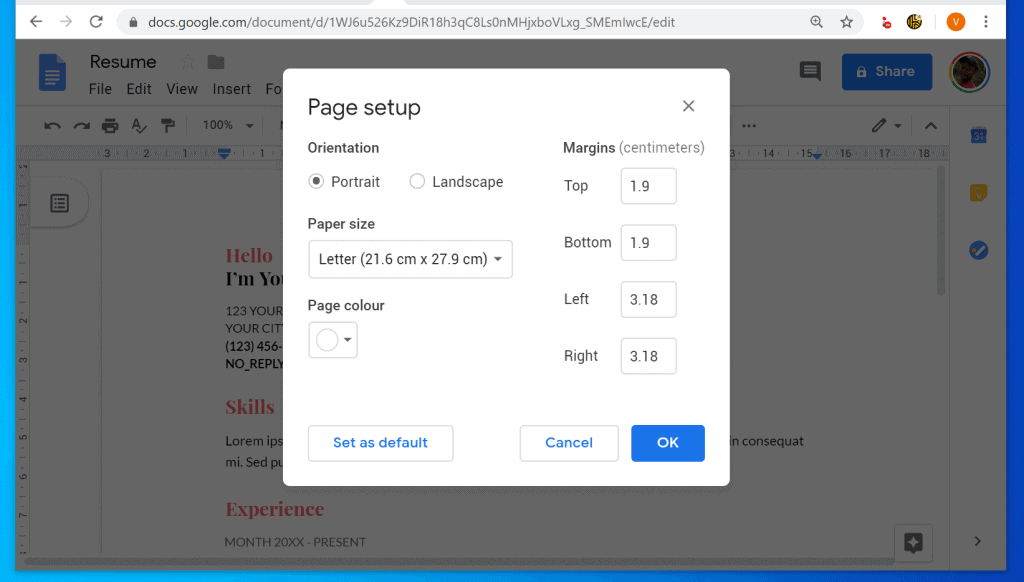
- Finally, at the right pane of Page setup pop window, modify the document’s margins. You can adjust Top, Bottom, Left or Right margins. When you finish, click OK.
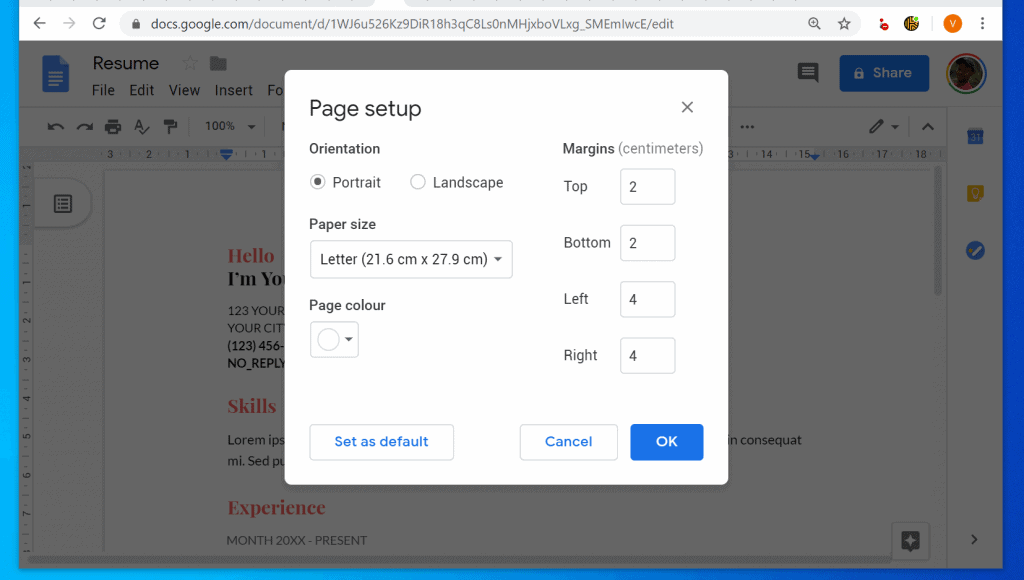
As you can see, from Page setup you can also change the orientation (link opens in a new tab), Paper size or Page color (opens in a new tab).
I hope you found this Itechguide helpful. If you found it helpful, click on “Yes” beside the “Was this page helpful” question below.
Do these 3 things before closing this tab:
1Fix the driver behind crashes, sound loss and screen glitches2Clear out junk files and repair common Windows errors3Scan for outdated or missing drivers - takes under a minuteSpecial offer. See more information about Outbyte and uninstall instructions. Please review EULA and Privacy policy.
You may also express your thoughts and opinions by using the “Leave a Comment” form at the bottom of this page.
Popular on Amazon
Sale

Rena Chris Architectural Scale Ruler: 12" Imperial Aluminum Alloy Metal Architecture Measuring Tools, Engineering Drafting Construction Drawing Blueprints Triangular Architect Scaling Rulers 12 Inches
- 12" triangular architect scale designed to facilitate the drafting and measuring of architectural drawings, such as floor plans, blue Prints, and orthographic projections
- Triangular ruler features 3 sides with 6 different scales, and made from high Impact aluminum, build to last
- Laser etched scales never fading. Architect ruler with enduring laser cut imperial prints for accuracy. They will not wipe or scratch off ever
- Professional grade for accuracy color coded triangular scale for easy and quick selection of the desired scale
- Standard imperial measurements: 1-1/2, 1, 3/4, 3/8, 3/16, 3/32, 1/2, 1/4, 1/8, 3, 16
Finally, for more Google Itechguides, visit our Google How To page.
Quick Recap
Also popular on Amazon

MeasureMate Learning Ruler, Four-Sided Math Tool for Students, Teaching Number Lines, Fraction Line, with Metric and Imperial, Black, 2-Pack
- Dynamic number line to improve math fluency and aid visual learners with integer markings ranging from -15 to 15
- Simplify fraction counting using 0/12 to 12/12 markings, plus additional benchmark fractions (1/6, 1/4, 1/3, 1/2)
- With a standard length of 12" (imperial) and 30.5cm (metric), this educational tool offers the convenience of a typical ruler, along with bonus math advantages!
- Squared-off edges ensure effortless drawing of straight lines to create neat and precise diagrams, graphs, geometric shapes, and more.
Also popular on Amazon

Margin Marker - Gerikt'n Adjustable Marking Gauge, time-Saving Tool for Accurate Marking Along Straight Edges, Internal Corners, architraves, ply Sheets and cabinetry
- Perfect for Carpenters, Joiners and DIY - Ideal for Trim jobs, Jambs, Architraves, Base boards, Cabinets and more
- Ideal for Straight Edges & Corners - Can be set from 0 - 25mm, 0 - 1"
- Compact Design - Easily fits into a pocket, pouch or tool bag
- Saves Time, Accurately - With its adjustable design, this marker helps to reduce time spent marking and also provides a high level of accuracy
- Use for furniture installation, cabinet-making, kitchen units and architraves
Also popular on Amazon
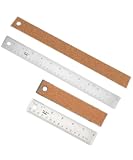
Mr. Pen- Metal Ruler with Non-Slip Cork Back, 2 Pack, 6" and 12" | Straight Edge Ruler with Inch and Centimeters for Home Improvement, College School Supplies, Drafting Tools
- Mr. Pen metal ruler set includes 2 rulers for measuring, drawing straight lines, drafting, crafting, schoolwork, and everyday projects.
- Each ruler features a durable metal construction with a non-slip cork backing that helps keep it steady while protecting work surfaces from scratches.
- The set includes one 6-inch ruler and one 12-inch ruler, both featuring clearly marked inch and centimeter scales for convenient measurement.
- The straight metal edges provide reliable guides for creating clean, precise lines, while the cork backing helps reduce slipping during use.
- Built-in hanging holes allow convenient storage, and the slim design fits easily into desks, toolboxes, art cases, and school bags.
Also popular on Amazon

Mr. Pen- Metal Straight Edge Ruler, 4 pcs, 6", 8", 12", 14" | Stainless Steel Ruler Set, Imperial & Metric Measurements for Drawing, Home, Office, Engineering
- The Set Includes 4 Steel Rulers In 4 Different Sizes: 14 Inch, 12 Inch, 8 Inch And 6 Inch
- Made From High Impact 1/32 Inch (0.9mm) Thick Stainless Steel
- Inch And cm Measurements, Etched With Marking Up To 1/64 Inch Measurements And 1/20 Centimeter Measurements
- Inch To mm Conversion Table In The Back Of The Rulers
- Accurate Markings, Perfect For Schools, Offices, Home Schools, Architects, And Engineers
Product prices and availability are accurate as of the date/time indicated and are subject to change. Any price and availability information displayed on Amazon at the time of purchase will apply. Prices as of November 8, 2026 8:00 am GMT.
Independent reader supportYour contribution helps us test, update, and keep practical guides available for everyone.