
PC Slower Than It Used to Be?
A free scan shows the junk files, broken settings and background clutter dragging Windows down - then fixes them in one click.Free scan · Windows 10 & 11Outdated Drivers Are Slowing You Down
One free scan finds every outdated or missing driver and matches the right update for your exact hardware.Free scan · exact hardware matchiTechGuides is reader-supported. When you buy through links on our site, we may earn an affiliate commission. As an Amazon Associate I earn from qualifying purchases. Learn more
This Itechguide teaches you how to add birthdays to Google Calendar. The guide covers steps to add birthdays to Google Calendar from a PC, Android or iPhone.
Option 1: Add Birthdays from a PC
As I said in the introduction, this is a 2-step process…
Step 1: Add a New Contact and include the Birthday
- Open Contacts.Google.com from a browser on your PC. Then, sign in with your Google email and password.

- On the top left of Google Contacts, click Create contact.

- When the Create new contact pop up opens, enter the contact’s basic details like First and Last names, email, etc. Then, at the bottom left of the pop up, click Show more. The pop up window will expand to show more fields.

- Scroll down to Birthday and add the contact’s birthday. Note the format of the birthday – mine is in dd/mm/yyyy. So if the person was born 10th May 1999, I will add 10/05/1999.

- Finally, to add birthdays to google calendar, at the bottom right of the Create new contact pop up, click Save.
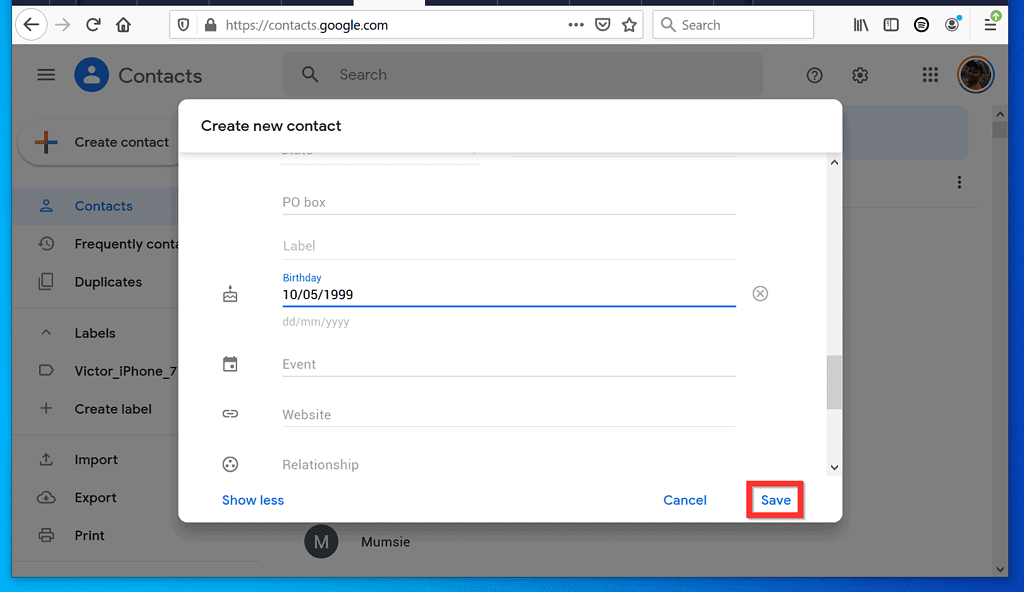
- You will receive a confirmation. To close the confirmation pop up, click the x on the top right.

Step 2: Ensure that “Birthdays” is Enabled in Google Calendar
The final step to add birthdays to Google Calendar is to check that “Birthdays” is enabled. Here are the steps…
- Open Calendar.Google.com from a browser in your PC.
- Then, on the left pane of Google Calendar, beneath My calendars, ensure that the check box beside Birthdays is checked.

- Finally, to confirm that the birthday was added to Google Calendar, scroll to the person’s birth date. The birthday should be listed.
- In this example, I added 10 May 1999 as the new contact’s birthday. If I check this date on my calendar, the contact’s name should be listed.

Option 2: Add Birthdays from Android or iPhone
Step 1: Add a New Contact and include the Birthday
The first step is to add a contact that include birthday. Here are the steps…
Popular on Amazon

- 2-in-1 WHITEBOARD CALENDAR & CORKBOARD - This wall dry erase calendar can be used as a monthly and weekly planner board, memo board, bulletin board or presentation board. The bottom cork board is perfect for pinning notes, pictures, to-do lists and class schedules.
- 2 MOUNTING OPTIONS - You can hang the dry erase board calendar on the wall or mount it to the wall with the included screws.
- QUALITY CALENDAR WHITEBOARD - This dry erase board is made of high quality materials, the wooden frame is sturdy, easy to write and erase, the lines won't fade, and is designed for long-term use.
- WIDE RANGE OF APPLICATIONS - Our wall whiteboard calendars with elegant and rustic wood frames are perfect for kitchens, cubicles, offices, dorm rooms, cafes, dining rooms, bedrooms, living rooms, classrooms, and more.
- CONTAINS EVERYTHING YOU NEED TO GET STARTED - This white board calendar dry erase set includes a 17x13 inch presentation board, 8 markers, 4 push pins, 4 magnets, and 1 eraser. Enjoy the dry erase calendar and cork board combo as soon as you receive it!
- Open Contacts.Google.com from a browser on your Android phone or iPhone.


- At the bottom right of Google Contacts, tap Create new contact (+ sign).

- Then, on the Create new contact page, enter the person’s basic information. On the bottom left of the page, tap Show more. The form will expand to display more fields.

- Scroll down to Birthday and add a the person’s birthday. Note the format of the birthday – mine is in the dd/mm/yyyy format. So to add 2nd October 1980, I will type 02/10/1980.

- After adding all the new contact’s details including birthday (required), at the bottom right of the page, tap Save.

- Once the new contact is saved successfully, you will receive a confirmation page.

Step 2: Ensure that “Birthdays” is Enabled in Google Calendar
Once you have added a new contact that includes a birthday, you can view it in Google Calendar. But first, you need to check that “Birthdays” is enabled. Here are the steps..
- Open Google Calendar App on your Android phone or iPhone.

- Then, tap the 3 lines on the top left of the Calendar App. A list of options will be displayed.

- Scroll down the displayed options to the email address you used to add the new contact. Then, confirm that the check box beside Birthdays is checked.

- Finally, to confirm that the birthday was successfully added, go to the date for the person’s birthday. The person’s name will be displayed on the birthday. That is the name displayed in October 2nd!

It is this easy to add birthdays to Google Calendar! I hope you found this guide helpful. If you did, click on “Yes” beside the “Was this page helpful” question below.
Also popular on Amazon

- Keep Your Schedule in Check: This 21 month calendar, running from April 2026 to December 2027, measures 14.7" x 11.5" and gives you the room to plan out your days with ease. The spacious boxes and notes section allow you to stay organized, while your 2026 wall calendar makes it easy to mark important dates and holidays.
- Smart Organization with Monthly Planning: Designed with large lined blocks, this monthly calendar allows you to efficiently manage your daily appointments and tasks. Each page also includes a to-do list and notes section on the right, creating a versatile space to track goals and keep additional details in order. It’s an elegant way to stay on top of your monthly schedule with ease.
- Seamless Spiral Calendar Experience: Designed with Twin-Wire Binding, this spiral calendar offers a smooth, hassle-free way to turn pages, while its layout remains flat as a hanging calendar. Moving between months is effortless, allowing you to stay on top of your plans with ease and giving you a quick glance at your schedule whenever you need it.
- Elegant Floral Designs: Each month features exquisite floral illustrations in different shades, this decorative calendar brings both function and style to your walls. It’s perfect for keeping life organized while adding color to kitchens, bedrooms, or workspaces.
- High-Quality Paper: Crafted from thick, premium 120gsm paper, this calendar is built to endure the rigors of daily use. Whether you're jotting down notes, marking important events, or tracking significant dates, its sturdy construction ensures that it will stand the test of time. Designed for durability and elegance, it’s your trusted companion for efficient planning all year long, gracefully handling every scribble, note, and mark with ease.
You may also express your thoughts and opinions by using the “Leave a Comment” form at the bottom of this page.
The Tool Desk
Outbyte PC Repair FREEClear out junk files and repair common Windows errorsFree Scan →Outbyte Driver Updater FREEScan for outdated or missing drivers - takes under a minuteDriver Scan →Finally, for more Google Itechguides, visit our Google How To page.
Quick Recap
Also popular on Amazon

- Stay on Track for 21 Months: This 21-month wall calendar helps you manage your schedule with large daily blocks and a notes section. Keep holidays, deadlines, and personal events organized in one easy-to-view format.
- Monthly Planning Made Simple: Each monthly spread includes spacious boxes for appointments, reminders, and goals. With a clear layout and a dedicated notes column, it’s easy to manage busy schedules and capture important details.
- Easy-to-Use Twin-Wire Binding: The sturdy twin-wire binding allows smooth page turning and keeps the calendar flat on the wall. Switch between months quickly while enjoying reliable, convenient use for home, school, or office.
- Floral-Inspired Design: Each month showcases beautifully detailed floral artwork in a variety of colors, adding a fresh and decorative touch to your space. This wall calendar combines practical organization with stylish design, making it ideal for keeping schedules on track while enhancing kitchens, bedrooms, or workspaces.
- Premium Paper Quality: Made with thick, high-quality paper, this calendar helps prevent ink bleed-through and maintains a clean writing surface. Ideal for jotting down notes, marking events, or tracking goals.
Also popular on Amazon

- Valuable Pack: Spanning July 2026 to Dec 2027, the wall calendar highlights holidays to keep you on track. Each month features two reference calendars for easy review of past and upcoming dates—perfect for managing long-term projects, school schedules, and work plans.
- Premium Material: This wall calendar 2026-2027 calendar spiral bound uses high-quality 120 gsm Paper, which is designed to prevent feathering and seepage. White Paper is ink-proof and thick enough to avoid ink bleeding through, offering you a smooth writing experience.
- Perfectly Sized for Planning: Measuring 14" x 11", giving you plenty of room to write tasks, appointments, and reminders. The neatly daily boxes ensure your notes stay organized and legible.
- Useful Features: Effortlessly tear off pages as needed to keep your school year calendar up-to-date and organized. Durable metal coils and hooks ensure that the calendar can be firmly hung on the wall.
- A thoughtful and practical gift: This 2026-2027 wall calendar is not only suitable for your own use, but also makes an excellent gift. It is particularly suitable for busy parents, teachers, or office workers. It can be used to record deadlines, appointments, children's sports activities or school events.
Also popular on Amazon
- Sleek Minimalist Design: Each month features soothing black white tones, big daily blocks, highlighted holidays and spaces for To-Do list and notes, our 2027 wall calendar promotes focus by avoiding distracting colors. Whether it's a monthly design or plenty of writing space, we are glad to helping you inspire and uplift you as you tackle your tasks
- Boss-Level Organization: Level up your every planning with our 12-month hanging calendar that's all about helping you crush it, whether you're hustling at work, scheduling your task, or juggling a busy social life. Our 2027 monthly calendar features monthly and weekly views and plenty of space for notes & to dos, making it easy to schedule and organize your life or work. You can stay on top of your tracking appointments and events without breaking a sweat, with this cute 2027 wall planner
- Say Goodbye to Poor Calendar: Our school year calendar spiral bound uses 120 GSM paper, premium thick paper to avoid ink feathering and seepage, which is durable and gives you a satisfying writing feel. Make sure your plans are on track and you stay organized
- Say Hello to Your New Desk Sized Calendar: Our academic calendar wall 2027 is sized just right at 14 inches by 11 inches, so it's big enough to handle all your plans but small enough to slide right onto your desk or hang on your wall. Plus, convenient preview of last months and next month displayed at every page, it's the ultimate desk accessory for staying on top of your school life
- Something Make Your Convince: Effortlessly tear off pages as needed to keep your school year calendar up-to-date and organized. Every day gets a 1.9 x 1.5 inch block with four printed guide lines for tidy and efficient note-taking. Durable metal coils and hooks ensure that the calendar can be firmly hung on the wall
Product prices and availability are accurate as of the date/time indicated and are subject to change. Any price and availability information displayed on Amazon at the time of purchase will apply.
Independent reader supportYour contribution helps us test, update, and keep practical guides available for everyone.


