
iTechGuides is reader-supported. When you buy through links on our site, we may earn an affiliate commission. As an Amazon Associate I earn from qualifying purchases. Learn more
For most people, the Brother PT-H110 is the safest current all-purpose choice: it has a built-in QWERTY keyboard, a preview screen, two-line printing, useful formatting tools, and does not require a phone app. If you can find a legitimate, supported listing, the Brother P-touch PT-D210 remains the more feature-rich home and office pick—but Brother’s U.S. product page currently marks it discontinued and out of stock.
For a cheaper compact option, choose the Brother PT-N10. Phone-first shoppers should look at the Brother PT-N25BT or the more capable Bluetooth-and-USB PT-P710BT. For cable identification, barcodes, heat-shrink tubing, magnetic labels, and other technical work, the Epson LabelWorks LW-PX300 is the standout specialty model. DYMO LabelManager models remain sensible for anyone already invested in the DYMO D1 tape system.
This guide does not claim firsthand testing by iTechGuides. It uses manufacturer specifications and published third-party evidence, including Bob Vila’s documented testing and NBC Select’s February 18, 2026 product-selection guide. Product availability, included tape, seller, and price can change, so check the exact listing before buying.
Free tools Windows power users keep installed
One-click scans. No signup required.
Quick verdict
| Best for | Recommended model | Why it stands out | Important limitation |
|---|---|---|---|
| Most home and office labeling | Brother PT-H110 | Built-in keyboard, preview display, two-line printing, broad TZe tape compatibility | Maximum tape width is 12 mm |
| Features and templates | Brother PT-D210, if available | Fonts, frames, symbols, templates, memory, and on-device editing | Brother U.S. currently lists it as discontinued and out of stock |
| Budget and compact use | Brother PT-N10 | Small keyboard-based design with a screen and simple formatting | Fewer formatting options than the PT-D210 |
| Phone-first labeling | Brother PT-N25BT | Bluetooth connection and Design&Print 2 app support | Depends on a phone or tablet workflow |
| Computer-connected Bluetooth printing | Brother PT-P710BT | Bluetooth plus USB connectivity for Windows and Mac | No built-in keyboard |
| Cables and specialty materials | Epson LabelWorks LW-PX300 | 18 mm tape, barcodes, cable formats, heat-shrink and magnetic media | No Bluetooth or PC connectivity; relatively slow stated print speed |
| DYMO D1 tape owners | DYMO LabelManager 280 or 420P | Rechargeable models with PC/Mac connectivity | Availability and software support should be checked |
Shopping note: Retailer availability, prices, seller status, included cartridges, and any commercial relationship can change. Verify those details at the time of purchase rather than relying on an old product listing or bundle description.
First, resolve the Brother PT-D210 availability problem
The PT-D210 is still a compelling design on paper and remains NBC Select’s best-overall choice in its February 2026 guide. It offers a built-in keyboard, on-screen preview, 14 fonts, 98 frames, approximately 600 symbols, two-line printing, 30-label memory, and compatibility with Brother’s TZe tape family.
However, Brother’s current U.S. product page identifies the PT-D210 as discontinued and out of stock. That makes it risky to present as a universally available 2026 recommendation. A retailer may still have old inventory, a PT-D210SV bundle, or a listing with a different included-tape configuration, but the buyer should confirm that the listing is for the exact model, comes from a reputable seller, and has a realistic return policy.
If the PT-D210 is unavailable or priced unusually high, the Brother PT-H110 is the safer current keyboard-based substitute. Brother’s newer catalog also lists models such as the PT-N10, PT-N20, PT-N25BT, PT-D410VP, PT-D460BTVP, and PT-D610BTVP. Those models may be better choices when a retailer has them in stock, but their exact feature sets and regional availability should be checked individually.
Windows Errors? Fix Them Before They Spread
Repair common Windows errors and clear accumulated junk for a smoother, more stable PC - no reinstall needed.Free scan · no reinstallCrashes, No Sound, or Screen Glitches?
Random freezes, missing sound and display glitches usually trace back to one bad driver. Find and replace yours safely.Free scan · under a minutePopular on Amazon

- For Home and Small Business: Prints 3/4" - 2" wide labels; ideal for home organization (storage bins, bottle, jar, food container, etc.), small business (address, product info, QR Code, barcode, brand logo, etc.), or school and office supplies (name tag, folder, documentation, etc.)
- Versatile App Editing Function: Easily add images from your phone, tablet or PC; customize your labels with 30+ fonts, 50+ frames, and 660+ icons; all free to use
- Enhanced Image Quality: The App delivers precise image processing capabilities, resulting in a high-resolution and clear output; enhanced aesthetic appeal, formality, and richness
- Easy to Use: The APP is completely free, requires no registration; features auto label size recognition; no ink or toner needed; create labels quickly and easily
- Versatile Label Compatiblity: Compatible with square, round, address, cable, jewelry and file labels, to meet all your needs; ensuring a perfect fit for any project; keeps everything neat and tidy
Best current simple handheld: Brother PT-H110
The Brother PT-H110 label maker is the best fit for ordinary household and light office labeling when the reader wants a self-contained machine rather than an app-driven printer. Its QWERTY keyboard makes it suitable for labeling folders, storage bins, drawers, classroom supplies, pantry containers, cables, and tool boxes without pairing another device.
- Preview display for checking the label before printing.
- Three fonts, 14 frames, and more than 250 symbols.
- Two-line printing for compact descriptions.
- Memory for up to 15 labels.
- Brother TZe tape compatibility from 3.5 mm to 12 mm.
The main trade-off is size. A maximum width of 12 mm is appropriate for identification labels but not for large signs, wide shipping labels, or prominent equipment placards. It is also a handheld consumer machine, so it is not the best choice for printing large batches of barcodes or managing labels from a computer.
Choose the PT-H110 when the priorities are independence from a phone, straightforward typing, low learning overhead, and broad household usefulness. It is less attractive for people who need logos, complex graphics, QR codes, desktop batch printing, or specialty industrial media.
Best feature-rich keyboard model: Brother P-touch PT-D210, subject to availability
If an authentic, reasonably priced listing is available, the PT-D210 remains one of the easiest label makers to recommend for a home office. Its larger set of fonts, frames, symbols, templates, memory, and two-line layouts gives it more creative flexibility than simpler handheld models. The on-device keyboard and preview also eliminate app compatibility concerns.
The Tool Desk
Outbyte PC Repair FREEClear out junk files and repair common Windows errorsFree Scan →Outbyte Driver Updater FREEScan for outdated or missing drivers - takes under a minuteDriver Scan →It uses Brother’s TZe tape ecosystem, which includes multiple widths, colors, and specialty formulations. That makes the machine more versatile than a basic monochrome-only labeler. The trade-off is not feature quality but product status: the model’s continued presence in older reviews and retailer listings should not be confused with current manufacturer availability.
Before purchasing a PT-D210, check:
- Whether the listing says PT-D210, PT-D210SV, or another bundle designation.
- Whether a starter cartridge is included and which width it uses.
- Whether the seller is reputable and accepts returns.
- Whether replacement TZe tape is readily available in the widths and colors you need.
- Whether the price makes sense compared with the PT-H110 or a newer Brother model.
Best inexpensive compact model: Brother PT-N10
The Brother PT-N10 label maker is the budget-oriented choice for small household projects, travel organization, dorm rooms, craft storage, and occasional office use. NBC Select describes it as a smaller PT-D210-style machine with a QWERTY keyboard and screen, so it preserves the basic advantage of a self-contained label maker: you can type and preview labels without installing an app.
Its feature set includes three fonts, 10 frames, more than 100 emojis, multiple tape options, and label-memory capability. The compact design is convenient to store, although buyers should expect fewer formatting controls than on the PT-D210.
Brother’s Btag materials identify the PT-N10 as part of a current Btag-compatible product family. Btag tapes are designed by Brother to resist ordinary dampness, changes in temperature, fading, and ultraviolet exposure. Those are manufacturer material claims, not independent durability results, so they should not be treated as proof that every label will remain permanent on every surface.
Check the exact retail configuration before ordering. The PT-N10 may be sold in different bundles, and the included tape—or whether tape is included at all—can materially change the value.
Best for smartphone users: Brother PT-N25BT
The Brother PT-N25BT is the better direction for buyers who prefer designing labels on a phone or tablet. Brother identifies it as a Bluetooth model compatible with the Design&Print 2 app. This type of workflow can be more convenient than a tiny handheld keyboard when the label needs richer layouts, decorative elements, or more deliberate editing.
The cost is dependence on the connected-device experience. Before buying, verify that:
- The app supports the intended iOS or Android device.
- The app is still available and maintained for that operating system.
- Bluetooth pairing works with the phone or tablet you plan to use.
- The model supports the label width, symbols, barcodes, or other formats you need.
The broader Brother P-touch Cube family is another phone-first option, but app and operating-system compatibility should be checked rather than assumed from an older review. A Bluetooth label maker is not automatically a better choice: it is better only when the reader prefers mobile design over a built-in keyboard.
Best Bluetooth model for computer and mobile use: Brother PT-P710BT
The Brother PT-P710BT is a more capable connected option for users who want both mobile and computer workflows. It supports Bluetooth and USB connectivity for Windows and Mac, making it a stronger fit for a home office, craft workspace, or small operation where labels are designed in batches or from a larger screen.
Compared with the PT-H110 or PT-N10, it gives up the convenience of a built-in keyboard. The buyer must use a phone, tablet, or computer, and software support becomes part of the purchase decision. In return, connected software is generally the more practical route for elaborate layouts, graphics, logos, and data-driven label work. Confirm the software, operating-system, and tape-width requirements before purchase.
Also popular on Amazon

- Fast Keyboard & Smart App Printing: Print directly via the keyboard for quick frequent labeling, or use the App via Bluetooth connection to create customized designs; ideal for home organization, garage tools, pantry items, office files, and school supplies
- Portable with Rechargeable Battery: Features with 1200 mAh battery provides up to 1 month of use per charge, offering great cost efficiency; lightweight (0.5 lb) and compact (5.7" x 2.9" x 1.3"), ideal for on-the-go labeling
- Minimal Margin Printing: Prints labels with only 0.2" margin — just 1/5 the size of others; saves material while improving label efficiency
- Versatile App Editing Function: Easily customize your labels with 30+ fonts, 50+ frames, and 660+ icons; built-in system with 17 languages (e.g., Spanish & French); create and save your own template locally; all free to use
- Wide Label Compatibility: Works with continuous labels and die-cut labels; ideal for long content and batch printing
Best for cables, barcodes, and specialty materials: Epson LabelWorks LW-PX300
The Epson LW-PX300 label maker is the strongest distinct-use choice for technical, electrical, workshop, and equipment-identification jobs. Epson specifies support for tape widths from 6 mm to 18 mm, which gives it more room than common household handheld models.
Its specialty capabilities include:
- Eight barcode types.
- Cable-wrap and cable-flag formats.
- Heat-shrink tubing supplies.
- Magnetic tape.
- Super-strong adhesive tape.
- Approximately 780 industrial and professional symbols.
- A backlit display.
- Storage for up to 50 files.
- A lifetime warranty specified by Epson.
The LW-PX300 can print barcodes, but Epson’s specifications do not list QR-code support. Do not buy it specifically for QR codes without confirming the current model documentation and workflow. It also lacks smartphone and PC connectivity, relies on batteries in the base unit, and has a relatively slow stated print speed compared with business-oriented desktop printers.
Recommended Free Tools
TechRadar’s published testing guide places the LW-PX300 among strong all-round handheld label printers while noting its slower stated speed and lack of computer or smartphone connectivity. That makes it a good technical handheld, not a replacement for a high-volume desktop label system.
For cable labels, asset identification, tool storage, heat-shrink wire markers, and labels that need more specialized materials, its extra width and media support matter more than app convenience.
Best DYMO option: LabelManager 280 or 420P for D1-tape owners
DYMO LabelManager models remain relevant for shoppers who prefer the DYMO D1 tape ecosystem or already own compatible cartridges. DYMO’s current comparison page lists the LabelManager 160, 280, 420P, 500TS, and Plug N Play models, with differences in maximum tape width, cutter type, power source, and computer connectivity.
The LabelManager 280 and 420P are the most useful general alternatives when rechargeable power and PC/Mac connectivity matter. The 420P supports wider 19 mm tape, while the 500TS supports tape up to 24 mm and has an automatic cutter. These differences are significant for larger labels and repeated batches, but they also make the models less directly comparable with small Brother handhelds.
Do these 3 things before closing this tab:
1Fix the driver behind crashes, sound loss and screen glitches2Clear out junk files and repair common Windows errors3Scan for outdated or missing drivers - takes under a minuteDYMO says D1 labels are available in multiple widths and colors and are designed for strong adhesion and resistance to fading and peeling. Those are manufacturer claims. More importantly for buyers, D1 and Brother TZe are separate consumable ecosystems: a Brother TZe cartridge is not a substitute for DYMO D1 tape, and vice versa.
Check current stock, software support, power accessories, maximum tape width, and the requirement for genuine or compatible D1 cartridges before choosing a LabelManager.
Handheld label makers versus shipping-label printers
A handheld tape label maker is not the same product category as a 4-by-6-inch shipping-label printer. Handheld devices use narrow cartridges or specialty media for identification labels, cable markers, folders, bins, and equipment. Shipping printers use roll media for addresses, ecommerce orders, barcodes, and logistics labels.
Products such as the Munbyn RealWriter 403B and 405B, Rollo printers, Brother QL-series models, and DYMO LabelWriter models belong to the shipping or desktop roll-label category. They are the better choice when the requirement is a stack of address labels, warehouse barcodes, or 4-by-6-inch parcel labels—not when the reader wants a small laminated label for a drawer or cable.
TechRadar’s 2026 coverage describes the Munbyn RealWriter 405B as a Bluetooth-and-USB thermal printer supporting media up to 4 inches and dual-color thermal paper. That is useful functionality, but it does not make the device a substitute for a keyboard-based P-touch or LabelManager.
How to choose the right label maker
1. Choose keyboard-first or phone-first
Keyboard-first models such as the PT-H110, PT-N10, and PT-D210 are simpler for occasional labeling. They do not require an app, account, Bluetooth pairing, or a compatible phone. They are also easier to hand to another person for a quick label.
Also popular on Amazon
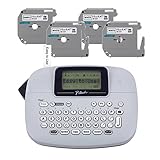
- Brother P-touch PT-M95 Label Maker This P-touch labeler is lightweight, portable, and easy to use. It features a QWERTY keyboard and an easy-view display. Great for home and home office use, the PT-M95 Comes with a variety of type styles, frames, and symbols to easily personalize your labels.
- Get your home and home office organized and personalized Add a custom touch to all your items, from files and folders in your home office to school projects and gift bags at home. It’s easy to label just about anything that you need to keep organized.
- Choose from Various Sizes / Widths and Colors Genuine Brother 'M' tapes comes in 9mm (~3/8 inch) and 12mm (~ ½ inch) widths and a range of colors.
- Many Label Making Options The PT-M95 can print 1 or 2 lines of text and includes 8 Deco Mode patterns, 9 ty
- Your Complete Labeling Solution The Brother P-touch PT-M95BP Label Maker Bundle comes with 1 sample of black on white label tape and 3 full-length black on white label tapes for added value.
Phone-first models such as the PT-N25BT and P-touch Cube family are better when the user wants richer designs, graphics, logos, or a larger editing surface. Computer-connected models such as the PT-P710BT are more appropriate for batches or office workflows. The convenience comes with software and operating-system dependencies.
2. Check tape width before buying
Tape width determines the type of label the machine can produce. Household handheld models commonly top out at 12 mm. The Epson LW-PX300 reaches 18 mm, and certain DYMO LabelManager models support 19 mm or 24 mm tape.
What’s actually slowing this PC down?
Pick the symptom - the matching free tool is one click away.
Narrow tape is efficient for folders, cable wraps, and small bins. Wider tape is easier to read from a distance and more useful for equipment labels. A machine cannot print wider tape merely because a wider cartridge exists, so confirm the model’s maximum width first.
3. Match the material to the surface and environment
Standard laminated or general-purpose tape is usually adequate for indoor folders, drawers, and containers. Technical jobs may require heat-shrink tubing, magnetic tape, stronger adhesive, cable-wrap formats, or materials designed for exposure to moisture, temperature changes, fading, or ultraviolet light.
Check both the label maker and the specific cartridge. “Compatible with Brother tape” or “uses D1” does not mean every material, width, and finish is supported by every model. For replacement supplies, look for Brother TZe replacement tape, DYMO D1 label tape, or the appropriate Epson LabelWorks media only after confirming the machine family and supported width.
4. Decide whether you need barcodes or QR codes
Barcode support varies by model and workflow. The Epson LW-PX300 specifies eight barcode types, but its specifications do not list QR-code support. App-connected or computer-connected models may offer more elaborate barcode and QR workflows, but the capability depends on the software and exact model.
Quick wins for a faster PC:
Scan for outdated or missing drivers - takes under a minuteDriver Scan →Clear out junk files and repair common Windows errorsFree Scan →Fix the driver behind crashes, sound loss and screen glitchesFind Drivers →If the primary job is printing shipping barcodes or large batches of inventory labels, compare desktop shipping-label printers instead of assuming a handheld tape machine will be efficient. If the job is occasional equipment identification, a handheld with the required barcode format may be sufficient.
5. Consider power and cutter design
Battery-powered handhelds are portable and easy to store, but repeated use can mean frequent battery changes. Rechargeable models are more convenient for regular desk work. AC power or USB operation can matter when printing a large batch in one location.
Manual cutters are acceptable for occasional labels and help keep a machine simple. An automatic cutter is more convenient when printing many labels or when consistent separation matters. Do not pay for an automatic cutter if the label maker will produce only a few labels a month.
6. Budget for the tape, not just the machine
Thermal-transfer label makers do not use liquid ink, but they do require compatible cartridges. Ongoing tape cost depends on width, color, finish, adhesive, specialty material, and cartridge length. A cheap machine with expensive or difficult-to-find media may cost more over time than a slightly more expensive model with readily available tape.
Brother TZe, Brother Btag, DYMO D1, and Epson LabelWorks supplies are not interchangeable ecosystems. Compare the price and availability of the exact replacement tape you expect to use before committing to a device.
Also popular on Amazon

- AVAILABLE IN A TRENDY PINK COLOR: Stay on top of things with a Pink design that stands out in all the right ways. Functional and fun, it’s a must-have for keeping life organized with style
- SLIM, COMPACT & LIGHTWEIGHT: This sleek, portable label maker fits easily into any bag or space and allows effortless one-handed use on the go
- WIDE TAPE VARIETY: Supports 12mm LetraTag tapes in paper, clear, opaque plastic, and textile finishes, all with easy-peel design and lasting readability
- YOUR LABELS, YOUR DESIGNS: Personalize labels with various fonts, symbols, styles, and box options. Enjoy date stamping, two-line printing, and a fast 7mm/sec print speed—smudge-free and precise
- BUILT TO LAST: Designed for home, school, and more, our durable label maker uses direct thermal printing for long-lasting reliability—no ink or toner needed
What the available testing evidence actually shows
There is useful independent evidence for this category, but it should not be confused with testing performed by iTechGuides.
Bob Vila describes a testing process that included setup and instructions, portability, functionality, and overall value. Its testers loaded cartridges, powered on each machine, installed apps where necessary, printed dozens of labels, evaluated design features, examined print quality and speed, and applied labels to different surfaces to assess backing removal, adhesion, and removability. Those findings can support claims about the models Bob Vila actually tested, but they should remain attributed to Bob Vila.
NBC Select’s February 2026 guide is primarily an expert-recommendation and product-selection guide. It consulted professional organizers and considered expert recommendations and substantial Amazon review history. It recommends different models—including the PT-D210, PT-N10, Phomemo compact label maker, Brother P-touch Cube, and PT-H110—according to whether the shopper wants an app, a keyboard, a screen, or particular convenience features. It is not evidence that every model was independently tested under the same laboratory conditions.
TechRadar’s label-printer coverage assesses design, specifications, speed, and print quality across home, office, and small-business products. It distinguishes handheld machines such as the Epson LW-PX300 from shipping-focused products such as the Munbyn RealWriter line.
Which label maker should you buy?
- Buy the Brother PT-H110 if you want the safest current recommendation for drawers, bins, folders, cables, and general household use.
- Buy the PT-D210 only after checking availability if you specifically want its richer on-device formatting, templates, symbols, and memory.
- Buy the Brother PT-N10 if low price, compact storage, and keyboard operation matter most.
- Buy the PT-N25BT if you prefer designing labels on a phone or tablet.
- Buy the PT-P710BT if you want Bluetooth plus USB connectivity to Windows and Mac.
- Buy the Epson LW-PX300 for cables, wire markers, barcodes, heat-shrink tubing, magnetic labels, and specialty materials.
- Buy a DYMO LabelManager 280 or 420P if you already own D1 tape or prefer DYMO’s desktop-connected workflow.
- Buy a shipping-label printer instead if you need 4-by-6-inch address labels, ecommerce labels, or high-volume roll printing.
Frequently Asked Questions
Is the Brother PT-D210 still a good buy in 2026?
It remains feature-rich and is still recommended by NBC Select, but Brother’s U.S. product page currently marks it discontinued and out of stock. Buy it only after checking the exact model, seller, included tape, return policy, and price. The PT-H110 is the safer current keyboard-based alternative.
Do Brother TZe tapes work in every Brother label maker?
No. TZe compatibility still has to be checked against the exact model, width, and tape type. The PT-H110 supports Brother TZe tapes from 3.5 mm to 12 mm, but other Brother families and models may have different requirements.
Can the Epson LW-PX300 print QR codes?
Epson specifies eight barcode types for the LW-PX300, but its listed specifications do not identify QR-code support. If QR codes are essential, confirm the current documentation or choose a connected model whose software explicitly supports them.
What is the difference between a label maker and a shipping-label printer?
A label maker prints narrow identification labels from tape cartridges, often with a keyboard or mobile app. A shipping-label printer prints larger roll media, commonly 4-by-6-inch address, logistics, or ecommerce labels. They serve different workflows and are not interchangeable.
Are DYMO D1 and Brother TZe tape interchangeable?
No. DYMO D1 and Brother TZe are different consumable systems. Check the exact cartridge family, width, and material before buying replacement tape.
The Bottom Line
Bottom line: Choose the Brother PT-H110 for dependable, app-free household and office labeling; consider the PT-D210 only if a verified listing is available at a sensible price. Choose the PT-N10 for a cheaper compact machine, the PT-N25BT or PT-P710BT for connected design, the Epson LW-PX300 for technical and specialty work, and a dedicated shipping printer for 4-by-6-inch logistics labels.
Quick Recap
Product prices and availability are accurate as of the date/time indicated and are subject to change. Any price and availability information displayed on Amazon at the time of purchase will apply.
The Tool Desk
Outbyte Driver Updater FREEFix the driver behind crashes, sound loss and screen glitchesFind Drivers →Outbyte PC Repair FREERepair Windows errors before they cause bigger problemsFix Now →
