
iTechGuides is reader-supported. When you buy through links on our site, we may earn an affiliate commission. As an Amazon Associate I earn from qualifying purchases. Learn more
Roku vs. Amazon Fire TV: Which Streaming Device Reigns Supreme? Roku wins for most households because its app-first home screen makes opening apps, finding shows, and switching services direct and less tied to one retailer. Fire TV is the better specialist choice for Prime Video-heavy or Alexa-centered homes and for buyers considering cloud gaming.
The recommendation depends on the exact device, not just the brand. Roku Ultra and Fire TV Stick 4K Plus are premium 4K competitors, while Fire TV Stick 4K Select uses Vega OS rather than the Fire OS found on many older Fire TV devices.
Key takeaways
- Roku is the better default for most households because its app-first interface makes navigation more direct and less tied to one content retailer.
- Roku Ultra is the strongest premium Roku player because it combines 4K, HDR10+, Dolby Vision, Dolby Atmos, Wi-Fi 6, built-in Ethernet, USB playback, and Bluetooth headphone mode.
- Fire TV Stick 4K Plus is the better fit for Prime Video-heavy homes and Alexa users; Amazon documents Fire OS 8, 2GB of RAM, Wi-Fi 6, Dolby Vision, HDR10+, Dolby Atmos, and an Alexa Voice Remote for the 2025 model.
- Fire TV Stick 4K Select is a separate 2025 device running Vega OS 1.1 with 1GB of RAM, so app compatibility should be checked instead of being assumed from older Fire TV Sticks.
- Fire TV Stick 4K Max, 2nd Gen has the clearest cloud-gaming and Wi-Fi 6E positioning, while Roku is better suited to straightforward streaming than gaming-first use.
- Both platforms support 4K HDR on compatible devices, televisions, HDMI paths, services, and titles; buying a 4K player alone cannot create unsupported picture or sound formats.
What are Roku and Amazon Fire TV actually being compared?
Roku and Amazon Fire TV are operating-system platforms available in both external HDMI streaming players and televisions with the software built in. A Roku Streaming Stick or Ultra is a separate device connected to a television, while a Roku TV includes Roku software in the television itself. Fire TV similarly spans streaming sticks, the Fire TV Cube, Amazon televisions, and licensed television models.
Quick wins for a faster PC:
Scan for outdated or missing drivers - takes under a minuteDriver Scan →Repair Windows errors before they cause bigger problemsFix Now →Fix the driver behind crashes, sound loss and screen glitchesFind Drivers →
This article compares external streaming players rather than Roku TVs and Fire TV televisions. Entry-level HD products are not fair stand-ins for the premium 4K experience, so the useful comparison is between the current 4K models identified in the research: Roku Streaming Stick Plus, Roku Streaming Stick 4K, Roku Ultra, Fire TV Stick 4K Plus, Fire TV Stick 4K Select, and Fire TV Stick 4K Max, 2nd Gen. Roku also sells the Streambar SE, but that product combines streaming with audio and is not a direct player-to-player equivalent.
| Model | Software or platform detail | Video and audio focus | Distinctive hardware or use case | Main caution |
|---|---|---|---|---|
| Roku Streaming Stick Plus | Roku OS; 4K HDR entry model | 4K HDR; premium formats are below the Streaming Stick 4K and Ultra in Roku’s comparison chart | Value-oriented compact player | No documented Dolby Vision, built-in Ethernet, USB playback, or Ultra remote advantage |
| Roku Streaming Stick 4K | Roku OS | 4K up to 60 frames per second, Dolby Vision, HDR10+, and HLG | Dual-band 802.11ac Wi-Fi, AirPlay, HomeKit, Google Home, and Alexa compatibility | Does not provide the Ultra’s built-in Ethernet, USB playback, or premium remote features |
| Roku Ultra | Roku OS; premium Roku player | 4K, HDR10+, Dolby Vision, and Dolby Atmos | Wi-Fi 6, built-in Ethernet, USB local-media playback, Bluetooth headphone mode, and Voice Remote Pro | Costs more than Roku’s stick-shaped players |
| Fire TV Stick 4K Select | Vega OS 1.1; 1GB of RAM; 2025 model | Amazon’s affordable 4K streaming-stick tier | Amazon says it provides the full Fire TV experience and access to more than 1.8 million movies and shows from major providers | Vega OS is a different application platform from Fire OS; check required apps first |
| Fire TV Stick 4K Plus | Fire OS 8 with Android 11-level APIs; 2GB of RAM; 2025 model | 4K Ultra HD, Dolby Vision, HDR10+, and Dolby Atmos | Wi-Fi 6 and Alexa Voice Remote with television and receiver controls | Ethernet requires an adapter |
| Fire TV Stick 4K Max, 2nd Gen | Fire TV high-end stick platform | 4K Max product tier | Wi-Fi 6E and Amazon-documented cloud-gaming optimization | Choose it for the gaming and wireless feature set, not because it is automatically the best interface |
Roku’s official player lineup and Amazon’s Fire TV device comparison table are the best places to recheck model names and specifications before buying. Hardware names, software versions, prices, and availability can change.
Which platform wins for most households?
Roku wins the general-purpose comparison. Roku’s home screen is built around launching apps and channels, and its traditional grid can be rearranged so frequently used services are easy to reach. The interface separates basic navigation from much of the content promotion, which makes Roku feel comparatively neutral when a household uses several services rather than one dominant ecosystem.
Popular on Amazon

- Ultra-speedy streaming: Roku Ultra is 30% faster than any other Roku player, delivering a lightning-fast interface and apps that launch in a snap.
- Cinematic streaming: This TV streaming device brings the movie theater to your living room with spectacular 4K, HDR10+, and Dolby Vision picture alongside immersive Dolby Atmos audio.
- The ultimate Roku remote: The rechargeable Roku Voice Remote Pro offers backlit buttons, hands-free voice controls, and a lost remote finder.
- No more fumbling in the dark: See what you’re pressing with backlit buttons.
- Say goodbye to batteries: Keep your remote powered for months on a single charge.
Independent comparisons support that practical distinction. Tom’s Guide’s 2024 Roku-versus-Fire-TV comparison favored Roku for navigation and overall usability, while its coverage characterized Fire TV as stronger for voice control and Amazon integration. More recent coverage from TechRadar and T3 also describes Fire TV as more recommendation-led and commercially oriented. Those are interface judgments from independent coverage, not current laboratory measurements of launch times or advertising volume.
The Tool Desk
Outbyte Driver Updater FREEFix the driver behind crashes, sound loss and screen glitchesFind Drivers →Outbyte PC Repair FREEClear out junk files and repair common Windows errorsFree Scan →Fire TV is not a poor choice. Fire TV becomes the better specialist platform when Prime Video is central to the household, Alexa is already used for smart-home control, or cloud gaming is a meaningful buying requirement. The overall recommendation is therefore conditional: buy Roku for simplicity and platform neutrality; buy Fire TV when Amazon integration is part of the reason for buying the device.
How much do Roku and Fire TV devices cost?
The supplied research recorded the following prices from Roku’s official U.S. player pages, but the research did not provide a capture date. Treat these figures as time-sensitive observations rather than guaranteed current prices; Roku and Amazon regularly change promotions, bundles, and availability.
| Roku device | Observed U.S. price | What that price buys |
|---|---|---|
| Roku Streaming Stick | $29.99 | HD streaming for an HD television |
| Roku Streaming Stick Plus | $39.99 | Entry-level 4K HDR streaming |
| Roku Streaming Stick 4K | $49.99 | 4K up to 60fps with Dolby Vision and HDR10+ |
| Roku Ultra | $99.99 | Premium video, audio, networking, storage, and remote features |
Amazon prices for the Fire TV models were not supplied in the research, so a responsible comparison should not invent a price gap. Check the exact Fire TV model and current offer when purchasing. The more useful value question is whether a feature such as Dolby Vision, Ethernet, Wi-Fi 6E, an Alexa remote, or Vega OS compatibility matters to the buyer.
Which Roku or Fire TV model should you buy?
The best model depends more on television features, network conditions, preferred services, and smart-home habits than on the brand name printed on the box.
Free tools Windows power users keep installed
One-click scans. No signup required.
| Buyer profile | Recommended device | Why it fits | What to verify first |
|---|---|---|---|
| Most households wanting a compact 4K player | Roku Streaming Stick 4K | It supports 4K up to 60fps, Dolby Vision, HDR10+, HLG, AirPlay, and HomeKit without the size of a premium set-top box | Television HDR support and sufficiently strong Wi-Fi |
| Premium home theater or weak/congested Wi-Fi | Roku Ultra | It adds Wi-Fi 6, built-in Ethernet, USB, Dolby Atmos, Bluetooth headphone mode, and the Voice Remote Pro | Available HDMI input and whether wired networking or local media justify the higher tier |
| Lowest-cost 4K Roku buyer | Roku Streaming Stick Plus | It is the value choice for compatible 4K HDR televisions | Whether Dolby Vision, Ethernet, USB playback, or the Ultra remote is required |
| Prime Video and Alexa household | Fire TV Stick 4K Plus | It combines Fire OS 8, Wi-Fi 6, Dolby Vision, HDR10+, Dolby Atmos, and Alexa remote controls | Whether the household prefers Amazon-led recommendations and whether wired networking is needed |
| Budget-conscious buyer considering the newest Fire TV software | Fire TV Stick 4K Select | It is Amazon’s affordable 4K stick and the first model in the documented transition to Vega OS | Every required app, because Vega OS is not identical to Fire OS |
| Cloud-gaming-oriented buyer | Fire TV Stick 4K Max, 2nd Gen | Amazon documents Wi-Fi 6E and optimized cloud gaming for this high-end Fire TV stick | Cloud-gaming service, game, controller, and network compatibility |
| Apple household | Roku Streaming Stick 4K or Roku Ultra | Roku documents AirPlay and HomeKit support on compatible models | The exact Roku model and the Apple devices to be used |
For premium hardware, choose Roku Ultra when built-in Ethernet, USB playback, Dolby Vision, Dolby Atmos, Wi-Fi 6, or Bluetooth headphone mode matters. Roku says the Ultra is 30% faster than any other Roku player, but no independent current benchmark was performed for this comparison. Roku’s official Ultra specifications define the documented feature set.
The Roku Streaming Stick 4K is the more sensible value choice when the television supports Dolby Vision or HDR10+ and the home uses Wi-Fi rather than wired Ethernet. Roku lists 4K up to 60fps, Dolby Vision, HDR10+, HLG, dual-band 802.11ac Wi-Fi, AirPlay, and HomeKit for the model on its official product page.
For Prime Video and Alexa households, choose the Fire TV Stick 4K Plus. Amazon’s device documentation identifies the 2025 model as a Fire OS 8 device with Android 11-level APIs, 2GB of RAM, Wi-Fi 6, Dolby Vision, HDR10+, Dolby Atmos, and an Alexa Voice Remote with television and receiver controls.
The Fire TV Stick 4K Select is a reasonable budget option only after checking the applications that matter to the household. Amazon identifies the 2025 model as using Vega OS 1.1 and 1GB of RAM, and Amazon says future Fire TV sticks will use Vega OS beginning with this model. The Fire TV device specifications and Fire TV platform documentation explain the platform distinction.
For cloud gaming, consider the Fire TV Stick 4K Max 2nd Gen because Amazon documents Wi-Fi 6E and cloud-gaming optimization for it. That documentation makes the Max a credible specialist choice, but it does not establish that every cloud-gaming service or game works identically on every Fire TV model. Confirm the service and controller requirements before buying.
How do picture, sound, and connectivity compare?
At the premium tier, Roku Ultra and Fire TV Stick 4K Plus both support the major 4K HDR formats listed in the research, including Dolby Vision and HDR10+, as well as Dolby Atmos. Roku Ultra has the clearer advantage for a wired home-theater installation because Ethernet and USB are built in; Fire TV Stick 4K Plus remains compact, but Amazon says Ethernet requires an adapter.
Also popular on Amazon

- Ultra-speedy streaming: Roku Ultra is 30% faster than any other Roku player, delivering a lightning-fast interface and apps that launch in a snap.
- Cinematic streaming: This TV streaming device brings the movie theater to your living room with spectacular 4K, HDR10+, and Dolby Vision picture alongside immersive Dolby Atmos audio.
- The ultimate Roku remote: The rechargeable Roku Voice Remote Pro offers backlit buttons, hands-free voice controls, and a lost remote finder.
| Feature | Roku Ultra | Roku Streaming Stick 4K | Fire TV Stick 4K Plus |
|---|---|---|---|
| 4K video | Yes | Up to 60 frames per second | 4K Ultra HD |
| Dolby Vision | Yes | Yes | Yes |
| HDR10+ | Yes | Yes | Yes |
| HLG | Documented by Roku for the premium player family | Yes | Not specified in the cited Fire TV summary |
| Dolby Atmos | Yes | Not specified in the cited Streaming Stick 4K summary | Yes |
| Wi-Fi | Wi-Fi 6 | Dual-band 802.11ac | Wi-Fi 6 |
| Ethernet | Built in | Not built in | Requires an Amazon Ethernet adapter |
| USB local playback | Built in | Not documented for this model | Not documented for this model |
| Bluetooth headphone mode | Documented | Not documented for this model | Not documented for this model |
Roku’s Ultra specifications, Streaming Stick 4K specifications, and Amazon’s Fire TV device specifications support the feature differences in the table.
A streaming player cannot manufacture a format that the rest of the chain does not support. A television, receiver or soundbar, HDMI connection, streaming service, and specific title may all limit the final result. A Dolby Vision-capable player will not force Dolby Vision from an SDR title or from a television that lacks Dolby Vision support. The same principle applies to 4K, HDR10+, and Dolby Atmos.
Do these 3 things before closing this tab:
1Clear out junk files and repair common Windows errors2Fix the driver behind crashes, sound loss and screen glitches3Repair Windows errors before they cause bigger problemsChoose Roku Ultra when the television is far from the wireless router, the network is congested, local media is important, or the installation needs a wired connection. Choose a stick when compact size and ordinary strong Wi-Fi matter more than USB and Ethernet. A Fire TV stick can also use wired networking, but the adapter adds another purchase and another connection in the setup.
Is Roku’s interface easier to use than Fire TV?
Roku is generally easier for people who think in terms of apps, while Fire TV is stronger for people who want the platform to recommend content across services. Roku’s traditional home screen presents apps in a straightforward grid that users can rearrange. Fire TV puts more emphasis on content aggregation, Prime Video, recommendations, and promotional discovery.
That difference affects ordinary tasks. Roku usually makes the path from the home screen to Netflix, YouTube, Disney+, Hulu, Max, or another installed service feel explicit. Fire TV can reduce the need to open individual apps when its cross-service recommendations surface a desired title, but the same design can make the home screen feel busier or more Amazon-centered.
Independent coverage should be treated as comparative evidence rather than a permanent description of either interface. Tom’s Guide’s 2024 comparison favored Roku’s navigation and usability while recognizing Fire TV’s voice and ecosystem strengths. TechRadar’s 2025 platform comparison and T3’s 2026 Fire TV interface report are useful reminders that interface design can change through software updates.
Are Roku and Fire TV ad-free?
Neither Roku nor Fire TV should be described as ad-free. Both platforms use home-screen recommendations, sponsored discovery, free content, and other commercial elements; the defensible difference is that Roku is generally more app-centric, while Fire TV more visibly blends Amazon content, recommendations, and promotions into browsing.
Roku also operates The Roku Channel, which provides free ad-supported programming and paid premium subscriptions inside the Roku ecosystem. Roku’s service information describes its broader free and premium content offering, while the company’s Roku Channel advertising page makes the advertising-supported nature clear.
The practical choice is not between advertising and no advertising. The choice is between two different content-discovery environments. Someone who wants a clean app launcher may prefer Roku; someone who wants recommendations integrated with Prime Video may prefer Fire TV. Interface controls, advertising choices, and recommendation behavior can change, so review the current privacy and advertising settings on the exact device.
Which platform has better apps and content discovery?
Both platforms cover the major U.S. streaming services, including Netflix, Prime Video, Hulu, Disney+, YouTube, and other mainstream video applications. Availability is not guaranteed across every model or geography, particularly during the Fire TV operating-system transition, so check the exact device and country for every must-have service.
App-count comparisons are poor buying guides. Catalog totals can vary by geography, operating system, device generation, and whether obsolete or niche applications are counted. A better test is to write down the household’s essential services and verify each one on the exact model before checkout.
Also popular on Amazon
Roku’s discovery model is app-and-channel oriented. Roku search can help users find programs across sources, and The Roku Channel adds free, live, and premium entertainment choices. Fire TV’s discovery model is more voice-led and aggregation-focused: Alexa can search for entertainment and perform broader assistant tasks, while Fire TV surfaces content from multiple services and gives Prime Video a prominent place.
Voice results and in-app commands can vary by application on either platform. A voice search may find a title but still require the viewer to choose a service or manage a subscription. Fire TV’s stronger Amazon integration is useful when Prime Video is the household’s center of gravity; Roku’s more explicit app model is easier when the household switches regularly among independent services.
Does Fire TV or Roku have better voice and smart-home control?
Fire TV wins the voice-assistant category because Alexa is central to its remote and platform design. Fire TV is the natural match for households that already use Echo speakers, Alexa routines, or Amazon smart-home devices.
Roku supports multiple ecosystems rather than organizing the experience around one assistant. Roku documents AirPlay and HomeKit, Google Home, Alexa, and Roku Smart Home compatibility for compatible Streaming Stick 4K configurations. Roku Ultra also includes a rechargeable, backlit Voice Remote Pro with hands-free voice control and a lost-remote finder.
| Need | Better fit | Reason |
|---|---|---|
| Alexa routines, Echo speakers, and Amazon smart-home control | Fire TV | Alexa is built into the remote and central to the Fire TV experience |
| AirPlay and HomeKit | Compatible Roku models | Roku documents AirPlay and HomeKit support for the Streaming Stick 4K and related compatible devices |
| Google Home without making one retailer’s content store central | Roku Streaming Stick 4K or Roku Ultra | Roku supports Google Home while keeping its interface app-centric |
| Hands-free Roku voice control and lost-remote finding | Roku Ultra | The Ultra includes the rechargeable Voice Remote Pro with both features |
| Basic voice search across entertainment | Either platform | Both offer voice features, but Fire TV integrates Alexa more deeply |
Roku’s Ultra product documentation and Streaming Stick 4K documentation support the Roku ecosystem details. Amazon’s Fire TV specifications describe the Alexa remote included with the Fire TV Stick 4K Plus.
Why does the Fire TV Vega OS transition matter?
The Fire TV Stick 4K Select matters because it is not simply another Fire TV Stick with the same software. Amazon identifies the 2025 Fire TV Stick 4K Select as running Vega OS 1.1, with 1GB of RAM, while the 2025 Fire TV Stick 4K Plus runs Fire OS 8 with Android 11-level APIs and 2GB of RAM.
Fire OS 8 is based on Android-level APIs. Vega OS is a new Linux-based operating system with React Native and web-development paths. The two platforms may present a similar Fire TV brand experience, but application compatibility should not be inferred from one to the other.
Crashes, No Sound, or Screen Glitches?
Random freezes, missing sound and display glitches usually trace back to one bad driver. Find and replace yours safely.Free scan · under a minutePC Slower Than It Used to Be?
A free scan shows the junk files, broken settings and background clutter dragging Windows down - then fixes them in one click.Free scan · Windows 10 & 11Amazon describes the Fire TV Stick 4K Select as its most affordable 4K streaming stick and says future Fire TV sticks will run Vega OS beginning with this model. That makes Vega OS strategically important, but it also creates a specific buying caveat: verify every required app, service, accessory, and feature on the exact Vega model. Do not assume that an app available on an older Fire OS stick is automatically available on the 4K Select.
The official Fire TV platform documentation and Amazon’s device comparison table are more reliable for this question than a generic search result using the words Fire TV Stick.
Independent reader supportYour contribution helps us test, update, and keep practical guides available for everyone.Is Fire TV better for gaming?
Fire TV has the stronger documented gaming angle, especially through the Fire TV Stick 4K Max, 2nd Gen. Amazon describes that model as supporting Wi-Fi 6E and optimized cloud gaming, making it the more logical choice for someone who is deliberately considering cloud gaming or Amazon Luna-related use cases.
Also popular on Amazon
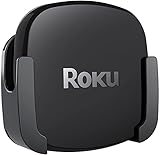
- DESIGNED IN THE USA.
- COMPATIBLE with ALL Roku Ultra models (including Roku Ultra 2024, 2025, and 2026).
- WHAT’S IN THE BOX: Premium mount for Roku Ultra and all mounting hardware.
- PERFECT FOR WALL-MOUNTED TELEVISIONS: Attaches Roku Ultra to the back of your television (or to a wall near your television). Makes Roku Ultra installation easy. Provides direct access to the HDMI ports on the back of your television and eliminates the need to tunnel an HDMI cable through your wall.
- HEAT MANAGEMENT – Ventilation channels allow cool air to flow under your Roku Ultra.
Roku should be chosen primarily for streaming simplicity, not as a gaming-first platform. Roku Ultra’s documented strengths are fast navigation, premium video and audio formats, Ethernet, USB, and remote features rather than a broad cloud-gaming proposition.
Recommended Free Tools
Cloud gaming still depends on more than the stick. Check the service’s supported countries, games, controller requirements, account requirements, and network expectations. The research did not include hands-on testing of current cloud-gaming performance, latency, game compatibility, or network throughput, so no universal gaming-superiority claim is justified.
How do you set up Roku or Fire TV?
Both platforms need an HDMI-equipped television and an internet connection. Roku’s support documentation says its players can connect to any television with an HDMI connection, while 4K and HDR require compatible television hardware and content.
- Check the television. Confirm that the television has an available HDMI port. For 4K HDR, confirm the television supports the desired resolution and HDR formats.
- Check the signal path. If the player connects through a receiver or soundbar, verify that the receiver, HDMI connection, and display can pass the intended 4K, HDR, and Dolby audio formats.
- Connect the player. Plug the Roku player or Fire TV stick into HDMI and connect its power. A Fire TV stick that needs wired networking also requires the compatible Amazon Ethernet adapter.
- Complete the on-screen setup. Connect to Wi-Fi or Ethernet where supported, sign in or activate the platform account, install the preferred apps, and allow required system updates.
- Test the important services. Open the household’s essential apps and play a title that the television and sound system can actually support. This catches app, account, HDR, and audio compatibility problems before the old device is removed.
Roku’s television requirements explain the HDMI and 4K/HDR prerequisites, and Roku’s Ultra setup instructions cover the connection, power, network, activation, and app-selection flow.
What should you check if streaming quality or app availability is wrong?
- The picture is not 4K or HDR: Confirm the title, service plan, television, HDMI path, and player all support the format. A compatible player cannot upgrade unsupported content or hardware.
- Dolby Vision or Dolby Atmos is missing: Check the television or receiver’s format support and the specific title or service. The player alone does not guarantee either format.
- Video buffers: Test the television’s Wi-Fi location and network congestion. Roku Ultra offers built-in Ethernet; Fire TV stick models require the Amazon Ethernet adapter for wired networking.
- An expected app is missing on Fire TV Stick 4K Select: Treat the issue as a possible Vega OS compatibility question and verify the app on the exact model and geography rather than comparing it with an older Fire OS catalog.
- Voice search produces an unexpected result: Check the service in which the title is available, whether the account is signed in, and whether the application supports the requested voice command.
- The interface looks different from a review: Roku and Fire TV interfaces can change through software updates. Use current device documentation and current on-screen settings rather than relying on an old screenshot.
What are the privacy and tracking trade-offs?
Neither platform should be treated as a privacy-free or advertising-free environment. Roku and Fire TV collect information needed for accounts, applications, recommendations, advertising, voice features, and device services. The consumer-facing distinction is that Fire TV has a stronger Amazon-content and commercial orientation, while Roku is generally more app-centric but still includes advertising and sponsored discovery.
What’s actually slowing this PC down?
Pick the symptom - the matching free tool is one click away.
A peer-reviewed 2019 study titled The TV is Smart and Full of Trackers examined advertising and tracking behavior in smart-TV environments, including Roku and Fire TV traffic. The study predates the models and software generations compared here, so it should be used as background rather than as a current measurement of Roku Ultra, Fire TV Stick 4K Plus, or Fire TV Stick 4K Select.
After setup, review the exact device’s privacy, voice-history, advertising, recommendation, and account settings. Settings names and locations can change, so avoid assuming that a control documented for one generation appears identically on another.
Final verdict: which streaming device reigns supreme?
Roku reigns supreme as the default streaming platform. Roku makes the basic job—opening apps, finding shows, and switching between services—more direct and less ecosystem-dependent. Roku Streaming Stick 4K is the strongest compact value recommendation, while Roku Ultra is the better premium choice for Ethernet, USB, Wi-Fi 6, premium audio, and remote features.
Fire TV is the better specialist choice rather than the overall loser. Choose Fire TV Stick 4K Plus when Prime Video, Alexa, or Amazon smart-home control is central. Choose Fire TV Stick 4K Max, 2nd Gen when documented Wi-Fi 6E and cloud-gaming positioning matter. Choose Fire TV Stick 4K Select only after confirming that its Vega OS software supports every app the household requires.
The shortest honest recommendation is: buy Roku unless Amazon integration is a central reason you are shopping; buy Fire TV when Alexa, Prime Video, or gaming outweighs interface neutrality.
The Bottom Line
Bottom line: Roku is the best all-around choice for most households, especially when simple app navigation and a neutral interface matter. Fire TV wins for Prime Video-heavy homes, Alexa users, and some cloud-gaming buyers. Compare exact models because Fire TV Stick 4K Select runs Vega OS while Fire TV Stick 4K Plus runs Fire OS 8.
Quick Recap
Product prices and availability are accurate as of the date/time indicated and are subject to change. Any price and availability information displayed on Amazon at the time of purchase will apply.

