Time Sink
Time Sink: A focused, low-cost Mac tracker for understanding where your time goes. Ranked #67 of 77 in Time Tracking Software by our editors (3.0/10); pricing: Paid; best for mac users needing lightweight activity tracking.
At a glance
- Editor score3.0 / 10
- PricingPaid
- Best forMac users needing lightweight activity tracking
- Free planNo
- Paid from$5 one-time
- Desktop appYes
- Facts checked22 Sep 2026
Where it wins
- Automatic tracking of Mac apps and windows
- One-time $5 license valid forever
- Reports, exports, Pools, timers, and optional screenshots
Where it doesn't
- Mac-only coverage
- No collaborative timesheets, billing, or approvals
- No listed integrations or mobile apps
Our verdict on Time Sink
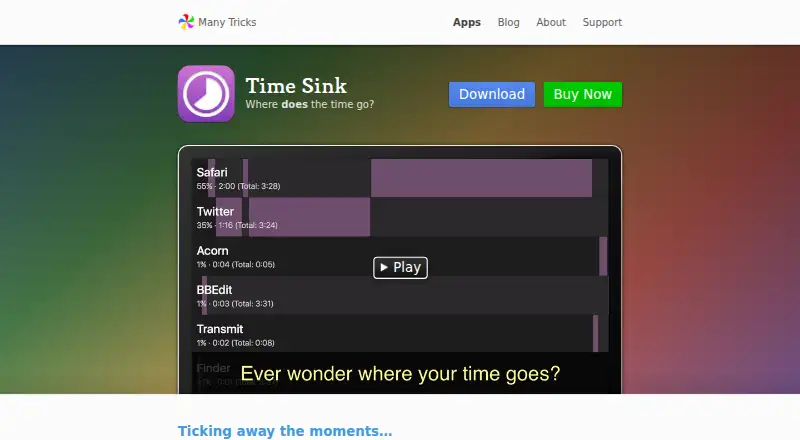
Time Sink is a macOS desktop utility that automatically records time spent in applications and their windows. It is designed for individuals who want a clearer view of how they spend time on a Mac, rather than teams managing shared timesheets, billing, or approvals. Its menu bar-only operation keeps the app focused, while Pools organize related apps and windows and ad hoc timers cover non-Mac activities.
According to the vendor’s pricing page, the Time Sink license costs $5 as a one-time purchase. The license remains valid forever and includes at least 1 year of updates. The published feature set centers on automatic activity capture: users can pause and resume tracking with a hot key, handle idle periods through automatic timers, and review reports using time-lapse or time-portions views. Custom report periods and manual or automatic exports make the collected activity practical for later review.
Time Sink’s main strength is its narrow focus. Optional periodic screenshots add context, while Pools and timers extend automatic tracking beyond individual Mac windows. That focus also defines its boundaries: the product is available for macOS, without cross-platform or mobile coverage, and it is not positioned as a collaborative timesheet, billing, or approval system. Choose Time Sink if you want inexpensive automatic tracking on a Mac and value a permanent license. Choose an alternative if your workflow depends on shared team records, billable time management, approvals, integrations, or broader platform support.
Your product? Our editors can test Time Sink in depth and publish a review, labelled as paid · from $149/mo →
Time Sink pricing
All 1 Time Sink plans and prices →
Time Sink fact sheet
| Free plan | No |
|---|---|
| Paid from | $5 one-time |
| Project tracking | Yes |
| Billable time | Not verified |
| Timesheet approvals | Not verified |
| Mobile apps | Not verified |
| Desktop app | Yes |
| Offline tracking | Not verified |
| Data export | Yes |
| Deployment | Desktop |
| Platforms | macOS |
| Support | Email, Tickets, Community, Docs |
| Built for | Solo, Small business (editorial estimate) |
| Pricing | Paid (source) |
| Website | manytricks.com |
| Facts checked | 22 Sep 2026 |
Alternatives to Time Sink
- Toggl TrackA mature time tracker with strong reporting, approvals, estimates, and integrations.9.2
- RescueTimeA broad automatic tracker for productivity, billable work, focus, and team timesheets.9.0
- Deltek RepliconA broad enterprise time-tracking suite for compliance-heavy project organizations.8.9



See all Time Sink alternatives →
Used Time Sink? Be the first to review it
The editor score above is our own research. What this page doesn't have yet is a reader's view — what you used Time Sink for, what worked and what didn't. No stars are seeded and no review is paid for; an editor reads every one before it appears.
Write a reviewTwo minutes · verified accounts only · read by an editor before it appears
Featured on iTechGuides

Time Sink is listed in our Time Tracking Software directory. Add the badge to your site — it links back to this page.
<a href="https://www.itechguides.com/products/time-sink/"><img src="https://www.itechguides.com/best/badge/time-sink.svg" alt="Featured on iTechGuides" width="230" height="46"></a>
Guides on time tracking software
- Best Time Tracking Apps for Android: Top Picks for Freelancers, Teams, and Field WorkAug 2026
- Best Lawyer Time Tracking Software: 5 Tools for Accurate Billing and Trust ComplianceOct 2026
- 10 Best Free Time-Tracking Software Tools in 2026Aug 2026
Reviewed by iTechGuides Editors · Editorial team · Updated Oct 2026
Advertiser disclosure: iTechGuides is reader-supported. Vendors can pay for top positions in our rankings and for a place on other products' pages, and we may earn a commission when you click some links. Bought places stand at the number bought; this page and our disclosure say so. Paying vendors may get a fuller, more detailed review from our editors, and that review can change their score. How we rank.
Last updated · How we research and update