
iTechGuides is reader-supported. When you buy through links on our site, we may earn an affiliate commission. As an Amazon Associate I earn from qualifying purchases. Learn more
There is no single best free time-tracking software tool for every reader. Clockify is the strongest default for broad free-plan functionality, while Toggl Track is usually better for a simpler freelancer experience; TimeCamp suits automatic tracking, Harvest suits invoicing, Jibble suits attendance, and Hubstaff suits monitoring-heavy teams.
Every tool below offers a meaningful free option or is included because its free offering addresses a distinct time-management need. A free trial does not count as a free plan. Free plans can still limit users, projects, report history, exports, integrations, invoices, approvals, screenshots, GPS, or advanced reports, so the most useful choice depends on what you need to do with the time data after recording it.
Pricing note: Vendor pricing signals in this article were checked on August 18, 2026, in USD. Prices can vary by country, taxes, monthly versus annual billing, and promotional terms. Recheck the linked vendor page before signing up.
Key takeaways
- Clockify is the best starting point for most small teams because its $0 plan includes core timers, timesheets, apps, reports, auto-tracking, and project export, but the plan summary says the free workspace supports up to five users.
- Toggl Track is the better fit when a freelancer or small team values a polished, low-friction timer, web, desktop, mobile, browser-extension, calendar, and productivity-reporting features over free billing controls.
- TimeCamp and RescueTime are better for automatic personal activity tracking, while automatic activity data should be treated as a reconstruction aid rather than unquestionable proof of productive work.
- Harvest and Paymo are the most relevant choices when tracked time must connect to client work, expenses, invoices, or broader project management, although their free tiers are more restricted.
- Jibble is aimed more at attendance, clock-in/out, mobile, and field-team workflows; Hubstaff adds screenshots, GPS, and workforce-monitoring features that require careful privacy and consent decisions.
What is the best free time-tracking software?
Clockify is the best default free time-tracking software for readers who want the broadest useful collection of core features. Clockify’s current free plan lists a timer, timesheets, an auto-tracker, calendar, mobile and desktop apps, idle detection, tracking integrations, reports, team activity, and project export. Clockify’s plan page also says the free plan is for up to five users, so this article does not describe Clockify as unlimited-user free software despite other wording on the same page.
#1 Best Overall

- Atomic Clock Digital - The clock has a built-in receiver that automatically synchronizes itself with WWVB radio broadcast, which will set and update time automatically every midnight, no need to set manually. It has four time zones selectable: EST, PST, MST, CST.
- Digital Wall Clock Battery Operated - This digital clock is supported by 3xAAA battery (Not included). No wires make it can be placed anywhere; and the low battery symbol reminds you to replace the battery in time to avoid getting the wrong time due to low power.
- Digital Wall Clock Large Display - The LCD screen measures 6.2 in x 3.7 in and it displays time, indoor temperature, day and date. Each section is showed separately, allows you to read the content easily and quickly.
- Atomic Clock with Auto DST - With DST on, the time would go forward or backward one hour automatically in daylight saving time, no worry about time changing on that day. If for no need, it could also be turned off, then “AUTO DST” disappears from screen.
- Digital Alarm Clock - The alarm could be turned on or off according to your need, just click the button to set. When alarm is set on, there is a bell icon staying on screen. The icon will disappear if alarm is set off. When alarm goes off, just click any button to stop it on the day.
Toggl Track is the better overall choice for simplicity. Toggl Track’s free-forever plan includes web, desktop, and mobile tracking, browser-extension integrations, Google and Outlook Calendar integrations, and productivity reports. The official plan information describes free users as limited, but the exact number should be confirmed at signup because the public pricing page does not clearly state it.
The other eight tools are not filler alternatives. They cover different categories: automatic tracking, project-and-client reporting, invoicing, attendance, GPS, screenshots, personal productivity, project-management integrations, and full project-management workflows.
Free time-tracking software comparison
The table separates confirmed plan signals from features that require verification. “Not confirmed” means the research dossier did not establish that the feature is currently available on the free tier; it does not necessarily mean the product lacks the feature entirely.
Recommended Free Tools
| Tool | Best for | Free-plan signal | Tracking style | Billing and reports | First important limitation |
|---|---|---|---|---|---|
| Clockify | Broad free tracking for individuals and small teams | $0; plan summary says up to five users | Timer, timesheet, auto-tracker, calendar, desktop and mobile apps, idle detection | Reports and project export; PDF-only free export and one-month report range | Billable rates, invoicing, approvals, attendance, overtime, screenshots, and GPS are paid-tier concerns |
| Toggl Track | Freelancers and teams that prioritize ease of use | Free forever; user limit should be verified | Web, desktop, mobile, browser extension, calendar integrations | Productivity reports; richer rates, estimates, team reporting, and profitability are paid | Limited free users and paid-only advanced billing/project controls |
| TimeCamp | Automatic app and website tracking | Free-forever plan; pricing page advertises unlimited users and projects in its comparison area | Automatic tracking and cross-platform support; exact free features need checking | Advanced reporting and productivity features may be paid | Verify automatic tracking, report, and export limits |
| My Hours | Simple client, project, and task tracking | Free plan limited to five active users | Project/task tracking, manual entries, and reports | Basic billable rates and detailed reports are listed in Basic | Free active-user limit and paid advanced rate/budget features |
| Harvest | Time, expenses, and client invoicing | Meaningful free-plan limits require current first-party confirmation | Time and expense workflow | Strongest fit in this list for time-to-invoice workflows | Free plan is substantially more restricted than Clockify or Toggl Track |
| Hubstaff | Remote or field teams needing workforce monitoring | Current free scope not sufficiently verified | Monitoring-oriented tracking, screenshots, activity data, and GPS on relevant plans | Workforce reports rather than a simple freelancer timesheet | Privacy, consent, and paid-feature limitations |
| Jibble | Attendance, clock-in/out, and field teams | Current free limits require verification | Mobile workforce, clock-in/out, attendance, and GPS-oriented workflows | Attendance-focused rather than client-profitability-focused | Less suitable for agency billing and detailed project analysis |
| RescueTime | Automatic personal productivity insights | Current plan details require verification | Passive app and website tracking, focus and distraction analysis | Personal productivity insights rather than invoices or payroll | Not designed primarily for team timesheets or client billing |
| Everhour | Time tracking inside project-management software | Free offering and integration limits require verification | Embedded tracking through supported project-management integrations | Useful when the existing project system is the source of truth | Its main value may depend on a paid or unavailable integration |
| Paymo | Project management plus time tracking and invoicing | Current free limits require verification | Tasks, projects, time, and client work | Broader project and invoicing ecosystem | Potential user, project, and feature constraints; overkill for a basic timer |
Independent comparisons disagree on rankings because they define “free” differently and target different audiences. The shortlist reflects those distinct use cases rather than pretending that attendance software, personal productivity software, and billable-hour software are interchangeable. See the current comparison coverage for additional market context.
1. Clockify: best overall free time tracker
Clockify is best for freelancers, consultants, agencies, nonprofits, and small teams that need broad core tracking without paying immediately. Its free plan combines the features most readers expect from a time tracker: start/stop timing, manual timesheets, a calendar, an auto-tracker, idle detection, desktop and mobile apps, reports, team activity, and project export.
The important qualification is the user limit. Clockify’s current pricing page displays the free plan at $0, says it is for up to five users, and says users can invite up to four others. The same page contains other wording that can appear to suggest unlimited users. The conservative interpretation is a five-user free workspace; verify the workspace limit during signup.
Clockify is strong for recording time, but its free tier is not a free billing or payroll system. The pricing page lists a one-month free report data range and PDF-only free export. Billable rates appear in Basic, while invoicing, approvals, locked time, attendance, and overtime appear in Standard. Screenshots and GPS appear in Pro. Those distinctions matter if you need historical CSV or Excel data, approved payroll records, or employee-location evidence.
Clockify’s auto-tracked data is described as visible only to the individual user, while screenshots and GPS are paid-tier capabilities. That makes the free auto-tracker materially different from employer-visible surveillance. Even so, app and website activity can be incomplete or misleading, especially for meetings, phone calls, reading, or work performed away from the tracked device.
Best alternative: Choose Toggl Track if a cleaner interface and easier personal adoption matter more than free-plan breadth.
Upgrade path: Clockify’s pricing signals show Basic from $3.99 per seat per month annually or $4.99 monthly, Standard from $5.49 annually or $6.99 monthly, and Pro from $7.99 annually or $9.99 monthly. Paid seats apply to active or invited users; deactivated users do not occupy a seat. Cancellation downgrades the account to the free version without deleting data, according to the vendor’s pricing information.
2. Toggl Track: best for freelancers and ease of use
Toggl Track is best for freelancers, consultants, and small teams that want a low-friction timer across web, desktop, and mobile. The free-forever plan includes browser-extension integrations, Google and Outlook Calendar integrations, and productivity reports in addition to the core timer.
Quick wins for a faster PC:
Clear out junk files and repair common Windows errorsFree Scan →Fix the driver behind crashes, sound loss and screen glitchesFind Drivers →Repair Windows errors before they cause bigger problemsFix Now →Toggl Track is a particularly sensible choice when the user’s main workflow is simple: create a client or project, choose a task, start the timer, correct forgotten entries, and review weekly time. The product is less attractive when the free plan must provide sophisticated commercial controls. The official Toggl Track pricing page places billable rates, estimates, alerts, richer team reporting, profitability analysis, approvals, customized reports, Jira, Salesforce, and SSO in paid plans.
The free user limit needs special care. Official material says free users are limited, but the pricing page does not clearly establish the number in the supplied research. Secondary comparisons commonly report five users, but that figure should be independently rechecked before publication. Do not rely on an old comparison if the signup screen gives a different limit.
Toggl Track is a good billing-data collector, but the free plan should not be described as a complete invoicing or payroll workflow. A freelancer can record time and produce useful productivity reports, but rates, estimates, approvals, profitability, and advanced reporting are likely paywalls for a growing service business.
Rank #2

- 3 Time Display Modes: Classic digital clock with traditional time display that aligns with standard reading habits. Colorful clock mode displays three colors simultaneously to distinguish week, time, and date, convenient for elderly users, young people, and children. Wall clock mode features imitation pointer design that decorates living rooms and bedrooms
- Power Outage Memory Function: Plug-in powered clock (no battery option) retains all settings after a power outage, eliminating the need to reset when power is restored. Features automatic DST (Daylight Saving Time) adjustment for hassle-free time changes
- 12 Daily Alarms and 3 Medication Reminders: Set up to 12 daily alarms for meals, appointments, exercises, feeding pets, bathroom breaks, drinking water, and taking medications. Includes 3 groups of medication reminders with options to repeat or not repeat. Functions as a dementia clock, digital wall clock, or desk clock
- Auto Dimming and 10 Language Options: Screen brightness adjusts automatically between day and night modes based on time (Bright: 7:00 am to 7:59 pm, Dim: 8:00 pm to 6:59 am), or can be set to fixed brightness. Features 10 built-in system languages: English, German, Spanish, Portuguese, French, Italian, Dutch, Czech, Polish, and Swedish
- Large Easy-to-Read Display: High contrast display with adjustable font colors in classic digital clock mode including white (default), yellow, red, or green options for seniors or those with visual needs. Soft, flicker-free backlight emits no harmful blue light for comfortable viewing without eye strain
Best alternative: Choose Clockify if free reports, project features, and team breadth are more important than interface simplicity.
The Tool Desk
Outbyte PC Repair FREERepair Windows errors before they cause bigger problemsFix Now →Outbyte Driver Updater FREEScan for outdated or missing drivers - takes under a minuteDriver Scan →Upgrade path: The pricing signal checked for this article displayed Starter at $9 per user per month. Premium was displayed at $14 per user per month for the first year on annual billing, renewing at $18 per user per month. Confirm the current offer and renewal terms on the official pricing page.
3. TimeCamp: best for automatic tracking
TimeCamp is best for users who want automatic app and website tracking alongside conventional time records. Automatic tracking can help reconstruct a day when a user forgets to start a timer, and TimeCamp is positioned as a cross-platform option for that workflow.
The official TimeCamp pricing page advertises a free-forever plan and shows unlimited users and unlimited projects in its free-plan comparison area. The exact feature matrix should still be checked before signup, particularly for automatic tracking, productivity reports, exports, and historical data.
TimeCamp’s automatic data is not the same thing as verified labor. Background applications can generate activity, idle detection can classify work incorrectly, and important work can happen in meetings, calls, printed documents, or a second device. Use automatic tracking to suggest or reconstruct entries, then review the result before billing a client or approving payroll.
Best alternative: Choose RescueTime for personal focus and distraction insights rather than project/client time reporting.
Upgrade path: The pricing signals checked displayed Starter at $3.99 per user per month annually or $5.49 monthly, Premium at $6.99 annually or $9.99 monthly, and Ultimate at $9.99 annually or $13.99 monthly. Verify which automatic and reporting features are included in the current free tier.
4. My Hours: best simple project tracker
My Hours is best for freelancers and small service teams that organize work around clients, projects, tasks, and rates. The product is more focused than workforce-monitoring suites, which can make setup easier for a consultant, contractor, or small agency.
My Hours’ pricing page says the free plan is limited to five active users. The free tier is therefore a reasonable fit for a solo operator or very small team, but the user count should be treated as active users rather than an unlimited invitation pool.
Free tools Windows power users keep installed
One-click scans. No signup required.
The paid Basic plan is shown at $4 per user per month billed annually or $5 monthly and includes unlimited projects and clients, project/task tracking, basic billable rates, and detailed reports. Pro is shown at $8 annually or $9 monthly and adds advanced rate and budget features. Those upgrade boundaries make My Hours attractive when the first need beyond free tracking is client/project detail rather than screenshots, GPS, or employee surveillance.
Best alternative: Choose Toggl Track for a more general-purpose timer or Clockify for a broader free feature set.
5. Harvest: best for time tracking plus invoicing
Harvest is best for a business whose main outcome is turning tracked time and expenses into client invoices. Harvest belongs on this list because invoicing changes the buying decision: a restricted free plan can still be relevant if it demonstrates a time-to-billing workflow that a basic timer does not provide.
Harvest is associated with time tracking, expense recording, invoicing, and client billing. The supplied research did not verify the current official free-plan limits or current official pricing, and independent coverage has described the free plan as highly restricted, including a claim that it may be limited to one user. Treat that limit as unconfirmed until the Harvest pricing page confirms it.
Do these 3 things before closing this tab:
1Scan for outdated or missing drivers - takes under a minute2Repair Windows errors before they cause bigger problems3Fix the driver behind crashes, sound loss and screen glitchesHarvest is a poor choice for someone who only needs an unlimited personal stopwatch. Harvest becomes more compelling when invoice creation, expenses, client records, and payment workflow matter more than the number of free users or projects.
Rank #3

- Atomic Wall Clock Never Need Setting: Atomic clock has a built-in receiver that automatically synchronizes itself with the WWVB radio broadcast by the US Government's National Institute (NIST) in Fort Collins, Colorado. The Atomic Clock will always be accurate to within one second as it receives daily WWVB updates. (No Backlight)
- Atomic Clock with Indoor/Outdoor Temp: The Wireless outdoor sensor transmits the outdoor temperature to the atomic clock. The sensor should be placed within 100ft of the clock. Also, clock has a built-in high-quality indoor temperature sensor so that you can read the temperature both indoor and outdoor
- Digital Wall Clock Large Display: Jumbo 2.5 inch Height Time Digital Display - Use as either a wall clock or as a desk clock, it is easy to read, easy to Use and easy to set up. This atomic clock has been designed with absolute simplicity in mind, you can also set it manually. Excellent clocks for seniors, suitable for anyplace in your home or office
- Atomic Clock Digital: 12/24 Hour time formats with accurate and clear second minute and hour display; 4 time zone to choose (PST, MST, CST, EST); auto daylight saving time; temperature display units in Celsius or Fahrenheit
- Digital Wall Clock Battery Operated: Both clock and outdoor sensor are supported by batteries only, no need to plug or charge (Batteries not included). The existed alarm features can wake you up in the morning or help you keep track of dates and days of the week to avoid missing any important meetings or appointments
Best alternative: Choose Paymo if you also need tasks and project management, or Clockify if you only need broad free time recording.
Upgrade path: Check current pricing, invoice limits, expense features, and accounting integrations on the vendor’s invoicing information before committing. The dossier did not establish current prices, so no price is presented as fact.
6. Hubstaff: best for monitoring-heavy remote or field teams
Hubstaff is best for employers managing remote or field teams who specifically need workforce-management features such as activity data, screenshots, or GPS. Hubstaff is not the natural default for a freelancer who only wants accurate billable-hour records.
The supplied research did not sufficiently verify Hubstaff’s current free-plan scope or pricing. The vendor’s pricing guide positions Clockify and Jibble as stronger choices for basic time tracking and differentiates Hubstaff through workforce-management features. Confirm the current plan matrix at Hubstaff pricing.
Monitoring changes the ethical and operational decision. Screenshots can capture confidential client material, GPS can reveal location, and activity signals can be a poor proxy for meaningful work. Employers should define work hours, notify workers, limit collection, protect captured data, and check applicable employment and privacy requirements. Contractors should know exactly what a client can see before accepting a monitoring arrangement.
Best alternative: Choose Jibble for attendance and clock-in/out, or Clockify when screenshots and GPS are unnecessary.
7. Jibble: best free attendance and field-team option
Jibble is best for attendance, clock-in/out, mobile teams, and field-oriented workforce workflows rather than detailed agency profitability analysis. The product addresses a different problem from a freelancer timer: who was present, when they clocked in or out, and potentially where mobile work occurred.
Crashes, No Sound, or Screen Glitches?
Random freezes, missing sound and display glitches usually trace back to one bad driver. Find and replace yours safely.Free scan · under a minuteWindows Errors? Fix Them Before They Spread
Repair common Windows errors and clear accumulated junk for a smoother, more stable PC - no reinstall needed.Free scan · no reinstallIndependent coverage in the supplied research identifies Jibble as a free option for attendance, GPS, field work, and workforce time clocks, but the exact current free limits were not verified through an official result. Review the vendor’s Jibble pricing page and time-clock documentation for current user, location, kiosk, and reporting rules.
Jibble is a better fit than Clockify when the primary record is attendance. Jibble is a worse fit when the required output is a client invoice broken down by project, task, billable rate, and profitability.
GPS and attendance data also require a clear policy. Location collection should be limited to a legitimate work purpose and scheduled work period, with appropriate employee notice and access controls.
Best alternative: Choose Hubstaff when monitoring and workforce analytics are central, or Clockify/My Hours for project-based client tracking.
What’s actually slowing this PC down?
Pick the symptom - the matching free tool is one click away.
8. RescueTime: best for automatic personal productivity tracking
RescueTime is best for an individual who wants passive app and website tracking, focus insights, and distraction analysis rather than payroll or client timesheets. RescueTime belongs in a broad list because “time tracking” often means understanding where personal computer time goes, not recording billable hours.
RescueTime automatically records activity patterns so users can review focus time and distractions without manually starting every task timer. That convenience comes with a category limitation: app and website usage is not the same as a client-approved timesheet. RescueTime is not the primary recommendation for invoices, attendance, employee approvals, overtime, or payroll.
The supplied research did not verify current plan details. Check the vendor’s RescueTime plans page for the current free offering, retention rules, device support, and paid productivity features.
Rank #4

- Large Digital Wall Clock with Big Numbers - Easy to Read: WallarGe digital wall clock has a high-definition LCD screen measures 14x6 inch and the time display is 8.1x4.3 inch, the large display helps you read the time from many angles at a room distance. You can also read the indoor temperature and date on screen for full information
- Digital Wall Clock Battery Operated - Easy to Setup: The clock is supported by 4xAA battery (not included). There is a low battery indicator display on screen when battery is not power enough, no more worries about forgetting to replace new batteries. The function buttons are at the back which are easily to set
- Day and Temp Display Switchable: There are three modes optional for the day/temp display: Day only, Temp only, Day and Temp display in turns every 10s. Just click the button at back to choose the display mode you favored. No matter which mode of day/temp you choose, the time and date will not change
- Wall Mount Large Digital Clock with Fold-out Stand - Digital Clock for Wall or Desk: The clock comes with a mounting template ruler showing 8.7 inches distance between two mounting holes, so you don't need to measure holes on wall. If you intend it to be placed on desk with no holes on wall, you can just unfold the fold-out stand
- Wall Clock Large Display with AUTO DST: The clock will automatically adjust time in Daylight Saving Time with AUTO DST on. It has two time display modes (Military time and Standard time), just click 12/24 button to switch. And the alarm is optional, it can be turned off manually if for no need
Best alternative: Choose TimeCamp when automatic tracking must connect more directly to projects and teams, or Toggl Track for deliberate billable timers.
9. Everhour: best for project-management integration
Everhour is best for teams that want time tracking embedded inside an existing project-management system. Everhour makes sense when tasks, estimates, budgets, and time entries should stay close to the team’s project workspace instead of living in a separate timer.
The trade-off is that Everhour’s value depends on the specific project-management integration. The supplied research did not verify whether the required integration is included in the current free offering. Check the Everhour integrations list and Everhour pricing before choosing it. A browser extension or a general timer is not equivalent to a native integration with the fields and workflows a team actually uses.
Everhour is a poor fit for a person who has no supported project-management platform or only needs a standalone stopwatch. Everhour is potentially strong for a project manager who wants time, budgets, and task context in one place.
Best alternative: Choose Paymo for an all-in-one project-management product or Clockify for standalone free tracking.
Quick wins for a faster PC:
Fix the driver behind crashes, sound loss and screen glitchesFind Drivers →Clear out junk files and repair common Windows errorsFree Scan →Scan for outdated or missing drivers - takes under a minuteDriver Scan →10. Paymo: best for project management plus time tracking
Paymo is best for a small service business that wants tasks, projects, time tracking, client work, and invoicing in one application. Paymo is broader than a timer and can therefore reduce the need to connect several separate tools.
Paymo appeared in current comparison coverage as a project-management, time-tracking, and invoicing option, but the supplied research did not verify its exact current free-plan limits from a first-party pricing result. Review Paymo pricing and the vendor’s Paymo time-tracking information for current user, project, storage, reporting, and invoicing restrictions.
Paymo can be overbuilt for a freelancer who only wants to start and stop a timer. Paymo becomes more attractive when project tasks, client work, invoices, and time records need to share one system.
Best alternative: Choose Harvest for a more invoice-centered workflow or My Hours for focused project/client tracking.
Do these 3 things before closing this tab:
1Fix the driver behind crashes, sound loss and screen glitches2Clear out junk files and repair common Windows errors3Scan for outdated or missing drivers - takes under a minuteWhich free time tracker is best for each use case?
| Need | Best starting point | Why | What to verify first |
|---|---|---|---|
| Personal or freelance timer | Toggl Track | Simple web, desktop, mobile, browser-extension, and calendar-based tracking | Free user limit and paid billing controls |
| Broadest free core feature set | Clockify | Timer, timesheets, auto-tracker, calendar, apps, reports, and export | Five-user workspace wording, one-month report range, and PDF-only free export |
| Automatic app and website capture | TimeCamp | Designed around automatic tracking and cross-platform use | Which automatic reports and exports are free |
| Personal productivity analysis | RescueTime | Passive activity, focus, and distraction insights | Current free plan and data-retention controls |
| Client invoices and expenses | Harvest | Connects time and expenses to invoicing workflows | Current free user and invoice limits |
| Attendance and field work | Jibble | Clock-in/out, attendance, mobile, and GPS-oriented workflows | Current GPS, kiosk, user, and report limits |
| Screenshots and GPS monitoring | Hubstaff | Workforce-management features for employers that need them | Privacy policy, consent, retention, and current free scope |
| Existing project-management platform | Everhour | Embeds tracking in the project system | Whether the required integration is free |
| Project management plus billing | Paymo | Tasks, projects, time, clients, and invoicing ecosystem | Current free project, user, and invoice limits |
| Focused client/project tracking | My Hours | Projects, clients, tasks, rates, and reports without a monitoring-heavy layer | Five-active-user limit and paid rate/budget features |
What does “free” mean in time-tracking software?
A genuinely free time-tracking tool lets you continue using a meaningful version after a trial ends; a free trial expires and should not be counted as free software. Before creating an account, check six separate limits:
- Users: Is the plan for one person, five active users, or a larger team?
- Projects and clients: “Unlimited tracking” can still mean limited projects or clients.
- History: Can you report on last year’s work, or only the most recent period?
- Export: Can you retrieve CSV, Excel, or PDF data before leaving?
- Business controls: Are rates, invoices, approvals, locking, overtime, and payroll integrations paid?
- Monitoring: Are screenshots, GPS, app usage, or activity levels separate paid features?
Clockify illustrates why the word “free” needs a definition: its plan is $0 and includes substantial tracking features, but its current page states a one-month report range and PDF-only free export. A free plan can be excellent for current operational tracking while being unsuitable as a long-term archive.
Can free time-tracking software support invoices or payroll?
Free time-tracking software can collect data for invoices, but a basic free timer is not automatically invoice-ready or payroll-ready. Client billing may require billable flags, hourly rates, expense records, invoice generation, payment status, and accounting integrations. Payroll may additionally require approved and locked entries, audit trails, breaks, overtime, employee identity, correction workflows, and jurisdiction-specific compliance.
Clockify’s current plan information places billable rates in Basic and invoicing, approvals, locked time, attendance, and overtime in Standard. Toggl Track’s official plan information similarly places billable rates, estimates, alerts, richer team reporting, profitability, and approvals in paid plans. Harvest and Paymo deserve consideration when invoicing is central, but their current free limits must be checked directly with the vendors.
Crashes, No Sound, or Screen Glitches?
Random freezes, missing sound and display glitches usually trace back to one bad driver. Find and replace yours safely.Free scan · under a minutePC Slower Than It Used to Be?
A free scan shows the junk files, broken settings and background clutter dragging Windows down - then fixes them in one click.Free scan · Windows 10 & 11How should you evaluate automatic tracking, screenshots, and GPS?
Automatic tracking, screenshots, and GPS are different levels of data collection and should not be treated as interchangeable productivity features. A private automatic tracker can help an individual reconstruct computer activity. Employer-visible screenshots and GPS can monitor workers, create sensitive records, and affect trust and legal obligations.
Best Value
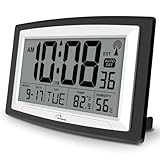
- Atomic Digital Clock Auto Set (No back light) - Using radio frequencies broadcast from NIST’s Colorado , the clock will automatically set to the correct time. Automatically adjusts to Daylight Savings Time while set the DST on.
- Atomic Wall Clocks Battery Operated with Alarm - This digital calendar alarm day clock required 3 “AA” long life batteries (Not included) for operation, no redundant wires, easy to use. Turn on the alarm clock before going to bed, it will wake you up in the morning.
- Clock with Temperature and Humidity - Excellent wall clocks for living room, office, bathroom decor,etc. Help you monitor indoor temperature and humidity to avoid cold. 12/24 hours formats with clear Hours, Minutes and Seconds display; 4 Time Zone to choose.
- Atomic Clock Large Display for seniors - WallarGe atomic clock has been designed with absolute simplicity in mind, you can also set it manually without any more ado. Wall clock or desk clock, large and clear digital display, easy to read.
- Digital Wall Clock with Accurate Date and Time - This digital calendar alarm day clock can help you keep track of dates, days of the week and times to avoid missing any important meetings, appointments or anniversaries, work well for work, study or travel schedule.
| Feature | Useful for | Common failure or risk | Question to ask |
|---|---|---|---|
| Automatic app and website tracking | Reconstructing computer-based work and personal productivity | Background apps, idle detection, second devices, meetings, and offline work distort the record | Can the user review and correct suggestions before they become timesheet entries? |
| Idle detection | Flagging periods with no keyboard or mouse activity | Quiet work can be mistaken for inactivity | Can idle time be edited, discarded, or reassigned? |
| Screenshots | Some employers’ remote-work verification workflows | Confidential data exposure, consent issues, and reduced trust | Who sees screenshots, how often are they taken, and can they be blurred or deleted? |
| GPS or geofencing | Field attendance and location-based work | Overcollection, cross-border privacy concerns, and tracking outside work | Is location optional, limited to scheduled hours, and governed by a clear retention policy? |
| Keyboard or mouse activity | Basic activity summaries | Activity is not a reliable measure of quality, judgment, or completed work | Is the data visible to workers and excluded from performance decisions? |
For contractors and client-facing teams, a project timer with manual correction is often more appropriate than surveillance features. For field operations, attendance and location can be legitimate requirements, but the employer should establish notice, consent, access, retention, and deletion rules before enabling them.
What should you check before choosing a free tracker?
- Run the forgotten-timer test. Confirm that a user can add a manual entry, edit its project, split it across tasks, and correct idle time without administrative trouble.
- Check data portability. Export a representative report and confirm its format, date range, columns, and whether the export is available without upgrading.
- Test the devices that matter. Web, Windows, macOS, Linux, iOS, Android, browser extensions, offline behavior, and mobile administration are not automatically feature-equivalent.
- Confirm the first paywall. Identify whether growth first requires more users, longer history, CSV/Excel exports, billable rates, approvals, invoices, integrations, GPS, screenshots, or advanced analytics.
- Separate time from attendance. Decide whether you need client/project hours, employee presence, automatic personal productivity, or workforce monitoring.
- Read the downgrade terms. Confirm whether historical data remains accessible, whether the account downgrades without deletion, and whether invited users consume seats.
- Check the plan at signup. Pricing pages change, free tiers can be removed, and annual prices may be lower than monthly prices while taxes may apply.
What happens when a team outgrows the free plan?
The cheapest free plan is not necessarily the cheapest upgrade path. A five-person agency may outgrow a user limit first, while a freelancer may hit a billable-rate or invoice paywall first. A manager may need approvals and locked entries; a field team may need GPS; a project team may need a specific integration.
| Likely growth problem | Feature that may become paid | Tools where the dossier identifies this concern |
|---|---|---|
| More people | Additional users or seats | Clockify, Toggl Track, My Hours |
| Long-term records | Longer report history and broader export | Clockify |
| Client billing | Billable rates, estimates, invoices, expenses, profitability | Clockify, Toggl Track, Harvest, Paymo |
| Payroll controls | Approvals, locked time, attendance, overtime, audit workflows | Clockify and attendance-focused tools |
| Workforce oversight | Screenshots, GPS, activity analytics, scheduling | Hubstaff, Jibble, Clockify |
| Workflow integration | Native project-management, accounting, or CRM integrations | Everhour, Toggl Track, Harvest, Paymo |
| Personal analytics | Advanced focus, productivity, and automatic tracking insights | RescueTime, TimeCamp |
Clockify provides a useful scaling detail: its pricing information says active or invited users occupy paid seats, while deactivated users do not. Clockify also says cancellation downgrades the account to the free version without deleting data. These policies should be checked for any product before a team treats a free plan as a long-term system of record.
Free tracker or spreadsheet: which should you use?
Use a free tracker when you need a timer, reminders, mobile capture, automatic reconstruction, reports, or multiple people entering time; use a spreadsheet when you need maximum control over fields and no vendor plan dependency.
A spreadsheet can work for a solo contractor with a stable weekly routine, especially if the contractor only needs date, client, task, hours, rate, and notes. A dedicated tracker is usually better when entries are made throughout the day, several devices are involved, managers need summaries, or forgotten timers are common.
A spreadsheet does not automatically provide timer accuracy, idle handling, mobile convenience, audit history, approvals, GPS, screenshots, or integrations. A cloud tracker, meanwhile, creates dependence on the vendor’s retention, export, pricing, and privacy policies. Whichever method you choose, maintain a regular export or backup if the records matter for billing, taxes, or disputes.
Frequently Asked Questions
What is the best completely free time tracker?
Clockify is the strongest default completely free time tracker for broad core functionality, including timers, timesheets, apps, reports, auto-tracking, and project export. Clockify’s current plan summary says the free workspace supports up to five users, and free reports and exports have important limits.
Is Clockify really free?
Clockify has a $0 plan intended for continued use, not merely a short trial. The current pricing page says the plan is for up to five users, limits free report data to a one-month range, and lists PDF-only free export, so Clockify is free but not unlimited in every respect.
Is Toggl Track free for teams?
Toggl Track offers a free-forever plan with web, desktop, mobile, browser-extension, calendar, and productivity-reporting features, but the official pricing material describes free users as limited. Confirm the current team limit at signup because the supplied official pages do not clearly establish the number.
Can free time-tracking software create invoices?
Some products connect tracked time to invoicing, but a free timer does not necessarily include invoice generation, expenses, billable rates, approvals, or accounting integrations. Harvest and Paymo are the most relevant products in this list for invoice-oriented workflows, while Clockify and Toggl Track place important billing controls in paid plans.
What is the difference between a time tracker and an employee-monitoring tool?
A time tracker records hours against a timer, timesheet, client, project, or task; an employee-monitoring tool may additionally collect screenshots, GPS, app and website activity, or keyboard and mouse signals. Monitoring features create different privacy, consent, data-retention, and employee-trust considerations.
The Bottom Line
Start with Clockify if you want the broadest free core tracker and can work within its five-user, one-month report-history, and PDF-export constraints. Choose Toggl Track for a simpler freelancer experience, TimeCamp or RescueTime for automatic personal tracking, Harvest or Paymo for invoicing and client work, Jibble for attendance and field teams, Hubstaff for monitoring-heavy operations, My Hours for focused project tracking, and Everhour when a supported project-management integration is the deciding factor.
Before adopting any free plan, verify the current user limit, report history, export format, device support, integration availability, privacy controls, and downgrade behavior on the vendor’s official page.
Quick Recap
Product prices and availability are accurate as of the date/time indicated and are subject to change. Any price and availability information displayed on Amazon at the time of purchase will apply.

