RemoteCall
RemoteCall: A broad remote support platform with strong browser access and mobile coverage. Ranked #38 of 48 in Remote Support Software by our editors (5.5/10); pricing: 14-day trial; best for browser-first attended support.
At a glance
- Editor score5.5 / 10
- Pricing14-day trial
- Best forBrowser-first attended support
- Free planNo
- Unattended accessYes
- Founded2001 · Seoul, Republic of Korea
- Facts checked21 Sep 2026
Where it wins
- Browser access without installation
- Session recording, transfers, chat, and access history
- Desktop, mobile, browser, and visual support coverage
Where it doesn't
- No perpetual free plan
- Mobile support requires the Mobile Pack
- Dedicated agent and 1-on-1 support require Total Pack
Our verdict on RemoteCall
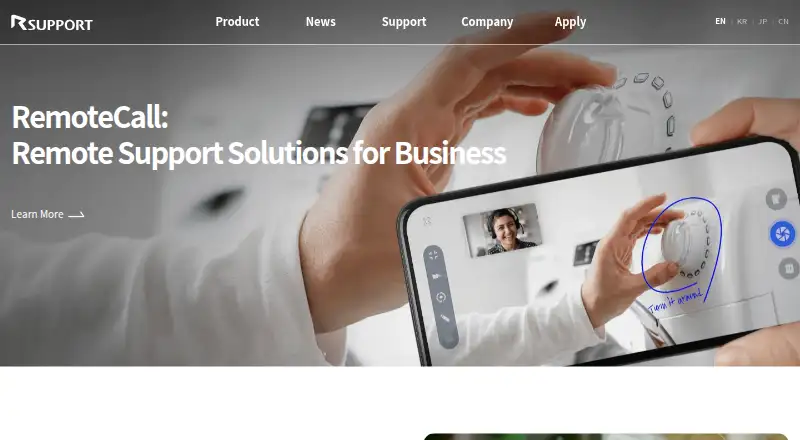
RemoteCall is a paid remote support platform from RSUPPORT Co., Ltd. It is designed for businesses assisting customer desktops, mobile devices, and field-service situations remotely. Support teams can provide browser-based or agent-based sessions with screen sharing and control, file transfer, voice and text chat, session recording, session history, and smartphone-camera visual support. The platform covers Windows, macOS, Linux, Android, iOS, and web environments, with cloud-based and on-premise deployment options described by the vendor.
The published plans show a 14-day unrestricted trial and no perpetual free plan. RemoteCall Base Pack provides browser access without installation, file transfer up to 1,000 MB, session and access history, and session recording. RemoteCall Mobile Pack adds mobile screen control, mobile screen sharing, and mobile-to-mobile support. RemoteCall Total Pack combines PC, mobile, and visual support features with a Dedicated Agent and 1-on-1 technical support. The plan structure suits teams that want to begin with desktop assistance and add mobile or higher-touch support as their scope expands.
RemoteCall’s strongest fit is browser-first attended support that also needs operational tools such as session transfer, multi-monitor support, remote reboot and reconnect, and concurrent sessions. Smartphone-camera assistance extends the product to visual support and field-service scenarios, while unattended reconnect is documented for running the service on a PC. Teams should choose it when broad platform coverage, recording, and mobile assistance matter more than a narrow desktop-only tool. It may be a less suitable choice for buyers seeking a perpetual free tier or a simpler product focused only on basic attended screen sharing.
Your product? Our editors can test RemoteCall in depth and publish a review, labelled as paid · from $149/mo →
RemoteCall pricing
All 3 RemoteCall plans and prices →
RemoteCall fact sheet
| Free plan | No |
|---|---|
| Paid from | Not verified |
| Unattended access | Yes |
| Session recording | Yes |
| Multi-monitor support | Yes |
| Supported platforms | Not verified |
| Included technician seats | Not verified |
| Concurrent sessions | 5 sessions |
| Session transfer | Yes |
| Free trial | 14 days |
| Deployment | Cloud, Self-hosted |
| Platforms | Web, Windows, macOS, Linux, iOS, Android |
| Support | Email, Phone, Docs |
| Built for | Small business, Mid-market, Enterprise (editorial estimate) |
| Pricing | 14-day trial (source) |
| Website | rsupport.com |
| Facts checked | 21 Sep 2026 |
Alternatives to RemoteCall
- TeamViewer RemoteA broad remote support suite with attended and unattended access, strong operations, and flexible licensing.9.4
- Zoho AssistA flexible remote support suite with a free plan and broad platform coverage.9.2
- SplashtopA cost-conscious choice for teams needing core remote access and support features.9.1


See all RemoteCall alternatives →
Used RemoteCall? Be the first to review it
The editor score above is our own research. What this page doesn't have yet is a reader's view — what you used RemoteCall for, what worked and what didn't. No stars are seeded and no review is paid for; an editor reads every one before it appears.
Write a reviewTwo minutes · verified accounts only · read by an editor before it appears
Featured on iTechGuides

RemoteCall is listed in our Remote Support Software directory. Add the badge to your site — it links back to this page.
<a href="https://www.itechguides.com/products/remotecall-remote-support-tool/"><img src="https://www.itechguides.com/best/badge/remotecall-remote-support-tool.svg" alt="Featured on iTechGuides" width="230" height="46"></a>
Reviewed by iTechGuides Editors · Editorial team · Updated Oct 2026
Advertiser disclosure: iTechGuides is reader-supported. Vendors can pay for top positions in our rankings and for a place on other products' pages, and we may earn a commission when you click some links. Bought places stand at the number bought; this page and our disclosure say so. Paying vendors may get a fuller, more detailed review from our editors, and that review can change their score. How we rank.
Last updated · How we research and update