LogMeIn Rescue
LogMeIn Rescue: A queue-focused remote support suite for teams managing many concurrent sessions. Ranked #6 of 48 in Remote Support Software by our editors (8.8/10); pricing: 14-day trial; best for support centers managing many concurrent sessions.
At a glance
- Editor score8.8 / 10
- Pricing14-day trial
- Best forSupport centers managing many concurrent sessions
- Free planNo
- Unattended accessYes
- Facts checked22 Sep 2026
Where it wins
- Support queues, auto-routing, session transfer, and multi-session handling
- Remote diagnostics, recording, scripting, file transfer, and unattended access
- Seven integrations plus mobile device support and configuration
Where it doesn't
- No free plan; access begins with a paid product
- The technician console's multi-session handling limit is 10 sessions
- Priority care and committed SLAs require the Rescue Enterprise plan
Our verdict on LogMeIn Rescue
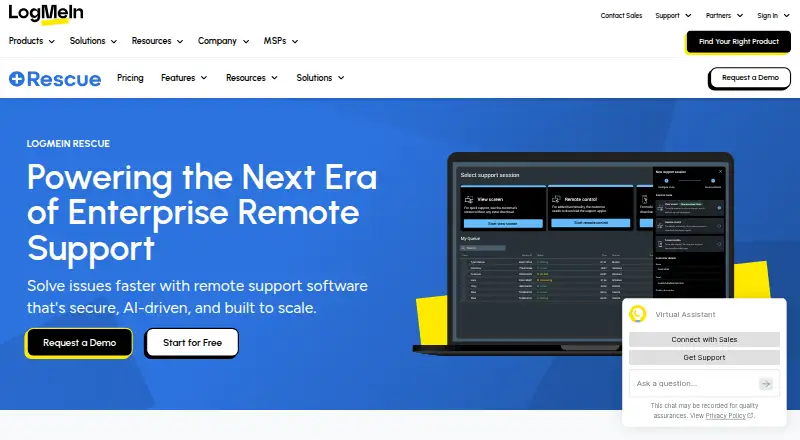
LogMeIn Rescue is cloud-based remote support software for enterprise IT and customer support teams. Technicians can connect to PCs, Macs, smartphones, and tablets without requiring pre-installed software. Its toolkit covers remote control, screen sharing, diagnostics, file transfer, unattended access, session recording, session transfer, and technician collaboration. Support queues, auto-routing, administrator controls, reporting, and mobile device configuration make it particularly suited to support centers coordinating many concurrent requests.
Its strongest area is operational depth for busy support teams. Technicians can manage multiple sessions from browser-based or desktop consoles, navigate multi-monitor systems, and transfer sessions when another specialist is needed. The technician console supports handling up to 10 sessions. Remote diagnostics, scripting, session recording, permissions, authentication, encryption, and audit logging add useful controls for structured support operations. AI features are also included, while technician and administrator management helps organizations define how teams work across queues and sessions.
LogMeIn Rescue connects with ServiceNow, Nexthink, Salesforce, Zendesk, Microsoft Teams, Microsoft Dynamics, and Freshdesk. The published plans include a 14-day free trial, followed by paid options. Remote Device Support includes Windows and Mac remote control, unattended access, in-session diagnostics, agent collaboration, and scripting. Rescue Enterprise adds a dedicated technical support team, 24/7 priority care, white-glove onboarding, a VIP support portal, and committed support SLAs. Choose it if queueing, multi-session workflows, mobile support, and service-desk integrations matter more than a free entry tier. Teams needing only occasional remote access or a narrower desktop tool may prefer a simpler alternative.
Your product? Our editors can test LogMeIn Rescue in depth and publish a review, labelled as paid · from $149/mo →
LogMeIn Rescue pricing
All 2 LogMeIn Rescue plans and prices →
LogMeIn Rescue fact sheet
| Free plan | No |
|---|---|
| Paid from | Not verified |
| Unattended access | Yes |
| Session recording | Yes |
| Multi-monitor support | Yes |
| Supported platforms | Not verified |
| Included technician seats | Not verified |
| Concurrent sessions | Not verified |
| Session transfer | Yes |
| Free trial | 14 days · no card needed |
| Deployment | Cloud |
| Platforms | Web, Windows, macOS, Linux, iOS, Android |
| Compliance & security | 2FA |
| Support | Docs · 24/7 |
| Built for | Mid-market, Enterprise (editorial estimate) |
| Pricing | 14-day trial (source) |
| Website | logmein.com |
| Facts checked | 22 Sep 2026 |
Alternatives to LogMeIn Rescue
- TeamViewer RemoteA broad remote support suite with attended and unattended access, strong operations, and flexible licensing.9.4
- Zoho AssistA flexible remote support suite with a free plan and broad platform coverage.9.2
- SplashtopA cost-conscious choice for teams needing core remote access and support features.9.1



See all LogMeIn Rescue alternatives →
LogMeIn Rescue vs the competition
- LogMeIn Rescue vs TeamViewer Remote
- LogMeIn Rescue vs Zoho Assist
- LogMeIn Rescue vs Splashtop
- LogMeIn Rescue vs ManageEngine Remote Access Plus
- LogMeIn Rescue vs AnyDesk
- LogMeIn Rescue vs ConnectWise ScreenConnect


Compare LogMeIn Rescue with any tool side by side →
Also Ranked In
LogMeIn Rescue is ranked in 2 of our directories.
Used LogMeIn Rescue? Be the first to review it
The editor score above is our own research. What this page doesn't have yet is a reader's view — what you used LogMeIn Rescue for, what worked and what didn't. No stars are seeded and no review is paid for; an editor reads every one before it appears.
Write a reviewTwo minutes · verified accounts only · read by an editor before it appears
Featured on iTechGuides

LogMeIn Rescue is listed in our Remote Support Software directory. Add the badge to your site — it links back to this page.
<a href="https://www.itechguides.com/products/logmein-rescue/"><img src="https://www.itechguides.com/best/badge/logmein-rescue.svg" alt="Featured on iTechGuides" width="230" height="46"></a>
Reviewed by iTechGuides Editors · Editorial team · Updated Oct 2026
Advertiser disclosure: iTechGuides is reader-supported. Vendors can pay for top positions in our rankings and for a place on other products' pages, and we may earn a commission when you click some links. Bought places stand at the number bought; this page and our disclosure say so. Paying vendors may get a fuller, more detailed review from our editors, and that review can change their score. How we rank.
Last updated · How we research and update