
GetDataBack Pro
GetDataBack Pro: A Windows recovery tool with broad filesystem support and preserved folder structures. Ranked #19 of 129 in Data Recovery Software by our editors (7.5/10); pricing: Paid; best for windows filesystem recovery with directory preservation.
At a glance
- Editor score7.5 / 10
- PricingPaid
- Best forWindows filesystem recovery with directory preservation
- Free planNo
- Paid from$79 one-time
- Bootable recoveryYes
- Facts checked21 Sep 2026
Where it wins
- Supports Windows, Linux EXT, and Apple HFS+ and APFS file systems
- Preserves file names and directory structures during recovery
- Bootable recovery and sector-by-sector drive-image scanning
Where it doesn't
- Windows application rather than a cross-platform desktop tool
- No free plan; the license costs $79 one time
- RAID recovery requires a virtual image created by RAID Reconstructor
Our verdict on GetDataBack Pro
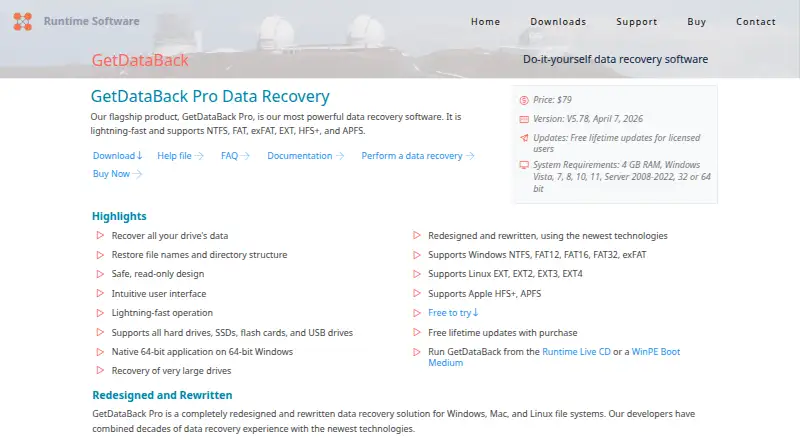
GetDataBack Pro is Windows-based data recovery software from Runtime Software for recovering files from inaccessible, formatted, partitioned, deleted, or damaged drives. It is suited to people recovering data from hard drives, SSDs, USB and flash drives, SD cards, floppy disks, volumes, drive images, and RAID virtual images. The software works with Windows NTFS, FAT12/16/32, and exFAT, as well as Linux EXT and Apple HFS+ and APFS file systems. Its focus is practical filesystem recovery with file and directory reconstruction rather than a broader multi-platform desktop experience.
The published plan is simple: GetDataBack Pro costs $79 USD as a one-time purchase. The plan is free to try and includes free lifetime updates for licensed users. A built-in viewer lets buyers check recovered files before purchase, while searches can be performed within recovered directory structures. Read-only recovery operations support a cautious workflow, and sector-by-sector scanning is available for drive images. These features make the product a fit for users who want to inspect recoverable files and retain recognizable names and folder organization.
Recovery can run from Windows or from WinPE and Runtime Live CD boot media, which helps when a normal Windows installation cannot start. The software supports Windows Vista, 7, 8, 10, 11, and Server 2008-2022. It also handles removable media and Apple and Linux filesystems from a Windows environment. RAID recovery is narrower: RAID data must be supplied as a virtual image created by RAID Reconstructor, rather than being described as direct recovery from a broken multi-disk RAID array. Choose GetDataBack Pro for Windows-centered recovery with broad filesystem coverage and directory preservation; choose an alternative if you need a non-Windows application or direct broken-array RAID recovery.
Your product? Our editors can test GetDataBack Pro in depth and publish a review, labelled as paid · from $99/mo →
GetDataBack Pro pricing
All 1 GetDataBack Pro plans and prices →
GetDataBack Pro fact sheet
| Free plan | No |
|---|---|
| Paid from | $79 one-time |
| Recovery sources | Hard drives, SSDs, USB drives, flash drives, SD cards, floppy disks, volumes, drive images, RAID virtual images |
| Operating systems | Windows Vista, 7, 8, 10, 11, Server 2008-2022 |
| Free recovery limit | Not verified |
| Memory card recovery | Yes |
| RAID recovery | Yes |
| Bootable recovery | Yes |
| File preview | Yes |
| Deployment | Desktop |
| Platforms | Windows |
| Support | Email, Phone, Docs |
| Built for | Solo, Small business, Mid-market, Enterprise (editorial estimate) |
| Pricing | Paid (source) |
| Website | runtime.org |
| Facts checked | 21 Sep 2026 |
Alternatives to GetDataBack Pro
- R-StudioA broad recovery toolkit for professionals handling disks, RAID, images, and networks.9.3
- TestDiskA capable free choice for partition repair, filesystem recovery, and file undelete.9.1
- RecoveritA broad recovery toolkit with strong media repair and storage-device coverage.9.0


See all GetDataBack Pro alternatives →
Also Ranked In
GetDataBack Pro is ranked in 4 of our directories.
Used GetDataBack Pro? Be the first to review it
The editor score above is our own research. What this page doesn't have yet is a reader's view — what you used GetDataBack Pro for, what worked and what didn't. No stars are seeded and no review is paid for; an editor reads every one before it appears.
Write a reviewTwo minutes · verified accounts only · read by an editor before it appears
Featured on iTechGuides

GetDataBack Pro is listed in our Data Recovery Software directory. Add the badge to your site — it links back to this page.
<a href="https://www.itechguides.com/products/getdataback-pro/"><img src="https://www.itechguides.com/best/badge/getdataback-pro.svg" alt="Featured on iTechGuides" width="230" height="46"></a>
Guides on data recovery software
- 10 Best Data Recovery Apps for Android: What Actually WorksAug 2026
- Best iPhone Data Recovery Software for Mac and Windows in 2026Aug 2026
- The best data recovery software; tried and tested by our expertsAug 2026
Reviewed by iTechGuides Editors · Editorial team · Updated Oct 2026
Advertiser disclosure: iTechGuides is reader-supported. Vendors can pay for top positions in our rankings and for a place on other products' pages, and we may earn a commission when you click some links. How we rank.
Last updated · How we research and update