
DocuClipper Invoice Processing
DocuClipper Invoice Processing: Broad invoice automation with a low entry price and accounting-ready workflows. Ranked #1 of 30 in Invoice Processing Software by our editors (9.7/10); pricing: 14-day trial; best for AP teams needing broad automation at $20/month.
At a glance
- Editor score9.7 / 10
- Pricing14-day trial
- Best forAP teams needing broad automation at $20/month
- Free planNo
- Paid from$20/mo
- OCR or AI extractionYes
- Facts checked19 Sep 2026
Where it wins
- OCR, line-item extraction, validation, and duplicate detection
- Purchase-order matching and configurable approval routing
- Direct exports to major accounting and storage platforms
Where it doesn't
- Starter includes 60 pages per month
- No free plan is available
- Page allowances may not align with invoice-count needs
Our verdict on DocuClipper Invoice Processing
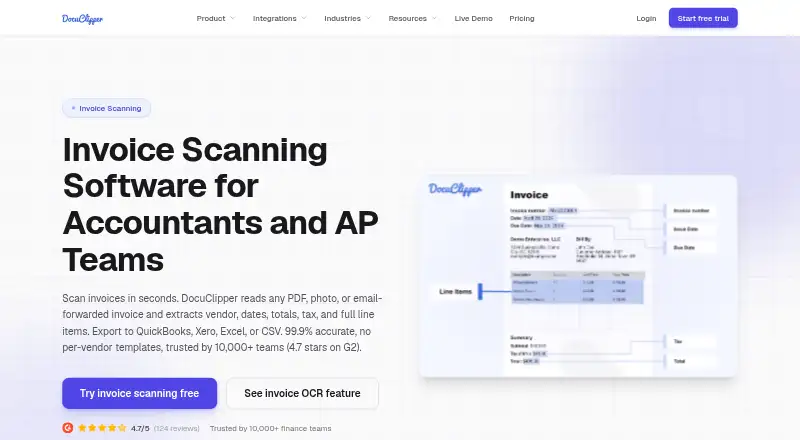
DocuClipper Invoice Processing is a web-based platform for accountants, accounts payable teams, bookkeepers, and finance professionals. It captures invoices from PDFs, scans, photos, email, cloud storage, and API uploads, then uses OCR and AI to extract vendor details, totals, taxes, purchase orders, and line items. It also validates invoice math, detects duplicates, matches invoices to purchase orders, routes approvals, and posts approved data to accounting systems.
The published plans show a paid structure with a 14-day free trial. Starter costs $20 per month and includes 60 pages per month, unlimited users, API access, QuickBooks, Xero, or Excel exports, and email and chat support. Business costs $111 per month for 640 pages, adding financial analysis, a dedicated processing queue, team management and collaboration, and premium support. Enterprise costs $360 per month for 2,000 pages, single sign-on, audit logs, IP allowlisting, an SLA guarantee, and white-glove onboarding. The page-based allowances make the entry plan straightforward to compare, but teams should assess how their invoice formats affect page consumption.
Its ecosystem coverage suits organizations that already work across accounting, storage, and automation tools. Integrations include QuickBooks Online and Desktop, Xero, NetSuite, Sage, Dynamics 365 Business Central, Excel, CSV, Google Sheets, Google Drive, Dropbox, OneDrive, Box, Zapier, and Gmail. Web and API access support both direct use and connected workflows. DocuClipper is a strong fit for teams that want broad AP processing with approvals, validation, purchase-order matching, and direct accounting exports. Organizations that need invoice-count allowances rather than page-based limits, or that do not need this breadth of automation, may prefer a more narrowly focused alternative.
Your product? Our editors can test DocuClipper Invoice Processing in depth and publish a review, labelled as paid · from $149/mo →
DocuClipper Invoice Processing pricing
All 3 DocuClipper Invoice Processing plans and prices →
DocuClipper Invoice Processing fact sheet
| Free plan | No |
|---|---|
| Paid from | $20/mo |
| OCR or AI extraction | Yes |
| Line-item extraction | Yes |
| PO matching | Yes |
| Approval routing | Yes |
| Accounting integrations | Yes |
| Duplicate detection | Yes |
| Included invoices | Not verified |
| Free trial | 14 days |
| Deployment | Cloud |
| Platforms | Web |
| Integrations | 16 integrations: QuickBooks Online, QuickBooks Desktop, Xero, NetSuite, Sage, Dynamics 365 Business Central … |
| Pricing | 14-day trial (source) |
| Website | docuclipper.com |
| Facts checked | 19 Sep 2026 |
DocuClipper Invoice Processing integrations
DocuClipper Invoice Processing lists 16 integrations on its own site.
- QuickBooks Online
- QuickBooks Desktop
- Xero
- NetSuite
- Sage
- Dynamics 365 Business Central
- Excel
- CSV
- Google Sheets
- Google Drive
- Dropbox
- OneDrive
- Box
- Zapier
- Gmail
- REST API
Alternatives to DocuClipper Invoice Processing
- ABBYY FlexiCapture for InvoicesA broad invoice-processing suite for organizations that need on-premises deployment and structured controls.9.1
- Dext PrepareA mobile-first capture and extraction tool for SMB invoice workflows.8.8
- AppZenA broad AP automation platform for enterprise controls, compliance, and fraud detection.8.7



See all DocuClipper Invoice Processing alternatives →
DocuClipper Invoice Processing vs the competition
- DocuClipper Invoice Processing vs ABBYY FlexiCapture for Invoices
- DocuClipper Invoice Processing vs Dext Prepare
- DocuClipper Invoice Processing vs AppZen
- DocuClipper Invoice Processing vs Tungsten AP Essentials
- DocuClipper Invoice Processing vs Hypatos
- DocuClipper Invoice Processing vs Infrrd for Invoice



Compare DocuClipper Invoice Processing with any tool side by side →
Used DocuClipper Invoice Processing? Be the first to review it
The editor score above is our own research. What this page doesn't have yet is a reader's view — what you used DocuClipper Invoice Processing for, what worked and what didn't. No stars are seeded and no review is paid for; an editor reads every one before it appears.
Write a reviewTwo minutes · verified accounts only · read by an editor before it appears
Featured on iTechGuides

DocuClipper Invoice Processing is listed in our Invoice Processing Software directory. Add the badge to your site — it links back to this page.
<a href="https://www.itechguides.com/products/docuclipper-invoice-processing/"><img src="https://www.itechguides.com/best/badge/docuclipper-invoice-processing.svg" alt="Featured on iTechGuides" width="230" height="46"></a>
Reviewed by iTechGuides Editors · Editorial team · Updated Sep 2026
Advertiser disclosure: iTechGuides is reader-supported. Vendors can pay for top positions in our rankings and for a place on other products' pages, and we may earn a commission when you click some links. Bought places stand at the number bought; this page and our disclosure say so. Paying vendors may get a fuller, more detailed review from our editors, and that review can change their score. How we rank.
Last updated · How we research and update