
File Scavenger
File Scavenger: A Windows utility for deep file-system recovery, with a $69 one-time starting price. Ranked #76 of 129 in Data Recovery Software by our editors (3.3/10); pricing: Paid; best for windows recovery with advanced file-system tools.
At a glance
- Editor score3.3 / 10
- PricingPaid
- Best forWindows recovery with advanced file-system tools
- Free planNo
- Paid from$69 one-time
- Facts checked19 Sep 2026
Where it wins
- Recovers from corrupted, reformatted, or deleted volumes and partitions
- Supports RAID, RAIDZ, NAS, memory cards, and multiple file systems
- Includes a snapshot browser, hex viewer, and picture-file previews
Where it doesn't
- Windows-only operation, even when recovering Linux or macOS file systems
- No free plan; the demo only saves files smaller than 64 kilobytes
- Premium and Professional editions cost $129 and $249 one-time
Our verdict on File Scavenger
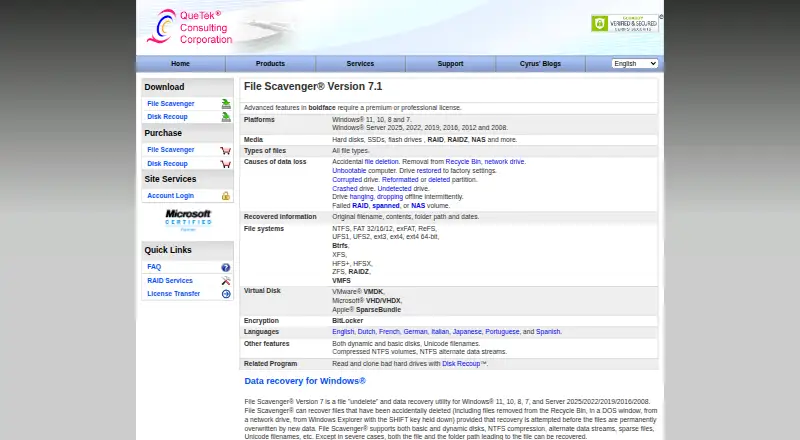
File Scavenger is a Windows utility for recovering accidentally deleted files and data from reformatted, deleted, corrupted, or crashed volumes. It is aimed at Windows users who need more than straightforward undelete, including people working with RAID, RAIDZ, NAS, memory cards, or drives using Linux and macOS file systems. Recovery can retain original filenames, contents, folder paths, and dates when data has not been overwritten. The supported file systems include NTFS, FAT, exFAT, ext, HFS+, XFS, ZFS, and ReFS.
Its scope is a notable strength: the software can scan hard disks, SSDs, flash drives, RAID, RAIDZ, and NAS devices, while the snapshot browser helps navigate very large file systems. A hex viewer with annotations for common file-system structures adds a lower-level inspection option, and picture files can be previewed before licensed recovery. Although it can recover from an unbootable computer, the product page does not describe bootable recovery media. Because the application runs on Windows, it is not a fit for buyers who need a native macOS or Linux recovery application.
According to the vendor's pricing page, Standard Edition costs $69 one-time and activates on three computers owned by the same person. Premium Edition costs $129 one-time and is described as a premium license for power users; Professional Edition costs $249 one-time for data recovery professionals. There is no free plan. The demo permits saving files smaller than 64 kilobytes, so it offers a limited way to check recovery before licensing rather than a broad free recovery tier. File Scavenger suits Windows users who value file-system breadth and advanced inspection tools; buyers seeking a free option or a non-Windows application should look elsewhere.
Your product? Our editors can test File Scavenger in depth and publish a review, labelled as paid · from $99/mo →
File Scavenger pricing
All 3 File Scavenger plans and prices →
File Scavenger fact sheet
| Free plan | No |
|---|---|
| Paid from | $69 one-time |
| Recovery sources | Hard disks, SSDs, flash drives, RAID, RAIDZ, NAS, memory cards |
| Operating systems | Windows 11, 10, 8, 7, Server 2025/2022/2019/2016/2012/2008 |
| Free recovery limit | Not verified |
| Memory card recovery | Yes |
| RAID recovery | Yes |
| Bootable recovery | Not verified |
| File preview | Yes |
| Deployment | Desktop |
| Platforms | Windows |
| Pricing | Paid (source) |
| Website | quetek.com |
| Facts checked | 19 Sep 2026 |
Alternatives to File Scavenger
- R-StudioA broad recovery toolkit for professionals handling disks, RAID, images, and networks.9.3
- TestDiskA capable free choice for partition repair, filesystem recovery, and file undelete.9.1
- RecoveritA broad recovery toolkit with strong media repair and storage-device coverage.9.0


See all File Scavenger alternatives →
Also Ranked In
File Scavenger is ranked in 2 of our directories.
Used File Scavenger? Be the first to review it
The editor score above is our own research. What this page doesn't have yet is a reader's view — what you used File Scavenger for, what worked and what didn't. No stars are seeded and no review is paid for; an editor reads every one before it appears.
Write a reviewTwo minutes · verified accounts only · read by an editor before it appears
Featured on iTechGuides

File Scavenger is listed in our Data Recovery Software directory. Add the badge to your site — it links back to this page.
<a href="https://www.itechguides.com/products/file-scavenger/"><img src="https://www.itechguides.com/best/badge/file-scavenger.svg" alt="Featured on iTechGuides" width="230" height="46"></a>
Guides on data recovery software
- 10 Best Data Recovery Apps for Android: What Actually WorksAug 2026
- Best iPhone Data Recovery Software for Mac and Windows in 2026Aug 2026
- The best data recovery software; tried and tested by our expertsAug 2026
Reviewed by iTechGuides Editors · Editorial team · Updated Oct 2026
Advertiser disclosure: iTechGuides is reader-supported. Vendors can pay for top positions in our rankings and for a place on other products' pages, and we may earn a commission when you click some links. How we rank.
Last updated · How we research and update