
Dialpad Meetings
Dialpad Meetings: A capable meeting platform, but not a voicemail-drop solution. Ranked #42 of 42 in Voicemail Drop Software by our editors (3.0/10); pricing: Free plan; best for free online meetings, not voicemail drops.
At a glance
- Editor score3.0 / 10
- PricingFree plan
- Best forFree online meetings, not voicemail drops
- Free planYes
- Facts checked20 Sep 2026
Where it wins
- Free plan includes video meetings and core meeting features
- AI transcription, summaries, key moments, and action items
- Supports calendar integrations and meetings with up to 1,500 participants
Where it doesn't
- No voicemail-drop workflow in the listed feature set
- Large Meetings capacity requires an add-on
- Business plan participant limit is up to 100 per conference
Our verdict on Dialpad Meetings
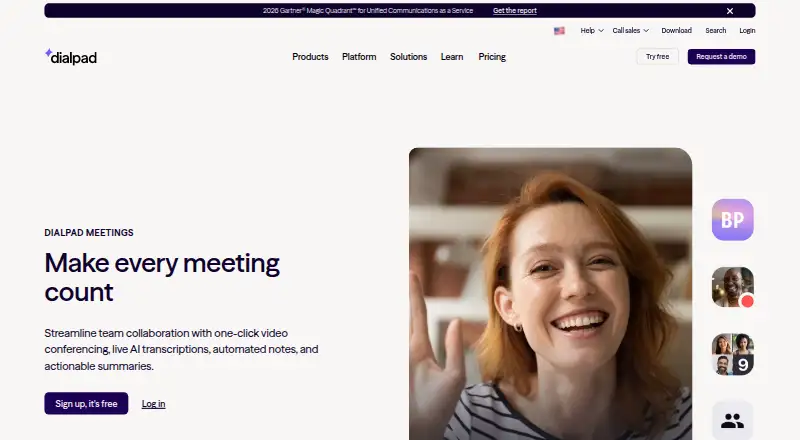
Dialpad Meetings is a browser-based and desktop video conferencing product for teams, customers, and external participants. It supports one-click browser and app meetings, HD video and audio, screen sharing, in-meeting chat, emoji reactions, recordings, transcripts, and host controls. The Free plan includes video meetings and core meeting features, making it suitable for organizations that need straightforward online meetings without starting with a paid tier. It is not designed around voicemail-drop campaigns or automated voicemail workflows.
Its strongest fit is live collaboration. Meeting hosts can lock sessions, remove participants, and control screen sharing, while attendees can share an entire screen or an individual browser tab. Calendar scheduling and integrations with Salesforce, Slack, Google Calendar, Microsoft Teams, Outlook, Intercom, and Miro support workflows around meetings and follow-up. The Business plan adds recurring conferences, international dial-ins, dial-out to participants, and Dialpad AI features. Large Meetings can extend capacity to 1,500 participants through an add-on.
AI features add practical meeting documentation, including live transcription, summaries, key moments, and action items, alongside meeting recording and transcript access. The product is available on the web, Windows, macOS, and Android. Choose Dialpad Meetings if your priority is free or plan-based video conferencing with scheduling, collaboration, and AI meeting records. Choose a voicemail-drop product instead if your primary workflow requires leaving prerecorded messages during outbound calling, because the listed capabilities focus on meetings rather than voicemail drops.
Your product? Our editors can test Dialpad Meetings in depth and publish a review, labelled as paid · from $149/mo →
Dialpad Meetings pricing
All 2 Dialpad Meetings plans and prices →
Dialpad Meetings fact sheet
| Free plan | Yes |
|---|---|
| Paid from | Not verified |
| Drop trigger | Not verified |
| CRM integrations | Not verified |
| Scheduled drops | Not verified |
| Drop analytics | Not verified |
| Contact import | Not verified |
| Included team seats | Not verified |
| Deployment | Cloud, Desktop, Mobile |
| Platforms | Web, Windows, macOS, Android |
| Compliance & security | SOC 2, ISO 27001, HIPAA |
| Support | Docs |
| Built for | Small business, Mid-market, Enterprise (editorial estimate) |
| Integrations | 7 integrations: Salesforce, Slack, Google Calendar, Microsoft Teams, Outlook, Intercom … |
| Pricing | Free plan (source) |
| Website | dialpad.com |
| Facts checked | 20 Sep 2026 |
Dialpad Meetings integrations
Dialpad Meetings lists 7 integrations on its own site.
- Salesforce
- Slack
- Google Calendar
- Microsoft Teams
- Outlook
- Intercom
- Miro
Alternatives to Dialpad Meetings
- Call LoopA flexible, credit-based platform for scheduled voicemail, voice, and SMS campaigns.9.3
- Ringless CloudA low-cost voicemail drop service with scheduling, analytics, automation, and API access.9.1
- SlybroadcastA focused ringless voicemail service with web, mobile, API, and automation support.9.0



See all Dialpad Meetings alternatives →
Also Ranked In
Dialpad Meetings is ranked in 11 of our directories; the 6 strongest besides Voicemail Drop Software.
- #11Web and Video Conferencing - Midmarket Software25 tools ranked
- #14Video Conferencing Software43 tools ranked
- #14Web and Video Conferencing - Enterprise Software24 tools ranked
- #17Toll-Free Number Services17 tools ranked
- #17Virtual Meeting Software28 tools ranked
- #19Google Workspace Communication Tools28 tools ranked
Used Dialpad Meetings? Be the first to review it
The editor score above is our own research. What this page doesn't have yet is a reader's view — what you used Dialpad Meetings for, what worked and what didn't. No stars are seeded and no review is paid for; an editor reads every one before it appears.
Write a reviewTwo minutes · verified accounts only · read by an editor before it appears
Featured on iTechGuides

Dialpad Meetings is listed in our Voicemail Drop Software directory. Add the badge to your site — it links back to this page.
<a href="https://www.itechguides.com/products/dialpad-meetings/"><img src="https://www.itechguides.com/best/badge/dialpad-meetings.svg" alt="Featured on iTechGuides" width="230" height="46"></a>
Reviewed by iTechGuides Editors · Editorial team · Updated Oct 2026
Advertiser disclosure: iTechGuides is reader-supported. Vendors can pay for top positions in our rankings and for a place on other products' pages, and we may earn a commission when you click some links. Bought places stand at the number bought; this page and our disclosure say so. Paying vendors may get a fuller, more detailed review from our editors, and that review can change their score. How we rank.
Last updated · How we research and update