

iTechGuides is reader-supported. When you buy through links on our site, we may earn an affiliate commission. As an Amazon Associate I earn from qualifying purchases. Learn more
In this Itechguide, Victor teaches you how to forget a network on Windows 10.
Option 1: Forget a Network from Taskbar Tray
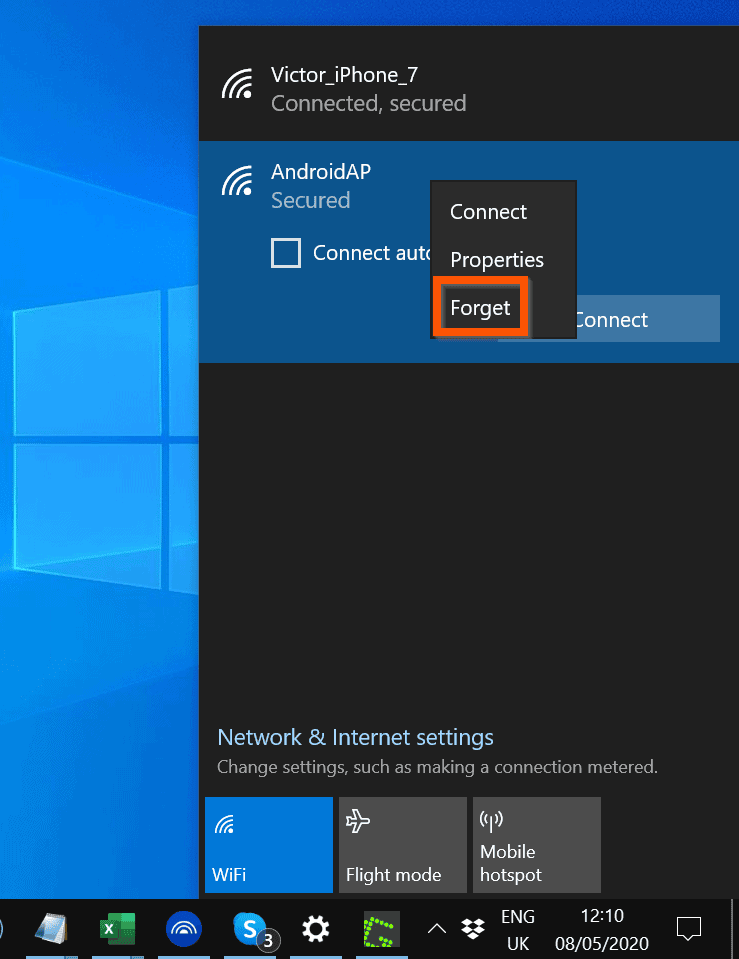
- On the right side of your Windows 10 taskbar (towards the clock), click the tray icon. Then, click the WiFi icon. A list of available Wi-Fis will be displayed.

- Right-click the WiFi network you want to forget. Then, click Forget. The network will be “forgotten” for a while – it will not be available for you to connect to.
Option 2: Forget a Network from WiFi Settings
- Right-click the Windows 10 Start menu and click Settings.

- Then, on the Windows Settings page, click the Network & Internet category.

- On the left pane of Network & Internet page, click WiFi.

- Then, on the WiFi Settings page, click Manage known networks.

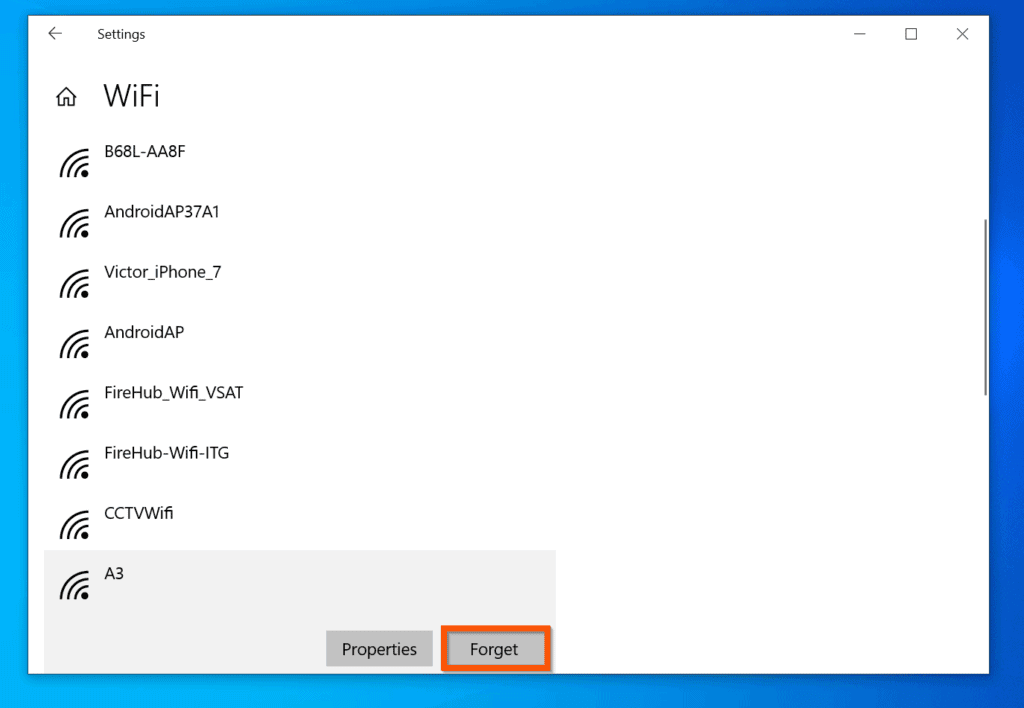
- Finally, on the Manage known networks page, click on the WiFi network you want to forget. It will display 2 options.
- From the displayed options, click Forget – see the second image below.

Conclusion
I hope you found this Itechguide helpful. If you did, click on “Yes” beside the “Was this page helpful” question below.
You may also express your thoughts and opinions by using the “Leave a Comment” form at the bottom of this page.
PC Slower Than It Used to Be?
A free scan shows the junk files, broken settings and background clutter dragging Windows down - then fixes them in one click.Free scan · Windows 10 & 11Outdated Drivers Are Slowing You Down
One free scan finds every outdated or missing driver and matches the right update for your exact hardware.Free scan · exact hardware matchFinally, for more Windows 10 Itechguides, visit our Windows 10 How–To page. You may also find our Work from Home page very helpful.
Quick Recap
Also popular on Amazon
- Intel Core i9 HX Power for Elite Gaming: Dominate demanding titles with the Intel Core i9-14900HX and its 24-core hybrid architecture, delivering fast load times, high FPS, and smooth multitasking.
- GeForce RTX 5070 With Ray Tracing & DLSS 4: Powered by NVIDIA Blackwell, the RTX 5070 delivers stronger ray tracing, higher FPS, faster AI upscaling, and more responsive gameplay—ideal for competitive and cinematic gaming.
- QHD 165Hz, 100% DCI-P3 for Ultra-Clear Combat: The QHD 165Hz display reveals more detail, reduces motion blur, and boosts visibility in fast-paced games while delivering richer, more accurate colors.
- Cooler Boost 5 for Sustained Performance: Dual fans and a 5-heat-pipe share-pipe design keep the CPU and GPU cool, maintaining stable frame rates during long gaming marathons.
- 4-Zone RGB Keyboard + Full Game-Ready Ports: Customize your setup with a 4-zone RGB keyboard and highlighted WASD keys. Includes USB-C Gen 2, HDMI up to 8K, multiple USB-A ports, RJ45, Wi-Fi 6E & Hi-Res Audio.
Popular on Amazon
Product prices and availability are accurate as of the date/time indicated and are subject to change. Any price and availability information displayed on Amazon at the time of purchase will apply.
Independent reader supportYour contribution helps us test, update, and keep practical guides available for everyone.


