

iTechGuides is reader-supported. When you buy through links on our site, we may earn an affiliate commission. As an Amazon Associate I earn from qualifying purchases. Learn more
In this Itechguide, Victor teaches you how to find computer model on Windows 10. The guide covers steps for 3 methods to find computer model on Windows 10.
Option 1: Find Computer Model from System Information
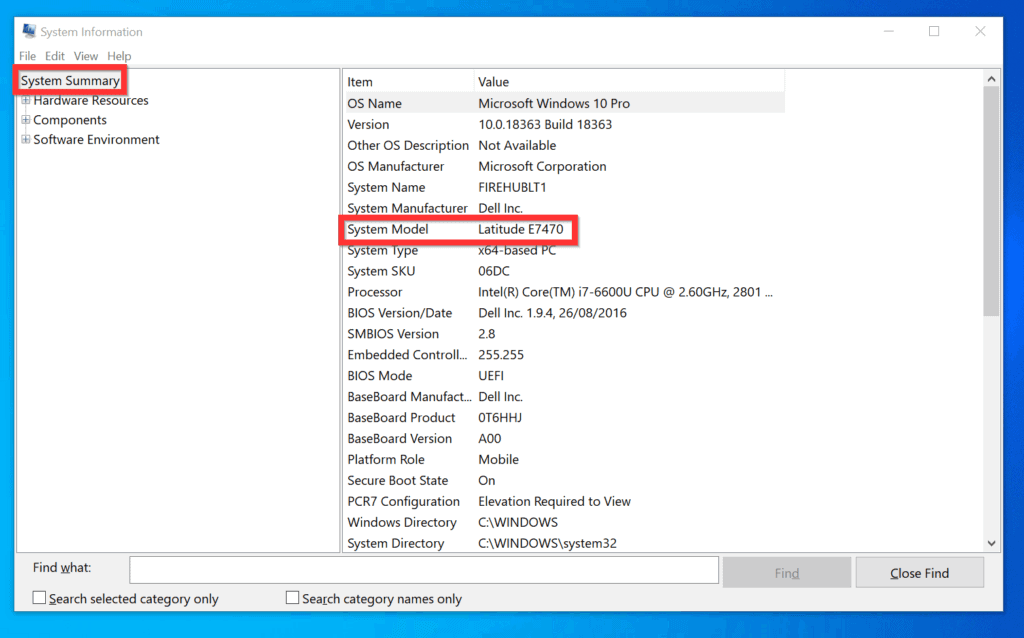
- Type MSINFO32 in the search box. Then, from the search results, click System Information.

- When System Information opens, on the left pane, System Summary should be selected by default.
- If System Summary is not selected, click on it. The details pane (right pane), will display the System Model (Computer Model) for your PC.
Option 2: Find Computer Model from DirectX Diagnostics Tool
To use this method to find the model of your computer, use the steps below…
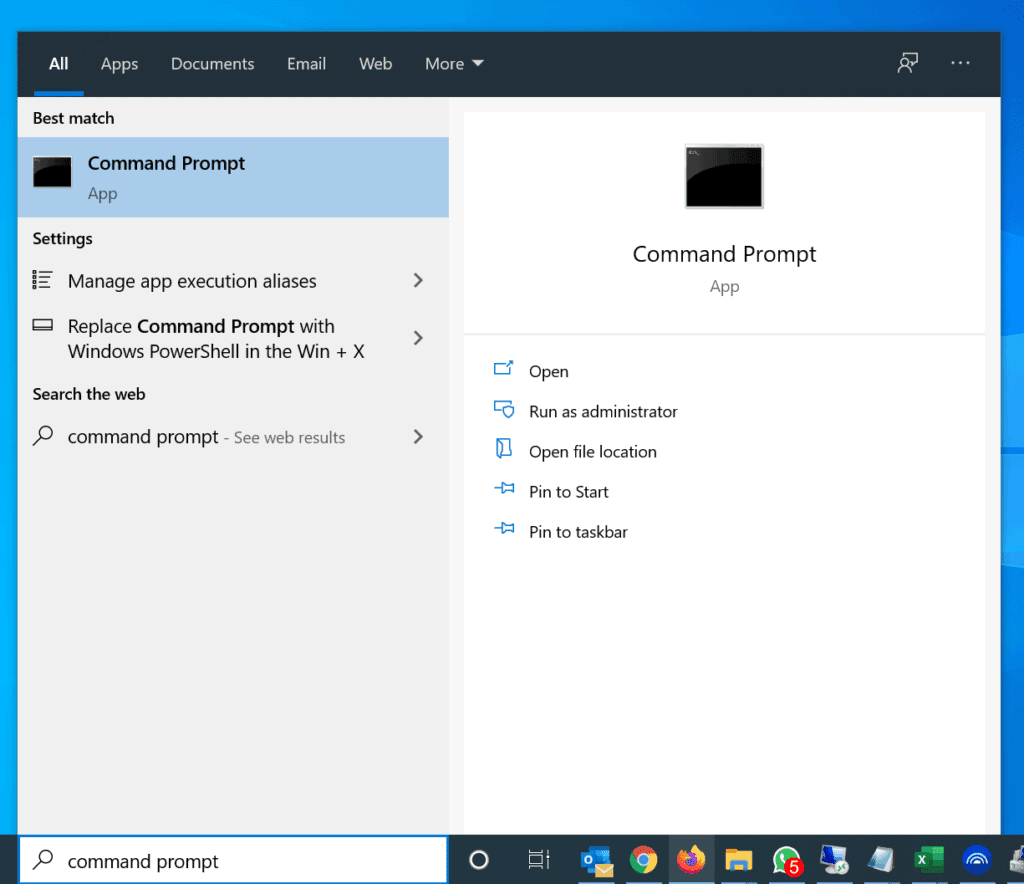
- Type command prompt in the search box. Then, from the search results, click Command Prompt.
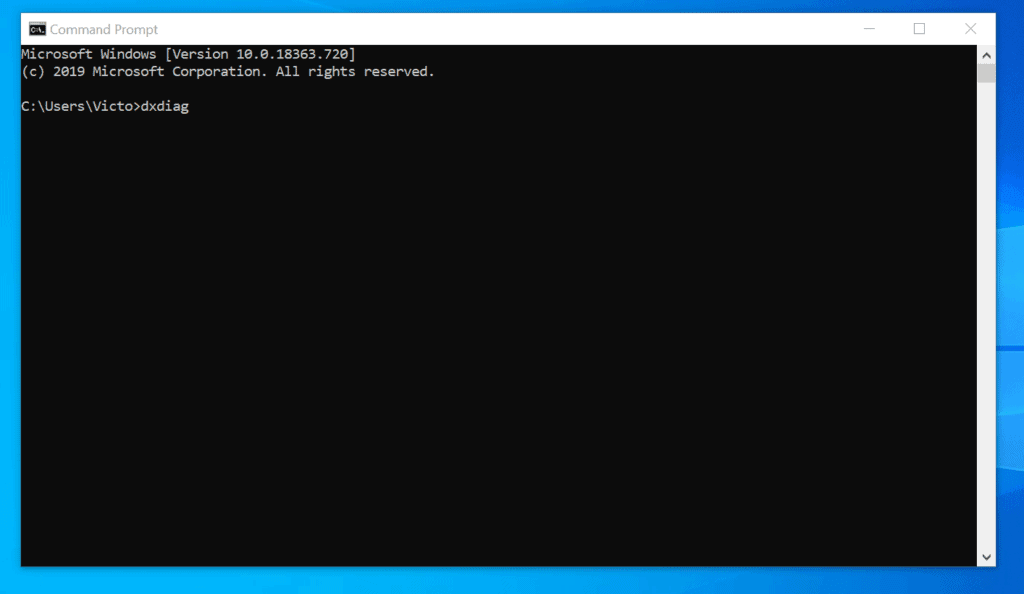
- On Command Prompt, type the command below and press enter. The command will open DirectX Diagnostics Tool.
dxdiag

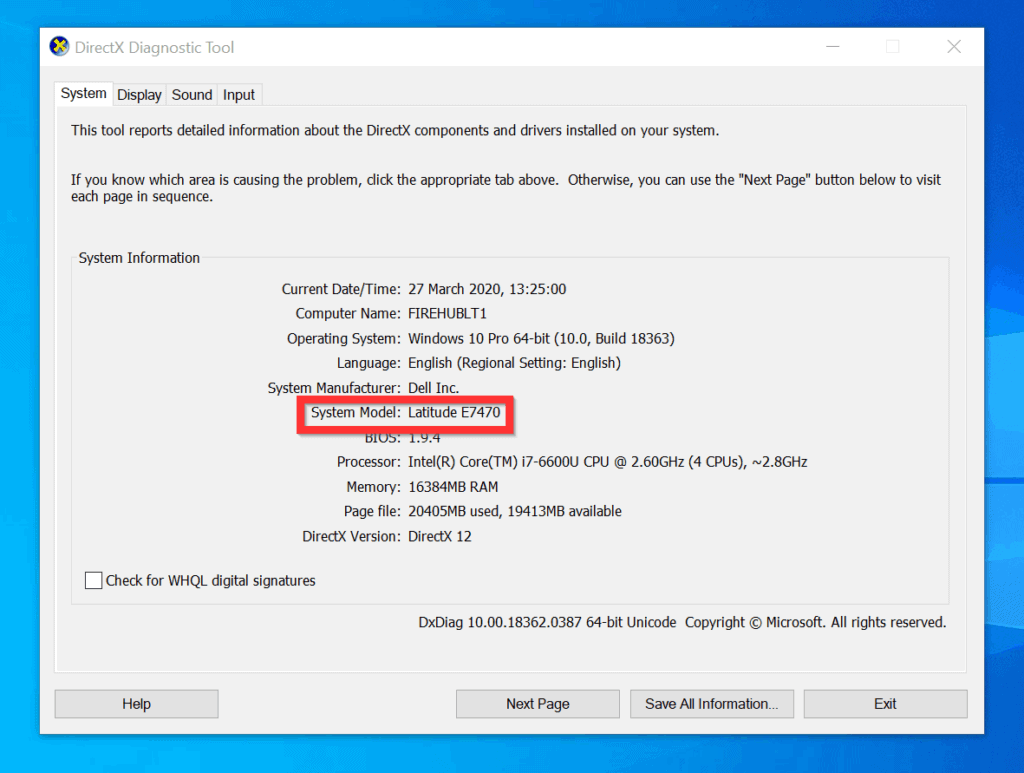
- DirectX Diagnostics Tool will open the System tab by default. Your computer model will be displayed as System Model (under System Information).
Option 3: Find Computer Model with Command Prompt or PowerShell
You can also find the model of your PC with Command Prompt or PowerShell.
Crashes, No Sound, or Screen Glitches?
Random freezes, missing sound and display glitches usually trace back to one bad driver. Find and replace yours safely.Free scan · under a minutePC Slower Than It Used to Be?
A free scan shows the junk files, broken settings and background clutter dragging Windows down - then fixes them in one click.Free scan · Windows 10 & 11Method 1: Find a Computer Model with Command Prompt
Here are the steps to find the model of your PC with CMD:
Popular on Amazon

- KEYBOARD: The keyboard works for Windows with hot keys that enable easy access to Media, My Computer, Mute, Volume up/down, and Calculator
- EASY SETUP: Experience simple installation with the USB wired connection
- VERSATILE COMPATIBILITY: This keyboard is designed to work with multiple Windows versions, including Vista, 7, 8, 10 offering broad compatibility across devices.
- SLEEK DESIGN: The elegant black color of the wired keyboard complements your tech and decor, adding a stylish and cohesive look to any setup without sacrificing function.
- FULL-SIZED CONVENIENCE: The standard QWERTY layout of this keyboard set offers a familiar typing experience, ideal for both professional tasks and personal use.
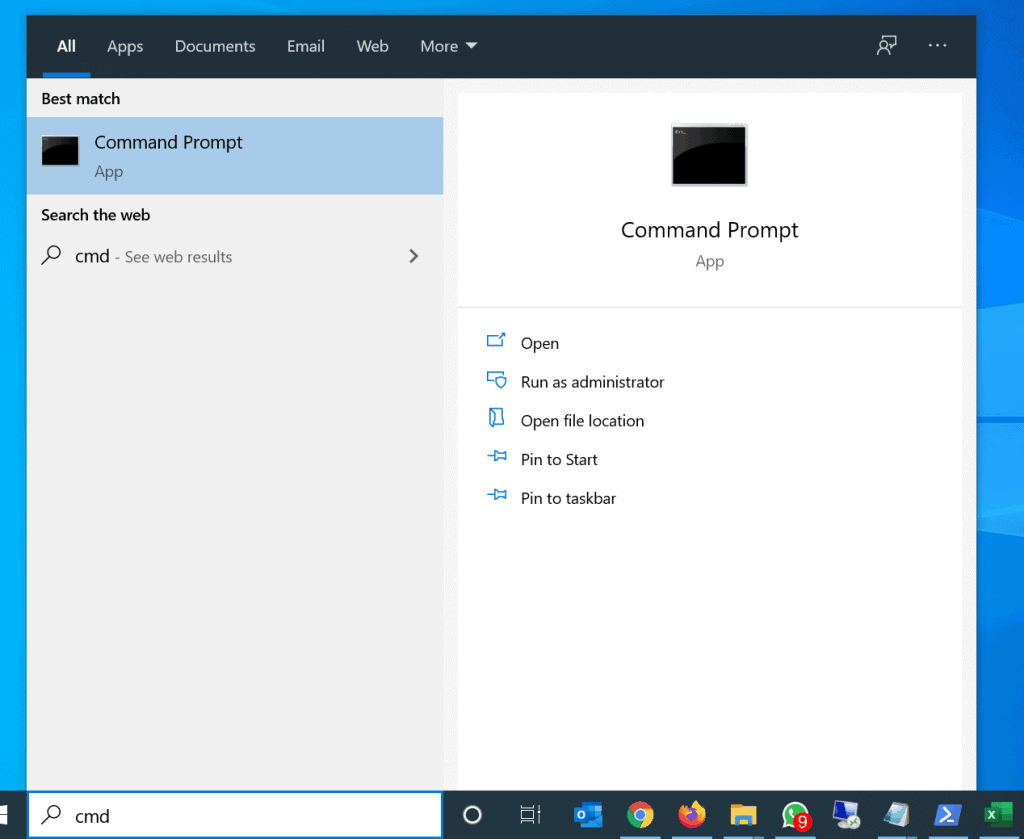
- Type cmd in the search bar. Then click Command Prompt.
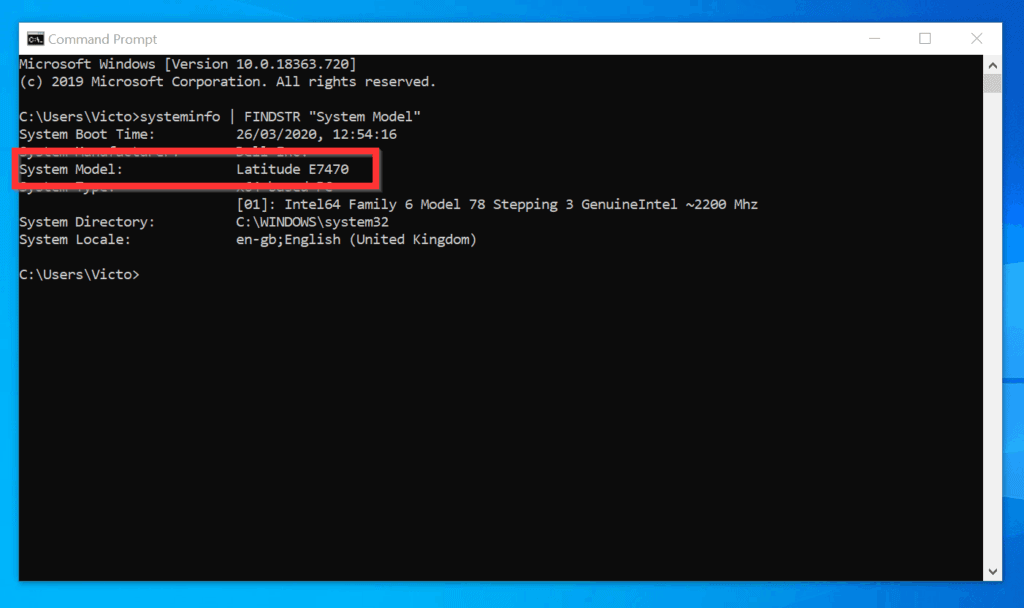
- On the Command Prompt, type the command below and press the enter key on your keyboard.
systeminfo | FINDSTR "System Model"
- The command will display the model of your computer as System Model.
Method 2: Find a Computer Model with PowerShell
You can also find a computer model with PowerShell. Here are the steps to get the model of your computer with PowerShell…
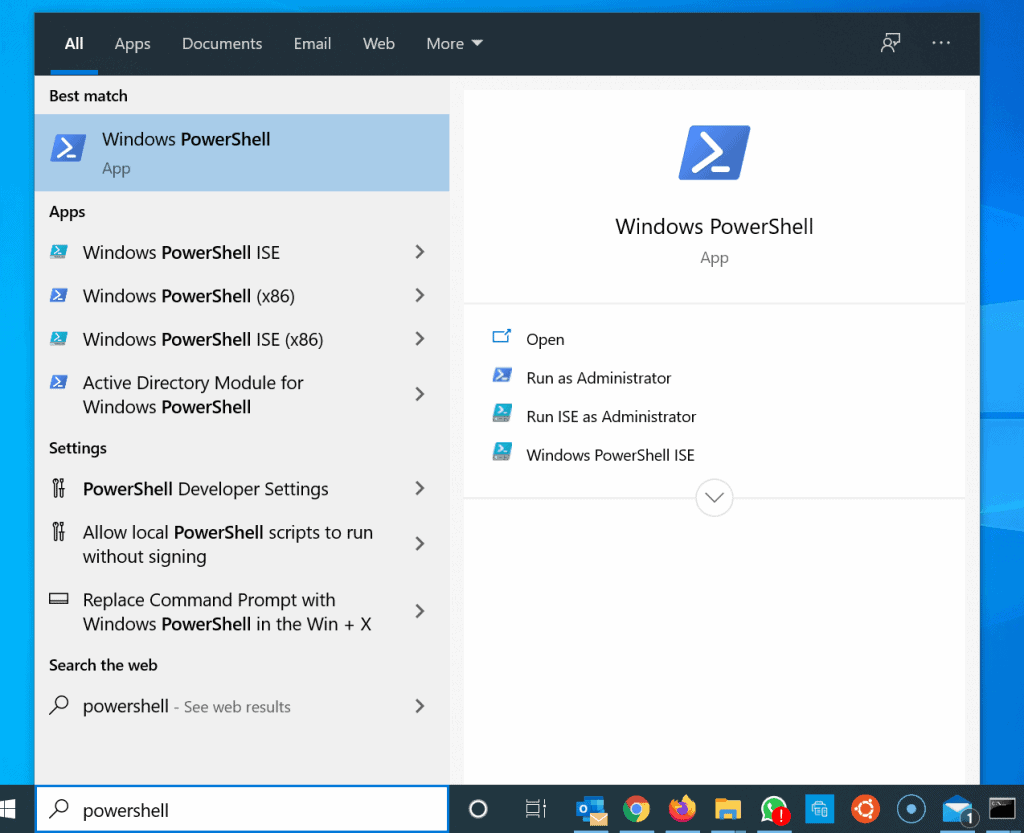
- Type powershell in the Windows 10 search box. Then, click Windows PowerShell.
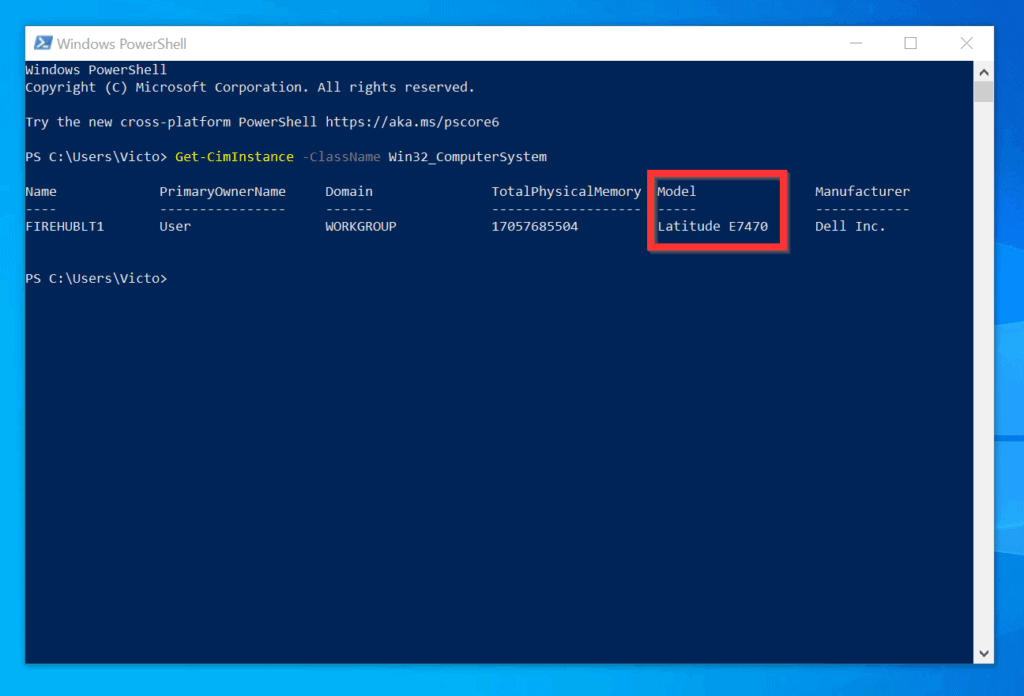
- On Windows PowerShell prompt, type the command below and press enter.
Get-CimInstance -ClassName Win32_ComputerSystem - The command displays a list of information about your computer. The model of your computer is displayed on the Model column.
As you can see, it is very easy to find a computer model on Windows 10!
Also popular on Amazon

- 【Compatible Models】Compatible with HP ProBook 450 G5 455 G5 470 G5 650 G4 650 G5 Series Laptop.
- 【Compatible Part Number】L00739-001 L09593-001 L01028-001 L01027-001 925741-001
- 【Specification】This keyboard with frame but without backlight.
- 【Good Package】This keyboard is covered bubble bag in box,make sure you can receive a high quality keyboard.
- 【Solution of keys don't work】If some keys don't work after install ,You can try to reconnect the ribbon cable in case bad connected ,pls use a dry cloth to wipe metal head of the connect ribbon,then try to connect about few times,many customer solve this problem after did this.
If you found this article helpful, kindly click on “Yes” beside the “Was this page helpful” question below. You may also express your thoughts and opinions by using the “Leave a Comment” form at the bottom of this page.
Do these 3 things before closing this tab:
1Repair Windows errors before they cause bigger problems2Fix the driver behind crashes, sound loss and screen glitches3Clear out junk files and repair common Windows errorsFinally, for more Windows 10 Itechguides, visit our Windows 10 How–To page.
Quick Recap
Also popular on Amazon

- All-day Comfort: The design of this standard keyboard creates a comfortable typing experience thanks to the deep-profile keys and full-size standard layout with F-keys and number pad
- Easy to Set-up and Use: Set-up couldn't be easier, you simply plug in this corded keyboard via USB on your desktop or laptop and start using right away without any software installation
- Compatibility: This full-size keyboard is compatible with Windows 7, 8, 10 or later, plus it's a reliable and durable partner for your desk at home, or at work
- Spill-proof: This durable keyboard features a spill-resistant design (1), anti-fade keys and sturdy tilt legs with adjustable height, meaning this keyboard is built to last
- Plastic parts in K120 include 51% certified post-consumer recycled plastic*
Also popular on Amazon

- 【Unique】The keyboard is with frame but without backlit!!!
- 【Compatible models】 Dell Inspiron 15-3000 15-3541 15-3542 15-3543 15-3551 15-3552 15-3555 15-3558 15-3565 15-3567 15-3568 15-3573 Series Laptop
- 【Compatible models】 Compatible with Dell Inspiron 15-5000 15-5542 15-5543 15-5545 15-5547 15-5548 15-5551 15-5552 15-5555 15-5556 15-5557 15-5558 15-5559 15-5566 15-5577 Series Laptop
- 【Compatible models】 Compatible with Dell Dell Inspiron 15-5749 15-5759 15-5755 17-5000 15-5748 15-7000 15-7557 15-7559 Series Laptop i3541 i3542 i3543 i3551 i3552
- 【Compatible models】 Compatible with Dell Latitude 15 3550 P38F 3560 3570 3580 P79G Series Laptop
Also popular on Amazon
- Compatible With:Dell Chromebook 3100 2-in-1 Series keyboards;For Dell Chromebook 3110 2 in 1 keyboard is designed for those who demand a dynamic typing experience, offering enhanced responsiveness and comfort;For Chromebook 3100, our keyboard replacement ensures compatibility and durability, providing seamless integration with your device;Experience the convenience of the Chromebook 3100 keyboard lock key, ensuring your privacy and security with just one touch
- Keyboard P/N: 0RFXCF 0H06WJ TPN-136US001909, AE09U018, NSK-EJ1SW
- Compatible With:Dell Chromebook 11 3100 3110 3120 5190 keyboard keys replacement surface was UV-processed, make it still clear after being repeated 10 million times
- Upgrade your study routine:with our compatible replacement keyboard designed for Dell Chromebook 11 series—models 3100 2-in-1, 3110 2-in-1, and 5190; Engineered to seamlessly fit, this keyboard ensures uninterrupted productivity whether you're typing essays or coding projects; With its precise key alignment and sturdy construction, it's the solution for students seeking efficiency without compromising on the original typing experience; Don't let a worn keyboard slow you down
- Warranty: provide a 120-day warranty against any manufacturer defective such as dead-on arrival (DOA), lines, video failure, and outage



