
iTechGuides is reader-supported. When you buy through links on our site, we may earn an affiliate commission. As an Amazon Associate I earn from qualifying purchases. Learn more
In this Itechguide, Victor teaches you how to download Instagram photos on PC. The guide covers steps for 2 methods to download Instagram photos on PC – from Chrome or Firefox.
Option 1: Download Instagram Photos from Chrome
The first sub-section of this section covers steps to install “Web for Instagram” Chrome extension. The second part teaches you how to use the extension to download Instagram photos on PC.
Step 1: Install Web for Instagram Extension
- Open Web for Instagram Chrome extension link from Google Chrome browser.
- Then, on the top right of the browser window, click Add to Chrome. A confirmation pop-up window will be displayed.

- To install the extension, on the bottom left of the pop-up window, click Add extension.

- You will receive a confirmation that the extension has been added to Chrome. The icon for the extension will also become available on the top right of the browser.

Step 2: Download Instagram Photos with Web for Instagram
- Sign in to your Instagram.com account on the Google Chrome browser.
- Then, to open the extension, on the top right of the browser, click the Web for Instagram extension icon.

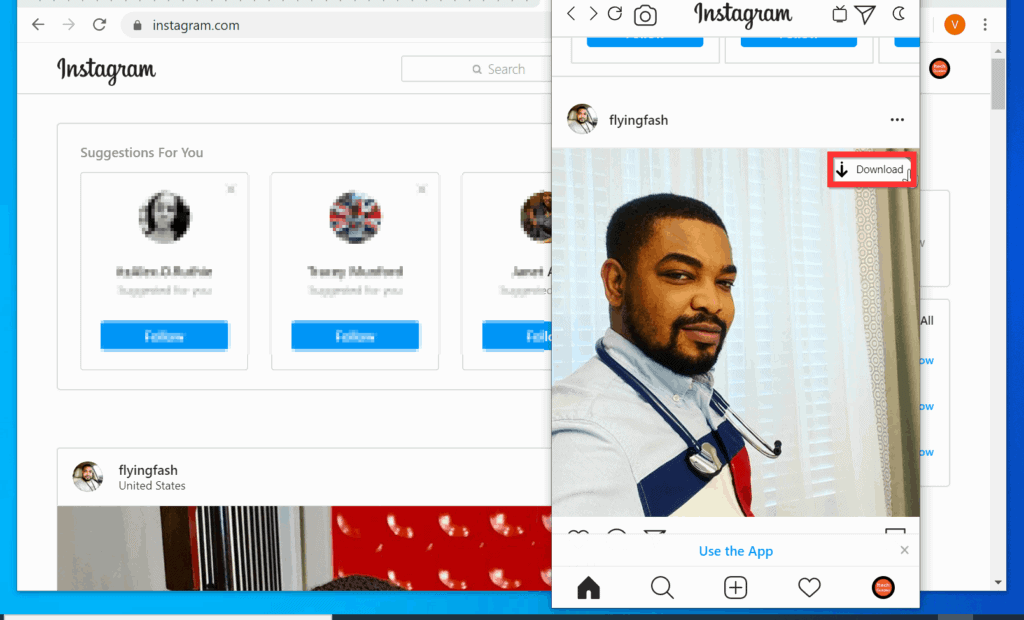
- To download a photo, on the extension pop-up window, hover over the photo you want to download. A download button will be displayed on the top right of the photo.

- Finally, to download the photo, on the top right of the photo, click the Download button and save the photo to a folder on your PC. See the second image below.

Option 2: Download Instagram Photos from Firefox
This section covers steps to add the Instagram photo downloader extension to Firefox and download Instagram photos from Firefox.
Free tools Windows power users keep installed
One-click scans. No signup required.
Step 1: Install Instagram Photo Downloader Extension
- Open the Instagram photo downloader from Firefox browser.
- Then, on the add-on page, click Add to Firefox. You will receive a confirmation pop-up window.

- To add the extension to Firefox, on the bottom left of the pop-up window, click Add. Firefox will display a pop-up window confirming that the extension was added successfully – see the second image below.


Step 2: Download Instagram Photos with Instagram Photo Downloader
- Open Instagram.com from Firefox browser and sign in with your Instagram account.

- Then, locate the photo you want to download, right-click the photo and click Download photo from Instagram. Firefox will open a Save As window.

- Save the photo to a folder on your PC.

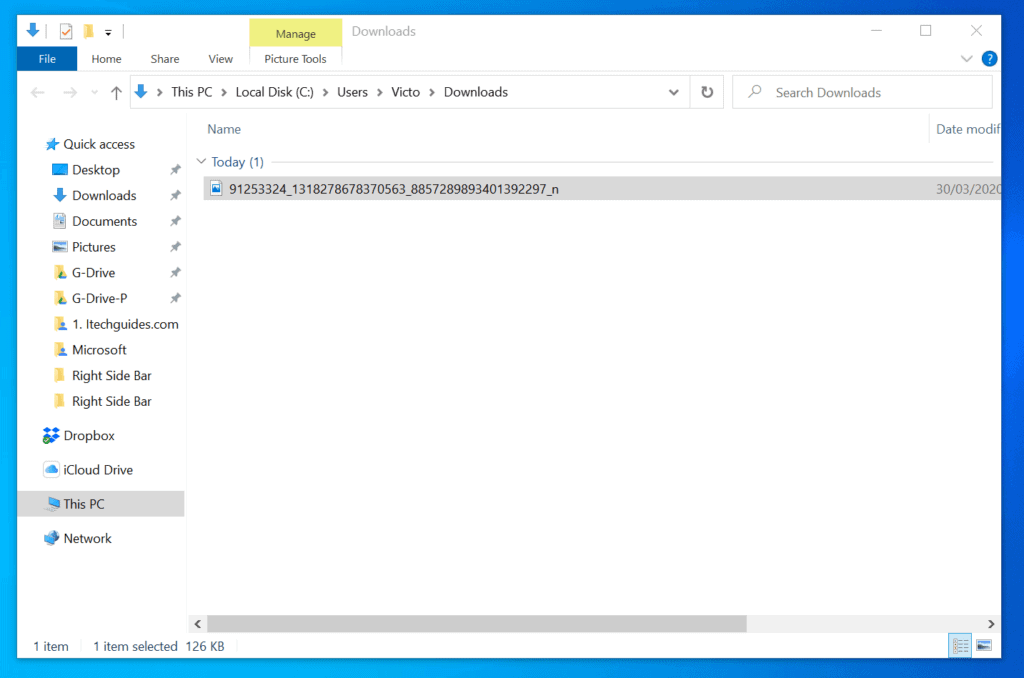
- To open the photo, open the folder you saved in and double-click the file.
I hope you found this Itechguide helpful. If you did, click on “Yes” beside the “Was this page helpful” question below.
Popular on Amazon

- User-Friendly Portable Photo Printer for iPhone, Android & PC - Get beautiful and colourful memories with Liene 4x6 photo printer! After opening the entire package, you can find one cartridge + 20 sheets of photo paper (placed inside the machine packaging), as well as an additional box containing 80 sheets of photo paper (which includes two cartridges + 80 sheets of photo paper). Full package includes smartphone photo printer, Liene 4x6 photo printer papers (100 sheets), 3 colour cartridges, and fully sealed cassette to prevent dust. Minimalist and magnetic design for compact storage.
- Superior Quality 4x6 Photo Printer - Print photos like no other thanks to the thermal-dye sublimation tech adopted by the picture printer for iphone. The dyes deeply penetrate the paper for vibrant photo printing, and the laminated surface is resistant to water, scratches, fingerprints and fading. Clean the print head promptly if smudges are observed on printed photos during operation. Get Liene photo printers now for yourself and your loved ones, print your happy moments together and keep your love forever!
- Wi-Fi Photo Printer for Smartphone - The built-in hotspot of the photo printer makes it easy to print pictures from your phone, avoiding outside interference with a fast and stable connection. No other networks required! Simply connect your device to the independent instant photo printer 4x6 hotspot.
- Multiple Device Compatibility - Liene phone printer provides instant photo printing for up to 5 simultaneous connections. Share with family and friends or print from your different devices. No additional cables or Bluetooth required when printing photos with this picture printer. Note: Ensure the ink cartridge clicks into place before printing.
- Customize your Printing with the Liene App - Customize your photos with our specialized App! You can add a Square border, insert filters, enhance the contrast and brightness, check printing status, and more. You can even print your ID and Visa photos from home with this photo printer for iphone 4x6 prints.
You may also express your thoughts and opinions by using the “Leave a Comment” form at the bottom of this page.
Finally, for more Social media Itechguides, visit our Social Media page.
Quick Recap
Also popular on Amazon

- Instant Photo Printing: The KODAK Mini 2 Retro is a portable photo printer designed to turn smartphone pictures into high quality prints in seconds. Whether capturing family moments, travel highlights, journaling pages, or creative projects, this mini printer lets you print real photos anytime, anywhere.
- Genuine 4PASS dye sublimation printing: Each photo is produced in three color layers and finished with a clear protective lamination layer. In approximately 55 seconds, you receive a smooth, detailed print designed to resist fingerprints, water, and fading for long-lasting quality.
- Easy to Use: Print photos quickly without complicated setup or technical steps. Simply power on, connect wireless bluetooth, and start printing within seconds. The Mini 2 Retro is built for straightforward operation, making it ideal for first time users and everyday photo printing.
- Print Anytime, Anywhere: Small enough to fit in your hand, bag, or even a pocket, the Mini 2 Retro is built for on-the-go printing. Ideal for parties, trips, school projects, scrapbooks, and spontaneous moments where you want real prints without waiting.
- KODAK Photo Printer APP: Featuring integrated Bluetooth connectivity, this portable printer connects to compatible iOS and Android devices through the KODAK Photo Printer app. Edit, crop, and customize your photos before printing for creative results.
Also popular on Amazon

- Dual 4x6" & 3x3" Photo Printer Paper Tray Convenience: Seamlessly print both 6-inch standard photo paper and 3-inch sticky-backed paper with our innovative dual tray design. This compact phone photo printer for smartphone offers easy storage and quick access, making it perfect for diverse printing needs without taking up much space. Enjoy vibrant, high-quality prints every time.
- Fast Bluetooth Connectivity: Experience lightning-fast printing with our liene photo printer's Bluetooth connection, which pairs in just 13 seconds. Enjoy a seamless and efficient printing experience, perfect for capturing and sharing memories on the go without the hassle of cables or complex setups.
- Superior Quality Photo Printer 4x6 - Print photos like no other thanks to the thermal-dye sublimation tech adopted by the picture printer for iphone. The dyes deeply penetrate the paper for vibrant photo printing, and the laminated surface is resistant to water, scratches, fingerprints and fading. Get Liene photo printers now as amazing gifts for yourself and your loved ones, print your happy moments together and keep your love forever!
- Multiple Device Compatibility - Liene picture printer for iphone provides instant photo printing for up to mutiple simultaneous connections. Share with family and friends or print from your different devices. No additional cables required when printing photos with this phone printer.
- Customize your Printing with the Liene App - Customize your photos with our specialized App! You can add a Polaroid border, insert filters, enhance the contrast and brightness, check printing status, and more. You can even print your ID and Visa photos from home with this iphone photo printer for 4x6 & 3x3 prints.
Also popular on Amazon

- 2x3" Portable Photo Printer: The upgraded PP01 photo printer uses advanced inkjet technology. This portable photo sticker printer produces vivid, full-color prints on premium sticky-backed photo paper that is smudge-proof, water-resistant, and tear-resistant. The Nelko mini photo printer is pocket-sized and weighs only 308 g, making it ultra-portable for school, travel, and field trips. Each ink cartridge prints up to 80 full-color 2x3 photos on sticky-backed paper
- Easy Printing via Bluetooth: The PP01 mini photo printer is compatible with iOS and Android phones via Bluetooth. Simply download the Nelko app from Google Play or the App Store. Load the 2x3 photo paper with the smooth side facing down. Install the ink cartridge, connect via Bluetooth, and print directly using the Nelko app. A USB charging cable is included; the adapter is not included
- High-Quality Photos: This mini photo sticker printer uses advanced inkjet technology for clear, vibrant prints. This portable photo printer produces 600 DPI high-resolution images with precise colors, capturing fine details and realistic tones. Each photo comes with adhesive backing, ideal for scrapbooks and preserving your memories with this sticker printer. Personalize every photo for holidays, birthdays, or daily events
- Powerful App: The Nelko 2x3" PP01 photo printer app lets you edit photos and offers a variety of frame designs, making it perfect for personalizing your photos for projects like scrapbooking or journaling. Download the Nelko app to create collages and customize photos with filters, graffiti, borders, stickers, text, AI image editing, and many other features. Edit photos on your phone, then send them to the Nelko app for instant printing in under 90 seconds
- Versatile Uses: This portable photo printer is ideal for travel journals, party favors, and family gatherings. Students use it for planners and photo printing. Crafters use it for DIY projects, custom labels, and scrapbooking. It's a practical photo sticker printer for bloggers, small businesses, and event photographers to create instant giveaways. Create holiday surprises and capture heartfelt moments with loved ones by printing photos on Nelko sticky-backed photo paper.
Also popular on Amazon
- Dock Photo Printer: The KODAK Dock Plus is a home photo printer that produces high-quality 4x6” prints directly from compatible smartphones. Featuring an integrated docking station, users can place their phone on the printer for better connection while simultaneously charging the device during printing.
- Genuine 4PASS dye sublimation printing: Each photo is produced in three color layers and finished with a clear protective lamination layer. In approximately 55 seconds, you receive a smooth, detailed print designed to resist fingerprints, water, and fading for long-lasting quality.
- Easy to Use: Print photos quickly without complicated setup or technical steps. Simply power on, connect wireless bluetooth, and start printing within seconds. The Dock Plus is built for straightforward operation, making it ideal for first time users and everyday photo printing.
- Home Printing Station: Designed for stable desktop use, this dock photo printer connects to a power outlet for consistent performance and larger 4x6” prints. Ideal for home printing, photo albums, framing, family events, and everyday picture printing.
- KODAK Photo Printer APP: Featuring integrated Bluetooth connectivity, this portable printer connects to compatible iOS and Android devices through the KODAK Photo Printer app. Edit, crop, and customize your photos before printing for creative results.



Download All in One Video Downloader Latest Script. Video downloader allows you to download video with one-click. you can watch the video offline after the download.
Sounds good,but I find that images from Instadram disappear from Firefox bookmarks after a short time.
Usually says that Url has expired.
Would this still happen with your exiension?