

What’s actually slowing this PC down?
Pick the symptom - the matching free tool is one click away.
iTechGuides is reader-supported. When you buy through links on our site, we may earn an affiliate commission. As an Amazon Associate I earn from qualifying purchases. Learn more
This Itechguide teaches you how to change YouTube thumbnail. The guide offers steps to change YouTube thumbnail from a PC or from the YouTube Studio App – one section offers steps for Android, another for iPhone.
Option 1: Change Thumbnail from a PC
- Open Studio.YouTube.com from your PC and login with your YouTube Account.
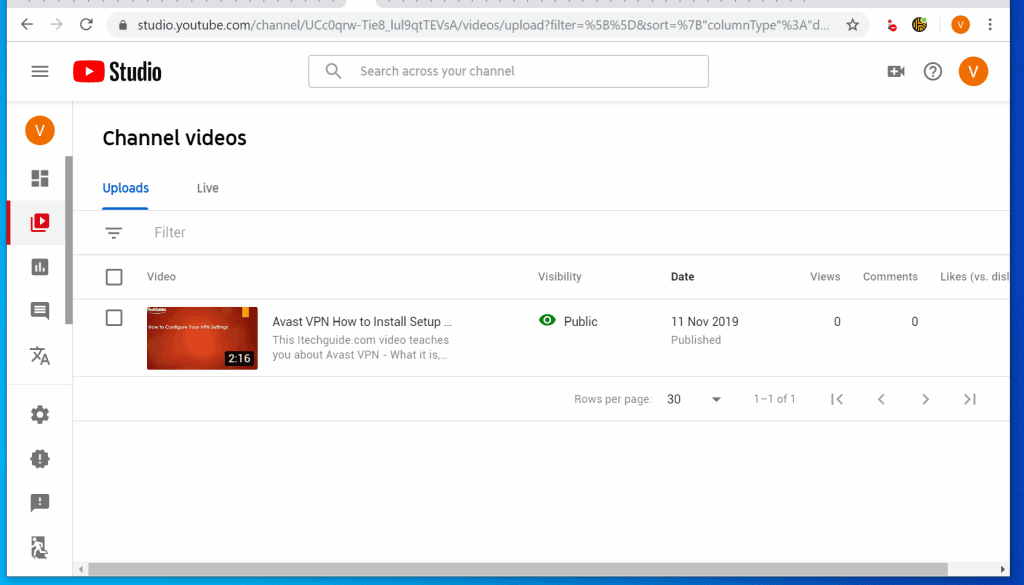
- Then on the left pane of the site, click Videos.

- When the Video tab opens, click the video you want to change thumbnail for.
- Then on the Basic tab, to change YouTube thumbnail, scroll down to Thumbnail section and select a different thumbnail from the list. You could also upload a custom thumbnail – see the next point for steps to do this…
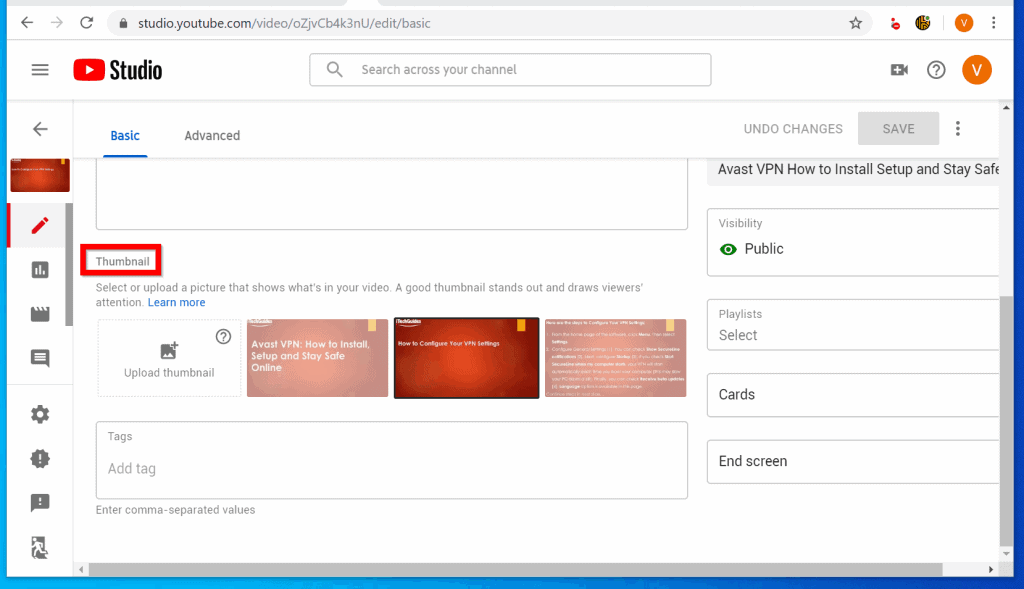
- You can add a custom thumbnail but before you do that your account must be verified and in “good standing”. To upload a custom thumbnail, on the thumbnail section, click Upload thumbnail. If this button is grayed out, see steps to fix it below…

- If Upload thumbnail button is grayed out, hover over the question mark on top – see my mouse button in the image below. Then click VERIFY. The link will open in a new tab. Follow the steps to verify your account.


- When you receive a confirmation that your account has been verified, go back to the YouTube Studio page and refresh it.

- Then on the Thumbnail category, click Upload thumbnail button and upload a an image you want to use as your YouTube video thumbnail.

- When you finish, click SAVE button – top right of the page.

Option 2: Change Thumbnail from the YouTube Studio App for Android
- If you have not installed the YouTube Studio App install it before you proceed. Then open the App on your Android phone.

- When the App opens, click the 3 lines on the top left. Then click Videos.


- To change YouTube thumbnail, click a video from the list.

- When the video opens, on the top right, click the edit icon (like a pencil) – see the image below…

- The video will open for editing. Click Edit thumbnail.

- Scroll down and select a different thumbnail. You could also upload a custom thumbnail by tapping Custom thumbnail.

- After selecting a new thumbnail, scroll up and tap SELECT. You will be returned to the Edit video screen. Tap SAVE.


Option 3: Change Thumbnail from the YouTube Studio App for iPhone
- If you have not installed YouTube Studio App for iPhone, install it before you proceed to the next step.
- Then open the App from your iPhone.

- On the top left of the App, tap the 3 lines – highlighted in black in the image below…

- Then tap Videos. When the list of videos opens, tap to open the video you want to change the thumbnail.


- Finally, to change YouTube thumbnail from iPhone App, tap on the edit button – top right of the video.

- The video will open for editing. To change the thumbnail, tap Edit thumbnail.

- Then, from the list of available thumbnails, tap to select a new thumbnail. If you want to upload and use your own image as thumbnail, tab Custom thumbnail. When you finish, click SELECT.

- You will be returned to the edit video screen. Click SAVE.

I hope that you found it helpful. If you did, click on “Yes” beside the “Was this page helpful” question below.
| # | Preview | Product | Price | |
|---|---|---|---|---|
| 1 |

|
Master YouTube Visuals: Create Thumbnails, Banners & Logos That Get Clicked (YouTube Success Guide) | $18.99 | Buy on Amazon |
You may also express your thoughts and opinions by using the “Leave a Comment” form at the bottom of this page.
Windows Errors? Fix Them Before They Spread
Repair common Windows errors and clear accumulated junk for a smoother, more stable PC - no reinstall needed.Free scan · no reinstallOutdated Drivers Are Slowing You Down
One free scan finds every outdated or missing driver and matches the right update for your exact hardware.Free scan · exact hardware matchFor more music and video streaming guides, visit our Music & Video Streaming page.



