

iTechGuides is reader-supported. When you buy through links on our site, we may earn an affiliate commission. As an Amazon Associate I earn from qualifying purchases. Learn more
This Itechguide teaches you how to change default font in Google Docs. Here are the high-level steps to change default font in Google Docs:
Step 1: Select a new Font
The first step to change default font in Google Docs to to select a new font you want to use as your default. Here is how…
- Open Docs.Google.com. Then open a new or existing Google Docs document.
- To open a new document, click File, then point to New and select Document.

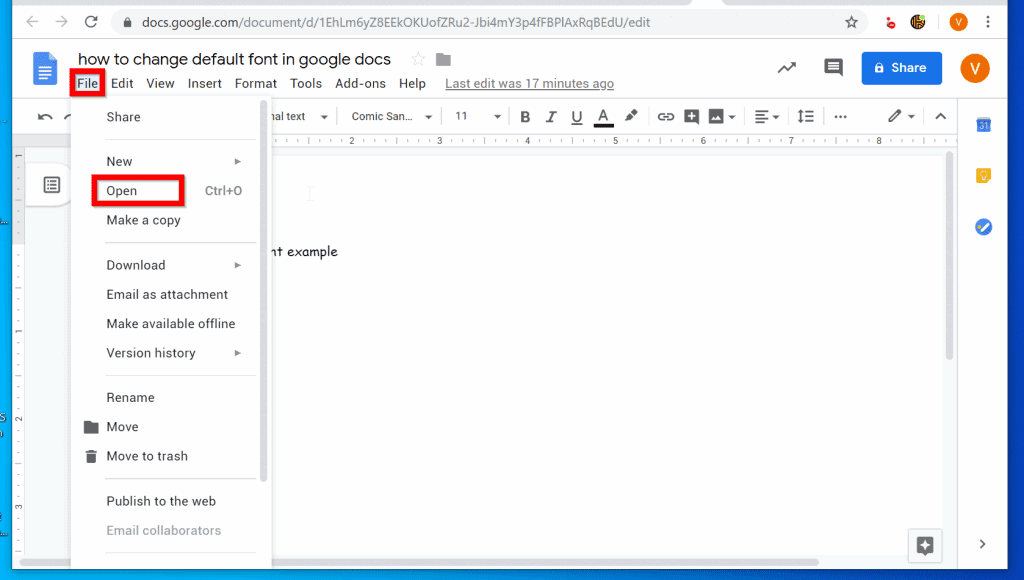
- To open an existing Google Docs document, click File. Then click Open and navigate to the Google Drive location the document was saved.
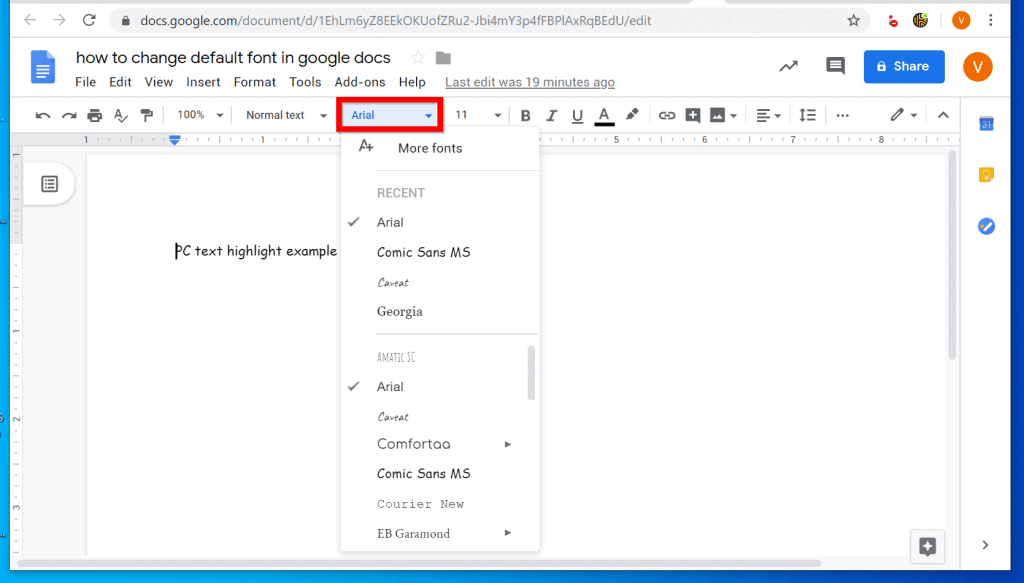
- When a document opens, click the Font drop-down and select the new font you want to use as your default font for Google Docs.
- Also, click the Font Size drop-down (next to the Font drop-down). Then select the new Font Size you want to use as your default.

- In this example, I want to change the default font to Georgia, Size 12.

Step 2: Update Google Docs to Use the New Font
Once you have selected a new font and font size, the next step is to update Google Docs to use the font. Here are the steps….
- From the same Google Docs document, click Format.

- Then, from the list of Format options, point to Paragraph styles -> Normal Text. Finally, click Update ‘Normal text’ to match.

Step 3: Save the New Font as Your Default Font
Here is the final step to change default font in Google Docs…
Popular on Amazon

- Compact Mouse: With a comfortable and contoured shape, this Logitech ambidextrous wireless mouse feels great in either right or left hand and is far superior to a touchpad
- Durable and Reliable: This USB wireless mouse features a line-by-line scroll wheel, up to 1 year of battery life (2) thanks to a smart sleep mode function, and comes with the included AA battery
- Universal Compatibility: Your Logitech mouse works with your Windows PC, Mac, or laptop, so no matter what type of computer you own today or buy tomorrow your mouse will be compatible
- Plug and Play Simplicity: Just plug in the tiny nano USB receiver and start working in seconds with a strong, reliable connection to your wireless computer mouse up to 33 feet / 10 m (5)
- Better than touchpad: Get more done by adding M185 to your laptop; according to a recent study, laptop users who chose this mouse over a touchpad were 50% more productive (3) and worked 30% faster (4)
- Using yet the same Google Docs document, click Format. Then point to Paragraph styles.

- Finally, from available options in Paragraph styles, point to Options. Then click Save as my default styles.

- You will receive a notification that Your default styles have been saved.

- To test that you have changed your default font, open a new document. The new document will take the new default Font and Size you set earlier.

That is it! If you found it helpful, click on “Yes” beside the “Was this page helpful” question below.
You may also express your thoughts and opinions by using the “Leave a Comment” form at the bottom of this page.
Also popular on Amazon

- Compact Mouse: With a comfortable and contoured shape, this Logitech ambidextrous wireless mouse feels great in either right or left hand and is far superior to a touchpad
- Durable and Reliable: This USB wireless mouse features a line-by-line scroll wheel, up to 1 year of battery life (2) thanks to a smart sleep mode function, and comes with the included AA battery
- Universal Compatibility: Your Logitech mouse works with your Windows PC, Mac, or laptop, so no matter what type of computer you own today or buy tomorrow your mouse will be compatible
- Plug and Play Simplicity: Just plug in the tiny nano USB receiver and start working in seconds with a strong, reliable connection to your wireless computer mouse up to 33 feet / 10 m (5)
- Better than touchpad: Get more done by adding M185 to your laptop; according to a recent study, laptop users who chose this mouse over a touchpad were 50% more productive (3) and worked 30% faster (4)
Want more Google guides? Then visit our Google How To page.
The Tool Desk
Outbyte PC Repair FREERepair Windows errors before they cause bigger problemsFix Now →Outbyte Driver Updater FREEScan for outdated or missing drivers - takes under a minuteDriver Scan →Quick Recap
Also popular on Amazon

- Plug-and-Play Connection: Connect in 3 seconds (1) to your computer via a strong, reliable USB receiver that plugs into your computer’s USB port
- Comfortable and Mobile: Comfortable, mobile mouse shape is small enough to toss in a bag and the ambidextrous design guides either hand into a natural position
- Power-Saving Features: 12-month battery life (2) and auto sleep help you go longer between AA battery changes
- Reliable 2.4 GHz Wireless Mouse: Reliable, the long-range computer mouse works up to 33 ft /10 m (3) away from your computer
- Easy Navigation: Thanks to controlled line-by-line scrolling and optical tracking, M170 Logitech Mouse has smooth and accurate cursor control on almost any surface
Also popular on Amazon

- 【Special Mint Green Mouse】This is an ideal choice if you need a colorful and cute mouse. Special mint green color and compact size makes it the best mouse for kids and people with small hands.
- 【Portable Small Mouse】 Only 3.94*2.28*1.52 inches, the usb mouse is designed for small to medium sized hands to achieve optimal fit and comfort. Portable design makes it easy to store in a bag for traveling.
- 【Soft Click Quiet Mouse】 Responsive buttons and scroll wheel provide very soft click with less noise, no more disturbing others and bring you comfortable using experience.
- 【Easy to Use Laptop Mouse】 2.4GHz wireless technology ensures reliable connectivity up to 49ft. 3 adjustable DPI levels (1600/1200/800) to meet your different needs. Only need 1xAA battery (NOT included) to support up to 15 months battery life.Note:USB connector is stored inside the back compartment (open the cover to access).
- 【Universal Compatibility】The wireless mouse is well compatible with Windows11/10/8.1/7,Mac OS . Fits for desktop, laptop, PC, and other devices.
Also popular on Amazon

- Your hand can relax in comfort hour after hour with this ergonomically designed mouse. Its contoured shape with soft rubber grips, gently curved sides and broad palm area give you the support you need for effortless control all day long.
- You’ve got the control to do more, faster. Flipping through photo albums and Web pages is a breeze, especially for right-handers—with three standard buttons plus Back/Forward buttons that you can also program to switch applications, go full screen and more. And side-to-side scrolling plus zoom gives you the power to scroll horizontally and vertically through your music library, maps and Facebook feeds, and zoom in and out of photos and budget spreadsheets with a click.* * Requires Logitech SetPoint software (Windows) or Logitech Control Center software (Mac OS X)
- Two years of battery life practically eliminates the need to replace batteries. ** The On/Off switch helps conserve power, smart sleep mode extends battery life and an indicator light eliminates surprises. ** Battery life may vary based on user and computing conditions.
- The tiny Logitech Unifying receiver stays in your laptop. There’s no need to unplug it when you move around, so there’s less worry of it being lost. And you can easily add compatible wireless mice and keyboards to the same wireless receiver.



