iTechGuides is reader-supported. When you buy through links on our site, we may earn an affiliate commission. As an Amazon Associate I earn from qualifying purchases. Learn more
This Itechguide reviews the 5 best video recording software. The best is reviewed last – starting with the 5th on top of the list.
ScreenFlow

Starting our review of the best video recording software, at no 5 is “ScreenFlow”.
The first most exciting feature of “ScreenFlow” is its retina display. This gives the software a perfect screen recording.
Crashes, No Sound, or Screen Glitches?
Random freezes, missing sound and display glitches usually trace back to one bad driver. Find and replace yours safely.Free scan · under a minuteWindows Errors? Fix Them Before They Spread
Repair common Windows errors and clear accumulated junk for a smoother, more stable PC - no reinstall needed.Free scan · no reinstallNext very noticeable and important feature of this software is its library of 500,000 unique media clips. These clips offer you different ways to modify your videos.
Popular on Amazon

- [Natural Audio Clarity] Operated with frequency response of 50Hz-16KHz, the podcasting XLR mic delivers balanced audio range, likely to resonate with your audience. Directional cardioid dynamic microphone corded will not exaggerate your voice, while rejects unwanted off-axis noise for vocal originality and intelligibility during your PS5 gaming streaming video recording. (Tips: Keep the top of end-addressing XLR dynamic microphone AM8 facing audio source, and suggested recording range is 2 to 6 in.)
- [XLR Connection Upgrade-Ability] To use XLR connection, connect the podcast microphone to an audio interface (or mixer) using a separate XLR cable (NOT Included) . Well-connected and smooth operation improves audio flexibility to make you explore various types of music recording singing. The streaming mic isolates the pristine and accurate sound from ambient noise with greater no interference and fidelity. (RGB and function key on mic are INACTIVE when using XLR connection.)
- [USB Connection with Handy Mute] Skip the hassle of setting something up and plug the cable to play the dynamic USB microphone directly, which suits for beginner creators or daily podcast. You can quickly control the gamer mic with tap-to-mute that is independent of computer/Macbook programs to keep privacy when live streaming. LED mute reminder helps you get rid of forgetting to cancel the mute. (RGB and function key are only available for USB connection, but NOT for XLR connection)
- [Soothing Controllable RGB] RGB ring on the desktop gaming microphone for PC, with 3 modes and more than 10 light colors collection, matches your PC gears accessories for gaming synergy even in dim room. You can control the RGB key button of the dynamic microphone USB directly for game color scheme gaming or live streaming. Configured memory function, the streaming microphone RGB no need to repeated selections after turnning off and brings itself alive when power on. (Only available for USB connection)
- [More Function Keys] Computer microphone with headphones jack upgrades your rhythm game experience and gets feedback whether the real-time voice your audience hear as expected. Get the desired level via monitoring volume control when gaming recording. Smooth mic gain knob on the PC microphone gaming has some resistance to the point, easily for audio attenuation or boost presence to less post-production audio. (Only available for USB connection)
The final feature that makes this software unique is its intuitive UI (user interface). This makes it easy for you to navigate and create amazing videos.
If you are curious to read some tech specs for this software here are some of them: transitions, text animations, video animations, freehand annotations, multi-channel audio and more.
“ScreenFlow” is a powerful tool. The software comes at a price but it has a free trial version.
Free tools Windows power users keep installed
One-click scans. No signup required.
ShareX
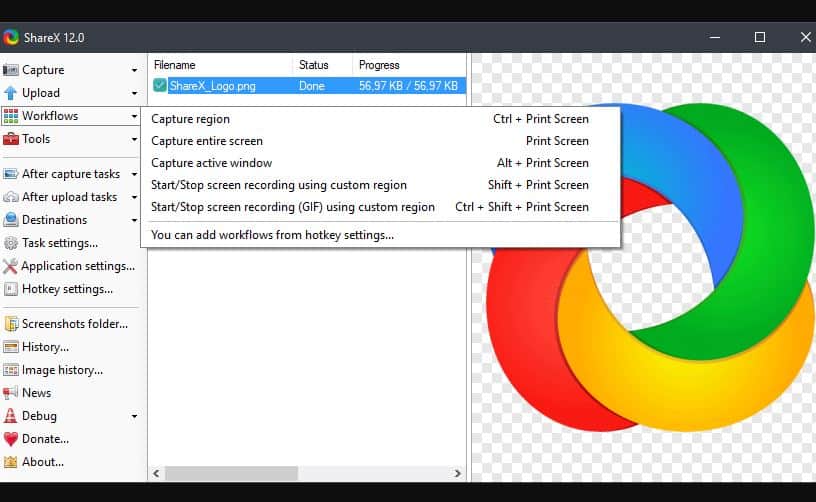
Taking the 4th spot in our review of the best video recording software is “ShareX”.
“ShareX” has a lot of amazing features. The first feature that caught my attention is the file-sharing. This means you can share your video files with connected devices to your system.
It also has an option to upload your files to google drive, Dropbox, and other cloud storage platforms. With this feature, you can securely save your files on the cloud and free up space on your system.
Also popular on Amazon

- [Convenient Setup] Plug and play recording USB microphone for PC, with 5.9-Foot USB cable included for computer PC laptop, is connected directly to USB-A port for recording music, computer singing or podcast. The office condenser microphone for computer is easy to use and install. (NOT compatible with Xbox and Phones)
- [Durable Metal Design] Solid sturdy metal construction design, the computer microphone for Zoom meetings with stable tripod stand is convenient when you are doing voice overs or livestreams on YouTube. Durable material extends the service life of the voice-over microphone.
- [Mic Volume Knob] Gaming condenser USB mic compatible for PS4 with additional volume knob itself has a louder or quieter adjustment and is more sensitive. Your voice would be heard well enough through the zoom microphone USB when gaming, skyping or voice recording. Also, you can adjust your volume to zero and protect your privacy.
- [Widely Use] USB-powered design, the condenser microphone for recording no need the 48v Phantom power supply, works well with Cortana, Discord, voice chat and voice recognition. The podcast microphone for Mac, with USB-B to USB-A/C cable, is compatible with desktop, laptop or PS4/PS5, which meets most of your daily recording needs.
- [Clear Output Voice] Cardioid condenser microphone for PC captures your voice properly, producing clear smooth and crisp sound. Great computer recording mic for gamers/streamers/youtubers focus on the main source and reduces background noise. The streaming microphone does the job well for broadcast ,OBS and teamspeak.
Finally, the software offers annotation tools such as highlight, speech balloon, crop, and many more.
This is a free screen capture and screen recording software. It is reliable and easy to use.
Screencast-O-Matic

“Screencast-O-Matic” ranks 3rd in our review of the best video recording software.
This software has some tantalizing features. Firstly, it can record and capture your screen. This means you can get video files and image files.
Secondly, “Screencast-O-Matic” allows you to draw while recording to emphasize your points. This is a good feature to use narration in your video.
Finally, this software offers a script editor. This means you can perfectly add a script to your recording at the right time.
Also popular on Amazon

- Custom three-capsule array: This professional USB mic produces clear, powerful, broadcast-quality sound for YouTube videos, Twitch game streaming, podcasting, Zoom meetings, music recording and more
- Blue VO!CE software: Elevate your streamings and recordings with clear broadcast vocal sound and entertain your audience with enhanced effects, advanced modulation and HD audio samples
- Four pickup patterns: Flexible cardioid, omni, bidirectional, and stereo pickup patterns allow you to record in ways that would normally require multiple mics, for vocals, instruments and podcasts
- Onboard audio controls: Headphone volume, pattern selection, instant mute, and mic gain put you in charge of every level of the audio recording and streaming process
- Positionable design: Pivot the mic in relation to the sound source to optimize your sound quality thanks to the adjustable desktop stand and track your voice in real time with no-latency monitoring
To support the features already listed above, you can add stock music and captions to your recording. You can also edit your videos by trimming and removing certain parts.
“Screencast-O-Matic” offers a free as well as a paid version. With the free version you can record 15 minutes videos. If you want to record a video that is longer than 15 minutes, you have to get the paid version of the software.
OBS Studio
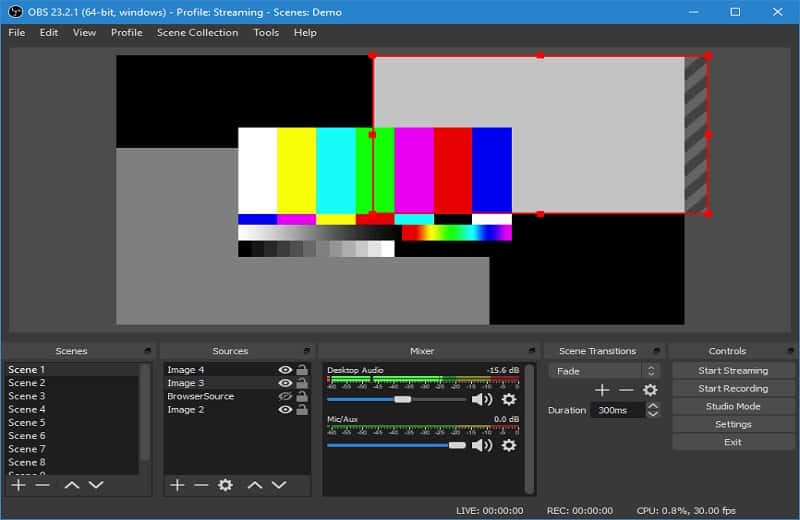
Coming 2nd in our review of the best video recording software is “OBS Studio”.
Quick wins for a faster PC:
Fix the driver behind crashes, sound loss and screen glitchesFind Drivers →Repair Windows errors before they cause bigger problemsFix Now →Scan for outdated or missing drivers - takes under a minuteDriver Scan →“OBS Studio” offers high performance and high-quality real-time video/audio capturing with mixing. This makes your recording clean and easy.
It also allows you to create scenes from window captures, images, text, browser windows, webcams, capture cards and more. This makes it easy to use the software for narration.
Finally, this software caps it up with its free and open-source video recording and live streaming.
Also popular on Amazon
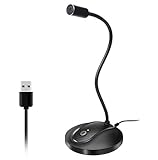
- 360 Degree Position Adjustable Gooseneck Design --Plug and play USB microphone Pick up the sound from 360-degree with high sensitivity, in the best possible location for sound to your PC gaming, dragon voice dictation, and talk to Cortana
- Mute Button & LED Indicator --One-click to mute/unmute your microphone for pc, Build-in LED indicator tells you the working status at any time
- Intelligent Noise-Canceling Tech --Premium omnidirectional condenser microphone with noise-canceling technology can pick up your clear voice and reduce background noise and echo
- USB Plug&Play(1.8/6ft USB Cable) -- No driver required. Just need to plug & play for the microphone to start recording, well compatible with Windows(7, 8, 10 and 11) and macOS. (NOT compatible with Xbox/Raspberry Pi/Android)
- Solid Construction--Adopting premium metal pipe and heavy-duty ABS stand to make sure that you will be satisfied with our computer mic quality
To spice it all up for you, here are the most important tech specs for this app: intuitive audio mixer with per-source filters such as noise gate, noise suppression, and gain.
What’s actually slowing this PC down?
Pick the symptom - the matching free tool is one click away.
If you wish to download this software, it is available for Windows, Mac or Linux.
Independent reader supportYour contribution helps us test, update, and keep practical guides available for everyone.Camtasia

At no 1 in our review of the best video recording software is “Camtasia”.
This software has some amazing features. Firstly, it can record any activities on your computer. This means you can capture video and audio from your desktop or record webcam to add a personal touch to your video.
Secondly, “Camtasia” offers amazing editing features such as drag-and-drop text, transitions, and more in the in-built video editor. This allows you to modify your video after recording.
Do these 3 things before closing this tab:
1Repair Windows errors before they cause bigger problems2Fix the driver behind crashes, sound loss and screen glitches3Clear out junk files and repair common Windows errorsFinally, this software offers pre-made animations, free music, and sound effects – these features allow you to customize your video.
Also popular on Amazon
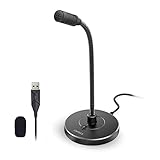
- 【Crystal Clear Audio Quality】Our Omnidirectional pattern condenser microphone accurately captures your voice, making it perfect for dictation, online classrooms, and more.
- 【Active Noise-Cancelling】Come in CMTECK CCS2.0 SMART CHIP with Omnidirectional Polar Pattern, which can effectively block the background noise. The pop filter prevents plosives from overloading the microphone, ensuring only your voice is heard.7
- 【Convenient Mute Button with LED Indicator】You can quickly mute/un-mute the microphone with the Mute Button and the built-in LED light lets you know the working status(Greenlight: Connected; Red light: Mute mode).
- 【Easy to use】 No drivers needed, just plug and record without external power supply, directly connect the microphone to a USB compatible device, well compatible with Windows(7, 8 and 10), Mac OS and PS4 (NOT compatible with Raspberry Pi/Linux/Android)
- 【Mini size with Adjustable Gooseneck】Adopted flexible and adjustable gooseneck metal pipe, easily adjust position 360 degrees to suit user comfort. The compact and stable base maximizes your desktop space.
To support the features already listed above, the software allows you to record and edit audio clips to modify the audio for video.
“Camtasia” is not free software. However, there is a free trial version that gives a taste of the software. It works on Windows and Mac.
I hope you found this article helpful. If you did, click on “Yes” beside the “Was this page helpful” question below.
You may also express your thoughts and opinions by using the “Leave a Comment” form at the bottom of this page.
Finally, to read more gadget reviews, visit our Apps & Software review page.
Quick Recap
Product prices and availability are accurate as of the date/time indicated and are subject to change. Any price and availability information displayed on Amazon at the time of purchase will apply.