
iTechGuides is reader-supported. When you buy through links on our site, we may earn an affiliate commission. As an Amazon Associate I earn from qualifying purchases. Learn more
Sometimes a Windows Server may be stuck in the automatic repair loop. Following the steps in this guide fixes this problem.
Step 1: Disable Automatic Startup Repair
Here are the steps:
- Boot your server to Recovery.
- When automatic repair displays Choose an option, click Troubleshoot.
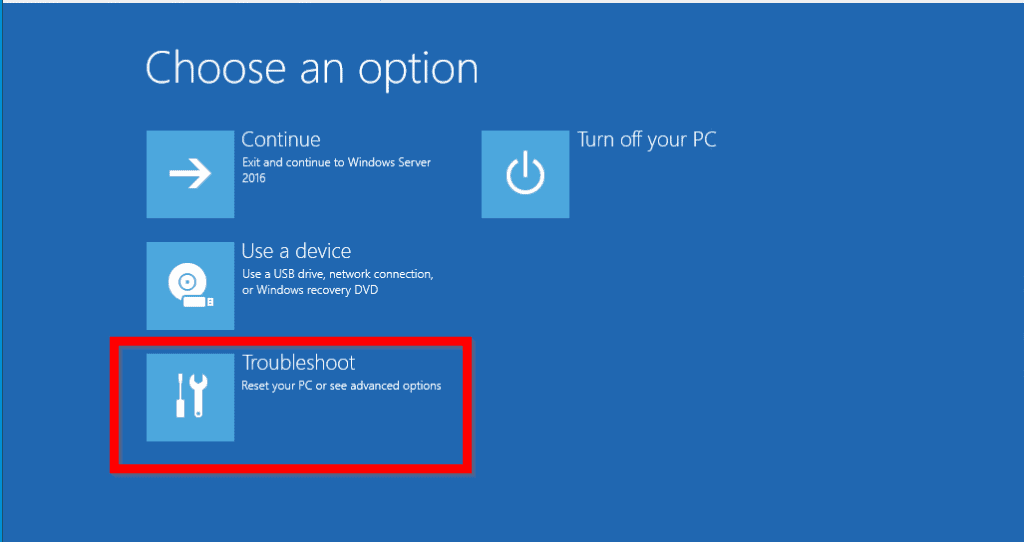
- Then, at Advanced options screen, click Command Prompt.

- Select a user with admin privilege. Then type the password for the selected user and click Continue.


- When Command Prompt opens, type the command below. Then press enter.
bcdedit /set {default} recoveryenabled No
This command disables automatic repair.

Step 2: Restore Registry from Backup
Once you have disabled automatic repair, the next step is to fix the actual reason for Windows Server 2016 automatic repair loop – restore registry from backup.
Before you can restore registry, you first need to determine the location of your windows installation. To do this, type this command. Then press enter.
Dir c:
This will list the files and folders in drive C:\.
If drive C:\ has a folder called Windows, your Windows server is installed in C:\.
#1 Best Overall

- Enhance security and reduce risk with multiple layers of protection, built into the operating system.
- Save money and gain flexibility with software-defined compute, storage, and networking technologies, inspired by Microsoft Azure.
- Use improved technologies, such as Windows containers and Nano Server, for another ways to deploy and run on-premises and cloud-based apps.
- License - 16 cores - OEM - DVD - 64-bit - English
On the other hand, if, it does not have a Windows folder, try Dir D:, Dir E:. Check the result of each command for a Windows folder.
Once you have confirmed the path your Operating System is installed, move to the next step – restore registry from backup.
Rank #2

- Dell PowerEdge T110 II 4-Bay 3.5" HDD Tower Server, a mini server made for small businesses and remote offices!
- Intel Xeon E3-1220 Quad-Core 3.1GHz 8MB Cache CPU, Turbo Up To 3.4GHz
- 32GB DDR3 PC3-10600 1333MHz ECC Memory; 8TB (4 x 2TB) 7200 RPM SATA Hard Drives for High Capacity Storage
- Microsoft Windows Server 2016 Operating System Included

- To restore registry from backup, type this command. Then press enter.
Copy C:\windows\system32\config\RegBack\* C:\windows\system32\config
Replace C with the drive letter where your OS is installed. Note that it appears in two places in the command. They are both in bold.
When you press enter, you will receive a prompt to confirm that you wish to overwrite your current registry. Type All then press enter.
Rank #3
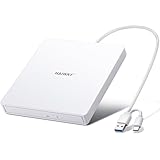
- True Plug and Play Simplicity: Haiway External DVD Drive offers true plug-and-play functionality. Designed for simplicity, this usb cd/dvd external drive draws power directly from your computer's USB port, eliminating the need for an external power supply. No drivers to install. (For Mac users, the drive icon will appear once a readable disc is inserted.)
- Say Goodbye to Short Cables: Our external cd drive for laptop pc features a 12.8-inch cable. At 3 inches longer than most embedded cable design, eliminates the hassle and constraint of short cables, ensuring a stable connection and a much more comfortable user experience in any setting.
- High-Speed USB 3.0 & Type-C Connectivity: This cd burner equipped with USB 3.0 and Type-C interface ensures broad compatibility with both new and legacy devices. Max DVD read speed 8x; Max CD read speed 24x and max CD burn speed 8x. Bringing you faster data transmission speed (Up to 5Gbps), enjoy smooth playback and efficient burning!
- All-in-One Reading & Burning Capability: This versatile external cd/dvd drive for laptop supports a wide range of formats including CD-R, CD-RW, DVD±R, and DVD±RW. It's your perfect solution for burning home videos, creating music CDs, installing software/games, backing up important data, or simply enjoying your favorite movies.
- Wide Compatibility with Windows & Mac: This external CD/DVD drive offers extensive compatibility. It is fully compatible with modern systems like Windows 11/10 and the latest macOS, as well as older systems including Windows XP/Vista and various Linux distributions, ensuring it works with virtually any computer you own.

- When the command completes, type the command below. Then press enter. You will be returned to Choose an option screen. Select Continue to boot Windows Server 2016 to normally.
Exit

If your server boots normally, it means that your Windows Server 2016 automatic repair loop issue have been fixed.
You need to re-enable automatic repair. See next step..
Rank #4

- Processors: Intel Xeon E-2124 Quad-Core 3.3GHz 8MB CPU, Up To 4.3GHz Turbo
- Memory: 64GB (4 x 16GB) DDR4 PC4-21300 2666MHz Unbuffered Memory
- Solid State Drives: 2TB (4 x 500GB) 6Gb/s SATA III SSDs in RAID
- Hard Drives: 16TB (4 x 4TB) 6Gb/s SATA 7200 3.5" Hard Drives in RAID
- Dual Power Supplies, Windows Server 2016 Standard Operating System
Step 3: Enable Automatic Startup Repair
This is the final step. To re-enable automatic repair:

- When the server boots to logon screen, login with your admin account.
- Then open command prompt as administrator – search for it, right-click. Then select Run as administrator. Type the command below and press enter.
bcdedit /set {default} recoveryenabled Yes

After re-enabling automatic repair, to confirm that Windows Server 2016 automatic repair loop is fixed, restart your server.
Best Value

- Plug and Play: Equipped with both USB 3.0 and USB-C ports, this external CD/DVD drive requires no external drivers or power supplies. Automatically detected by laptops and desktops. Warming: It serves as the perfect companion for devices lacking a built-in DVD drive. NOTE: The integrated cable is non-detachable to prevent loss.
- Reliable Design & High Speed Quiet: Made of high-quality materials, shockproof, low noise, and strong fault tolerance. Ensures smooth and fast reading and writing of CDs/DVDs without stuttering or noise. Offers max 8x DVD rewrite/read speed and max 24x CD write/read speed. Supports data transmission up to 5Gbps. Ultra-thin design with a subtle machine size, easily fits into travel bags. Perfect for business and travel use.
- Wide Compatibility: Works with Windows XP/2003/Vista/7/8/10, Linux OS, and all Mac OS versions. Plays movies, burns/rips CDs, installs software, and backs up data. NOTE: Not suitable for cars, TVs, mobile phones, Blu-ray discs. You can use this external CD/DVD player to play movie DVDs, burn/rip CDs, install software/system, DVD games, back up data to CD/DVD,and more. (Not support TV, car player, Chromebook, Surface Pro, Ubuntu.)
- Technical Support & Usage Tips: If the device is not recognized, try restarting your computer or testing with a different disc. Requires 3V-5V (1.3A-2A) output from your computer’s USB port. Keep the external CD/DVD drive away from magnetic objects. Ensure your laptop has sufficient power—low power may cause recognition failure. Our dedicated customer service team is always available to assist with any compatibility or connectivity issues to ensure satisfied experience.
- Troubleshooting & Solutions: Common Causes of Freezing - 1. Insufficient power supply through USB; 2. Damaged or dirty disc; 3. Compatibility issues with certain software programs. [Check Your Drive: 1. Make sure the disc is clean and not scratched; 2. Try a different disc to see if the problem persists; 3. Ensure the drive's lens is clean.] --- Quick Fixes: 1. Try a different USB port - Use a USB 3.0 port (usually blue); 2. Connect directly to your computer - Avoid using USB hubs, as they may not provide enough power; 3. Restart your computer with the drive disconnected, then reconnect it; 4. Check the disc - Try a different CD/DVD to see if the issue is with the specific disc.
Conclusion
The steps in this guide should fix Windows server 2016 automatic repair loop for you.
Let us know if you found the guide helpful by responding to the “Was this page helpful?” question below.
Want more Windows Server fixes? Visit our Windows Server Fix page.
What’s actually slowing this PC down?
Pick the symptom - the matching free tool is one click away.
Quick Recap
Product prices and availability are accurate as of the date/time indicated and are subject to change. Any price and availability information displayed on Amazon at the time of purchase will apply.

![DistributedCOM DC Server Event ID 10016 DCDIAG Error [Fixed]](https://www.itechguides.com/wp-content/uploads/2025/04/DistributedCOM-DC-Server-Event-ID-10016-DCDIAG-Error-Fixed-768x494.jpg)
![Attribute Editor Tab Missing in ADUC [Fixed]](https://www.itechguides.com/wp-content/uploads/2024/03/Attribute-Editor-Tab-Missing-in-ADUC-Fixed-featured-image-768x512.jpg)


I am getting an error.
The request could not be performed because of an I/O device error.
3 files(s) copied.
I recently changed one failed HDD on server. RAID-5. Rarity rebuilding is in progress.
thanks for the descriptive solution but, unfortunately there is no C drive in CMD prompt and my machine is in VMWare.
Need to load pvscsi driver i think. please advise.
thanks in advance
Mohamed Bilal