

What’s actually slowing this PC down?
Pick the symptom - the matching free tool is one click away.
iTechGuides is reader-supported. When you buy through links on our site, we may earn an affiliate commission. As an Amazon Associate I earn from qualifying purchases. Learn more
Have you ever wondered what makes an IPS monitor stand out in the world of displays? In this article, we’ll explore the ins and outs of this display technology.
Overview
To start with, IPS is also known as In-Plane Switching. Furthermore, it is a kind of liquid crystal display (LCD) panel technology used in computer monitors, TVs, and other display devices.
Hence, an IPS monitor is any monitor with an IPS panel technology. IPS technology was developed as an improvement over earlier LCD technologies like TN (Twisted Nematic) and VA (Vertical Alignment).
It was designed with the goal of addressing some of their limitations. Moreover, the term “In-Plane Switching” refers to the alignment of liquid crystal molecules within the panel.
Popular on Amazon

- Incredible Images: The Acer KB272 G0bi 27" monitor with 1920 x 1080 Full HD resolution in a 16:9 aspect ratio presents stunning, high-quality images with excellent detail.
- Adaptive-Sync Support: Get fast refresh rates thanks to the Adaptive-Sync Support (FreeSync Compatible) product that matches the refresh rate of your monitor with your graphics card. The result is a smooth, tear-free experience in gaming and video playback applications.
- Responsive!!: Fast response time of 1ms enhances the experience. No matter the fast-moving action or any dramatic transitions will be all rendered smoothly without the annoying effects of smearing or ghosting. A 120Hz refresh rate speeds up the frames per second to deliver smooth 2D motion scenes in gaming and video.
- 27" Full HD (1920 x 1080) Widescreen IPS Monitor | Adaptive-Sync Support (FreeSync Compatible)
- Refresh Rate: Up to 120Hz | Response Time: 1ms VRB | Brightness: 250 nits | Pixel Pitch: 0.311mm
These molecules are oriented in the same plane, allowing them to move horizontally when an electric current is applied. This arrangement allows better control over the display’s pixel elements, improving performance characteristics.
Features of IPS Monitors
As with other technologies, In-Plane Switching monitors have some unique features that make them stand out. In this section, we will explain four of these features.
Variants
IPS technology has evolved to include various types of IPS panels, each with its own set of characteristics. For example, e-IPS (Enhanced In-Plane Switching) panels provide a balance between performance and affordability.
Meanwhile, AH-IPS (Advanced High-Performance In-Plane Switching) panels offer even better color accuracy and improved response times. P-IPS (Professional In-Plane Switching) panels are tailored for professional-grade work, providing exceptional color accuracy and extensive color gamut coverage.
This range of IPS variants allows users to choose a monitor that best suits their specific needs and budget.
Resolution Options
IPS displays come in various resolution options to cater to different usage scenarios. Common resolutions include Full HD (1920×1080), 4K UHD (3840×2160), and others.
The choice of resolution depends on factors like the nature of the work being done, the size of the monitor, and the desired level of detail. For example, a content creator might prefer a 4K IPS monitor for video editing.
Also popular on Amazon

- Clear visuals. Fluid motion: A 144Hz refresh rate and 1ms MPRT deliver smooth, tear‑free motion across work, gaming, and streaming for clearer, more fluid viewing.
- Eye comfort: TÜV Rheinland 3‑star* certification reduces harmful blue light while preserving stunning color quality without compromise. *TÜV Rheinland 3-star eye comfort certification.
- Wide viewing angle: Get consistent views across a wide 178° /178° viewing angle.
- In-Plane Switching (IPS): See excellent color accuracy and consistency across wide viewing angles with In-plane Switching (IPS) technology.
- Ultra-thin bezels: Maximize your viewing experience with thin bezels.
On the other hand, a casual user might find a Full HD IPS monitor sufficient for everyday tasks.
Supports Advanced Technologies
IPS displays are often equipped with advanced features that enhance their image quality and color performance. For instance, HDR support allows IPS monitors to display a wider range of brightness and contrast, resulting in more lifelike visuals.
This is particularly advantageous when viewing HDR content, such as movies or games that support HDR. Some IPS displays incorporate Mini-LED or MicroLED backlighting technologies.
These advanced backlighting solutions enable better local dimming. This can result in enhanced contrast ratios and more precise control over backlight zones.
Free tools Windows power users keep installed
One-click scans. No signup required.
Quantum dots, when integrated with IPS panels, expand the color gamut and improve color accuracy. This technology is commonly found in high-end displays, further elevating the color performance and vibrancy of the visuals.
It Has Several Manufacturers
The fact that several different companies manufacture IPS monitors is a significant feature of this technology. Having multiple manufacturers producing IPS displays is the diversity it brings to the market.
Various manufacturers offer their own models with unique features, specifications, and price points. This diversity allows consumers to choose from a wide range of options.
Also popular on Amazon

- Incredible Images: The Acer KB242Y G0bi 23.8" monitor with 1920 x 1080 Full HD resolution in a 16:9 aspect ratio presents stunning, high-quality images with excellent detail. The zero-frame design provides maximum visibility of the screen from edge-to-edge.
- Adaptive-Sync Support: Get fast refresh rates thanks to the Adaptive-Sync Support (FreeSync Compatible) product that matches the refresh rate of your monitor with your graphics card. The result is a smooth, tear-free experience in gaming and video playback applications.
- Responsive!!: Fast response time of 1ms enhances the experience. No matter the fast-moving action or any dramatic transitions will be all rendered smoothly without the annoying effects of smearing or ghosting. With up to 120Hz refresh rate speeds up the frames per second to deliver smooth 2D motion scenes.
- 23.8" Full HD (1920 x 1080) Widescreen IPS Monitor | Adaptive-Sync Support (FreeSync Compatible)
- Refresh Rate: Up to 120Hz | Response Time: 1ms VRB | Brightness: 250 nits | Pixel Pitch: 0.275mm
Furthermore, it ensures that a monitor to suit different needs, preferences, and budgets is available. In fact, the competition among manufacturers also fosters innovation and improvement.
The Tool Desk
Outbyte PC Repair FREERepair Windows errors before they cause bigger problemsFix Now →Outbyte Driver Updater FREEFix the driver behind crashes, sound loss and screen glitchesFind Drivers →This is because companies will strive to outdo each other in terms of display quality and added features.
Strengths of IPS Monitors
Accurate Color Reproduction
IPS displays are renowned for their color accuracy. They can display a wide color gamut, often covering 100% of the sRGB or Adobe RGB color spaces.
This accuracy is vital for tasks where precise color representation is non-negotiable. Unlike some other panel types, IPS panels minimize color distortion, ensuring that what you see on the screen closely matches the intended colors.
Wide Viewing Angles
IPS monitors come with wide viewing angles, often exceeding 170 degrees both horizontally and vertically.
This means that viewers can look at the screen from various angles without experiencing significant color distortion or image loss. Hence, when multiple people are looking at the same screen or when you’re sharing your work, the image remains true to its original quality.
Excellent for Multimedia
In-plane switching monitors are a popular choice for multimedia consumption due to their accurate color representation and wide viewing angles.
When watching movies, IPS displays ensure that everyone sees the same vibrant and true-to-life colors. Due to this, it enhances your overall entertainment experience.
Recommended Free Tools
Flicker-free Technology
Many IPS monitors incorporate flicker-free technology, which helps reduce eye strain and fatigue.
Flickering screens – often caused by pulse-width modulation (PWM) to control brightness – can be bothersome and lead to discomfort during extended use. Gladly, IPS monitors are designed to minimize this issue, making them suitable for long hours of work or entertainment.
Excellent for Professional Use
Professionals in fields like photography, graphic design, and video editing rely on IPS displays.
This is because of their color accuracy, consistent performance, and suitability for color-critical work. The ability to trust that the colors you see on your screen are accurate is paramount in these industries.
IPS displays offer the reliability needed to produce high-quality, color-critical content.
Also popular on Amazon
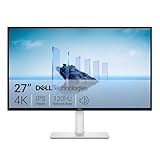
- Improved ComfortView Plus: Reduces harmful blue light emissions to ≤35%, for all-day comfort without sacrificing color accuracy.
- Refresh rate: A smooth, tear-free experience with AMD FreeSync Premium (refresh rate up to 120Hz) and an ultra-low 0.03ms response time create a captivating experience for work and play.
- Vivid colors: Immerse yourself in breathtaking 4K visuals with in-plane switching technology. Enjoy vibrant colors with 99% sRGB. The 1500:1 contrast ratio and HDR readiness deliver excellent depth and detail.
- Re-engineered sound quality: Enjoy more detailed sound with spacious audio featuring greater output power, deeper frequency response and more decibel range than the previous generation.
- Ultra-thin bezel: Designed with a sleek, modern aesthetic and an ash white finish, this display features ultra-thin bezels for a refined, minimalist design.
Weaknesses of IPS Monitor
Higher Cost
IPS monitors are generally more expensive than monitors with TN or VA panels. This higher cost is mainly due to the manufacturing complexity and the quality of the components used.
IPS panels require more advanced technology to achieve their superior color accuracy and viewing angles, which contributes to their higher price point. While this cost may be justified for professionals who require accurate color representation, it can be a significant barrier for budget-conscious consumers.
Backlight Bleeding
Backlight bleeding is a common issue with IPS displays.
This involves uneven distribution of the backlight resulting in noticeable brighter areas around the edges of the screen. Furthermore, it mostly happens when viewing dark content in a dark room.
This can be a significant drawback for users who require consistent brightness levels, such as professional image or video editors.
Do these 3 things before closing this tab:
1Clear out junk files and repair common Windows errors2Fix the driver behind crashes, sound loss and screen glitches3Repair Windows errors before they cause bigger problemsSubstantial Power Consumption
IPS monitors tend to consume more power compared to monitors with other panel types.
This higher power consumption may result in slightly higher energy bills. Therefore, it can be a concern for users who are environmentally conscious or need to use the monitor with battery-powered devices, such as laptops.
Nonetheless, power-efficient models and energy-saving settings can help mitigate this issue.
Slower Response Times
Traditional IPS panels have slower response times compared to TN panels.
Response time refers to how quickly a pixel can change from one color to another. Slow response times can lead to motion blur, which can be particularly noticeable in fast-paced gaming or video content.
However, it’s important to note that modern IPS monitors have made significant improvements in response times.
Frequently Asked Questions
An IPS (In-Plane Switching) panel is a type of LCD display panel technology with superior color accuracy and wide viewing angles. IPS panels are commonly used in computer monitors, laptops, and other display devices.
Yes, many modern IPS monitors are suitable for gaming. They offer good color accuracy, wide viewing angles, and improved response times.
However, for competitive gaming, some gamers may prefer displays with even faster response times and higher refresh rates.
Outdated Drivers Are Slowing You Down
One free scan finds every outdated or missing driver and matches the right update for your exact hardware.Free scan · exact hardware matchWindows Errors? Fix Them Before They Spread
Repair common Windows errors and clear accumulated junk for a smoother, more stable PC - no reinstall needed.Free scan · no reinstallIPS displays tend to consume more power compared to other panel types, which can result in slightly higher energy bills. However, power-efficient models and energy-saving settings are available to help limit this issue.
Also popular on Amazon
- Clear visuals. Fluid motion: A 144Hz refresh rate and 1ms MPRT deliver smooth, tear‑free motion across work, gaming, and streaming for clearer, more fluid viewing.
- Eye comfort: TÜV Rheinland 3‑star* certification reduces harmful blue light while preserving stunning color quality without compromise. *TÜV Rheinland 3-star eye comfort certification.
- Wide viewing angle: Get consistent views across a wide 178° /178° viewing angle.
- In-Plane Switching (IPS): See excellent color accuracy and consistency across wide viewing angles with In-plane Switching (IPS) technology.
- Ultra-thin bezels: Maximize your viewing experience with thin bezels.
While many touchscreen displays use IPS panels for their visual quality and wide viewing angles, not all IPS screens are touchscreens. The touchscreen capability depends on whether the manufacturer has added touch-sensitive layers.
Yes, many mobile phones do use IPS (In-Plane Switching) panels for their displays. Moreover, IPS technology has excellent color accuracy and wide viewing angles.
Therefore, it is a popular choice for smartphones that prioritize visual quality and a good viewing experience.
Conclusion
An IPS (In-Plane Switching) monitor is a type of LCD (Liquid Crystal Display) technology that has revolutionized visual quality. It also improves the viewing experience in various display devices, including computer monitors, laptops, tablets, and smartphones.
Moreover, IPS technology is popular for its exceptional color accuracy, wide viewing angles, and consistent color representation. This makes it a favored choice for a wide range of applications.
These include professional fields like graphic design, photo editing, and video production, where precise color representation is paramount. Additionally, the wide viewing angles of IPS displays ensure that the content remains vivid and consistent from different positions.
Despite their numerous advantages, In-plane switching monitors are not without drawbacks, such as backlight bleeding and higher costs. However, these disadvantages are often outweighed by the advantages they offer.
We trust that the content we’ve shared in this article has been informative and of great value to you. If you’ve found this information helpful, we’d be delighted if you could share your thoughts with us using the comments form (“Leave a Reply”) at the bottom of this page.
Quick wins for a faster PC:
Scan for outdated or missing drivers - takes under a minuteDriver Scan →Clear out junk files and repair common Windows errorsFree Scan →Fix the driver behind crashes, sound loss and screen glitchesFind Drivers →You could also use the “Was this page helpful?” buttons below to give us your feedback.
Finally, we urge you to explore our Technology Explained page, where you’ll find an abundance of related articles.



IPS viewing angles are great; the tradeoff is IPS glow versus true backlight bleed. A black screen plus moving your head helps tell them apart: https://screentest.run/