
The Tool Desk
Outbyte Driver Updater FREEFix the driver behind crashes, sound loss and screen glitchesFind Drivers →Outbyte PC Repair FREEClear out junk files and repair common Windows errorsFree Scan →iTechGuides is reader-supported. When you buy through links on our site, we may earn an affiliate commission. As an Amazon Associate I earn from qualifying purchases. Learn more
Choose a Raspberry Pi 5 for a small, efficient server running light services, or an Intel N100 mini PC when you need higher throughput, x86-64 software compatibility, bundled RAM and storage, or room for virtual machines. Neither is automatically cheaper: compare complete builds and measure power at the wall with your actual services running.
The Pi 5 is an Arm single-board computer with GPIO and user-supplied storage and cooling. An N100 mini PC is a complete x86 system, but its RAM, SSD, ports, firmware, power supply and cooling vary by model. Those differences matter more than the processor name on the box.
What you are actually comparing
Raspberry Pi 5
Raspberry Pi 5 uses the BCM2712 system and a quad-core Arm Cortex-A76 CPU. The comparison source lists 4GB and 8GB versions for its timeframe; later market reports also describe a 16GB board, so confirm the capacity and current SKU before buying. The board provides Gigabit Ethernet, a 40-pin GPIO header and microSD boot storage. An NVMe or SATA drive can be added through a compatible HAT, but that adds cost, cabling and another component to configure.
Raspberry Pi Ltd documents a 27W USB-C power-supply option and says the board can reach about 12W during its most intensive workloads. The 12W figure is a vendor-reported peak estimate, not a normal idle measurement. A 5V/5A supply is useful when high-power USB devices are attached because it preserves electrical headroom.
Popular on Amazon
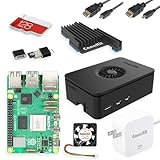
- Includes Raspberry Pi 5 with 2.4Ghz 64-bit quad-core CPU (8GB RAM)
- Includes 128GB Micro SD Card pre-loaded with 64-bit Raspberry Pi OS, USB MicroSD Card Reader
- CanaKit Turbine Black Case for the Raspberry Pi 5
- CanaKit Low Noise Bearing System Fan
- Mega Heat Sink - Black Anodized
Intel N100 mini PC
Intel’s official N100 specification lists four cores, four threads, a maximum turbo frequency of 3.40GHz and a 6W processor TDP. TDP describes the processor, not the consumption of the complete computer at the wall. A mini PC also includes memory, an SSD, motherboard, network controller, cooling fan, firmware and power adapter.
There is no single N100 configuration. One listing may include 8GB of memory and a 256GB SSD, while another has 16GB, 32GB or more, a larger drive, different ports and a different power brick. Check the exact model, storage interface, memory type, operating-system license, drive bays and warranty rather than treating “N100 mini PC” as a complete specification.
Quick comparison
| Factor | Raspberry Pi 5 | Intel N100 mini PC |
|---|---|---|
| Architecture | Arm (BCM2712, quad-core Cortex-A76) | x86-64 class; N100 has four cores and four threads |
| Memory | Capacity depends on board SKU; 4GB/8GB were listed in the cited comparison, and later reports mention 16GB | Configuration-dependent; often installed by the seller |
| Boot and data storage | microSD standard; NVMe/SATA possible with a compatible HAT | Usually an included M.2 or other SSD, but capacity and interface vary |
| Expansion | 40-pin GPIO; HAT ecosystem | PC-style USB, display and storage ports vary by model; no Pi-style GPIO header |
| Reported idle power | 3.0–3.6W in CNX Software’s April 2024 test | 7.5–10W typical in the same dated comparison |
| Performance evidence | Baseline in Jeff Geerling’s 2025 comparison | Tested NucBox G3 with N100/N150-class hardware was about 1.5–2 times faster, depending on benchmark |
| Power-supply situation | Buy a suitable USB-C supply; Raspberry Pi offers a 27W option | Normally supplied with a model-specific adapter |
| Best fit | Light services, low footprint, low measured power, GPIO projects | Multiple containers, heavier databases, virtual machines, x86-only software or more CPU headroom |
Which workloads fit each platform?
Light home services
DNS filtering, a small home-automation deployment, a modest file service or a few low-demand containers generally do not require maximum CPU throughput. A Pi 5 is sensible when its storage, memory and architecture support the software you intend to run. Its GPIO header is a decisive advantage for sensors, relays, displays and other hardware projects.
Do these 3 things before closing this tab:
1Clear out junk files and repair common Windows errors2Fix the driver behind crashes, sound loss and screen glitches3Repair Windows errors before they cause bigger problemsContainers and databases
As container count, concurrent users, indexing, compilation or database activity increases, CPU headroom and memory capacity become more valuable. The cited 2025 comparison found the tested N100/N150 system approximately 1.5–2 times as fast as the tested Pi 5, depending on the benchmark. That result applies to the named hardware, operating system and test conditions; it is not a guarantee for every N100 model or service.
Virtual machines and x86-dependent software
Choose the N100 path when you need several virtual machines, software distributed only as x86-64 packages, or container images whose Arm support is uncertain. Arm-compatible alternatives exist for many popular services, but an image that is unavailable or poorly maintained for Arm can turn a low purchase price into ongoing administration work.
Transcoding and sustained loads
For media or other sustained workloads, test the exact application rather than relying on a CPU label. Cooling, memory configuration, power limits and firmware affect an N100 mini PC’s sustained speed, while the Pi’s thermal solution and power supply affect its ability to maintain performance. A short benchmark can hide throttling that appears after several minutes.
Power: compare the whole server, not a processor number
What the published measurements show
CNX Software’s April 29, 2024 comparison measured 3.0–3.6W idle for its Raspberry Pi 5 and reported 7.5–10W as typical idle consumption for the N100 mini PCs it tested. These are dated ranges from particular systems. RAM amount, SSD, power-brick efficiency, BIOS settings, attached USB devices, network activity, operating system and fan behavior can move the result substantially.
Free tools Windows power users keep installed
One-click scans. No signup required.
Also popular on Amazon

- Fully assembled for plug-and-play operation
- Includes Raspberry Pi 5 with 8GB RAM
- 256 GB PCIe Pi NVMe SSD (Pre-loaded with Pi 64-Bit OS)
- M.2 HAT+
- CanaKit Turbine Black Case for the Pi 5
Intel’s 6W N100 TDP cannot be used as the mini PC’s wall draw. Conversely, Raspberry Pi’s approximately 12W intensive-workload figure is not a typical Pi server idle value. Both numbers describe different things and should not be placed in the same “watts” comparison without qualification.
Measure an apples-to-apples setup
- Assemble each computer with the intended RAM, SSD, case, cooling, network cable and power adapter.
- Install the same class of server software and enable the services you will actually leave running.
- Let the system settle at idle, then record wall power with a plug-in meter. Record the operating system, BIOS power settings, room temperature and attached peripherals.
- Apply a representative workload: for example, the normal number of clients, scheduled jobs, database activity or media streams you expect.
- Record both the steady workload reading and any short peaks. Repeat after the system has warmed up so thermal behavior is included.
Convert watts into annual energy cost
For continuous operation, average watts × 8.76 equals annual kilowatt-hours. A system averaging 5W uses 43.8kWh per year. Multiply that energy by your electricity tariff to obtain the annual energy cost; the tariff, not a universal dollar figure, determines the result.
Jeff Geerling estimated in March 2025 that the idle-power difference could be worth roughly $10–20 per year under his assumptions. Treat that as an attributed estimate, not a promise: your measured average draw, local electricity price and workload determine the actual saving. A server that uses more energy but replaces another computer or avoids a storage upgrade may still be the lower-cost choice overall.
Upfront cost: price a usable build
What belongs in the Pi budget
- Pi 5 board in the required memory capacity.
- Compatible USB-C power supply.
- Case, heatsink and fan or another adequate cooling solution.
- Boot and data storage. Include a reliable microSD card, or price an NVMe/SATA drive and the compatible HAT.
- Any RTC battery, cables, adapters or GPIO hardware required by the project.
What belongs in the mini-PC budget
- The exact N100 model and installed RAM.
- SSD capacity and interface, plus any empty bay or upgrade cost.
- Included power adapter and its efficiency.
- Operating-system license or the time and storage needed to install another system.
- Warranty, delivery, tax and any replacement or expansion parts.
A bare Pi board is not equivalent to a complete mini PC. A fair comparison matches usable memory and storage and includes every component needed to boot, cool and operate the server.
Dated price observations
| Reported configuration | Price and date | How to interpret it |
|---|---|---|
| Jeff Geerling’s Pi 5 build: 16GB board, 512GB SSD, NVMe HAT, cooler, RTC battery, 27W adapter and bumper case | About $208, March 3, 2025 | A complete cited build, not a current universal price |
| Tom’s Hardware reported Pi build with 16GB and 512GB plus accessories | $246.95 observed US price, January 6, 2026 | A dated US-market observation; taxes, seller and availability can differ |
| Pi 5 16GB board | $145 reported US price, January 2026 | Board only; power, cooling and storage remain extra |
| Pi 5 1GB board | $45 reported US price, January 2026 | Board-only observation with a different memory capacity |
Those figures are not October 2026 quotations and do not establish a current winner. Before purchase, make a local basket for one explicitly specified Pi build and one explicitly specified N100 system. Include shipping, tax, operating-system assumptions, accessories, warranty and any storage upgrade. Used office mini PCs need a separate comparison because condition, warranty, idle power and included storage can differ from new equipment.
Software and architecture checks
Audit images and packages before buying
- List every service, container image, plugin and monitoring tool you plan to run.
- Check whether each component publishes an Arm64 build as well as x86-64, and whether required third-party modules support that architecture.
- Identify software that relies on x86 virtualization, proprietary binaries or vendor drivers.
- Estimate memory and storage use with room for logs, updates, databases and backups.
- Choose the platform only after the complete stack has a supported installation path.
The N100’s x86 compatibility can reduce adaptation work. The Pi’s Arm platform can be entirely adequate when the software stack is native or multi-architecture. Architecture support is a maintenance consideration, not merely a benchmark result.
Storage, backups and reliability
microSD is convenient for a Pi test server, but an always-on system with frequent database or log writes deserves a storage plan. Price an SSD through a compatible Pi HAT if write endurance, capacity or recovery time matters. Confirm that the HAT, drive, case and cooling all fit together.
Also popular on Amazon

- Pi5 8GB Pack: RasTech Pi 5 8GB kit includes 1 x Pi5 8GB board ,1 x 64GB Card, 2 x Card Readers,1 x Active Cooler,1 x Case for Pi5, 2 x 4K Micro HD Out Cable,1 x GaN 27W 5A USB-C Power supply,1 x Screwdriver and 1 x instructions.
- Pi5 8GB Board: The Pi5 board is equipped with a 64-bit quad-core Arm Cortex-A76 processor running at 2.4GHz and an 800MHz VideoCore VII GPU with support for OpenGL ES 3.1 and Vulkan 1.2, which delivers a significant increase in graphics performance. Dual HD Out 4Kp60 display outputs and a built-in dual 4-channel MIPI camera/display transceiver provide state-of-the-art camera support. The Pi 5 offers a 2-3 times increase in CPU performance compare to Pi4.
- Important Graphics Features: Equipped with an 800MHz VideoCore VII GPU and providing better graphics performance, suitable for multimedia applications,gaming,and graphics intensive tasks.Provides 1 UART interface,1 card slot that supports high-speed operation, 2 USB. 3 0.5 ports that support synchronous 0Gbps operation,2 USB 2.0 port ports,2 4Kp60 display outputs that support HDR.Built-in dedicated dual 4-channel 1Gbps MIPI DSI/CSI connectors,triple the total bandwidth.
- Cooling Kit for Pi 5: Compatible with Active Cooler for Raspberry Pi5, It can provide Pi 5 board with better cooling effect in using. The Case can accurately access usb-c power jack,Micro HD Out ports, usb ports, Ethernet jack, card slot, power button, 4-lane MIPI DSI/CSI connectors and so on, and it also supports installation of cooling fan.
- 64GB Card Kit and GaN 27W USB-C Power Supply: With extra 64GB card to store more files and card readers for multiple medium, keep better performance for Raspberry Pi 5, 27W USB C Power Supply is Compatible with Pi5 8GB, offers a variety of output voltage options, including 5.1V at 5A, 9.0V at 3.0A, 12.0V at 2.25A, and 15.0V at 1.8A, providing for different device requirements.
An N100 mini PC often includes an M.2 SSD, which can make the first build simpler, but “included SSD” does not specify capacity, endurance, controller or backup protection. Check whether a second drive can be installed and whether the model supports the filesystem and replacement procedure you intend to use.
- Keep a separate backup rather than treating the boot drive as a backup.
- Test restoring the configuration and important data before the server becomes essential.
- Use a UPS or controlled shutdown strategy if outages could corrupt writes.
- Monitor free space, drive health and temperatures on either platform.
Physical installation, noise and expansion
The Pi board is small and exposes GPIO, making it easy to place beside electronics or inside a custom enclosure. That flexibility also means you must select the case, cooling, power supply and storage interface yourself. Poor airflow or an undersized supply can turn a theoretically efficient build into an unstable one.
An N100 mini PC is usually a finished enclosure with standard PC ports and an included adapter. Port selection, fan noise, display outputs, Wi-Fi, Ethernet speed, drive bays and serviceability vary by model. Read the exact listing and photographs; two systems with the same processor can have materially different expansion options.
Networking, ports and placement
Both platforms can serve ordinary home networks, but the practical networking choice is the exact board or mini-PC model. The Pi 5 comparison configuration provides Gigabit Ethernet. An N100 system may offer different Ethernet, Wi-Fi, USB and display combinations, so verify the listing if the server will use a particular uplink, adapter or external drive.
Count the ports required by your intended build before buying. A Pi may need USB storage, a keyboard during setup, a powered hub or GPIO accessories. A mini PC may provide more conventional PC connectivity, yet still lack a second drive bay or a port in the location your enclosure requires. Cable clearance and airflow matter in a cabinet just as much as headline dimensions.
PC Slower Than It Used to Be?
A free scan shows the junk files, broken settings and background clutter dragging Windows down - then fixes them in one click.Free scan · Windows 10 & 11Crashes, No Sound, or Screen Glitches?
Random freezes, missing sound and display glitches usually trace back to one bad driver. Find and replace yours safely.Free scan · under a minuteCommon buying mistakes
- Comparing board price with system price. Add the Pi’s supply, case, cooling, storage and HAT before comparing it with an N100 box that already includes those parts.
- Reading TDP as wall power. Measure the complete computer, including its adapter, SSD, memory and fan.
- Assuming every N100 is identical. RAM, SSD, firmware, cooling, ports and warranty are seller- and model-specific.
- Using a microSD card for heavy writes without a recovery plan. Move write-intensive data to suitable SSD storage and maintain tested backups.
- Choosing from a benchmark headline. Run the real service workload long enough to expose thermal throttling and memory pressure.
- Ignoring architecture during setup. Confirm Arm64 or x86-64 support for images, plugins, drivers and virtualization before committing.
- Extrapolating dated prices. The reported US prices from 2025 and January 2026 are useful examples, not live October 2026 quotes.
A repeatable decision process
- Define the workload. Write down services, clients, storage growth, expected concurrency and whether you need GPIO or virtual machines.
- Set the minimum hardware. Choose memory and SSD capacity first, then select a Pi SKU or N100 model that meets those requirements.
- Build matched bills of materials. Add power, cooling, enclosure, storage adapters, operating-system costs, delivery, tax and warranty assumptions.
- Validate software. Confirm Arm64 or x86-64 support for every image, package, driver and virtualization feature.
- Measure power. Use the same wall meter and service workload for both systems; capture idle and warmed-up workload readings.
- Test sustained performance. Run the real database, container, file or media workload long enough to expose thermal throttling and memory pressure.
- Plan recovery. Document backups, drive replacement, configuration restoration and safe shutdown before deployment.
Recommendation by scenario
Choose Raspberry Pi 5 when
- Your services are light and have reliable Arm64 support.
- GPIO, a very small footprint or custom hardware integration is important.
- Your measured whole-system power is materially lower and that saving matters locally.
- You are comfortable selecting storage, cooling and a suitable power supply.
Choose an Intel N100 mini PC when
- You need x86-64 compatibility or several virtual machines.
- You will run multiple containers, heavier databases or other CPU-intensive services.
- Bundled RAM, SSD, enclosure and power supply reduce setup time.
- The exact model offers the ports, cooling and storage expansion your server needs.
The practical answer is workload-specific. A Pi 5 can be the better always-on server when modest services, GPIO and measured efficiency outweigh its expansion work. An N100 mini PC is generally the stronger platform when software compatibility, storage included in the box or additional CPU headroom prevents compromises. Use a matched local bill of materials and wall measurements rather than a processor TDP, a bare-board price or a single benchmark to make the final choice.
Independent reader supportYour contribution helps us test, update, and keep practical guides available for everyone.Frequently Asked Questions
Is a Raspberry Pi 5 cheaper than an Intel N100 mini PC?
Not automatically. A Pi requires a power supply, enclosure, cooling and storage, and an NVMe setup may need a HAT. An N100 mini PC often includes RAM, an SSD, case and adapter. Compare matched memory and storage, including tax, delivery, operating-system assumptions and warranty.
Also popular on Amazon

- [ULTIMATE RASPBERRY PI 5 CASE & MINI PC] - Unlock the full potential of your Raspberry Pi 5 with the Pironman 5-MAX — the most advanced Raspberry Pi 5 Case for power users. This high-performance Raspberry Pi 5 Cooling Case features dual NVMe M.2 slots with RAID 0/1 support, AI accelerator compatibility ( e.g. Hailo-8l M.2 AI), a PCIe Gen2 switch, a PWM tower cooler + dual RGB fans and a smart OLED display. With its dual transparent panels and optimized cable management (including full-size HDMI), it’s the ideal Raspberry Pi 5 Enclosure for building a high-speed NAS, AI edge computing device, or Home Assistant hub. (Raspberry Pi NOT Included)
- [DUAL NVMe M.2 SLITS & NAS RAID SUPPORT] - Supercharge your storage with the best Raspberry Pi 5 NVMe Case solution. Featuring two expandable NVMe M.2 slots (2230-2280) powered by a built-in PCIe Gen2 switch, this Raspberry Pi 5 NAS Case supports RAID 0/1 for ultra-fast data setups. Whether you're using a high-speed NVMe SSD or a Hailo-8L AI accelerator, Pironman 5-MAX delivers the ultimate performance boost for advanced Raspberry Pi 5 AI applications and edge computing
- [ADVANCED COOLING SYSTEM] - Engineered for high-performance builds, Pironman 5-MAX features a powerful tower cooler, one PWM fan, and dual RGB fans for enhanced airflow. The dual transparent panel design improves ventilation while showcasing vibrant RGB lighting. Ideal for cooling both the Raspberry Pi 5 and dual NVMe SSDs or AI accelerators like Hailo-8L, it ensures stable operation under heavy workloads with low noise and long-term durability
- [SMART OLED DISPLAY WITH VIBRATION WAKE-UP] - Pironman 5-MAX features a 0.96" OLED screen that delivers real-time system insights including CPU usage, memory, temperature, IP address, and disk status. With customizable display options and auto sleep mode, the screen can be instantly reactivated by a light tap thanks to the built-in vibration sensor—offering a smarter and more interactive experience
- [ENHANCED FUNCTIONALITY] - Pironman 5-MAX empowers your Raspberry Pi 5 with advanced features like safe shutdown via a metal power button, customizable RGB lighting, dual full-size HDMI ports, vibration-triggered OLED wake-up, and an external GPIO extender. It also includes RTC battery support for timekeeping and seamless Home Assistant integration. With detailed guides, online tutorials, and full technical support from SunFounder, setup and use are effortless and worry-free
Which one uses less electricity?
In CNX Software’s April 2024 comparison, the tested Pi 5 idled at 3.0–3.6W and the tested N100 mini PCs typically used 7.5–10W. Those are dated measurements, not guarantees. Measure both complete systems at the wall with the same services and peripherals.
Is the N100 really a 6W computer?
No. Intel’s 6W figure is the processor’s TDP. A complete mini PC also powers memory, SSD, motherboard, networking, cooling and its adapter, so wall draw can be higher.
Recommended Free Tools
How much faster is an N100 mini PC?
Jeff Geerling found the tested NucBox G3 with N100/N150-class hardware about 1.5–2 times faster than his Pi 5, depending on benchmark. Results vary with cooling, memory, power limits, software and workload.
Can a Pi 5 run an always-on server reliably?
Yes, for light services when the software supports Arm64 and the build has adequate power and cooling. Use suitable SSD storage for frequent writes, monitor temperatures and maintain separate tested backups.
What should I check in an N100 listing?
Verify the exact model, installed RAM, SSD capacity and interface, operating-system license, power adapter, ports, cooling, drive bays, warranty and upgrade options. “N100 mini PC” alone does not identify a complete configuration.
When is GPIO a deciding factor?
Choose the Pi when you need its 40-pin header for sensors, relays, displays or other electronics. N100 mini PCs provide conventional PC ports but do not offer the Pi’s built-in GPIO ecosystem.
What’s actually slowing this PC down?
Pick the symptom - the matching free tool is one click away.
The Bottom Line
Bottom line: Pick Raspberry Pi 5 for light, Arm-compatible services, GPIO projects and lower measured whole-system power. Pick an Intel N100 mini PC for x86 software, virtual machines, heavier workloads or a simpler all-in-one build. Compare complete local configurations and verify power at the wall before deciding.

