
Zenkit To Do
Zenkit To Do: A flexible to-do app for visual task capture, recurring work, and collaboration. Ranked #11 of 148 in To-Do List Apps by our editors (8.0/10); pricing: Free plan; best for visual task and collaboration workflows.
At a glance
- Editor score8.0 / 10
- PricingFree plan
- Best forVisual task and collaboration workflows
- Free planYes
- Recurring tasksYes
- Founded2016 · Karlsruhe, Germany
- Facts checked22 Sep 2026
Where it wins
- Recurring tasks, reminders, subtasks, checklists, and smart lists
- Collaboration with sharing, assignments, comments, and @mentions
- Web, desktop, mobile, offline access, and calendar synchronization
Where it doesn't
- Offline access is specified for mobile rather than every platform
- Integrations focus on Dropbox, Box, Google Drive, iCal, and Zenkit Suite
- Its scope centers on lists and folders rather than broader project management
Our verdict on Zenkit To Do
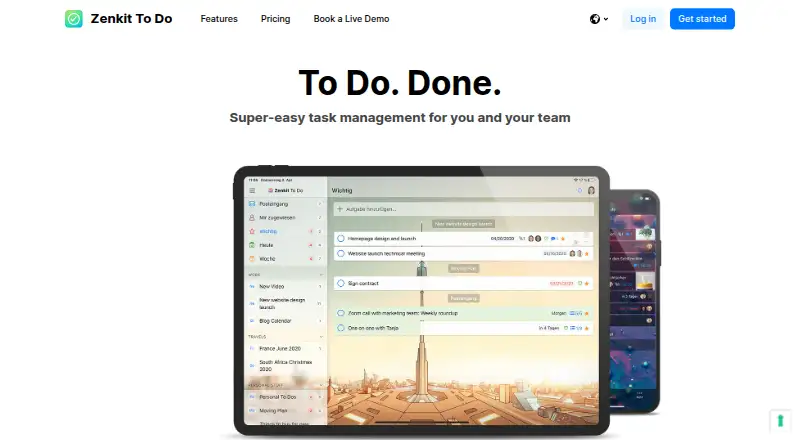
Zenkit To Do is a task-management app for individuals, families, and teams. It organizes work into lists and folders, with an Inbox for capturing tasks and smart lists such as Today, Week, Starred, and Assigned to Me. Due dates, reminders, recurring tasks, subtasks, checklists, notes, attachments, tags, and task search support both everyday planning and shared workflows. Apps are available on the web, Windows, macOS, Linux, iOS, and Android, and the product is part of the wider Zenkit Suite from Axonic GmbH.
Its strongest fit is visual task and collaboration workflows. Users can share tasks, assign work, add comments and @mentions, and attach files, while filters and global search help organize larger task collections. Calendar synchronization through iCal adds a useful bridge between task planning and scheduled commitments. The free plan makes the product accessible for personal use and smaller shared lists, while the broader Zenkit ecosystem may suit teams already working with other Zenkit products. Zenkit To Do is a practical choice when task visibility and collaboration matter more than specialized project controls.
Platform coverage is broad, but the feature emphasis remains focused on to-do management. Offline access is specified for mobile, so users who need the same offline behavior across web and desktop should assess that fit carefully. Integrations center on Dropbox, Box, Google Drive, iCal, and Zenkit Suite rather than a large integration catalog. Choose Zenkit To Do for recurring tasks, reminders, shared lists, and a consistent experience across six platforms. Consider an alternative if you need a wider project-management scope or a broader ecosystem of connected services.
Your product? Our editors can test Zenkit To Do in depth and publish a review, labelled as paid · from $149/mo →
Zenkit To Do pricing
Zenkit To Do fact sheet
| Free plan | Yes |
|---|---|
| Paid from | Not verified |
| Recurring tasks | Yes |
| Task reminders | Yes |
| Calendar sync | Yes |
| Subtasks | Yes |
| Offline access | Mobile |
| Active task limit | Not verified |
| Supported platforms | web, windows, macos, linux, ios, android |
| Deployment | Cloud, Desktop, Mobile |
| Platforms | Web, Windows, macOS, Linux, iOS, Android |
| Compliance & security | GDPR, 2FA |
| Support | Phone, Docs |
| Built for | Solo, Small business, Mid-market, Enterprise (editorial estimate) |
| Integrations | 5 integrations: Dropbox, Box, Google Drive, iCal, Zenkit Suite |
| Pricing | Free plan (source) |
| Website | zenkit.com |
| Facts checked | 22 Sep 2026 |
Zenkit To Do integrations
Zenkit To Do lists 5 integrations on its own site.
- Dropbox
- Box
- Google Drive
- iCal
- Zenkit Suite
Alternatives to Zenkit To Do
- TodoistA complete task manager with broad platform coverage, recurring tasks, and team workspaces.9.2
- TickTickA broad to-do app for users who want tasks, planning, habits, and focus tools together.9.0
- Microsoft To DoA capable free choice for daily planning, shared lists, and Microsoft-connected task management.8.8



See all Zenkit To Do alternatives →
Used Zenkit To Do? Be the first to review it
The editor score above is our own research. What this page doesn't have yet is a reader's view — what you used Zenkit To Do for, what worked and what didn't. No stars are seeded and no review is paid for; an editor reads every one before it appears.
Write a reviewTwo minutes · verified accounts only · read by an editor before it appears
Featured on iTechGuides

Zenkit To Do is listed in our To-Do List Apps directory. Add the badge to your site — it links back to this page.
<a href="https://www.itechguides.com/products/zenkit-to-do/"><img src="https://www.itechguides.com/best/badge/zenkit-to-do.svg" alt="Featured on iTechGuides" width="230" height="46"></a>
Reviewed by iTechGuides Editors · Editorial team · Updated Oct 2026
Advertiser disclosure: iTechGuides is reader-supported. Vendors can pay for top positions in our rankings and for a place on other products' pages, and we may earn a commission when you click some links. Bought places stand at the number bought; this page and our disclosure say so. Paying vendors may get a fuller, more detailed review from our editors, and that review can change their score. How we rank.
Last updated · How we research and update