WineGUI
WineGUI: A free, open-source Wine manager with guided machine setup and runner controls. Ranked #10 of 26 in Windows Compatibility Layers by our editors (6.5/10); pricing: Free plan; best for linux users wanting a guided Wine interface.
At a glance
- Editor score6.5 / 10
- PricingFree plan
- Best forLinux users wanting a guided Wine interface
- Free planYes
- Paid fromNone
- Facts checked20 Sep 2026
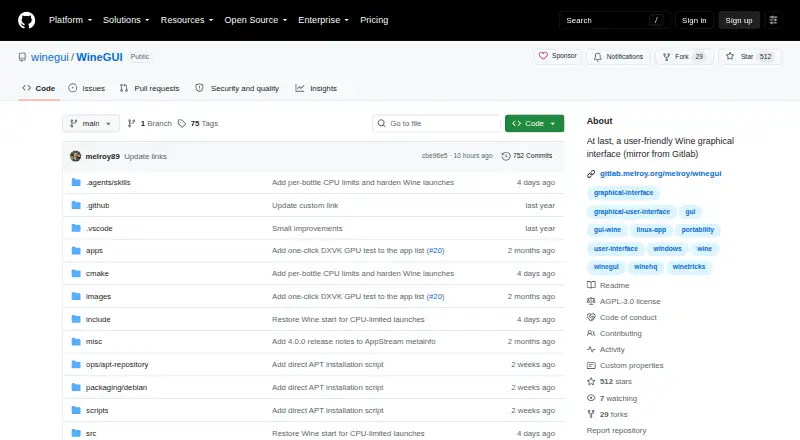
Where it wins
- Step-by-step wizard simplifies separate Windows machine creation.
- Manages Wine runners, GE-Proton, DXVK, and Winetricks.
- Provides shortcuts, search, cloning, and process controls.
Where it doesn't
- Supports Linux rather than macOS or Windows.
- Official packages focus on supported Debian, Ubuntu, Fedora, and compatible distributions.
- Requires the Wine ecosystem for Windows application management.
Our verdict on WineGUI
WineGUI is an open-source Linux desktop application for managing Wine and Windows applications through separate environments called machines. It is aimed at Linux users who want a graphical alternative to managing Wine configurations manually, with guided machine creation, per-machine application lists, runner selection, and application shortcuts. Its focus is practical: organize Windows programs, keep environments separate, and control common Wine tasks from one interface.
The standout feature is the breadth of machine and runner management in a single desktop interface. A step-by-step wizard helps create machines, while users can download and switch between Wine runner versions, edit or remove machines, clone them, and search each machine’s application list. WineGUI also handles additional software such as DirectX and DXVK, supports GE-Proton management through a managed UMU runtime, and exposes controls for launching programs, opening the C: drive, simulating a reboot, and terminating processes. Its ecosystem fit is centered on Wine, DXVK, GE-Proton, and Winetricks rather than a broader operating-system layer.
WineGUI is free and open source, with no paid tiers to compare. Official packages are provided for supported Debian, Ubuntu, Fedora, and compatible Linux distributions. That makes the product a clear fit for Linux users who want guided setup and visible controls without a commercial licensing model. The tradeoff is platform scope: it is a Linux application, and its workflow depends on the Wine ecosystem and compatible distribution packaging. Users seeking a native Windows or macOS application, or a tool outside Wine-based compatibility workflows, should choose a different category of solution.
WineGUI pricing
WineGUI fact sheet
| Free plan | Yes |
|---|---|
| Paid from | None |
| macOS support | Not verified |
| Linux support | Yes |
| Apple silicon support | Not verified |
| Graphics acceleration | Dxvk |
| Compatibility database | Not verified |
| Prefix management | Yes |
| Deployment | Desktop |
| Platforms | Linux |
| Support | Docs, Community |
| Built for | Solo, Small business (editorial estimate) |
| Integrations | 4 integrations: Wine, DXVK, GE-Proton, Winetricks |
| Pricing | Free plan |
| Website | github.com |
| Facts checked | 20 Sep 2026 |
WineGUI integrations
WineGUI lists 4 integrations on its own site.
- Wine
- DXVK
- GE-Proton
- Winetricks
Alternatives to WineGUI
- WineWine is a free, broad foundation for running Windows applications on Linux and macOS.9.0
- CrossOverA paid compatibility layer with application recipes, bottles, ratings, and graphics options.8.7
- BottlesA free, open-source choice for organizing and running Windows apps across platforms.8.2


See all WineGUI alternatives →
Used WineGUI? Be the first to review it
The editor score above is our own research. What this page doesn't have yet is a reader's view — what you used WineGUI for, what worked and what didn't. No stars are seeded and no review is paid for; an editor reads every one before it appears.
Write a reviewTwo minutes · verified accounts only · read by an editor before it appears
Featured on iTechGuides

WineGUI is listed in our Windows Compatibility Layers directory. Add the badge to your site — it links back to this page.
<a href="https://www.itechguides.com/products/winegui/"><img src="https://www.itechguides.com/best/badge/winegui.svg" alt="Featured on iTechGuides" width="230" height="46"></a>
Reviewed by iTechGuides Editors · Editorial team · Updated Sep 2026
Advertiser disclosure: iTechGuides is reader-supported. We may earn a commission when you click some links. How we rank.
Last updated · How we research and update