WineCharm
WineCharm: A focused, free Linux tool for organizing Wine prefixes, runners, backups, and launches. Ranked #11 of 26 in Windows Compatibility Layers by our editors (6.3/10); pricing: Free plan; best for linux users managing reusable Wine setups.
At a glance
- Editor score6.3 / 10
- PricingFree plan
- Best forLinux users managing reusable Wine setups
- Free planYes
- Paid fromNone
- macOS supportNo
- Facts checked20 Sep 2026
Where it wins
- Creates, clones, backs up, restores, and deletes Wine prefixes
- Supports reusable 32-bit and 64-bit templates
- Offers GUI, headless operation, scripts, and portable backups
Where it doesn't
- Linux-only; it does not support macOS
- Focused on Wine management rather than a compatibility database
- Does not include documented DXVK or VKD3D integration
Our verdict on WineCharm
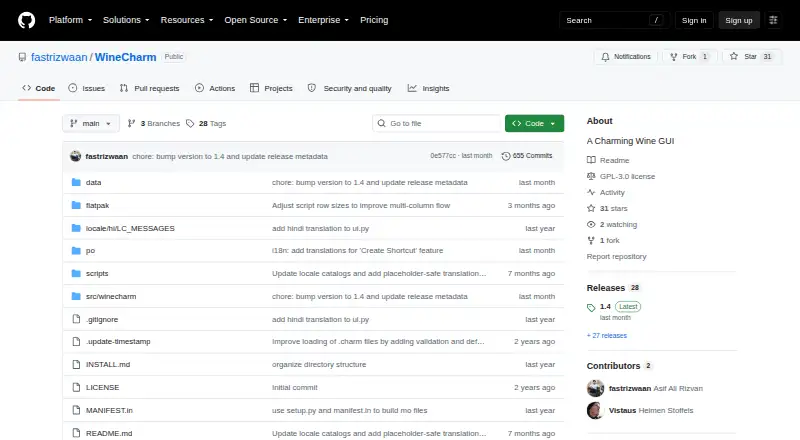
WineCharm is an open-source desktop GUI for Linux users who run Windows software through Wine. It launches EXE and MSI applications while organizing the surrounding Wine setup: separate prefixes, reusable 32-bit and 64-bit templates, Wine runners, shortcuts, and backups. That makes it a fit for Linux users who want repeatable environments rather than a single ad hoc application launch. Its free, open-source model also suits users who prefer a locally managed tool without a paid-plan decision.
The strongest part of WineCharm is its lifecycle coverage. Users can create, clone, back up, restore, and delete prefixes, while also downloading, importing, and backing up Wine runners. Portable prefix and runner backups extend that organization beyond one installation. The GUI supports desktop use, and headless operation plus Charm scripts provide a path for automation. Flatpak installation adds another Linux distribution option, while desktop or application-menu shortcuts make frequently launched Windows applications easier to access. Together, these features give WineCharm a broader management role than a launcher alone.
WineCharm remains a focused Linux-and-Wine utility. It is not the right choice for users who need macOS support, including Apple silicon, or who expect a compatibility database integrated into the product. Its documented feature set also does not include DXVK or VKD3D integration. Choose WineCharm if your priority is reusable Wine configuration, runner handling, backup management, and scripted operation on Linux. Choose an alternative if your priority is cross-platform support or a broader compatibility and graphics-integration layer rather than prefix and runner management.
WineCharm pricing
WineCharm fact sheet
| Free plan | Yes |
|---|---|
| Paid from | None |
| macOS support | No |
| Linux support | Yes |
| Apple silicon support | Not verified |
| Graphics acceleration | Not verified |
| Compatibility database | Not verified |
| Prefix management | Yes |
| Deployment | Desktop |
| Platforms | Linux |
| Built for | Solo, Small business (editorial estimate) |
| Pricing | Free plan |
| Website | github.com |
| Facts checked | 20 Sep 2026 |
Alternatives to WineCharm
- WineWine is a free, broad foundation for running Windows applications on Linux and macOS.9.0
- CrossOverA paid compatibility layer with application recipes, bottles, ratings, and graphics options.8.7
- BottlesA free, open-source choice for organizing and running Windows apps across platforms.8.2


See all WineCharm alternatives →
Used WineCharm? Be the first to review it
The editor score above is our own research. What this page doesn't have yet is a reader's view — what you used WineCharm for, what worked and what didn't. No stars are seeded and no review is paid for; an editor reads every one before it appears.
Write a reviewTwo minutes · verified accounts only · read by an editor before it appears
Featured on iTechGuides

WineCharm is listed in our Windows Compatibility Layers directory. Add the badge to your site — it links back to this page.
<a href="https://www.itechguides.com/products/winecharm/"><img src="https://www.itechguides.com/best/badge/winecharm.svg" alt="Featured on iTechGuides" width="230" height="46"></a>
Reviewed by iTechGuides Editors · Editorial team · Updated Sep 2026
Advertiser disclosure: iTechGuides is reader-supported. We may earn a commission when you click some links. How we rank.
Last updated · How we research and update