
WinDbg
WinDbg: A free, deeply capable debugger for Windows applications, drivers, and crash analysis. Ranked #3 of 27 in Debuggers by our editors (9.0/10); pricing: Free plan; best for windows and kernel debugging.
At a glance
- Editor score9.0 / 10
- PricingFree plan
- Best forWindows and kernel debugging
- Free planYes
- Paid fromFree
- Supported languagesC++, C#, JavaScript, assembly
- Facts checked20 Sep 2026
Where it wins
- Combines user-mode and kernel-mode debugging for Windows code and drivers
- Supports crash dumps, remote sessions, and configurable exception handling
- Time Travel Debugging records and replays execution for deeper analysis
Where it doesn't
- Its primary focus is Windows rather than cross-platform debugging
- Linux support centers on kernel and ELF core-dump analysis
- The broad feature set may be more than basic application debugging requires
Our verdict on WinDbg
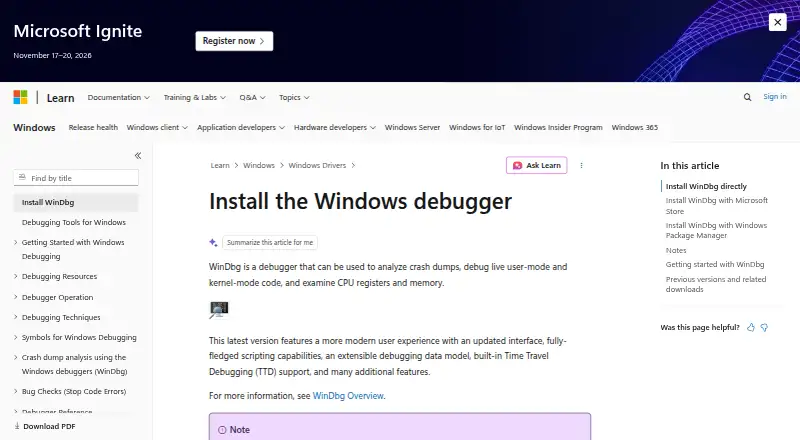
WinDbg is Microsoft’s debugger for live user-mode and kernel-mode code, crash dumps, and minidumps. It is aimed at software developers, driver developers, system engineers, and incident investigators working with Windows applications, operating-system components, and drivers. The debugger supports C++, C#, JavaScript, and assembly, while compatible versions can open Linux kernel and ELF core dumps.
The product is free, making its full debugging feature set available without a paid tier structure. Its platform fit is strongest on Windows, with documented support for Windows 10 version 1607 or newer and Windows 11, plus x64 and ARM64 processors. WinDbg can attach to processes, inspect memory and registers, manage symbols and breakpoints, and connect to remote sessions through client/server debugging. That combination suits teams investigating failures across local and remote Windows environments rather than developers seeking a broadly cross-platform desktop debugger.
Time Travel Debugging is a standout capability: trace recording and replay can help analyze execution paths that are difficult to reproduce through conventional breakpoints alone. Conditional breakpoints, exception and event handling, JavaScript and NatVis scripting, and an extensible debugger data model with LINQ queries add depth for complex investigations. Choose WinDbg when Windows internals, drivers, crash analysis, or kernel work are central. Choose an alternative when the priority is a debugger designed primarily for non-Windows live application development rather than Windows-focused diagnostics.
Your product? Our editors can test WinDbg in depth and publish a review, labelled as paid · from $149/mo →
WinDbg pricing
WinDbg fact sheet
| Free plan | Yes |
|---|---|
| Paid from | Free |
| Supported languages | C++, C#, JavaScript, assembly |
| Target platforms | Windows; Linux crash dumps |
| Remote debugging | Yes |
| Conditional breakpoints | Yes |
| Exception breakpoints | Yes |
| Time-travel debugging | Yes |
| Core dump debugging | Yes |
| Deployment | Desktop |
| Platforms | Windows |
| Support | Docs |
| Built for | Small business, Mid-market, Enterprise (editorial estimate) |
| Pricing | Free plan |
| Website | learn.microsoft.com |
| Facts checked | 20 Sep 2026 |
Alternatives to WinDbg
- GDBA free, open-source debugger with unusually broad language, target, and remote-debugging coverage.9.4
- LLDBA capable, free debugger for C/C++ and Apple-platform development.9.2
- DelveA deep, free Go debugger for developers who need process and runtime control.8.8

WinDbg vs the competition


Compare WinDbg with any tool side by side →
Also Ranked In
WinDbg is ranked in 2 of our directories.
Used WinDbg? Be the first to review it
The editor score above is our own research. What this page doesn't have yet is a reader's view — what you used WinDbg for, what worked and what didn't. No stars are seeded and no review is paid for; an editor reads every one before it appears.
Write a reviewTwo minutes · verified accounts only · read by an editor before it appears
Featured on iTechGuides

WinDbg is listed in our Debuggers directory. Add the badge to your site — it links back to this page.
<a href="https://www.itechguides.com/products/windbg/"><img src="https://www.itechguides.com/best/badge/windbg.svg" alt="Featured on iTechGuides" width="230" height="46"></a>
Reviewed by iTechGuides Editors · Editorial team · Updated Oct 2026
Advertiser disclosure: iTechGuides is reader-supported. Vendors can pay for top positions in our rankings and for a place on other products' pages, and we may earn a commission when you click some links. Bought places stand at the number bought; this page and our disclosure say so. Paying vendors may get a fuller, more detailed review from our editors, and that review can change their score. How we rank.
Last updated · How we research and update