
WhenToWork
WhenToWork: A capable scheduling tool for small teams, but its pricing and limited integrations narrow the fit. Ranked #30 of 42 in Employee Scheduling Software by our editors (6.3/10); pricing: 30-day trial; best for small teams needing automatic schedule generation.
At a glance
- Editor score6.3 / 10
- Pricing30-day trial
- Best forSmall teams needing automatic schedule generation
- Free planNo
- Paid from$273/yr
- Auto-schedulingYes
- Founded2000 · San Angelo, Texas, United States
- Facts checked21 Sep 2026
Where it wins
- AutoFill generates schedules automatically for up to 10 employees
- Availability, leave, open shifts, and shift trading support team changes
- Web, iOS, and Android access with email, text, and app notifications
Where it doesn't
- Starts at $38 per month for up to 10 employees
- No integrations are included
- The permanent free plan is not available
Our verdict on WhenToWork
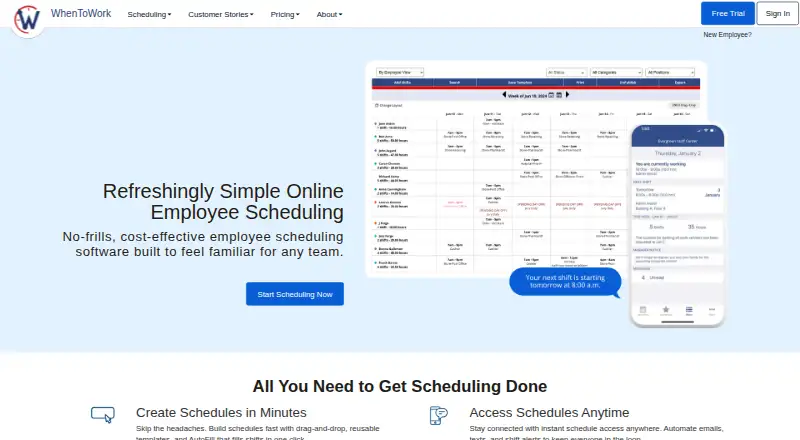
WhenToWork is web-based employee scheduling software for organizations managing hourly, part-time, seasonal, volunteer, or multi-location teams. Managers can build schedules manually or use AutoFill, apply reusable templates, publish changes, and monitor coverage. Employees can submit availability, request time off, pick up open shifts, and trade shifts subject to manager controls. Access is available through web browsers and mobile apps for iOS and Android, making it a fit for small teams that need scheduling automation alongside employee self-service.
The published plans show one feature set across four billing periods, with capacity of up to 10 employees. The 1 Month plan costs $38 per month, while the 3 Months plan costs $100 per 3 months, the 6 Months plan costs $164 per 6 months, and the 1 Year plan costs $273 per year. Each plan includes all features. A 30-day trial is available, but there is no permanent free plan. The pricing structure is straightforward for a small team, although the starting monthly cost is significant when the employee limit is only 10.
WhenToWork covers the core scheduling workflow well: availability collection, time-off approval, automatic schedule generation, open-shift pickup, shift trading, multi-location and department scheduling, and schedule-change notifications. Its web, iOS, and Android access also supports teams that need mobile schedule updates. The tradeoff is ecosystem fit: integrations are not included, so organizations seeking connections with other business systems may need a different product. Choose WhenToWork if automatic scheduling and shift management are the priority for a small team; consider an alternative if integrations or broader system connectivity matter more than the scheduling feature set.
Your product? Our editors can test WhenToWork in depth and publish a review, labelled as paid · from $149/mo →
WhenToWork pricing
All 4 WhenToWork plans and prices →
WhenToWork fact sheet
| Free plan | No |
|---|---|
| Paid from | $273/yr |
| Employee limit | 10 employees |
| Auto-scheduling | Yes |
| Availability collection | Yes |
| Time-off management | Yes |
| Open-shift management | Yes |
| Shift swaps | Yes |
| Mobile apps | Yes |
| Free trial | 30 days · no card needed |
| Deployment | Cloud, Mobile |
| Platforms | Web, iOS, Android |
| Support | Email, Phone, Docs · 24/7 |
| Built for | Small business, Mid-market, Enterprise (editorial estimate) |
| Integrations | 2 integrations: Google Calendar, Outlook |
| Pricing | 30-day trial (source) |
| Website | whentowork.com |
| Facts checked | 21 Sep 2026 |
WhenToWork integrations
WhenToWork lists 2 integrations on its own site.
- Google Calendar
- Outlook
Alternatives to WhenToWork
- DeputyA comprehensive scheduler for shift-based teams that need automation, compliance, and integrations.9.4
- HomebaseA capable scheduling and workforce platform with a useful free plan for small businesses.9.2
- 7shiftsA restaurant-focused scheduler with free entry and deeper labor tools on paid plans.9.2



See all WhenToWork alternatives →
Also Ranked In
WhenToWork is ranked in 2 of our directories.
Used WhenToWork? Be the first to review it
The editor score above is our own research. What this page doesn't have yet is a reader's view — what you used WhenToWork for, what worked and what didn't. No stars are seeded and no review is paid for; an editor reads every one before it appears.
Write a reviewTwo minutes · verified accounts only · read by an editor before it appears
Featured on iTechGuides

WhenToWork is listed in our Employee Scheduling Software directory. Add the badge to your site — it links back to this page.
<a href="https://www.itechguides.com/products/whentowork/"><img src="https://www.itechguides.com/best/badge/whentowork.svg" alt="Featured on iTechGuides" width="230" height="46"></a>
Reviewed by iTechGuides Editors · Editorial team · Updated Oct 2026
Advertiser disclosure: iTechGuides is reader-supported. Vendors can pay for top positions in our rankings and for a place on other products' pages, and we may earn a commission when you click some links. Bought places stand at the number bought; this page and our disclosure say so. Paying vendors may get a fuller, more detailed review from our editors, and that review can change their score. How we rank.
Last updated · How we research and update