UserFolderMigrator
UserFolderMigrator: A free, automation-ready choice for Windows profile and shell-folder migration. Ranked #10 of 26 in PC Migration Software by our editors (7.3/10); pricing: Free plan; best for open-source automated profile migration.
At a glance
- Editor score7.3 / 10
- PricingFree plan
- Best forOpen-source automated profile migration
- Free planYes
- Paid fromFree
- Application migrationNo
- Facts checked20 Sep 2026
Where it wins
- Supports multi-user, checkpointed, and unattended migration workflows
- Verifies transfers with checksums and test restores
- Connects automation to SMTP, Teams, syslog, SCCM, and Intune
Where it doesn't
- Windows-only platform support
- Application migration is not included
- Requires PowerShell 7 and supported Windows versions
Our verdict on UserFolderMigrator
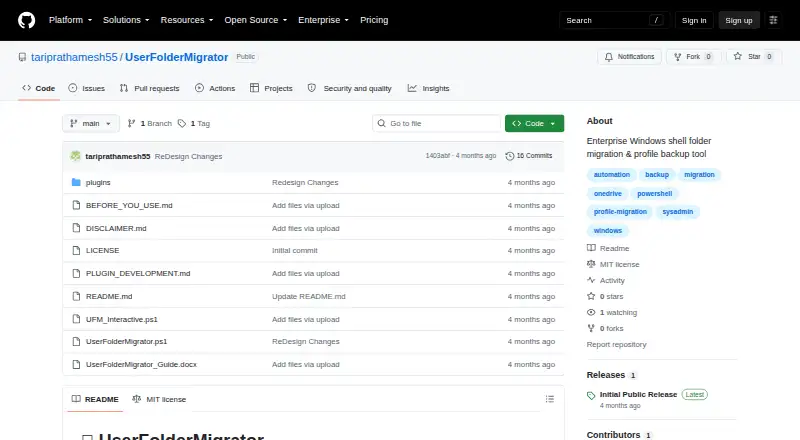
UserFolderMigrator is an open-source PowerShell 7 tool for Windows administrators and power users managing profile and shell-folder moves. It can migrate Desktop, Documents, Downloads, and Pictures, update registry paths, back up and restore complete user profiles, and handle multiple users. The project is intended for Windows 10 and Windows Server 2016 or later, making it a focused option for Windows-based migration work rather than a cross-platform utility.
Its strongest operational advantage is workflow control. Checkpoint and resume support helps structure longer migrations, while Volume Shadow Copy support addresses locked files. Checksum verification and test restore capabilities add validation before or after transfer, and report-only workflows can produce HTML and JSON migration reports. OneDrive Known Folder Move detection is also included, alongside selective transfer, multiple transfer methods, and a plugin system. These features suit administrators who need repeatable, auditable profile operations instead of a basic file-copy process.
Automation and integration are central to the product’s fit. Unattended workflows can send notifications through email, Microsoft Teams, and syslog, with SCCM and Microsoft Intune listed among its integrations. The free, open-source model may appeal to teams that want to inspect or adapt the tool without adopting a paid migration platform. Choose UserFolderMigrator when profile data, shell folders, settings, verification, and administrative automation are the priority. Choose another option when application migration or support beyond Windows is required.
Your product? Our editors can test UserFolderMigrator in depth and publish a review, labelled as paid · from $149/mo →
UserFolderMigrator pricing
UserFolderMigrator fact sheet
| Free plan | Yes |
|---|---|
| Paid from | Free |
| Application migration | No |
| User profile migration | Yes |
| Settings migration | Yes |
| Transfer methods | Multiple |
| Selective transfer | Yes |
| Included devices | Not verified |
| Deployment | Self-hosted |
| Platforms | Windows |
| Support | Docs, Community |
| Built for | Small business, Mid-market, Enterprise (editorial estimate) |
| Integrations | 5 integrations: SMTP, Microsoft Teams, Syslog, SCCM, Microsoft Intune |
| Pricing | Free plan |
| Website | github.com |
| Facts checked | 20 Sep 2026 |
UserFolderMigrator integrations
UserFolderMigrator lists 5 integrations on its own site.
- SMTP
- Microsoft Teams
- Syslog
- SCCM
- Microsoft Intune
Alternatives to UserFolderMigrator
- EaseUS Todo PCTransA broad Windows migration toolkit with free access and extensive paid transfer options.9.2
- Laplink PCmoverA paid Windows migration tool with broad transfer controls and multiple connection options.8.7
- IObit PCtransferA portable, free option for selective file and settings transfers between Windows PCs.8.1

See all UserFolderMigrator alternatives →
Also Ranked In
UserFolderMigrator is ranked in 2 of our directories.
Used UserFolderMigrator? Be the first to review it
The editor score above is our own research. What this page doesn't have yet is a reader's view — what you used UserFolderMigrator for, what worked and what didn't. No stars are seeded and no review is paid for; an editor reads every one before it appears.
Write a reviewTwo minutes · verified accounts only · read by an editor before it appears
Featured on iTechGuides

UserFolderMigrator is listed in our PC Migration Software directory. Add the badge to your site — it links back to this page.
<a href="https://www.itechguides.com/products/userfoldermigrator/"><img src="https://www.itechguides.com/best/badge/userfoldermigrator.svg" alt="Featured on iTechGuides" width="230" height="46"></a>
Reviewed by iTechGuides Editors · Editorial team · Updated Oct 2026
Advertiser disclosure: iTechGuides is reader-supported. Vendors can pay for top positions in our rankings and for a place on other products' pages, and we may earn a commission when you click some links. Bought places stand at the number bought; this page and our disclosure say so. Paying vendors may get a fuller, more detailed review from our editors, and that review can change their score. How we rank.
Last updated · How we research and update