
UniDesk
UniDesk: A broad AI-first help desk for teams that need more than ticketing. Ranked #44 of 49 in IT Help Desk Software by our editors (4.9/10); pricing: 14-day trial; best for AI-first help desk intake teams.
At a glance
- Editor score4.9 / 10
- Pricing14-day trial
- Best forAI-first help desk intake teams
- Paid from$249/mo
- SLA managementYes
- Facts checked22 Sep 2026
Where it wins
- AI classifies, prioritizes, routes, and drafts ticket replies
- Intake spans Slack, email, Teams, portal, API, and webhooks
- Combines SLAs, assets, workflows, remediation, and reporting
Where it doesn't
- The starting price is $249 per month
- Pricing is flat monthly rather than per agent
- Advanced capabilities require higher plans
Our verdict on UniDesk
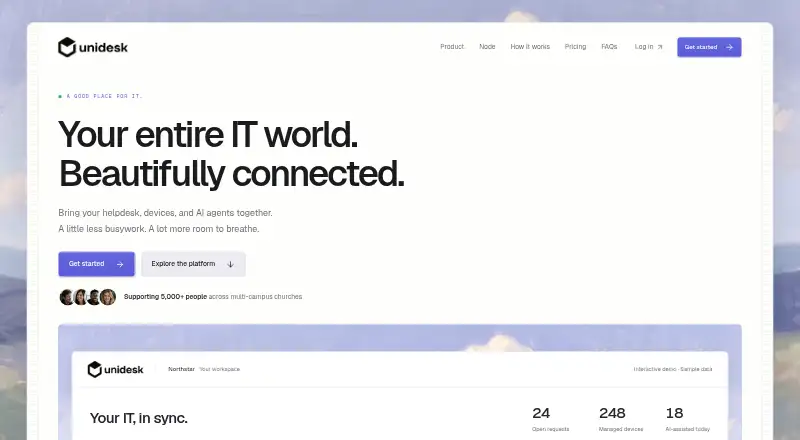
UniDesk is an IT help desk platform for internal IT teams and managed service providers. It combines ticketing, AI-assisted classification and reply drafting, knowledge management, workflow automation, SLA tracking, asset records, and remote device management. Requests can arrive through Slack, email, Microsoft Teams, a web portal, REST API, or webhooks. A self-service portal with knowledge-base search and an embedded agent supports employees who want to find answers before opening a ticket.
Its breadth is the main differentiator. Tickets can be linked to employee devices, while workflows support triggers, conditions, actions, and approvals. Teams can track ticket volume, resolution time, and SLA performance, and use remote device management and remediation for operational follow-through. Integrations include Datadog, Sentry, Jamf, Microsoft 365, Google Workspace, and Okta. That combination suits organizations that want help desk intake, IT operations, asset context, and automation in one platform rather than a narrow ticketing tool.
Pricing starts at $249 per month for Starter, which includes ticketing, a knowledge base, AI, and unlimited admins and staff. Growth costs $449 per month and adds custom reports and custom workflows, while Scale costs $799 per month and adds advanced automation, an advanced workflow builder, and reporting. A 14-day free trial and an enterprise option are available. Choose UniDesk if AI-first intake and broad IT operations coverage justify a higher entry price; teams seeking simpler ticketing or agent-based pricing should consider a narrower alternative.
Your product? Our editors can test UniDesk in depth and publish a review, labelled as paid · from $149/mo →
UniDesk pricing
All 3 UniDesk plans and prices →
UniDesk fact sheet
| Free plan | Not verified |
|---|---|
| Paid from | $249/mo |
| SLA management | Yes |
| Knowledge base | Yes |
| Employee portal | Yes |
| Asset management | Yes |
| Single sign-on | Not verified |
| Approval workflows | Yes |
| Mobile apps | Yes |
| Free trial | 14 days |
| Deployment | Cloud |
| Platforms | Web |
| Compliance & security | SOC 2 |
| Built for | Small business, Mid-market, Enterprise (editorial estimate) |
| Integrations | 8 integrations: Slack, Microsoft Teams, Datadog, Sentry, Jamf, Microsoft 365 … |
| Pricing | 14-day trial (source) |
| Website | myunidesk.org |
| Facts checked | 22 Sep 2026 |
UniDesk integrations
UniDesk lists 8 integrations on its own site.
- Slack
- Microsoft Teams
- Datadog
- Sentry
- Jamf
- Microsoft 365
- Google Workspace
- Okta
Alternatives to UniDesk
- ManageEngine ServiceDesk PlusA broad ITSM suite with a free plan, asset management, CMDB, automation, and AI.9.3
- FreshserviceDeep ITSM, asset management, automation and AI for growing service teams.9.2
- SolarWinds Service DeskA mature ITSM suite for teams that need CMDB, asset, SLA, and change-management depth.9.1



See all UniDesk alternatives →
Used UniDesk? Be the first to review it
The editor score above is our own research. What this page doesn't have yet is a reader's view — what you used UniDesk for, what worked and what didn't. No stars are seeded and no review is paid for; an editor reads every one before it appears.
Write a reviewTwo minutes · verified accounts only · read by an editor before it appears
Featured on iTechGuides

UniDesk is listed in our IT Help Desk Software directory. Add the badge to your site — it links back to this page.
<a href="https://www.itechguides.com/products/unidesk/"><img src="https://www.itechguides.com/best/badge/unidesk.svg" alt="Featured on iTechGuides" width="230" height="46"></a>
Reviewed by iTechGuides Editors · Editorial team · Updated Oct 2026
Advertiser disclosure: iTechGuides is reader-supported. Vendors can pay for top positions in our rankings and for a place on other products' pages, and we may earn a commission when you click some links. Bought places stand at the number bought; this page and our disclosure say so. Paying vendors may get a fuller, more detailed review from our editors, and that review can change their score. How we rank.
Last updated · How we research and update