
Team Password Manager
Team Password Manager: A self-hosted team vault with fixed licenses, granular permissions, and passkey support. Ranked #37 of 38 in Password Management Software by our editors (5.7/10); pricing: Free plan · 30-day trial; best for self-hosted teams needing fixed licenses.
At a glance
- Editor score5.7 / 10
- PricingFree plan · 30-day trial
- Best forSelf-hosted teams needing fixed licenses
- Free planYes
- Paid from$185 one-time
- Founded2011 · Matadepera, near Barcelona, Catalonia, Spain
- Facts checked23 Sep 2026
Where it wins
- Self-hosted deployment with Docker images and REST API access
- Granular groups, roles, project permissions, and password permissions
- TOTP, passkeys, secure sharing, and browser autofill extensions
Where it doesn't
- The free plan is limited to 2 users and 5 projects
- Paid licenses start at US $185 for 5 users
- Self-hosting requires an organization-managed server
Our verdict on Team Password Manager
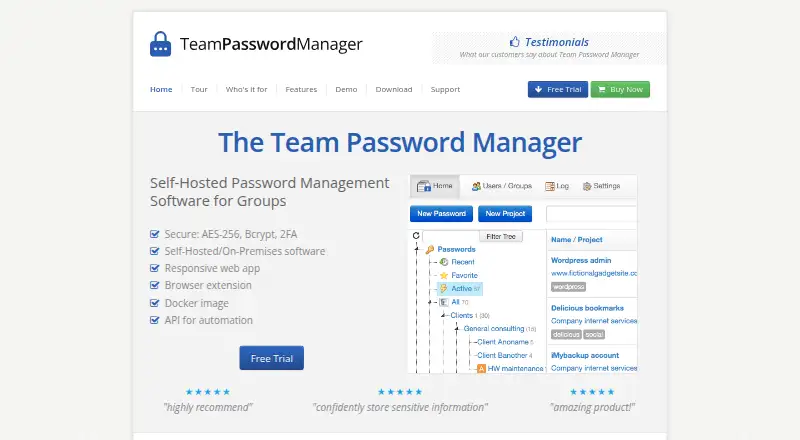
Team Password Manager is a self-hosted, web-based password manager for organizations that want to control their own credential vault. It organizes passwords across projects and combines AES-256 encrypted storage with tags, search, favorites, password generation, sharing, access reporting, and password history. Teams can manage users through groups, roles, project permissions, and password permissions. The product is suited to organizations that need project-based credential sharing and administrative control rather than a vendor-hosted vault.
Pricing uses a free tier and fixed user licenses. The Free plan has no time limit and is limited to 2 users and 5 projects. The 5 Users License costs US $185, the 10 Users License costs US $325, the 20 Users License costs US $599, the 50 Users License costs US $1,339, the 100 Users License costs US $2,179, and the Unlimited Users License costs US $5,499. Each paid license includes unlimited passwords, unlimited projects, one year of support and updates, and perpetual use. A 30-day free trial is also available. This structure fits teams that prefer a one-time license, while larger organizations should weigh the higher fixed license costs carefully.
Control and ecosystem fit are central to the product. Deployment options include web access, self-hosting, Docker images, and a REST API, while browser extensions support Chrome, Edge, and Firefox for autofill and password saving. Authentication options include LDAP, Active Directory, SAML 2.0, Google, Microsoft Azure Active Directory, Okta, OneLogin, TOTP, and passkeys for local users. Secure external sharing can use expiry and password protection. Choose Team Password Manager if self-hosting, fixed licenses, and detailed permissions matter; choose an alternative if your team wants a fully vendor-hosted service instead.
Your product? Our editors can test Team Password Manager in depth and publish a review, labelled as paid · from $149/mo →
Team Password Manager pricing
All 6 Team Password Manager plans and prices →
Team Password Manager fact sheet
| Free plan | Yes |
|---|---|
| Paid from | $185 one-time |
| Team sharing | Not verified |
| Admin controls | Not verified |
| SSO support | Not verified |
| MFA support | Not verified |
| Audit logs | Not verified |
| Supported platforms | Web app; Chrome, Firefox, and Edge extensions; responsive on iPhone and Android devices |
| Free trial | 30 days |
| Money-back guarantee | 30 days |
| Deployment | Self-hosted, Browser extension |
| Platforms | Web, Chrome extension |
| Compliance & security | SSO/SAML, 2FA |
| Support | |
| Built for | Small business, Mid-market, Enterprise (editorial estimate) |
| Integrations | 3 integrations: LDAP, Active Directory, SAML identity providers |
| Pricing | Free plan · 30-day trial (source) |
| Website | teampasswordmanager.com |
| Facts checked | 23 Sep 2026 |
Team Password Manager integrations
Team Password Manager lists 3 integrations on its own site.
- LDAP
- Active Directory
- SAML identity providers
Alternatives to Team Password Manager
- 1PasswordA feature-rich password manager with strong sharing and business controls, but no free plan.9.4
- LastPassA mature password manager with a capable free tier and broad device coverage.9.3
- Proton PassA broad, open-source password vault with a capable free plan and business tiers.9.2


See all Team Password Manager alternatives →
Also Ranked In
Team Password Manager is ranked in 2 of our directories.
Used Team Password Manager? Be the first to review it
The editor score above is our own research. What this page doesn't have yet is a reader's view — what you used Team Password Manager for, what worked and what didn't. No stars are seeded and no review is paid for; an editor reads every one before it appears.
Write a reviewTwo minutes · verified accounts only · read by an editor before it appears
Featured on iTechGuides

Team Password Manager is listed in our Password Management Software directory. Add the badge to your site — it links back to this page.
<a href="https://www.itechguides.com/products/team-password-manager/"><img src="https://www.itechguides.com/best/badge/team-password-manager.svg" alt="Featured on iTechGuides" width="230" height="46"></a>
Reviewed by iTechGuides Editors · Editorial team · Updated Oct 2026
Advertiser disclosure: iTechGuides is reader-supported. Vendors can pay for top positions in our rankings and for a place on other products' pages, and we may earn a commission when you click some links. Bought places stand at the number bought; this page and our disclosure say so. Paying vendors may get a fuller, more detailed review from our editors, and that review can change their score. How we rank.
Last updated · How we research and update