
Tabby
Tabby: A versatile open-source terminal for power users who automate across systems. Ranked #1 of 40 in Terminal Emulators by our editors (9.4/10); pricing: Free plan; best for power users needing SSH and extensive automation.
At a glance
- Editor score9.4 / 10
- PricingFree plan
- Best forPower users needing SSH and extensive automation
- Free planYes
- Paid fromFree
- Split panesYes
- Facts checked20 Sep 2026
Where it wins
- Integrated SSH includes jump hosts, forwarding, and connection management
- Nested split panes, GPU rendering, and extensive customization
- Documented TypeScript plugin API supports automation-focused extensions
Where it doesn't
- Session sync depends on a plugin using Gist or Gitee
- Its broad feature set may exceed simple local-shell needs
- The web application is available through self-hosting
Our verdict on Tabby
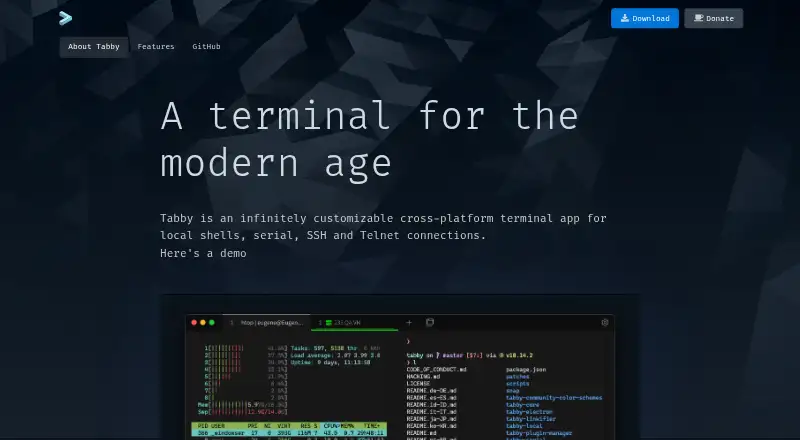
Tabby is an open-source terminal emulator for developers and system administrators who work across local shells, remote servers, serial connections, and Telnet. It runs on Windows, macOS, and Linux, and also offers a self-hosted web application. Local shell support includes PowerShell, WSL, Git Bash, Cygwin, MSYS2, Cmder, and CMD, giving users one interface for several command-line environments. Split panes, tabs, profiles, configurable shortcuts, themes, and font ligatures support both daily terminal work and more tailored workflows.
Its strongest area is the combination of terminal access and remote-session tooling. The integrated SSH client includes a connection manager, jump hosts, agent forwarding, X11 forwarding, and port forwarding. SSH sessions can also use SFTP and Zmodem for file transfers, while the serial terminal provides saved connections and configurable input/output modes. The plugin system adds a documented TypeScript API, including automation-oriented plugins, so Tabby can be extended beyond its built-in workflows. An encrypted container stores SSH secrets and configuration, adding focused protection for connection data.
Tabby suits users who want one customizable application for local development, infrastructure access, and terminal automation rather than a minimal shell window. Its platform coverage, GPU acceleration, nested panes, shell integrations, and extension model make it a capable fit for complex terminal routines. Session synchronization is provided through the listed sync-config plugin, which syncs configuration to Gist or Gitee rather than through a built-in hosted account service. Users who prefer a simple local terminal or do not want to manage plugin-based synchronization may prefer a narrower tool; users who need SSH, multiple shell environments, file transfer, and automation in one application should consider Tabby.
Your product? Our editors can test Tabby in depth and publish a review, labelled as paid · from $149/mo →
Tabby pricing
Tabby fact sheet
| Free plan | Yes |
|---|---|
| Paid from | Free |
| Supported platforms | Windows, macOS, Linux |
| Split panes | Yes |
| Session sync | Yes |
| GPU acceleration | Yes |
| Scripting API | Yes |
| SSH support | Yes |
| Deployment | Desktop, Self-hosted |
| Platforms | Windows, macOS, Linux |
| Integrations | 10 integrations: PowerShell, WSL, Git Bash, Cygwin, MSYS2, Cmder … |
| Pricing | Free plan |
| Website | tabby.sh |
| Facts checked | 20 Sep 2026 |
Tabby integrations
Tabby lists 10 integrations on its own site.
- PowerShell
- WSL
- Git Bash
- Cygwin
- MSYS2
- Cmder
- CMD
- SFTP
- Zmodem
- Telnet
Alternatives to Tabby
- Windows TerminalA free, open-source Windows terminal with tabs, panes, profiles, and automation.9.3
- iTerm2A capable Mac terminal with advanced panes, profiles, session restoration, and automation.9.2
- kittyA programmable terminal with strong SSH workflows, graphics, layouts, and session control.9.0


Tabby vs the competition
- Tabby vs Windows Terminal
- Tabby vs iTerm2
- Tabby vs kitty
- Tabby vs Warp
- Tabby vs MobaXterm
- Tabby vs Alacritty



Compare Tabby with any tool side by side →
Also Ranked In
Tabby is ranked in 2 of our directories.
Used Tabby? Be the first to review it
The editor score above is our own research. What this page doesn't have yet is a reader's view — what you used Tabby for, what worked and what didn't. No stars are seeded and no review is paid for; an editor reads every one before it appears.
Write a reviewTwo minutes · verified accounts only · read by an editor before it appears
Featured on iTechGuides

Tabby is listed in our Terminal Emulators directory. Add the badge to your site — it links back to this page.
<a href="https://www.itechguides.com/products/tabby-terminal-emulator/"><img src="https://www.itechguides.com/best/badge/tabby-terminal-emulator.svg" alt="Featured on iTechGuides" width="230" height="46"></a>
Reviewed by iTechGuides Editors · Editorial team · Updated Oct 2026
Advertiser disclosure: iTechGuides is reader-supported. Vendors can pay for top positions in our rankings and for a place on other products' pages, and we may earn a commission when you click some links. Bought places stand at the number bought; this page and our disclosure say so. Paying vendors may get a fuller, more detailed review from our editors, and that review can change their score. How we rank.
Last updated · How we research and update