
ScreenTinker
ScreenTinker: A capable open-source signage option, strongest for small teams using free video-wall features. Ranked #4 of 207 in Digital Signage Software by our editors (8.3/10); pricing: Free plan · paid from $39/mo · 14-day trial; best for small teams wanting free video-wall features.
At a glance
- Editor score8.3 / 10
- PricingFree plan · paid from $39/mo · 14-day trial
- Best forSmall teams wanting free video-wall features
- Free planYes
- Paid from$39/mo
- Screen limit5 screens
- Facts checked21 Sep 2026
Where it wins
- Free plan with multi-zone layouts, scheduling, and offline playback
- Video walls include bezel compensation and remote screen control
- Self-hosted deployment, API access, and broad platform support
Where it doesn't
- Free plan is limited to 1 device and 500 MB of storage
- Pro costs $99/month for up to 15 devices
- No separate mobile management app; the dashboard is browser-based
Our verdict on ScreenTinker
ScreenTinker is open-source digital signage software for businesses, schools, healthcare organizations, nonprofits, and other teams managing one or more displays. It supports cloud-hosted and self-hosted deployments for TVs, video walls, interactive kiosks, playlists, schedules, widgets, monitoring, and proof-of-play reporting. Content can include images, video, web pages, YouTube, RSS, weather, text/HTML, clocks, social feeds, and directories, with browser-based playback and players for Android TV, Fire TV, Raspberry Pi, Windows, ChromeOS, LG webOS, Samsung Tizen, and BrightSign.
Pricing spans a Free plan at $0 per month for 1 device and 500 MB of storage, a Pro plan at $99 per month for up to 15 devices, and an Enterprise plan for more than 15 devices through an enterprise inquiry. A 14-day free trial is also available. The hosted pricing information shows a starting point of $39 per month for 5 devices, so buyers should match the quoted plan and device allowance to their deployment. YouTube, RSS, Weather, Google Slides, Canva, Power BI, Tableau, and Grafana integrations support common content workflows. The platform also offers web, Windows, Linux, Android, API, and self-hosted options.
Its strongest fit is a small team that values open-source control and needs more than basic playlist playback. Multi-zone drag-and-drop layouts, video walls with bezel compensation, recurrence-based scheduling, kiosk mode, remote viewing and control, offline playback, telemetry, alerts, CSV proof-of-play reports, and owner, editor, and viewer roles give it meaningful operational depth. White-label branding and custom domains extend its presentation options. Teams needing a separate mobile management app or a lower-cost paid plan for a growing device fleet should look elsewhere; ScreenTinker is most compelling when its free capabilities, self-hosting, and video-wall features align with a modest rollout.
From the maker
Written by ByteTinker LLC · approved by our editors 22 Sep 2026. It does not change our score or ranking.
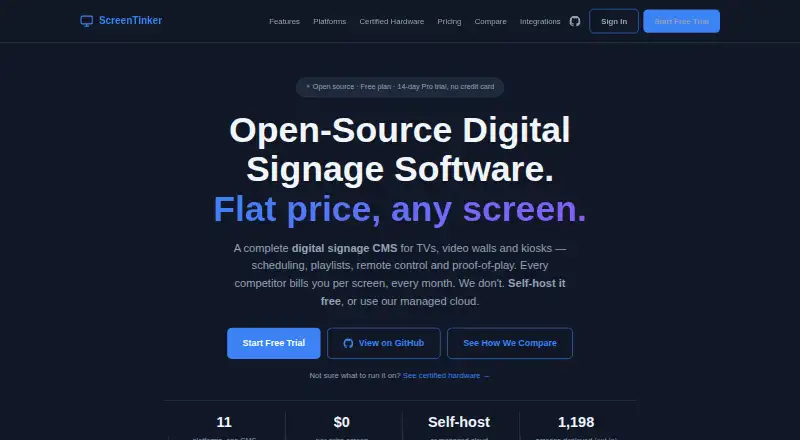
ScreenTinker is an open-source (MIT) digital signage CMS you can self-host or run on managed cloud. One dashboard for playlists, scheduling, multi-zone layouts, video walls, kiosks, proof-of-play and offline playback. Free players on Android TV, Fire TV, Samsung Tizen, LG webOS, Raspberry Pi, Windows, ChromeOS, BrightSign and any browser — no per-device licence. Built for retail, QSR menus, offices, lobbies and education.


What it does, in their words
- MIT-licensed open source CMS
- Self-host or managed cloud
- No per-device player licence
- Playlists with draft/publish
- Dayparting and weekly schedules
- Multi-zone layouts
- Video walls with bezel compensation
- Proof-of-play reports
- Offline cache and catch-up
- Remote monitoring and alerts
- Kiosk / touch mode
- Slide editor and PDF-to-playlist
Plans as the maker lists them
| Free | $0 / month | 1 device 500 MB storage Remote control & live view |
|---|---|---|
| Starter | $39 / month | 5 devices 5 GB storage Remote control & live view Remote URL streaming |
| Enterprise | Custom / month |
- Platforms
- Web, Windows, Linux, Android, API
- Integrations
- iCal/Webcal, RSS, YouTube, web embed (Canva/Google Slides/Power BI, Google/Microsoft sign-in, Stripe (hosted billing), Crestron/Extron triggers, MQTT/webhooks via plugins
- Company
- ByteTinker LLC
- Headquarters
- Kenosha, Wisconsin, USA
- Team size
- 1–10
- Founded
- 2026
- Links
- Documentation ↗ · Pricing page ↗
ScreenTinker user reviews
- 5★1
- 4★0
- 3★0
- 2★0
- 1★0
Editor score 8.3/10 is our own research. User rating 5.0/5 is what readers say — every review is read by an editor before it appears, and none is ever paid for.
-
★★★★★
It just works
We used it for a conference. Updating the remote screens was a breeze — it’s fast, surprisingly simple to use, and you can export your own data. Did what we needed.
Pros- its fast
- surprisingly simple to use
- you can export your own data
Write a reviewTwo minutes · verified accounts only · read by an editor before it appears
ScreenTinker pricing
All 4 ScreenTinker plans and prices →
ScreenTinker fact sheet
| Free plan | Yes |
|---|---|
| Paid from | $39/mo |
| Screen limit | 5 screens |
| Offline playback | Yes |
| Content types | images, video, PDF, YouTube, webpages, RSS, text, HTML, widgets |
| User roles | Advanced |
| API access | Yes |
| Mobile app | No |
| Free trial | 14 days · no card needed |
| Deployment | Cloud, Self-hosted |
| Platforms | Web, Windows, Linux, Android |
| Support | Community, Docs |
| Built for | Small business, Mid-market, Enterprise (editorial estimate) |
| Integrations | 8 integrations: YouTube, RSS, Weather, Google Slides, Canva, Power BI … See all → |
| Pricing | Free plan · paid from $39/mo · 14-day trial (source) |
| Website | screentinker.com |
| Facts checked | 21 Sep 2026 |
ScreenTinker integrations
ScreenTinker lists 8 integrations on its own site.
- YouTube
- RSS
- Weather
- Google Slides
- Canva
- Power BI
- Tableau
- Grafana
See all ScreenTinker integrations →
Alternatives to ScreenTinker
- OptiSignsA flexible signage platform with mobile administration, offline playback, and a free plan.10.0
- YodeckA flexible signage platform with a generous free tier and broad content support.8.9
- Play Digital SignageFeature-rich signage with a free screen option and wide platform coverage.8.3



See all ScreenTinker alternatives →
ScreenTinker vs the competition
- ScreenTinker vs OptiSigns
- ScreenTinker vs Yodeck
- ScreenTinker vs Play Digital Signage
- ScreenTinker vs DigitalSignage.com
- ScreenTinker vs PiSignage
- ScreenTinker vs Xibo


Compare ScreenTinker with any tool side by side →
Featured on iTechGuides

ScreenTinker is listed in our Digital Signage Software directory. Add the badge to your site — it links back to this page.
<a href="https://www.itechguides.com/products/screentinker/"><img src="https://www.itechguides.com/best/badge/screentinker.svg" alt="Featured on iTechGuides" width="230" height="46"></a>
Guides on digital signage software
- Top 10 Digital Signage Software: Free and Open Source Options in 2021Aug 2026
- Best Digital Signage Software in 2026: Pricing, Reviews & DemoAug 2026
Reviewed by iTechGuides Editors · Editorial team · Updated Sep 2026
Advertiser disclosure: iTechGuides is reader-supported. We may earn a commission when you click some links. How we rank.
Last updated · How we research and update