
OptiSigns
OptiSigns: A flexible signage platform with mobile administration, offline playback, and a free plan. Ranked #1 of 207 in Digital Signage Software by our editors (9.3/10); pricing: Free plan · 14-day trial; best for organizations wanting mobile administration.
At a glance
- Editor score9.3 / 10
- PricingFree plan · 14-day trial
- Best forOrganizations wanting mobile administration
- Free planYes
- Paid from$9/unit/mo
- Founded2016 · Houston, Texas, United States
- Facts checked21 Sep 2026
Where it wins
- Mobile administration through iOS and Android apps
- Offline playback with remote screen and content management
- Custom permissions, API access, and broad platform coverage
Where it doesn't
- Free plan is limited to up to three screens
- Free plan includes device restrictions
- Enterprise pricing requires a minimum of 25 screens
Our verdict on OptiSigns
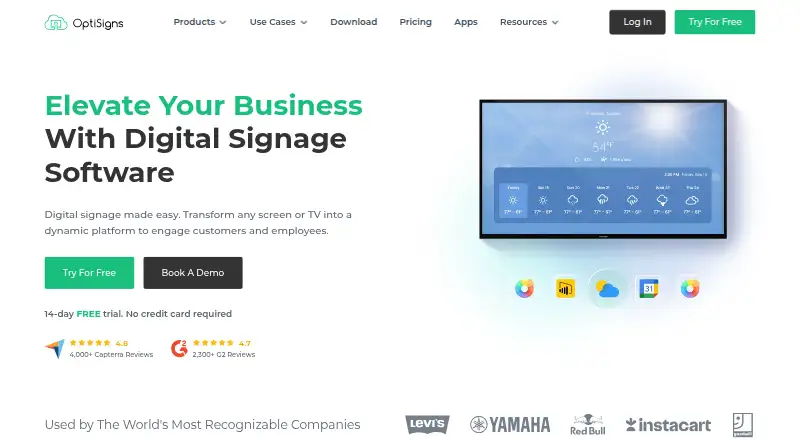
OptiSigns is a cloud-based digital signage platform for organizations managing screens across retail locations, restaurants, offices, and other environments. It supports uploading and displaying images, videos, documents, and presentations, along with dashboards, websites, and social feeds. Teams can create playlists, schedule content, manage screens remotely, and administer deployments through web, desktop, mobile, embedded, smart-TV, and dedicated-player environments. Its mobile apps make it a practical fit for organizations wanting to manage signage away from a desktop.
Pricing follows a freemium model. The Free plan costs $0 per screen and supports up to three screens, with device restrictions. The Standard plan is $9 per screen per month with annual billing. Pro is listed as a plan without a published price in the available plan details. Pro Plus is $13.5 per screen per month with annual billing, while Engage is $27 per screen per month with annual billing. Enterprise is also listed without a published price, and enterprise pricing requires a minimum of 25 screens. A 14-day free trial is available. Higher-tier plans add collaboration controls such as teams, user roles, folder permissions, approval workflows, and content management controls.
OptiSigns stands out for combining offline playback, custom permissions, API and GraphQL-based device and content management, and mobile administration. It integrates with services including Power BI, Google Slides, OneDrive, Google Drive, YouTube, Google Play, and the Apple App Store. Platform coverage includes web, Windows, macOS, Linux, iOS, Android, and API access. Organizations that need mobile control, varied deployment options, or API-driven publishing should consider it. Teams needing more than three screens must move beyond the Free plan, while larger organizations should account for the Enterprise minimum of 25 screens.
Your product? Our editors can test OptiSigns in depth and publish a review, labelled as paid · from $149/mo →
OptiSigns pricing
All 6 OptiSigns plans and prices →
OptiSigns fact sheet
| Free plan | Yes |
|---|---|
| Paid from | $9/unit/mo |
| Screen limit | Not verified |
| Offline playback | Yes |
| Content types | JPG, PNG, BMP, GIF, AVI, MP4, PDF, DOC, DOCX, PPT, PPTX, XLS, XLSX, Google Docs, Sheets, Slides, YouTube, Instagram, Twitter, websites |
| User roles | Custom |
| API access | Yes |
| Mobile app | Yes |
| Free trial | 14 days · no card needed |
| Deployment | Cloud, Self-hosted, Desktop, Mobile |
| Platforms | Web, Windows, macOS, Linux, iOS, Android |
| Compliance & security | SOC 2, GDPR, HIPAA, SSO/SAML, 2FA |
| Support | Email, Phone, Docs |
| Built for | Solo, Small business, Mid-market, Enterprise (editorial estimate) |
| Integrations | 160+ integrations: Google Slides, Google Sheets, Google Drive, Microsoft Excel, Microsoft PowerPoint, Microsoft Teams … See all → |
| Pricing | Free plan · 14-day trial (source) |
| Website | optisigns.com |
| Facts checked | 21 Sep 2026 |
OptiSigns integrations
OptiSigns lists 160+ integrations on its own site — the 16 named here are the ones its pages call out.
- Google Slides
- Google Sheets
- Google Drive
- Microsoft Excel
- Microsoft PowerPoint
- Microsoft Teams
- OneDrive
- Power BI
- Salesforce
- Looker Studio
- Slack
- Canva
- YouTube
See all OptiSigns integrations →
Alternatives to OptiSigns
- YodeckA flexible signage platform with a generous free tier and broad content support.9.2
- Play Digital SignageFeature-rich signage with a free screen option and wide platform coverage.9.1
- XiboFlexible digital signage for teams that need self-hosting, control and scheduling depth.8.9



See all OptiSigns alternatives →
OptiSigns vs the competition
- OptiSigns vs Yodeck
- OptiSigns vs Play Digital Signage
- OptiSigns vs Xibo
- OptiSigns vs DigitalSignage.com
- OptiSigns vs PiSignage
- OptiSigns vs Navori



Compare OptiSigns with any tool side by side →
Used OptiSigns? Be the first to review it
The editor score above is our own research. What this page doesn't have yet is a reader's view — what you used OptiSigns for, what worked and what didn't. No stars are seeded and no review is paid for; an editor reads every one before it appears.
Write a reviewTwo minutes · verified accounts only · read by an editor before it appears
Featured on iTechGuides

OptiSigns is listed in our Digital Signage Software directory. Add the badge to your site — it links back to this page.
<a href="https://www.itechguides.com/products/optisigns/"><img src="https://www.itechguides.com/best/badge/optisigns.svg" alt="Featured on iTechGuides" width="230" height="46"></a>
Reviewed by iTechGuides Editors · Editorial team · Updated Oct 2026
Advertiser disclosure: iTechGuides is reader-supported. Vendors can pay for top positions in our rankings and for a place on other products' pages, and we may earn a commission when you click some links. Bought places stand at the number bought; this page and our disclosure say so. Paying vendors may get a fuller, more detailed review from our editors, and that review can change their score. How we rank.
Last updated · How we research and update